dsh-mobile-ui
English | 中文
Make the DeepSeek Harness Web UI usable on phones. The PC-first interface stops overflowing on mobile viewports: no horizontal scroll, overlay sidebar, full-screen detail panel, bottom-sheet pickers, two-row question/plan-review card footers, safe-area handling — all applied with runtime CSS, zero source changes to DSH itself.
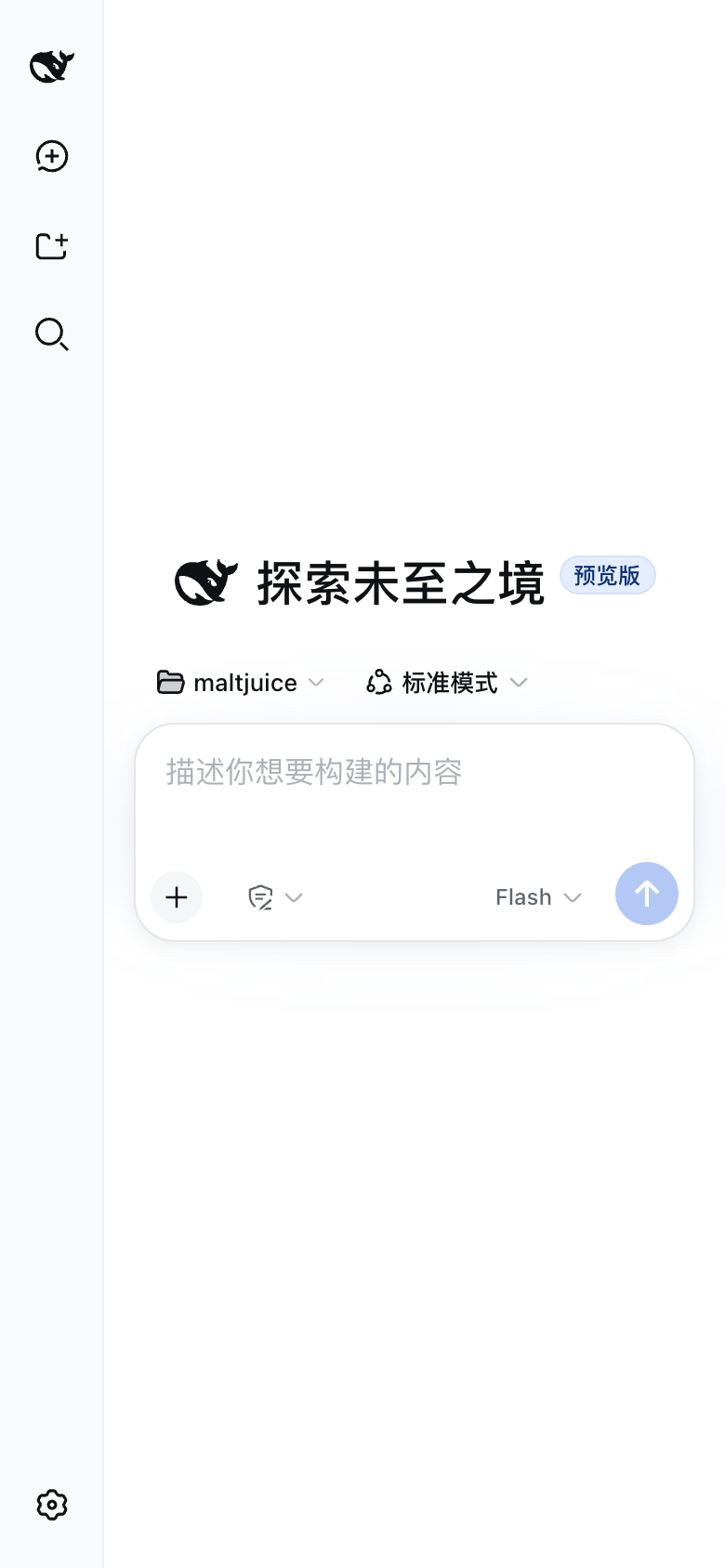
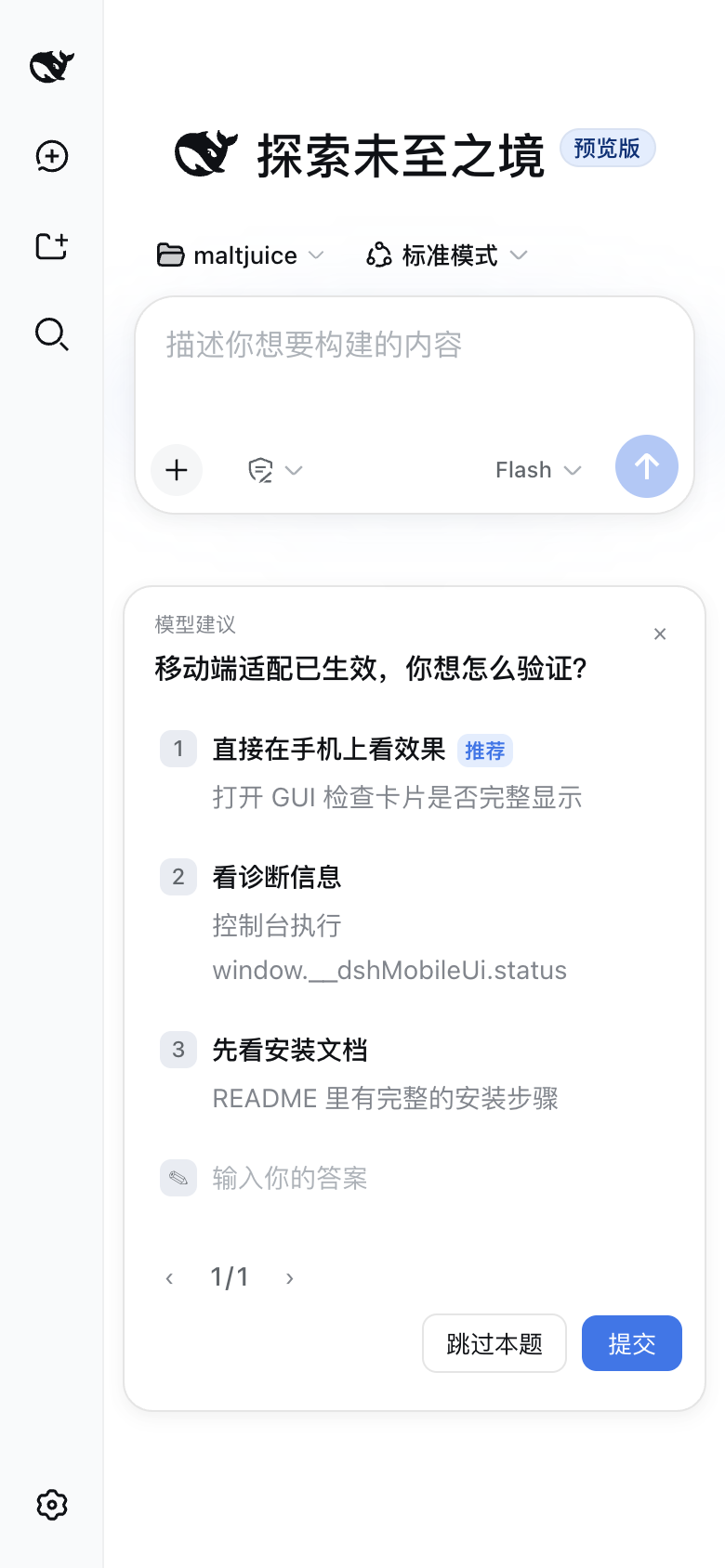
Features
| Block |
What it does |
| On-demand trigger |
Since v0.3.3 the plugin only runs when the viewport is ≤820px; on wider screens nothing is injected or executed — zero desktop impact even at runtime |
| Overflow containment |
Page never scrolls horizontally; long tokens wrap; code blocks / tables scroll inside; images shrink; dialogs never exceed the viewport |
| Sidebar overlay + details full-screen |
Expanding the sidebar on a phone overlays the content instead of squeezing the chat column; the details/preview panel becomes a full-screen layer |
| Composer safe area |
Input area avoids the iOS bottom safe-area inset; the model trigger's text is left to the official component (it already collapses to an icon-only button when its bottom-row container is ≤360px wide); the composer bottom row tightens so the new context-usage button stays on one line |
| Model picker → bottom sheet |
Model selector becomes a thumb-reachable bottom sheet |
| Access mode (permission) → bottom sheet |
The composer's shield-button permission list ships as an absolutely-positioned popup that grows rightward from the trigger's left edge, so on a phone it runs past the viewport's right edge and gets clipped — restyled as the same fixed bottom sheet as the model picker |
| Command popups → bottom sheet |
/model and similar popupSelect views become bottom sheets |
| Context-usage panel |
The new official context-usage popup would clip at the viewport edge on narrow screens — restyled as a fixed bottom sheet so it's always fully visible |
| Conversation header layout |
Two-row header (title + download session on one line, standard mode + background tasks on the next), scrollable tabs, capped composer height |
| Jobs / export compacting |
Background-task label truncates; download-session button collapses to a round icon |
| Settings full-screen |
Settings page goes full-screen with a top horizontal nav; inputs take the full row width |
| Question card two-row footer |
ask_user_question cards: footer splits into two rows (pager + error hint on one, action buttons right-aligned on the next) — buttons are never clipped on narrow screens, the card uses the full width, and long option text wraps |
| Plan-review card |
Plan-review cards get the same two-row footer; the three buttons wrap instead of overflowing |
| Message meta wraps |
The per-message meta line (time · ran-for · first-token · tok/s; hover-revealed on desktop, always shown on mobile) wraps instead of clipping — nothing ever overflows the screen at any width |
| Goal-bar right breathing room |
The goal widget ("goal in progress" + pause/edit/discard) ships with only 5px of right padding inside its bar; on phones the whole bar hugs the screen edge so the discard button looks glued — widened to 12px (matching the left side) on mobile |
| Goal tap-to-view |
In the single-row "label + truncated objective + buttons" layout, the objective area gets only 0–13px on narrow screens (half a character) — on mobile the bar becomes a status strip + actions, and tapping "goal in progress" opens a bottom-sheet with the full objective (Esc/backdrop/close button all work) |
| Dialog recentering |
Dialogs that render into a 0-width column and become invisible are auto-recentered |
| Overlap self-healing |
Runtime detection of real button/control overlaps; the offending flex row is switched to wrapping (.mui-wrap) |
Installation
Requires a DSH web profile (dsh web). All changes are browser-side — no DSH source is modified.
Option 1: one-line installer (macOS / Linux)
bash -c "$(curl -fsSL https://raw.githubusercontent.com/lan450/dsh-mobile-ui/main/install.sh)"
Clones the plugin into the profile's plugins/ directory, registers it in the
profile package.json and cordis.patch.yml (idempotent — safe to run again),
and prints the restart hint.
Option 2: manual (any platform)
DSH_HOME="${DSH_HOME:-$HOME/.dsh}"          # adjust if your DSH home differs
PROFILE="${PROFILE:-web}"                    # the profile running `dsh web`

# 1. clone the plugin into the profile's plugins dir
git clone --depth 1 https://github.com/lan450/dsh-mobile-ui.git \
  "$DSH_HOME/profiles/$PROFILE/plugins/dsh-mobile-ui"

# 2. register it in the profile package.json and install
cd "$DSH_HOME/profiles/$PROFILE"
pnpm add "dsh-mobile-ui@file:plugins/dsh-mobile-ui"

# 3. append the plugin row to cordis.patch.yml
cat >> cordis.patch.yml <<'EOF'
- insert:
    - id: mobile-ui
      name: 'dsh-mobile-ui'
EOF
Then restart dsh web (or reload the profile). On the phone, open the Web UI
and refresh — done.
Usage
Open the Web UI on your phone (the plugin also works in a desktop browser
narrower than 820px). Everything is applied automatically. On screens wider
than 820px the plugin does not run at all — no styles injected, no
behavior blocks, no observers or polling; the desktop UI is completely
untouched (model names stay full, no dialog recentering). When the viewport
crosses the breakpoint, the plugin starts/stops itself automatically.
Diagnostics
In the browser console:
window.__dshMobileUi.status   // per-block state: ok / miss / run / off
window.__dshMobileUi.notes    // why a block missed (stylesheet not ready / entries mismatch)
On wide screens status is empty — the plugin is off. A derived block that
misses its class names falls back to structural selectors (usable on phones)
or renders no CSS (e.g. modelSheet/popupSheet), and notes explains why.
Uninstall
Remove the - insert: row from cordis.patch.yml (and optionally
dsh-mobile-ui from the profile package.json), then restart dsh web. The
plugin adds no persistent state, so nothing else to clean up.
Development
lib/client.js — the whole plugin (browser half). Edit it and refresh the
page; it is fetched on every load.- The installer links
node_modules/dsh-mobile-ui to plugins/dsh-mobile-ui
(a symlink from node_modules: ../plugins/dsh-mobile-ui) so source edits
take effect immediately. If you install manually with plain pnpm add file:..., the package is copied — replace the copy with that symlink.
package.json → dsh.client.inject — load-order dependencies; changing it
requires a service restart.- Everything is on-demand since v0.3.3: the plugin only starts when
(max-width: 820px) matches and fully stops when it does not, so desktop
is never affected — not even at runtime.
- Hash class names are derived at runtime from the official component
stylesheets (
style[data-plugin-css="<pkg>/<File>.module.css"]); when the
stylesheet is not ready yet, the plugin retries on DOM mutations and a 3s
poll.
Compatibility
Tested against DSH web 0.1.0-rc.6 (deepseek-harness master). Works over
plain HTTP (LAN) — a crypto.randomUUID fallback is included for non-secure
contexts.
License
MIT


