

模型与 MCP
待识别

rea
morluto
Reverse engineer anything with agents, from app behavior down to native binaries.
PROJECT TOPICS
INSTALL REFERENCE
dsh plugin --profile web add github:kyoukisu/dsh-rich-ui
该命令指向仓库当前默认分支;尚无绑定当前 commit 的完整验证结果。
PROJECT README
ChatGPT-style rich answers inside DeepSeek Harness.
Entity collections with detail panels, KPI cards, multi-series charts, sortable tables, flow and layered architecture diagrams, calculators that recompute as you drag — rendered natively inside DeepSeek Harness.


Live demo · Install · Quick start · Contract · Design notes · Safety

A model can describe a comparison, but a wall of Markdown makes the reader do the layout work. This plugin gives the model a small declarative language for the cases where structure carries the answer: side-by-side options, an object you want to inspect, a number the reader will change.
The renderer is a real React tree behind a strict schema. There is no generated HTML, no eval, no shell access, and no page-level JavaScript from the model. Local controls recompute in the browser; the model is only called again when the reader explicitly asks.
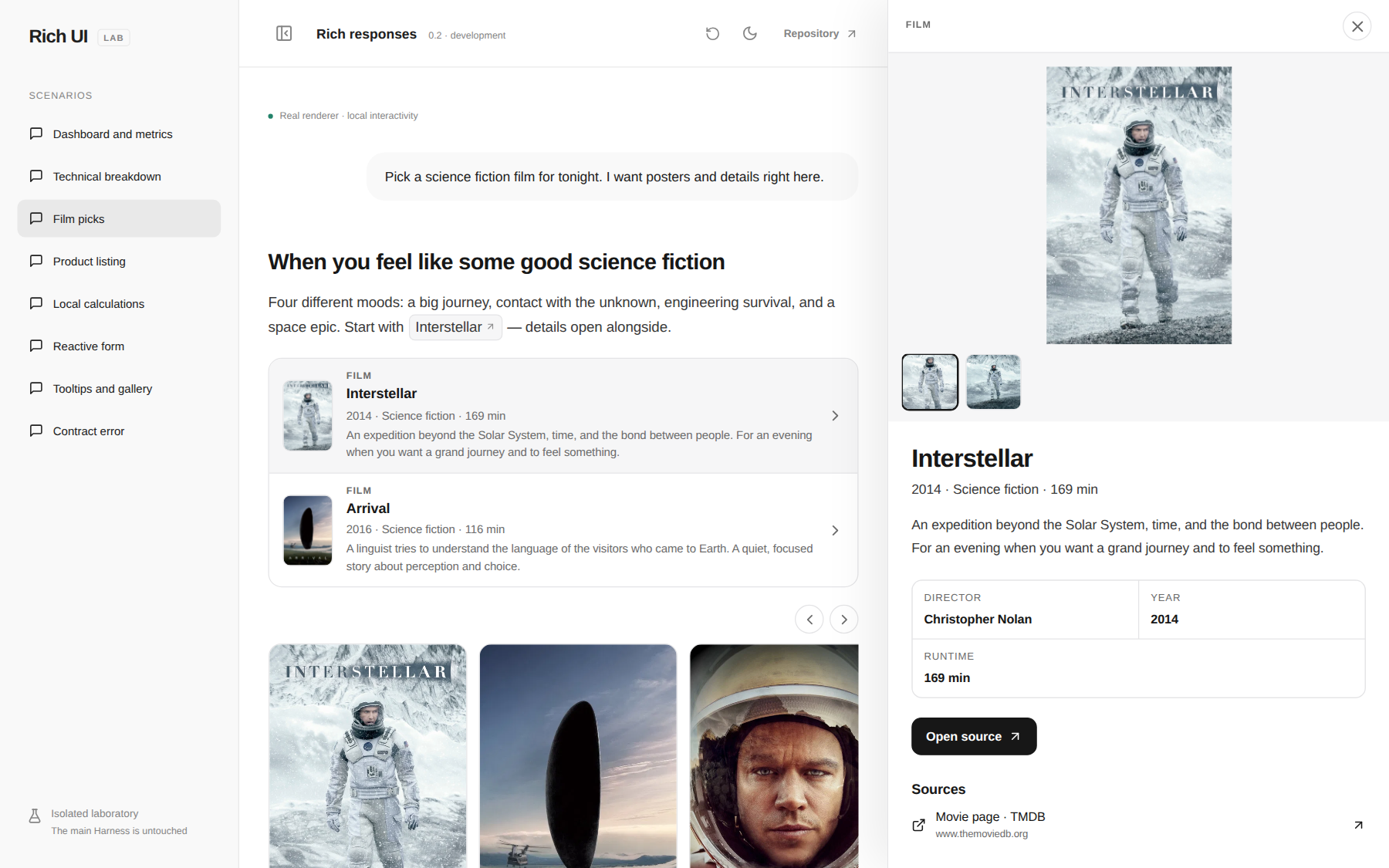
In the lab the answer reflows beside the open panel. In Harness the same entity opens as a native right-column tab, so the conversation narrows instead of being covered — see the integration notes.

entity-list layout:"feature" gives a software shortlist a wide preview, the whole description and its sources. Below it, a captioned gallery shows one screenshot at a time.

Metrics, a two-series chart with units and hover, a filterable table with status pills and an ordered flow — one document.
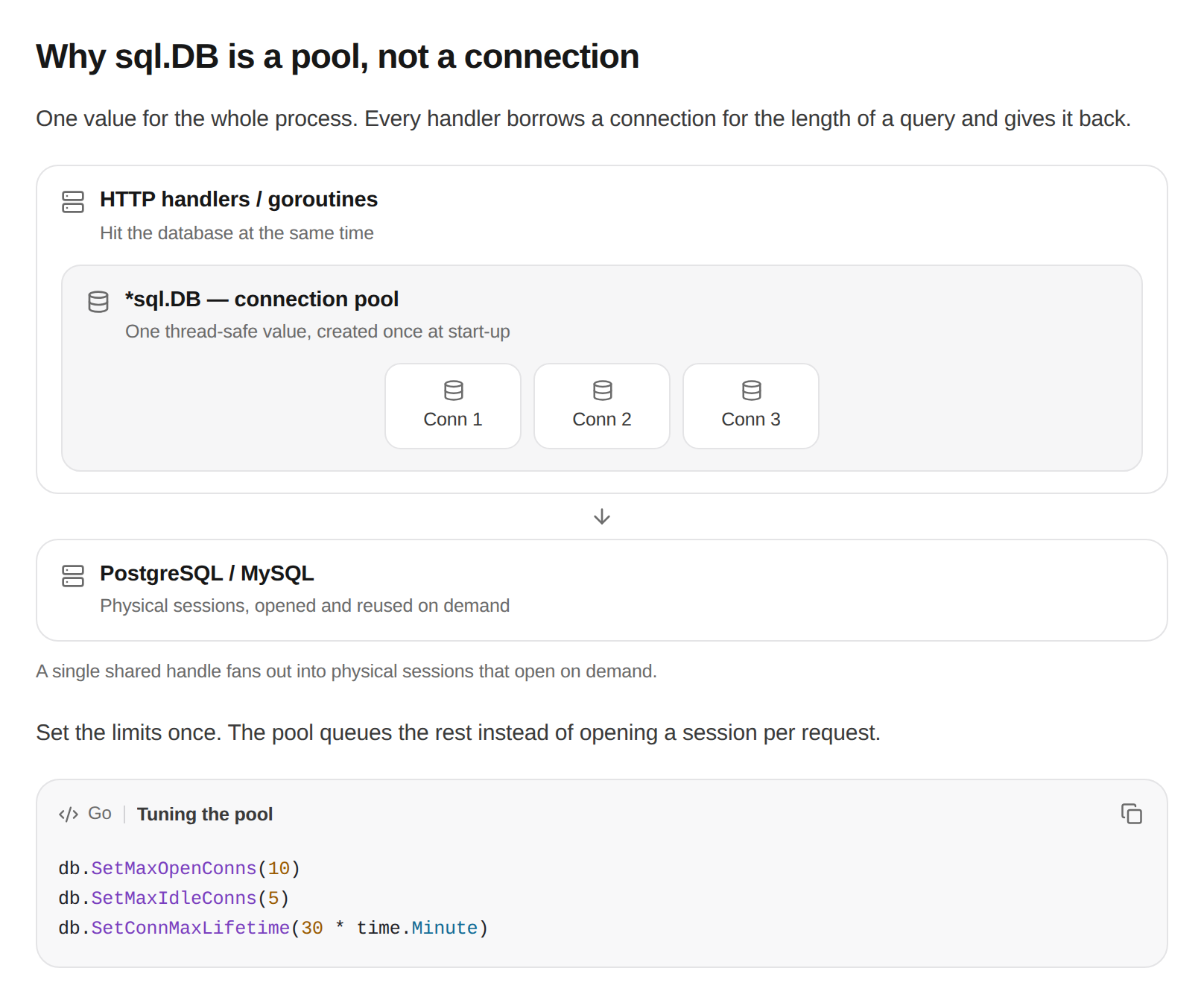
Boxes inside boxes: the pool holds connections, the arrow shows what it talks to. The code block keeps language label, syntax colour and copy.
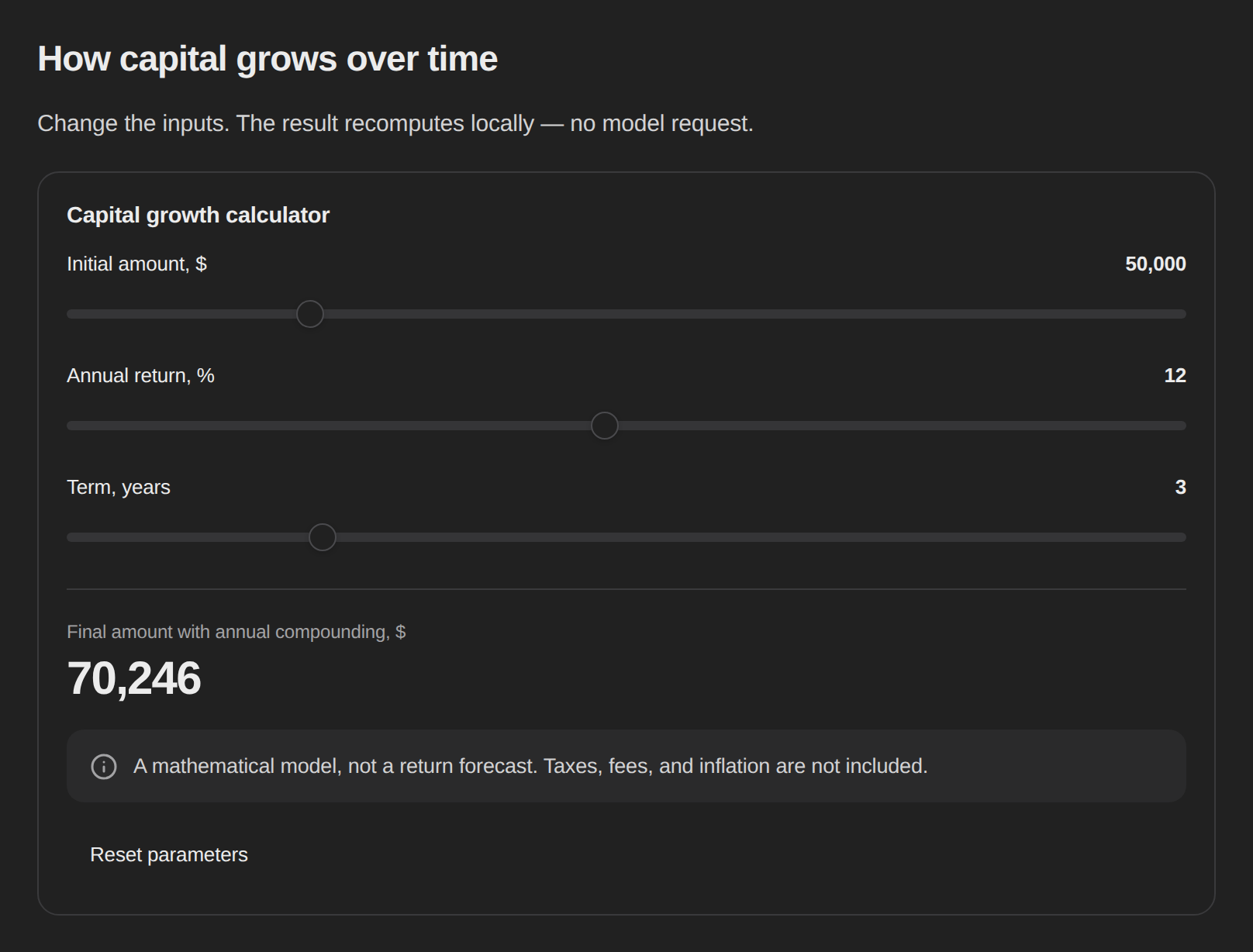
Sliders recompute the number in the browser; the model is not called again.
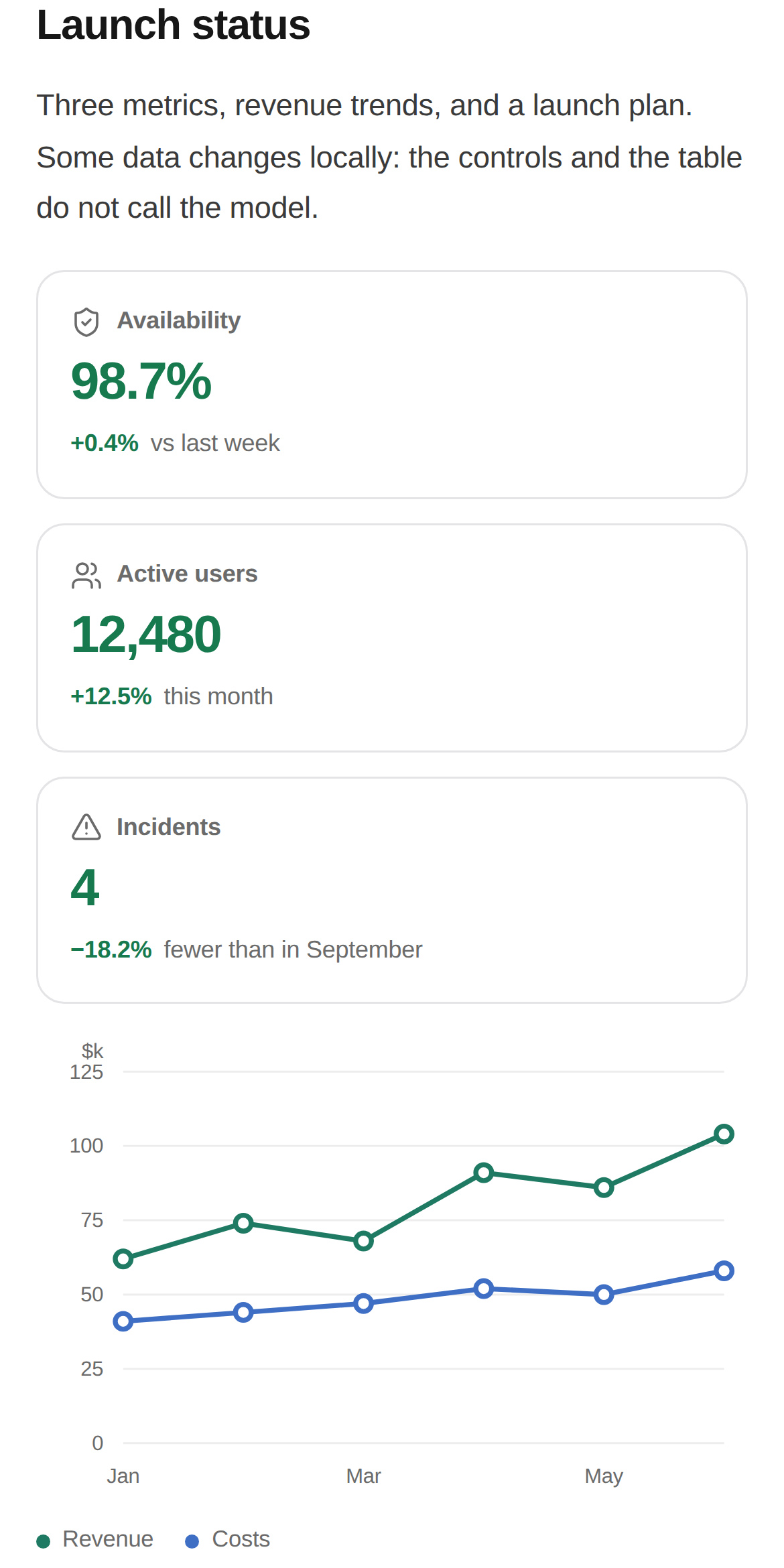
390 px: KPI cards in two columns, every chart label, and a table that still fits.
rich-ui.beako.best — the real renderer in laboratory conditions, no install. Scenarios: dashboard, films, listing, calculator, configurator, technical breakdown and the rejected-block diagnostic; add &theme=dark for the dark theme. Demo data is illustrative.
Requires DeepSeek Harness 0.2.x and Node 22.19+. No NixOS change, no patched Harness.
dsh plugin --profile web add @kyoukisu/dsh-rich-ui
systemctl --user restart deepseek-harness   # or restart however your Harness runs
From a checkout — this is the loop the author uses:
git clone https://github.com/kyoukisu/dsh-rich-ui && cd dsh-rich-ui
npm ci && npm run build:plugin
dsh plugin --profile web add link:$PWD
Unreleased commits: dsh plugin --profile web add github:kyoukisu/dsh-rich-ui.
The plugin registers itself as a bundle; the fence language is rich-ui.
Ask for something that benefits from structure, in a new session:
Compare three electric kettles by price, volume and features. Make it clickable.The reply arrives as an interface: a summary strip, rows with photos, and a green highlight on the cheapest option. Opening a row shows facts, sources and related items without leaving the conversation.
Things worth trying: "build a budget calculator with three sliders", "show this quarter as a chart and a table", "make a configurator with tabs and conditional warnings".
| Group | Nodes |
|---|---|
| Layout | stack, row, grid, card, divider, meta |
| Text | text with inline code, bold, links and [[entityId]] chips; callout with optional title; code with syntax colour, language label, line numbers and copy |
| Objects | entity-ref, entity-list in compact or layout:"feature" rows, with poster, square or landscape previews; entity details dock in the native right column or fall back to an in-page drawer, with a two-up photo gallery or one captioned screenshot at a time, plus cast |
| Data | stat (KPI card), progress, status, table (sortable, filterable, status and progress columns, scroll hint when it overflows), chart (bar / line / area / donut / scatter, 1–6 series, units, tooltips), computed |
| Flow | diagram with ordered steps, connector labels and branch depth; layers for boxes-inside-boxes architecture with member chips |
| Media | image with caption, image-group with optional per-frame captions and an inline presentation:"gallery", video and audio with native controls, gallery lightbox, popover, tooltip |
| Controls | input (text / number / date), select, slider, switch, checkbox, radio, segmented, tabs |
| Logic | expressions (add, mul, round, comparisons…), conditional, local actions, send-message |
Roughly 150 Lucide icons resolve by name, with semantic tones (success, warning, danger, muted) so colour means something. Light and dark themes follow the host palette and font.
```rich-ui
{"version":1,"title":"Budget","initialState":{"spend":1200},
 "nodes":[
  {"type":"slider","stateKey":"spend","label":"Monthly spend, €","min":100,"max":5000,"step":100},
  {"type":"computed","label":"Per year, €","expr":{"op":"mul","args":[{"state":"spend"},12]}},
  {"type":"callout","tone":"info","content":"Recomputed locally — no model call."}
 ]}
```{"version":1,"title":"Films for tonight",
"entities":[{"id":"a","kind":"Film","title":"Arrival","subtitle":"2016 · science fiction",
"image":"https://example.org/poster.jpg",
"facts":[{"label":"Director","value":"Denis Villeneuve"}],
"sources":[{"title":"TMDB","url":"https://www.themoviedb.org/movie/329865-arrival"}],
"badge":{"label":"Editors' pick","tone":"success"}}],
"nodes":[
{"type":"meta","items":[{"icon":"film","text":"3 films"},{"icon":"clock","text":"2 hours"}]},
{"type":"entity-list","entityIds":["a"]},
{"type":"table","columns":[{"key":"k","label":"What"},{"key":"v","label":"How many"}],
"rows":[{"k":"Screenings","v":3}]},
{"type":"chart","kind":"bar","data":[{"label":"Mon","value":2},{"label":"Tue","value":5}]}]}The authoritative text is prompt-rich-ui/prompt.md; exact fields, enums and budgets live in references/schema.md, and working documents in references/examples.md.
flowchart LR
  A["Model writes a rich-ui fence"] --> B["Adapter finds the code block"]
  B --> C{Strict JSON schema}
  C -- invalid --> D["Stays a normal code block"]
  C -- valid --> E["React renderer mounts"]
  E --> F["Local state, no model call"]
F -- explicit button --> G["rich-ui action message"]rich_ui_validate tool. The model can validate the exact JSON before emitting it; a schema error comes back as a tool result, not a visible user message.| Risk | Mitigation |
|---|---|
| Arbitrary code execution | Declarative JSON only; no HTML, CSS, JS, eval or property paths |
| Prompt-injected actions | Local actions cannot call tools; send-message needs an explicit click and is delivered as ordinary user text |
| Secrets in the UI | Password/secret state keys are rejected; no secret input components exist |
| Hostile URLs | http(s) only, credentials in URLs rejected |
| Resource exhaustion | Bounded depth, node count, string size and expression budget |
| Stored data | Persistence is opt-in, per session, and never stores text or date inputs |
Measured, not claimed: 19 of 27 reference scenarios reproduced, 2 partial, 6 missing — with an itemised deviation list in docs/PARITY.md. Missing today: Mermaid/ER graphs, math, maps, artifacts, persistent panels and mini-apps.
Known limitation: the fence label is not preserved by Harness, so an unlabelled block is claimed only when its payload looks like a spec document and passes the strict parser. A json-labelled block is never claimed.
The block stayed as code. The JSON did not pass the schema — usually an unknown field (title inside a node that has none, or items from another plugin's syntax). A claimed fence shows the exact error and the rejected source, and copies them on request. Nothing is executed, rewritten or sent automatically. The model should call rich_ui_validate before sending; if it did not, ask it to fix the document and validate it.

A rejected block explains itself and copies the exact error and source. Nothing is sent automatically.
Images show a placeholder. The URL is wrong, blocked by the remote host, or not http(s). Ozon/WB CDNs reject hotlinks; use a permitted source or your own media host.
Old dsh-ui messages stopped rendering. That is a different plugin's syntax. This one claims rich-ui only.
npm ci
npm run dev            # lab at http://127.0.0.1:4173, HMR, no Harness needed
npm run build          # typecheck + lab build
npm run build:plugin   # the two real bundle artifacts
npm test               # 217 unit, schema and DOM tests
npm run test:browser   # 58 Playwright desktop + mobile checks (goldens never auto-update)
# Interaction timings: docs/PERFORMANCE.md
Browser tests run in a pinned container so no system libraries are required:
docker run --rm --network host --ipc host --user "$(id -u):$(id -g)" \
  -e HOME=/tmp -v "$PWD:/work" -w /work \
  mcr.microsoft.com/playwright:v1.64.1-noble npx playwright test
Scenarios in the lab: ?demo=dashboard, films, listing, apps, calculator, configurator, technical, primitives, plus &theme=dark.
Screenshots in this README are captures of that lab, not mockups. Golden images under tests/ are regression baselines and say nothing about fidelity to another product.
MIT — see LICENSE. Demo photography comes from Wikimedia Commons under free licences; prices and metadata are illustrative. DeepSeek Harness is a separate project by DeepSeek; this plugin is unaffiliated. ChatGPT is a trademark of OpenAI: the description points at the style of rich answers, not at any affiliation, endorsement or shared code.
CLASSIFICATION EVIDENCE
系统优先读取 GitHub Topics,再与站内分类词典和词根规则比对。当前命中: deepseek、deepseek-harness。
morluto
Reverse engineer anything with agents, from app behavior down to native binaries.

deepseek-ai
DeepSeek Harness: Everything is a Plugin.

nexu-io
The 1st Collaborative AI Design Agent Workspace. Local-first and open source. Create motion, prototypes, websites, apps, dashboards, presentations, images, and videos with your team and AI agents. Share work, exchange feedback, and iterate together in one workspace.