dsh-pet-StatusLight
A talking desktop pet for DeepSeek Harness.
English ·
中文






A character portrait that reflects your model's live state — thinking, error, completed, idle — with character-specific chat bubbles when a task finishes, fails, or asks you a question. When the model completes a task, a chat bubble proactively notifies you, and you can click View Details below it to navigate to the corresponding session. With native desktop notifications enabled, DSH Desktop shows the bubble and Jump to Session together only while you are in the DSH Desktop interface and the notification comes from another session; both remain hidden in other states. Disabling native notifications fully restores the chat bubble and View Details fallback. Even when the browser or desktop app is minimized, the system-level always-on-top mini-window stays with you.
Preview
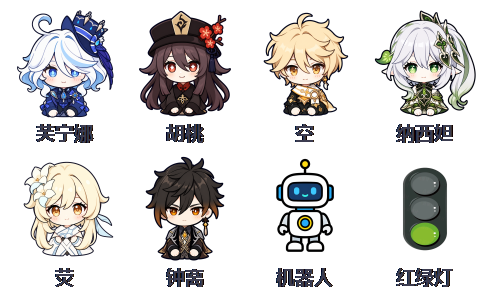
Nine characters, switch anytime via right-click
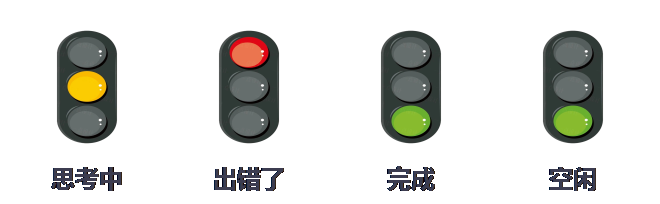
Status light: thinking / error / completed / idle expressions switch automatically

Character-specific chat bubbles on completion, error, and questions
Contact
Feel free to open an issue for bugs, suggestions, or questions.
Highlights & Features
- 🐾 9 desktop-pet characters: Furina, Hu Tao, Aether, Nahida, Kazuha, Lumine, Zhongli, Traffic Light, Robot; switch anytime via right-click, and your choice is remembered.
- 🎭 Live expressions: four states — thinking, error, completed, idle — each with its own set of expressions; errors take priority and auto-recover.
- 🖥️ DSH Desktop support: supports both the
web and desktop Profiles, with consistent chat-bubble behavior tailored to window focus, native desktop notifications, and cross-session navigation.
- 💬 Character chat bubbles: pop up when a task completes, errors, or asks you a question; ordinary dsh web provides View Details. In DSH Desktop, native notification mode shows Jump to Session only while Desktop is focused on a different session; disabling native notifications shows View Details with the same settings as dsh web.
- 🪟 Always-on-top mini-window (Windows): a transparent window independent of the browser — visible even when the browser is minimized; draggable, right-click to switch characters, auto-respawns on failure.
Install, Uninstall & Update
Install
Method 1: Hand it to your AI (copy and send the text below to your AI)
Install for dsh web, or the web Profile currently selected in DSH Desktop:
Install this plugin by following INSTALL_WEB.md at https://github.com/kongchengavg/dsh-pet-StatusLight/
Install for the desktop Profile currently selected in DSH Desktop:
Install this plugin by following INSTALL_DESKTOP.md at https://github.com/kongchengavg/dsh-pet-StatusLight/
Restart the active host (dsh web or DSH Desktop) after installation and the plugin loads automatically.
Method 2: Manual install
Published to npm. Choose the command for the host and Profile you use:
Install for dsh web, or the web Profile currently selected in DSH Desktop:
dsh plugin --profile web add dsh-pet-statuslight          # one-line npm install
# or via GitHub source:
dsh plugin --profile web add git+https://github.com/kongchengavg/dsh-pet-StatusLight.git
Install for the desktop Profile currently selected in DSH Desktop:
dsh plugin --profile desktop add dsh-pet-statuslight      # one-line npm install
# or via GitHub source:
dsh plugin --profile desktop add git+https://github.com/kongchengavg/dsh-pet-StatusLight.git
DSH Desktop stores plugins separately for its web and desktop Profiles. The --profile value must match the Profile currently selected in DSH Desktop. If you use both Profiles, run both installation commands.
No global dsh CLI? Use npx — run the same commands through npx without installing dsh globally:
npx -y @deepseek-ai/dsh plugin --profile web add dsh-pet-statuslight
npx -y @deepseek-ai/dsh plugin --profile web add git+https://github.com/kongchengavg/dsh-pet-StatusLight.git
npx -y @deepseek-ai/dsh plugin --profile desktop add dsh-pet-statuslight
npx -y @deepseek-ai/dsh plugin --profile desktop add git+https://github.com/kongchengavg/dsh-pet-StatusLight.git
Restart the active host (dsh web or DSH Desktop) and the plugin loads automatically.
Note: pnpm withholds versions published less than 24 hours ago; if you do not get the latest version, pin the version explicitly (e.g. dsh-pet-statuslight@1.0.33).
Uninstall
For dsh web, or the web Profile currently selected in DSH Desktop:
dsh plugin --profile web remove dsh-pet-statuslight
# no global dsh CLI? use npx:
npx -y @deepseek-ai/dsh plugin --profile web remove dsh-pet-statuslight
For the desktop Profile currently selected in DSH Desktop:
dsh plugin --profile desktop remove dsh-pet-statuslight
# no global dsh CLI? use npx:
npx -y @deepseek-ai/dsh plugin --profile desktop remove dsh-pet-statuslight
Restart dsh web and the plugin is removed.
Update
Reinstall the plugin using the same method you used for installation.
Re-adding completes the update; restart dsh web to apply.
Usage
- Right-click the light or the mini-window: switch character / open the main UI / close the mini-window.
- Left-drag the mini-window: move it (position auto-saved).
- Desktop Profile: selecting either the
web or desktop Profile inside DSH Desktop uses the same Desktop chat-bubble, notification, and navigation rules; Profile=web also shows Jump to Session when native notifications are enabled.
- Chat bubble: ordinary dsh web uses the 1.0.37-based View Details navigation behavior and display duration; the bubble closes automatically when you manually return from the background to its target session. DSH Desktop also closes the bubble when you manually return to its target session. With native desktop notifications enabled, Jump to Session appears only while Desktop is focused on a different session; both the bubble and action remain hidden while Desktop is unfocused, minimized, hidden, or already on the target session. With native notifications disabled, the bubble and View Details remain available even while Desktop is unfocused, minimized, or hidden, using the same duration, read, and navigation rules as dsh web. Clicking the link, manually opening the target session, or tapping × dismisses the bubble.
- Character and position settings are stored in
.statuslight.json in the workspace and can be edited manually.
Future improvements
- Add unique notification sounds for each character;
- Add more fun characters;
- If you have valuable feedback, feel free to open an issue — I will evaluate it and upgrade the plugin as soon as possible.
Disclaimer
This project is provided as-is, without warranty or endorsement for any particular purpose (including commercial use). Character image assets belong to their original authors and are provided for personal/learning use only — verify their licenses yourself. This is a community open-source project and is not affiliated with DeepSeek, miHoYo, or any official entity.
License
Code is licensed under MIT (see LICENSE); character image assets belong to their original authors.


