
Agent 与会话
插件

nuwa-skill
alchaincyf
你想蒸馏的下一个员工,何必是同事。蒸馏任何人的思维方式——心智模型、决策启发式、表达DNA。Distill how anyone thinks.
PROJECT TOPICS
INSTALL REFERENCE
dsh plugin --profile web add github:knottttt/codex-dsh-bridge
该命令指向仓库当前默认分支;尚无绑定当前 commit 的完整验证结果。
PROJECT README
Let Codex dispatch local project tasks to DeepSeek Harness sessions. All code in this repository was generated by Codex.
ENGLISH | 简体中文
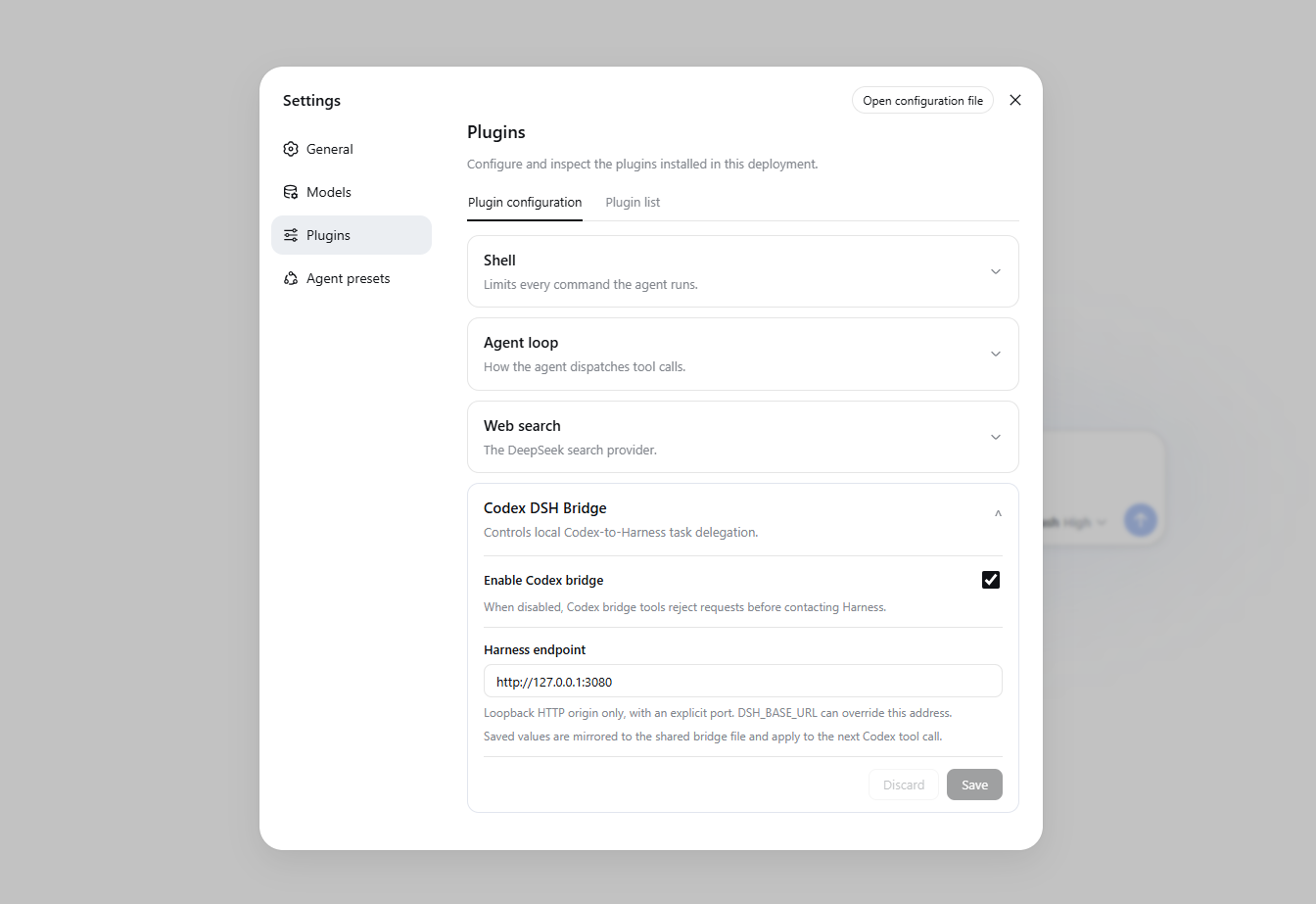
codex-dsh-bridge connects Codex to a locally running DeepSeek Harness WebUI through its HTTP RPC API.
The repository contains both sides of the integration:
Requirements:
dsh command available.Download and run the installer:
$installer = Join-Path $env:TEMP "codex-dsh-bridge-install.ps1"
Invoke-WebRequest "https://raw.githubusercontent.com/knottttt/codex-dsh-bridge/main/install.ps1" -OutFile $installer
powershell -ExecutionPolicy Bypass -File $installer
The installer:
web profile;After installation:
Settings → Plugins → Plugin configuration in Harness;Run these commands if you prefer to review each action:
codex plugin marketplace add knottttt/codex-dsh-bridge --ref main
codex plugin add codex-dsh-bridge@codex-dsh-bridge
dsh plugin --profile web add github:knottttt/codex-dsh-bridge#main
Restart Harness and start a new Codex task after the commands finish.
Run the installer again. It refreshes the marketplace, reinstalls the Codex plugin, and updates the Harness package:
powershell -ExecutionPolicy Bypass -File $installerDownload and run the uninstaller:
$uninstaller = Join-Path $env:TEMP "codex-dsh-bridge-uninstall.ps1"
Invoke-WebRequest "https://raw.githubusercontent.com/knottttt/codex-dsh-bridge/main/uninstall.ps1" -OutFile $uninstaller
powershell -ExecutionPolicy Bypass -File $uninstaller
Saved bridge settings are preserved by default. Pass -RemoveSettings to remove them as well.
| Component | Location | Purpose |
|---|---|---|
| Codex plugin | .codex-plugin/, .mcp.json |
Registers the plugin and its local MCP server |
| MCP bridge | scripts/ |
Connects Codex tools to the DSH HTTP RPC API |
| Collaboration skill | skills/ |
Guides Codex when delegating work to DSH |
| Harness companion | dsh-plugin/ |
Adds bridge controls to Harness settings |
| Marketplace | .agents/plugins/marketplace.json |
Makes the Codex plugin installable from GitHub |
| Installer | install.ps1 |
Installs and updates both sides of the bridge |
The companion adds a configuration card at:
Settings → Plugins → Plugin configuration → Codex DSH BridgeThe card controls:
Settings are mirrored to:
%DSH_HOME%\codex-dsh-bridge.jsonWhen DSH_HOME is unset, the fallback location is:
%USERPROFILE%\.dsh\codex-dsh-bridge.jsonThe MCP process reads this file for every tool call, so endpoint and enabled-state changes apply without restarting Codex. The optional DSH_BASE_URL environment variable overrides the saved endpoint, while the Harness enabled switch still takes priority.
The bridge accepts only loopback HTTP origins with an explicit port:
127.0.0.1localhost::1HTTPS, LAN addresses, credentials, URL paths, query parameters, and fragments are rejected.
Start a new Codex task. Plugins and MCP tools are loaded when a task starts.
Restart the Harness WebUI and verify the installed package:
dsh plugin --profile web list --depth 0The list should contain codex-dsh-bridge-companion.
Verify the commands independently:
node --version
codex --version
dsh --versionThe installer supports:
.\install.ps1 -SkipDsh
.\install.ps1 -SkipCodexRun the complete test suite and package check from the repository root:
npm test
npm run pack:check
The suite covers bridge configuration, endpoint validation, Harness settings, revision conflicts, client registration, and distribution metadata.
CLASSIFICATION EVIDENCE
系统优先读取 GitHub Topics,再与站内分类词典和词根规则比对。当前命中: session、sessions。
alchaincyf
你想蒸馏的下一个员工,何必是同事。蒸馏任何人的思维方式——心智模型、决策启发式、表达DNA。Distill how anyone thinks.

freestylefly
Prompt as Code | GPT Image 2 / 2.5 提示词与案例库,530+ 个案例、20+ 套工业级模板与可复用 Skills,新增 2.5 同提示词对比专区,附完整提示词与生成记录,持续更新。

titanwings
Distilly — Distill how they think into reusable Skills for any Agent or Bot. Formerly Colleague Skill(原同事 Skill).