

模型与 MCP
待识别

rea
morluto
Reverse engineer anything with agents, from app behavior down to native binaries.
PROJECT TOPICS
INSTALL REFERENCE
dsh plugin --profile web add github:klaus-2/dsh-redline
该命令指向仓库当前默认分支;尚无绑定当前 commit 的完整验证结果。
PROJECT README
English · Português (Brasil) · 简体中文




Point at any element on the page. Your agent fixes the code.
dsh-redline is a visual feedback and design review plugin for DeepSeek Harness — think Figma comments / Vercel Toolbar, but the feedback goes straight to your coding agent. Select an element, leave a comment, adjust styles live, and confirm — the annotations travel to your agent as structured context attached to your next message, with a cropped screenshot of exactly the region you marked.
dsh plugin --profile web add dsh-redline
Describing a UI problem in words loses the pointer. "The button in the middle section looks off" makes your agent guess. Redline keeps the feedback attached to the element: selector, role, text, your comment, a cropped screenshot, and every style tweak you tried — delivered in one structured block the agent can act on.
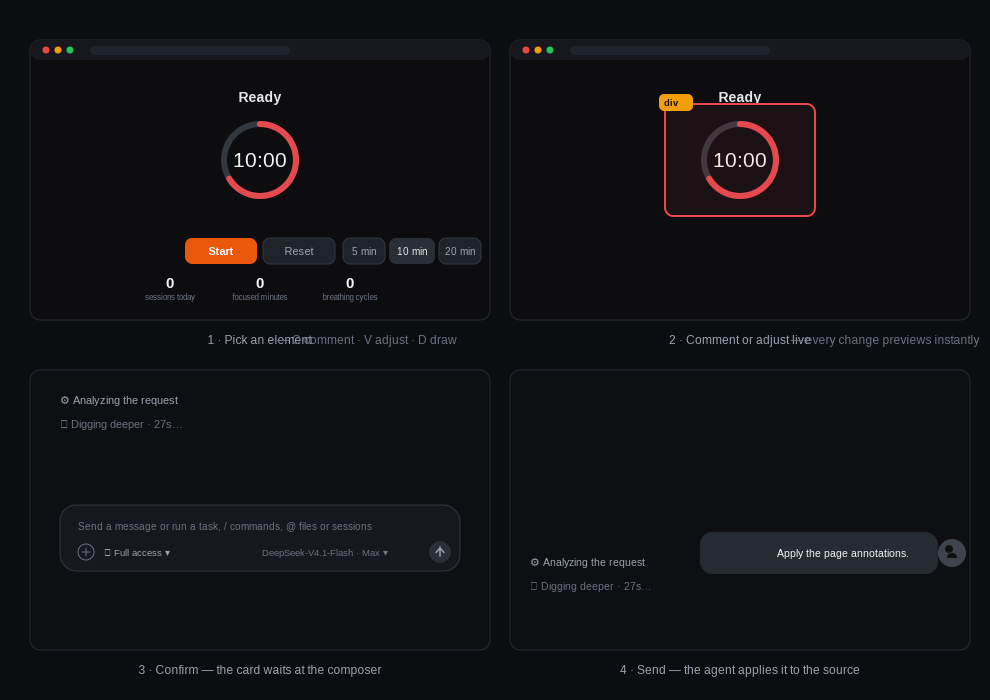
For each pin, one block in a single snapshot:
Target — tag, role, accessible labelTarget selector — a CSS path back to the elementTarget text / Component — content and framework hintsScreenshot (cropped around the target) — a JPEG of the marked region with surrounding contextComment — what you asked forRequested visual changes — every live adjustment as prop: before -> afterRequested text change — when you edited the element's textvar(--token) is offered when its resolved value matches the value being editedselector { prop: value; } rule in the overlay and as a Requested CSS: block in the agent context100vw units and position: fixed navbars do not respect the constraint)dsh plugin --profile web add dsh-redline
dsh webFor a private or unreleased build, install from a git URL or a local path:
dsh plugin --profile web add git+https://github.com/klaus-2/dsh-redline.git
dsh plugin --profile web add ./dsh-redline| Key | Action |
|---|---|
C |
Comment mode — pick an element, write what should change |
V |
Adjust mode — pick an element, open the live style inspector |
D |
Free canvas — draw over the page, send it with the screenshot |
H |
Show or hide the pins — markers, popovers and the comment composer disappear, the toolbar stays |
Esc |
Cancel the current mode, popover or preview |
Enter |
Save the annotation from the popover |
Every one of the three mode keys can be changed in the plugin settings, and a shortcut can carry
modifiers: Ctrl+Shift+A is a shortcut too. The modifiers must match exactly — Ctrl+A does
not fire a shortcut set to Ctrl+Shift+A, and a plain key does not fire while a modifier is
held. Two modes cannot share the same shortcut; the settings refuse the second one.
Because the modifiers must match exactly, Shift+C no longer enters comment mode: Shift is a
modifier like any other, so the shortcut that fires with Shift held is Shift+C.
Pins collect in the card above the composer. Send dispatches them with your next message; the ✕ discards them, and the page overlay updates itself.
The loopback server binds to 127.0.0.1 only, answers only for its own host names (so a name that resolves to 127.0.0.1 cannot reach it) and validates the Host header, so remote origins cannot reach it. Every private route requires an instance secret that the host keeps in the profile (~/.dsh/profiles/<profile>/dsh-redline/instance.secret, mode 0600) and that never reaches the page: the overlay holds no secret, no header and no secret in a URL.
The page talks to the host through a limited message bridge instead. It can submit the annotations, save the drawings, read the narrow state the overlay draws (language, delivery, pending ids, settings) and report a diagnostic — every other route answers 401. The host half calls the bridge with the secret; the page calls it from a browser request that carries this origin, and the Origin header cannot be forged by a script. That origin also carries the pages the plugin proxies, so the bridge is an annotation channel and never a data channel.
The page no longer receives review text in its inline config and no longer keeps drawings in Web Storage; the host's secret-gated drawings store is the only repository of saved drawings. Unsent drawings are memory-only and do not survive a reload, pins stay tab-scoped, and an inline guard purges legacy review keys from Web Storage before the overlay loads.
Pages running in the harness browser can submit annotations by design — that is the plugin working as intended, so treat comments arriving through Redline like any other user-authored input: a comment is the text the Redline overlay captured on the page, and the pending annotations are shown in the card above the composer before they attach to your next message. The agent ticker (tool arguments, agent text) stays in the host; the page only ever sees the narrow projection above. No cookies are forwarded through the proxy.
The plugin starts a loopback server (127.0.0.1:47477, falling back to the next 20 ports) that serves the overlay, the screenshot attachments and the annotation intake.
The four mode keys (comment, adjust, canvas, hide-pins) are the only shortcut setting: open the plugin settings and change the comment, adjust or
canvas key — the hide-pins key is preserved on every save and can be edited directly in
~/.dsh/redline/settings.json. A shortcut can carry modifiers (Ctrl+Shift+A), the modifiers must match exactly, and
two modes cannot share one shortcut.
The overlay theme is a setting too: dark (the default), light, or a high-contrast variant of the dark palette. It applies on the page immediately and survives reloads and restarts.
The client face injects the overlay into every page the harness browser renders. The overlay sends the annotations through the message bridge, and the loopback server stores a pending snapshot keyed by the session you are viewing. When you send a message, the host attaches the snapshot to the agent's turn as a producer-owned context message whose source carries the structured pins, and the chat renders it through the conversation-node API as one Redline row — collapsible sections included — instead of the generic context disclosure.
npm run build
npm test
npm run strip-comments
No dependencies to install — the plugin is plain Node.js.
overlay.template.js + tencil-overlay.css are the sources; lib/overlay.js is generated — never edit it directly. npm run strip-comments reports what the comment stripper would change in the shipped sources; add -- --write to apply it. License and copyright notices are preserved in the JS and CSS sources; write mode also removes the contract and safety notes described in CONTRIBUTING.md, so it is a deliberate edit, not a formatter. tools/smoke.mjs exercises the proxy, HTML/CSS rewriting, annotation intake, cropped-screenshot persistence, the context format and overlay integrity against an isolated port and a temporary home; tools/regression.mjs adds the host, client and package suites, and it is the one that prints a check count.
One harness instance, pages rendered by its built-in browser, viewport-based crops. Remote browsers and full-page capture are out of scope for now.
tencil — the overlay design system in
tencil-overlay.css is derived from tencil's overlay sources
(Copyright 2026 Pixel Perfect Agency, licensed under Apache-2.0 and
modified: accent palette, comment removal, inspector additions).
Full notice: THIRD-PARTY-NOTICES.md.
html2canvas — vendor/html2canvas.min.js
bundles version 1.4.1 (Copyright 2022 Niklas von Hertzen, MIT) to render
screenshot crops without any install-time dependency.
Full notice: THIRD-PARTY-NOTICES.md.
CLASSIFICATION EVIDENCE
系统优先读取 GitHub Topics,再与站内分类词典和词根规则比对。当前命中: deepseek-harness、deepseek-harness-plugin。
morluto
Reverse engineer anything with agents, from app behavior down to native binaries.

deepseek-ai
DeepSeek Harness: Everything is a Plugin.

nexu-io
The 1st Collaborative AI Design Agent Workspace. Local-first and open source. Create motion, prototypes, websites, apps, dashboards, presentations, images, and videos with your team and AI agents. Share work, exchange feedback, and iterate together in one workspace.