
模型与 MCP
待识别

rea
morluto
Reverse engineer anything with agents, from app behavior down to native binaries.
PROJECT TOPICS
INSTALL REFERENCE
dsh plugin --profile web add github:kkkkk-tubu/dsh-deep-purge
该命令指向仓库当前默认分支;尚无绑定当前 commit 的完整验证结果。
PROJECT README
DSH has archive, not delete. This adds the delete — and it clears every trace, not just the sidebar entry.
DeepSeek Harness can archive a session, but archiving only hides it. The transcript, the title cache, the SQLite index, the cost ledger and the bridge logs all stay on disk forever. dsh-deep-purge removes a session from all six locations, in one action, from a panel inside the app.
Windows only.
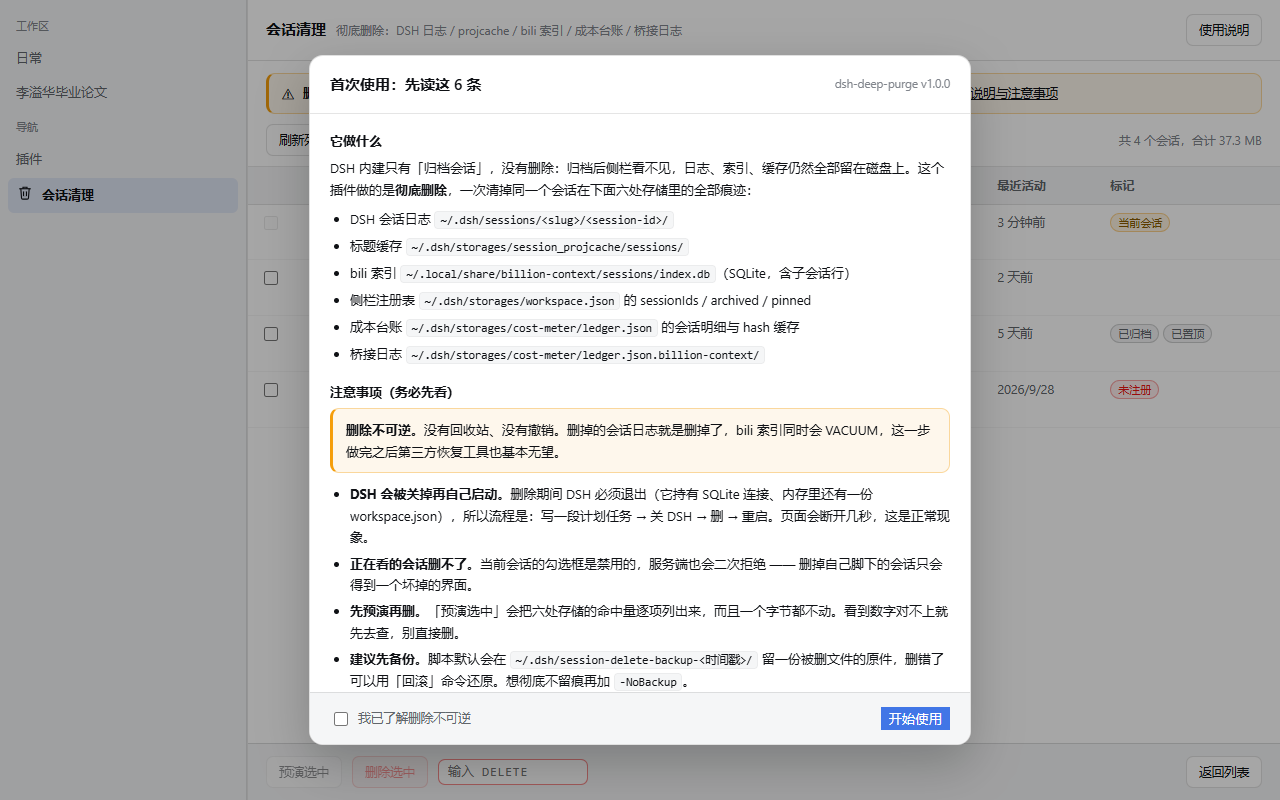
One session id touches six places. Most "delete" tools stop after the first one.
| # | Location | What lives there |
|---|---|---|
| 1 | ~/.dsh/sessions/<slug>/<session-id>/session.v4.jsonl.zstd |
The full conversation transcript (zstd compressed JSONL) |
| 2 | ~/.dsh/storages/session_projcache/sessions/<session-id>.json |
Cached title / project metadata |
| 3 | ~/.local/share/billion-context/sessions/index.db |
billion-context SQLite index — the session row and its \|sub: sub-agent rows, followed by VACUUM |
| 4 | ~/.dsh/storages/workspace.json |
Sidebar registry: sessionIds, archivedSessionIds, pinnedSessionIds |
| 5 | ~/.dsh/storages/cost-meter/ledger.json |
Per-session token/cost detail rows, plus the hash caches that reference the id |
| 6 | ~/.dsh/storages/cost-meter/ledger.json.billion-context/ |
Per-call bridge logs (thousands of small JSONL files; matched by substring) |
The panel shows the hit count for each of the six before you commit, with a dry run that writes nothing.
This is not laziness — there is no safe way to delete these files while DSH is running.
workspace.json is held in memory. DSH keeps the parsed object in its process and rewrites the whole file on any sidebar change. Delete the file underneath it and the next change resurrects the session. There is no file-watch reconciliation.index.db is a WAL-mode SQLite database with a live connection. VACUUM needs exclusive access.So the flow is: arm a scheduled task → ask DSH to quit → delete the files → relaunch DSH. The helper runs outside DSH's process tree on purpose: DSH puts tool child processes in a Windows Job Object, so anything spawned from inside the session dies with it. The panel says so, and the page will drop for a few seconds while this happens.
dsh plugin add dsh-deep-purgeThen restart DSH. The entry 会话清理 / Session purge appears in the left navigation bar, and 彻底删除会话 / Delete session permanently is added to every session's right-click menu.
Manual install: put the package under <profile>/node_modules/, add it to the profile's dependencies and to dsh.profile.bundles, restart.
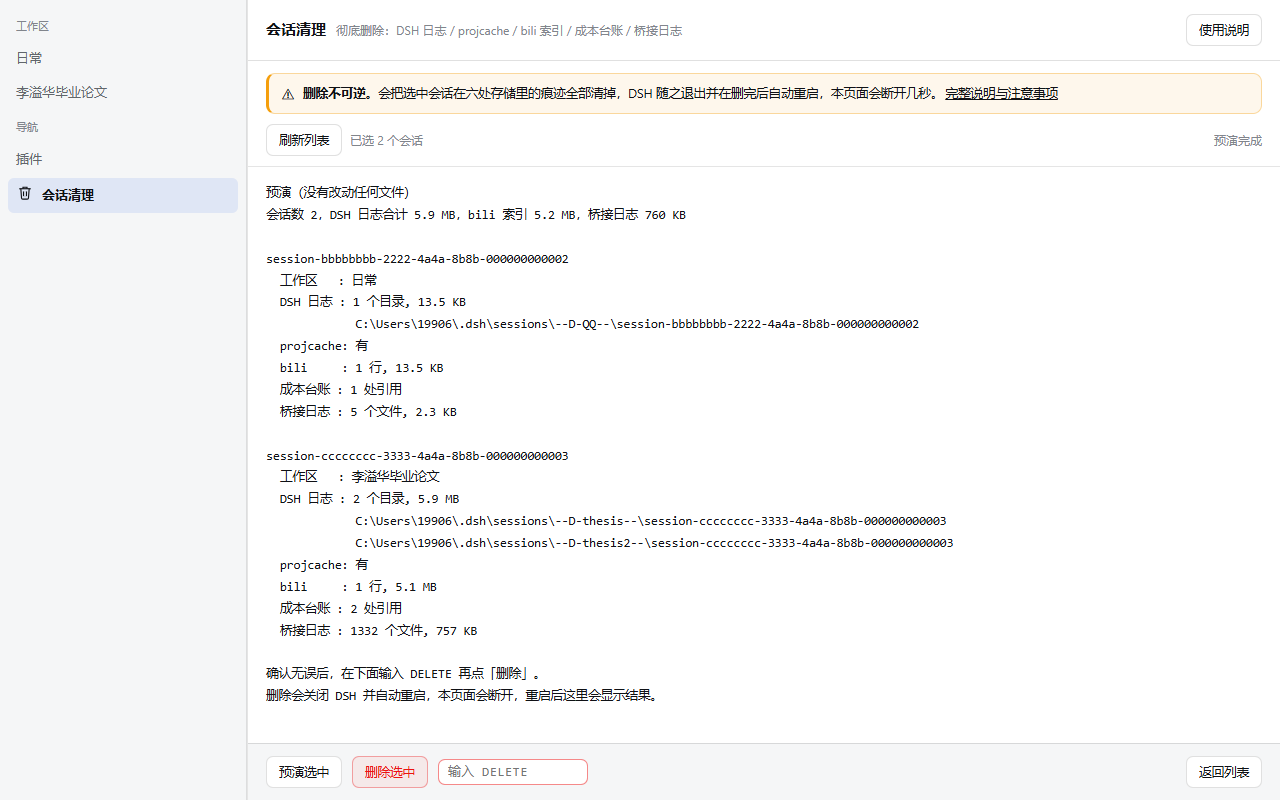
DELETE in the box (an anti-fat-finger phrase, not a password), then click 删除选中.Every deletion leaves a backup under ~/.dsh/session-delete-backup-<timestamp>/ unless you pass -NoBackup.
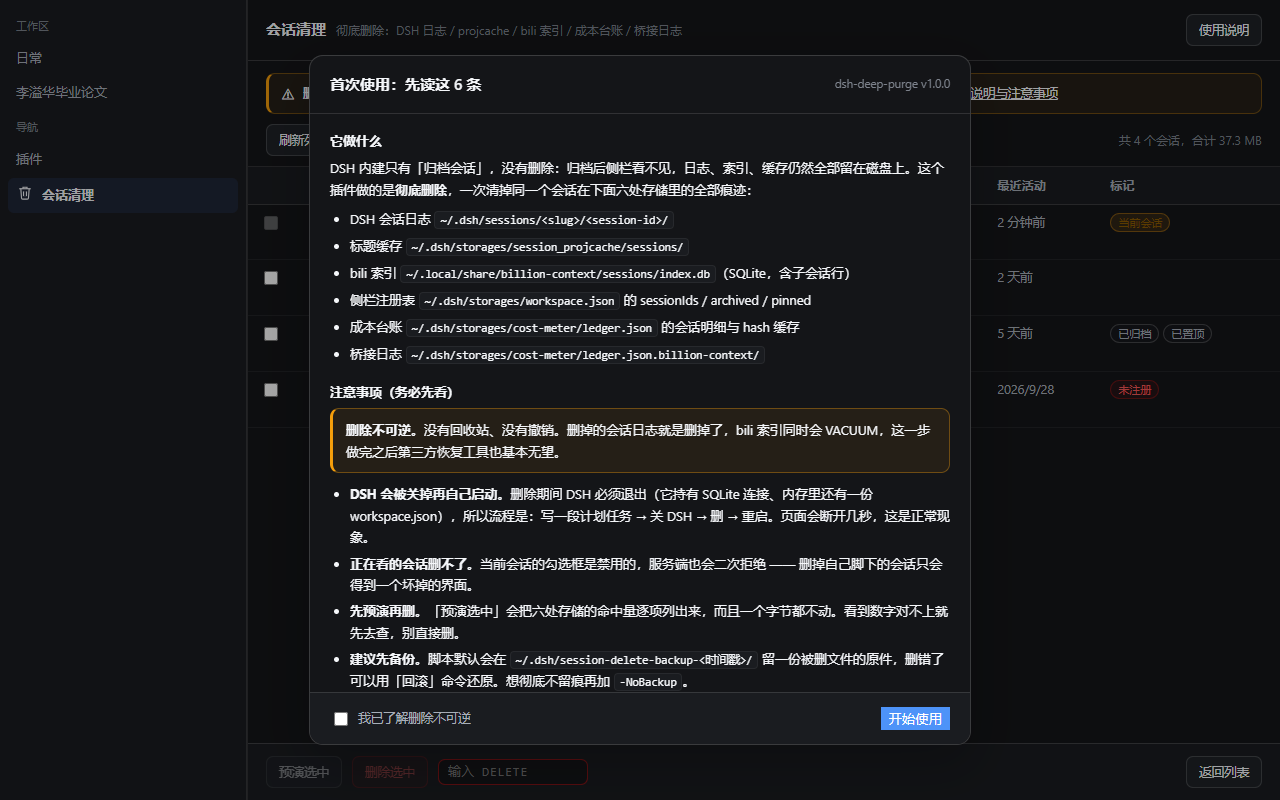
On first open a blocking guide appears: what gets deleted (all six paths), the risk
list, the five-step workflow, how to roll back, and how to uninstall. The start button
stays disabled until you tick "I understand deletion is irreversible" — Esc and
clicking the backdrop do not dismiss it. It re-appears after an update that changes the
text (GUIDE_VERSION bump), and 使用说明 in the header reopens it at any time.
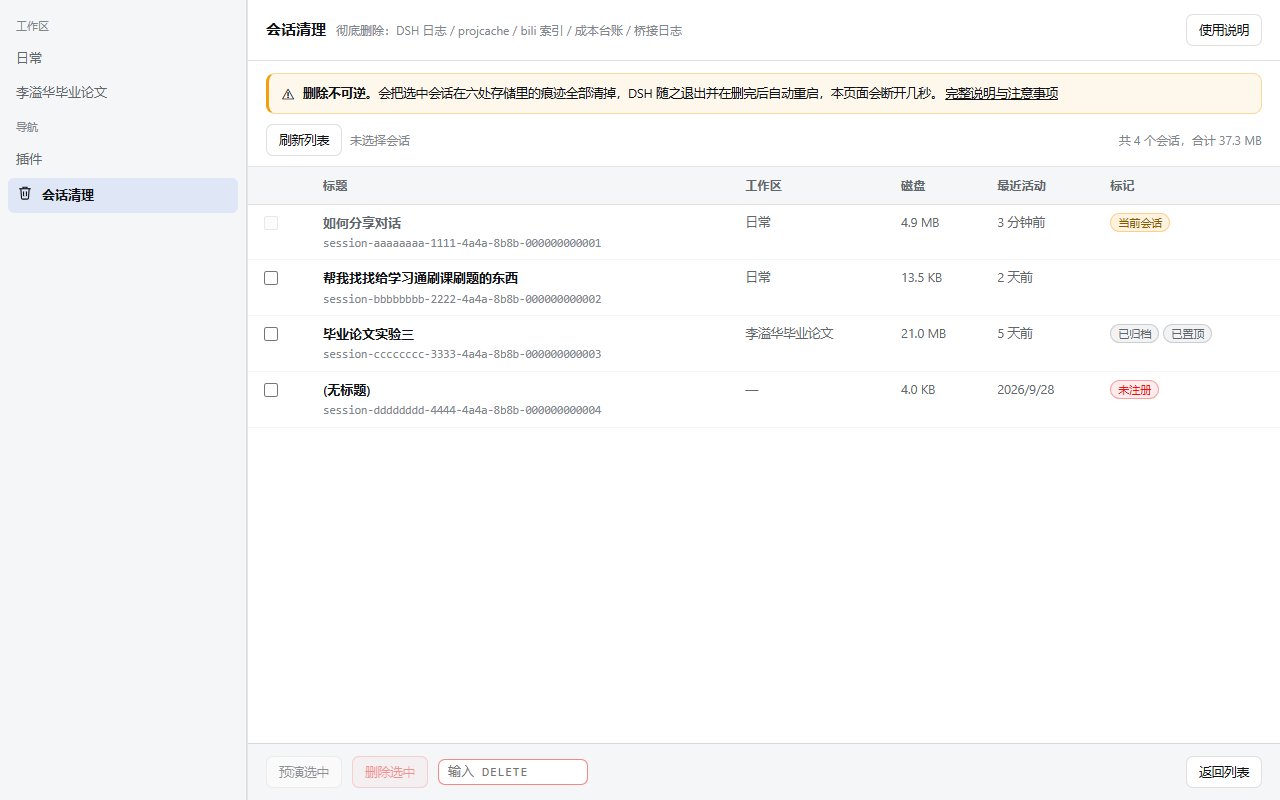
Below the header, permanently, sits a warning bar with no close button: deletion is irreversible, DSH will quit and relaunch, the page drops for a few seconds. A dismissible warning is not a warning.
Every colour is a host design token (--dsw-alias-*), so the panel follows DSH's light and
dark themes without a separate stylesheet. Nothing is hard-coded:
powershell -ExecutionPolicy Bypass -File "<plugin>\ps\dsh-session-cleanup.ps1" -Restore "<backup dir>"Quit DSH first — otherwise the in-memory workspace.json overwrites what you just restored. The restore writes the backed-up files back; it does not touch sessions created after the deletion.
The panel is a front end; the real work is a standalone PowerShell script you can also run directly.
$ps1 = "<profile>\node_modules\dsh-deep-purge\ps\dsh-session-cleanup.ps1"

# inventory: what exists where, nothing is touched
powershell -ExecutionPolicy Bypass -File $ps1 -List

# dry run for specific sessions
powershell -ExecutionPolicy Bypass -File $ps1 -SessionId session-aaaa,session-bbbb

# real deletion (DSH must be closed, or add -AutoRestart)
powershell -ExecutionPolicy Bypass -File $ps1 -SessionId session-aaaa -Execute -AutoRestart| Parameter | Meaning |
|---|---|
-List |
Inventory of all sessions across the six locations. Read-only. |
-SessionId <ids> |
Comma-separated ids to operate on. |
-Execute |
Actually delete. Without it you get a dry run. |
-AutoRestart |
Quit DSH, delete, relaunch. Requires -Execute. |
-Restore <dir> |
Restore from a backup directory. |
-NoBackup |
Skip the backup. Faster, irreversible. |
-SkipBiliGc |
Leave index.db as-is (no VACUUM). |
-WaitTimeoutSec |
How long to wait for DSH to exit (default 180). |
-DshHome / -HarnessExe / -DshProcessName |
Override auto-discovery. |
Exit codes: 0 clean, 1 residue left, 2 DSH running and no -AutoRestart, 3 timeout waiting for DSH to exit (nothing was touched).
workspace.json in memory; last writer wins.Disable or remove dsh-deep-purge in the plugin manager and restart DSH. The plugin keeps no state of its own; everything it touches is your own session data.
CLASSIFICATION EVIDENCE
系统优先读取 GitHub Topics,再与站内分类词典和词根规则比对。当前命中: deepseek、deepseek-harness。
morluto
Reverse engineer anything with agents, from app behavior down to native binaries.

deepseek-ai
DeepSeek Harness: Everything is a Plugin.

nexu-io
The 1st Collaborative AI Design Agent Workspace. Local-first and open source. Create motion, prototypes, websites, apps, dashboards, presentations, images, and videos with your team and AI agents. Share work, exchange feedback, and iterate together in one workspace.