

其他
完整应用

deepseek-harness
deepseek-ai
DeepSeek Harness: Everything is a Plugin.
PROJECT TOPICS
PROJECT README
Move Claude Code conversations, skills, agents, commands, memory, and MCP servers into DeepSeek Harness as native, resumable sessions — and take DSH turns back to Claude Code JSONL when you need to.




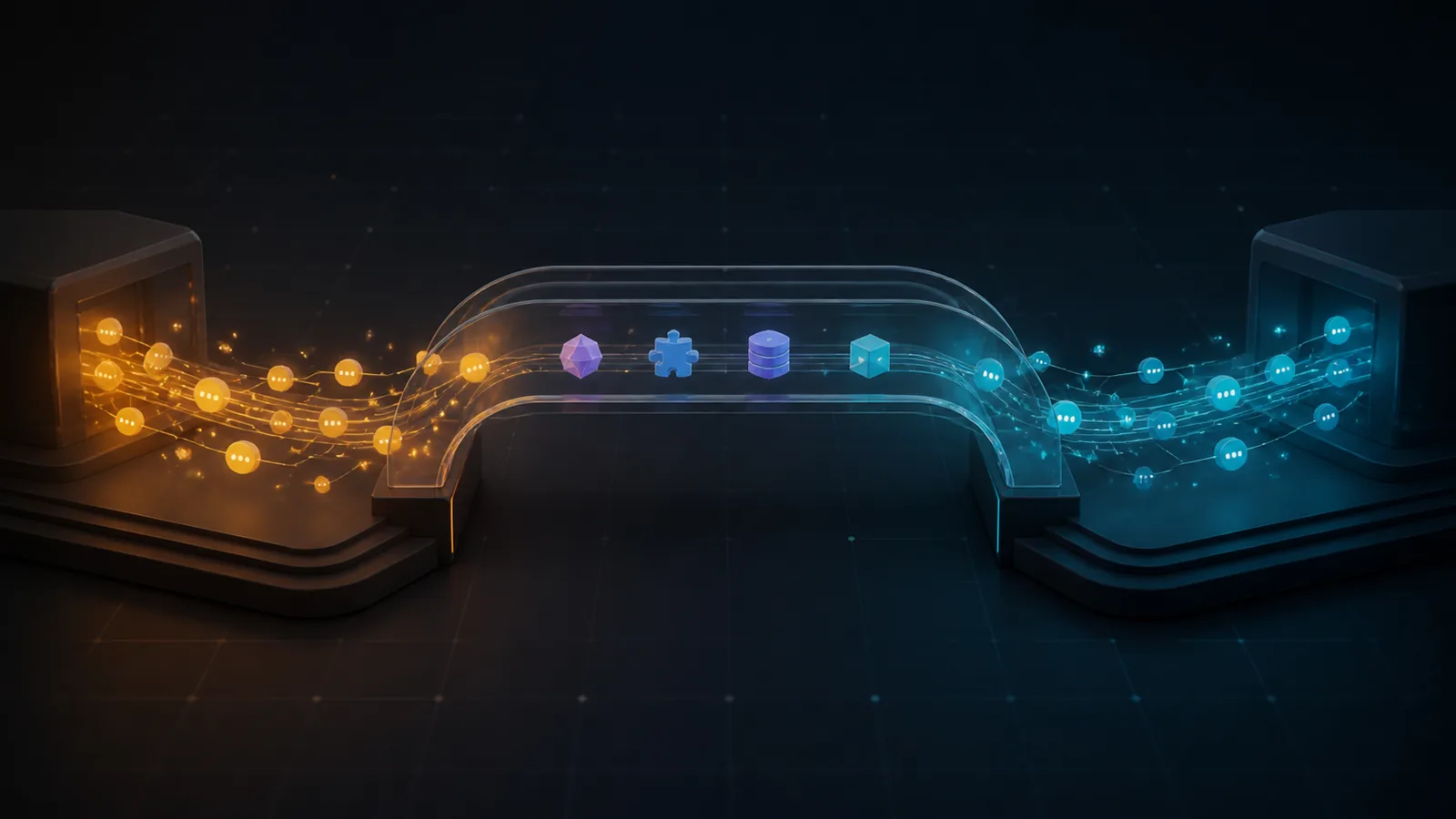
Claude Code is the first source adapter in a multi-tool migration layer. Claude2DSH preserves the useful conversation structure, writes through DSH's native persistence APIs, and keeps the original Claude directory read-only by default.
[!IMPORTANT]
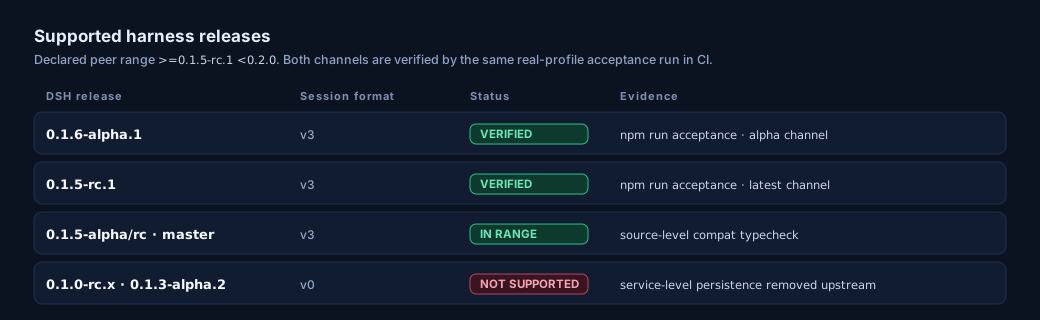
0.3.0requires DSH>=0.1.5-rc.1 <0.2.0and no longer starts on0.1.0-rc.x. DSH 0.1.5 replaced the service-level session API with per-session handles and moved the Session log to format v3; 0.2.x releases predate that change. Upgrade the harness (npm install -g @deepseek-ai/dsh@latest) or stay onclaude2dsh@0.2.0-rc.5.
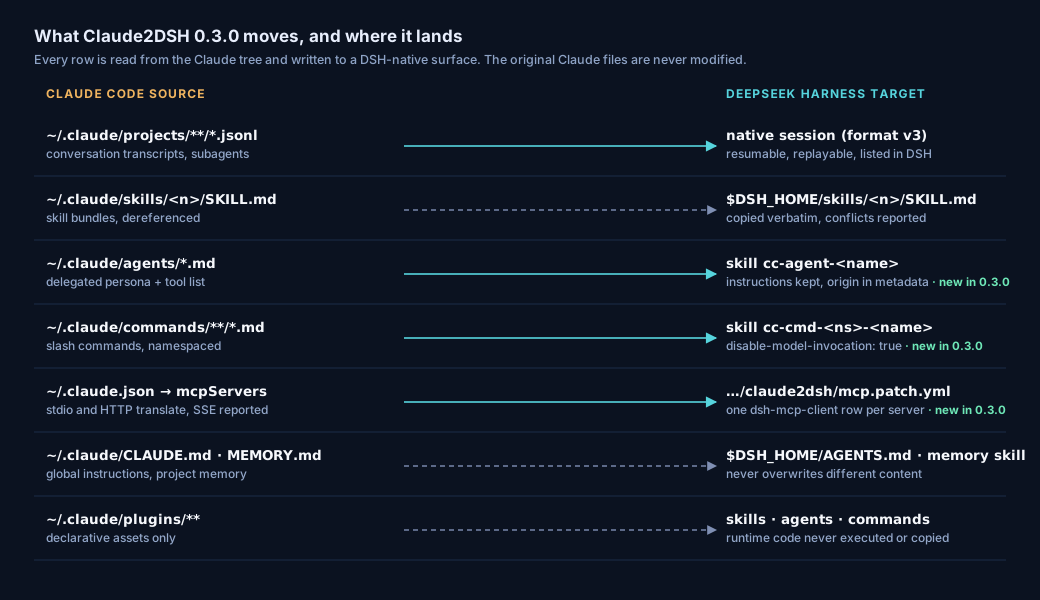
| Resume natively | Bring more than chat | Return without risking the source |
|---|---|---|
| Claude turns become DSH-native session events that DSH can inspect, replay, and resume. | Skills, user-global instructions, project memory, tool-output sidecars, subagent transcripts, and plugin assets have explicit migration paths. | Export and sync target a safe copy under $DSH_HOME by default. Concurrent edits pause instead of overwriting either side. |
The governing principle is zero-configuration by default: the default path produces a visible result without requiring users to understand profiles or bundles first, while dangerous write-back remains explicitly gated.
flowchart LR
    A["Claude Code JSONL<br/>~/.claude/projects<br/>read-only"] --> B["Claude adapter<br/>discover · parse · normalize"]
    B --> C["Normalized session IR<br/>turns · steps · tools · images"]
    C --> D["DSH event synthesis<br/>native session events"]
    D --> E[("DSH sessions<br/>$DSH_HOME/sessions")]
    E --> F["Export / sync<br/>safe copy"]
    F --> G["Claude Code JSONL<br/>resumable transcript"]
E --> H["Settings UI + tools<br/>import · export · sync · merge"]Requirements: Node.js >=22.19.0, pnpm, and the dsh CLI.
# Install the published plugin into DSH's built-in headed profile
dsh plugin --profile web add @claude2dsh/plugin@0.3.0

# Start the browser UI; the terminal prints the local URL
dsh web
Then:
dsh web.flowchart LR
S1["Install plugin<br/>dsh plugin --profile web add ..."] --> S2["Start UI<br/>dsh web"]
S2 --> S3["Open Settings → Claude2DSH"]
S3 --> S4["Preview import"]
S4 --> S5["Run import"]
S5 --> R["Native DSH sessions<br/>listed in Session sources"]The first section of Settings → Claude2DSH is the migration guide; Chinese is the default UI language and English is selectable. If port 3080 is already in use, run dsh web --port 0 and open the URL printed by DSH.
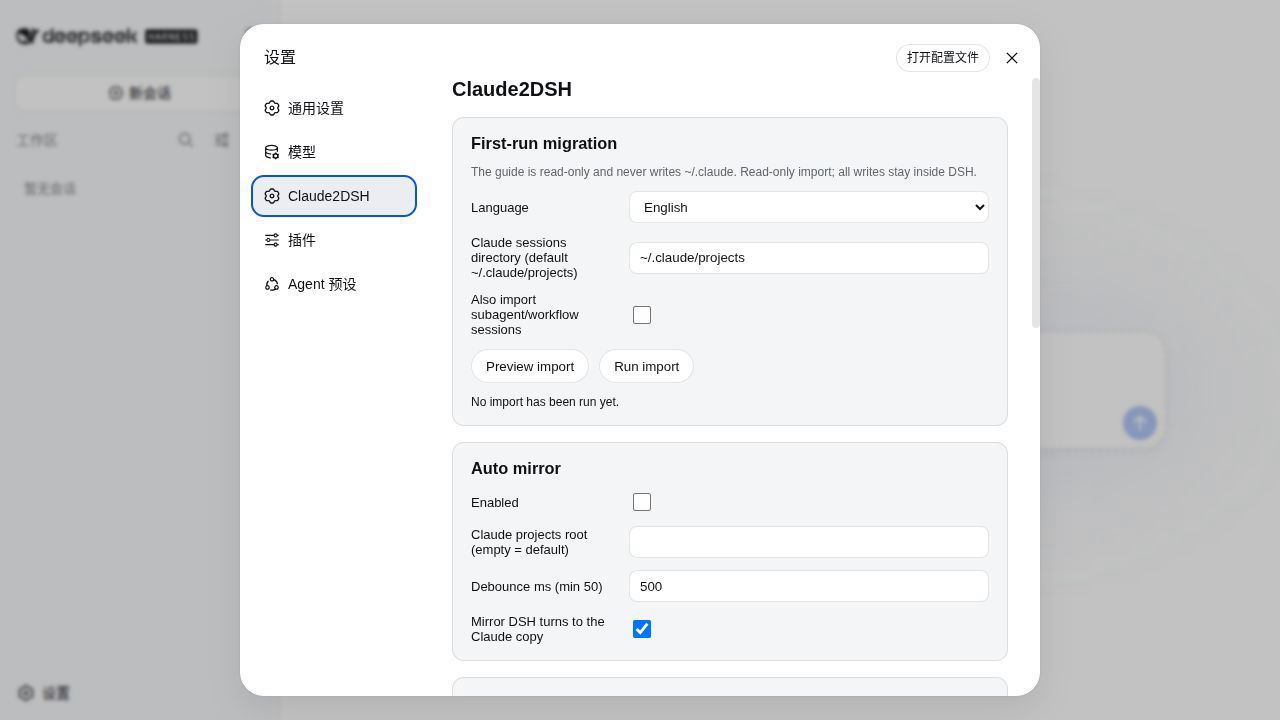
Preview is read-only and returns an itemized plan before any DSH write.
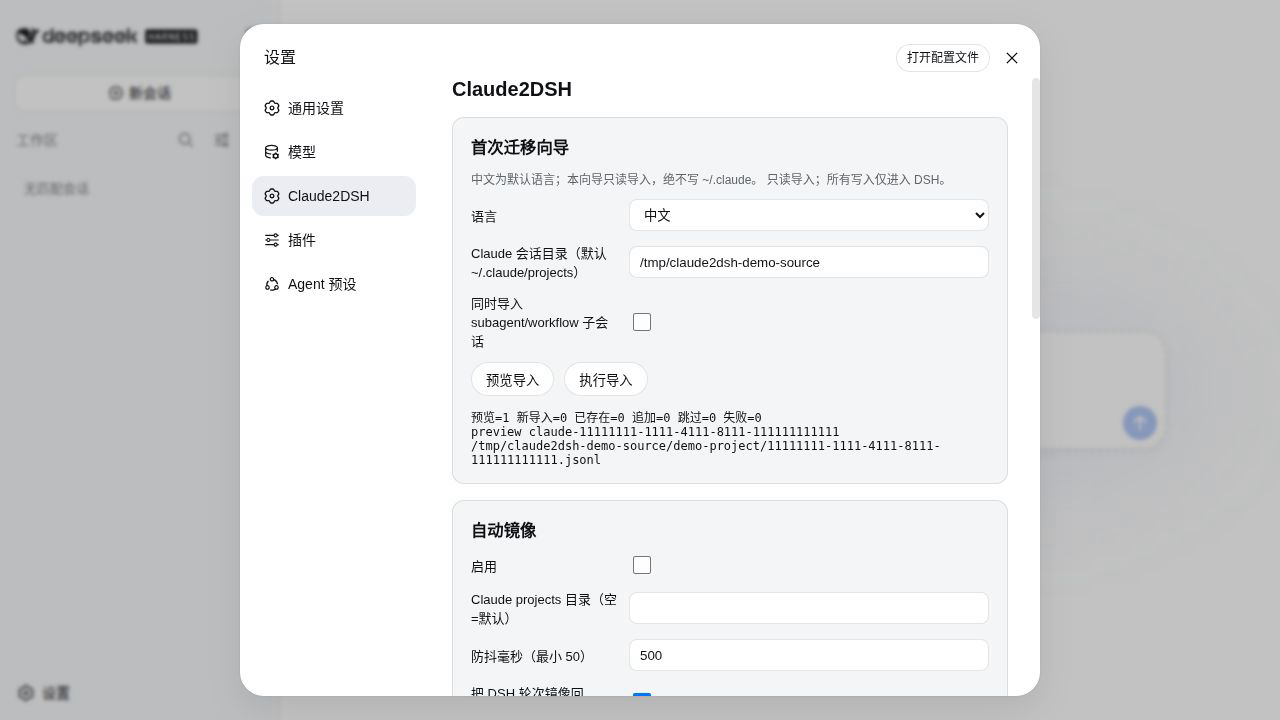
This is what a successful run looks like. The screenshot comes from a real Claude2DSH UI using a synthetic, privacy-safe Claude transcript.
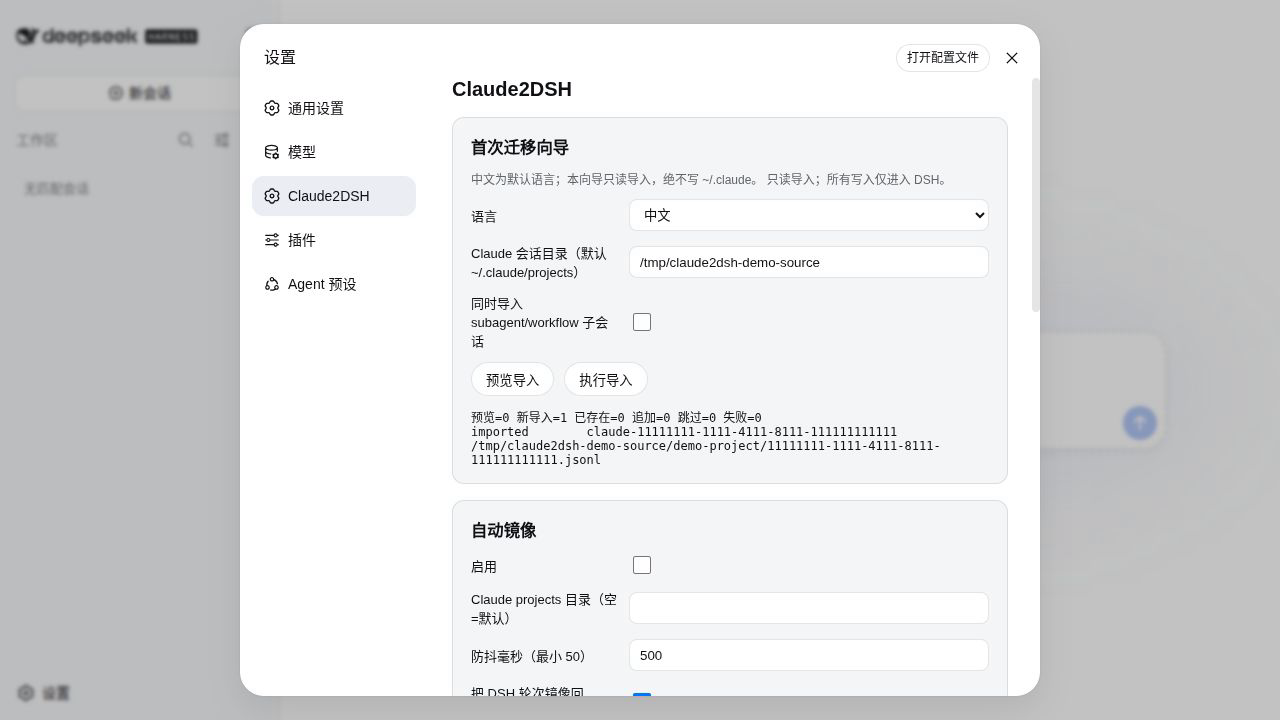
If you cloned this repository, the helper performs the same install into the main web profile and starts the UI on DSH's default local port (3080):
bash scripts/install-claude2dsh.shSet CLAUDE2DSH_PROFILE only when you intentionally want a custom profile. Headless profiles expose the same tools but do not include the browser UI.
| Capability | Use it when | Entry and visible result |
|---|---|---|
| Session import | First migration, or after the Claude transcript gains turns | Settings → Claude2DSH → First-run migration, or claude2dsh_import; reports previewed/imported/already/appended/skipped/failed |
| Skill import | Claude skills should become DSH-native discoverable assets | claude2dsh_import_skills; copied skills appear under $DSH_HOME/skills and in DSH skill discovery |
| Global context | Move user-global ~/.claude/CLAUDE.md into DSH global instructions |
claude2dsh_import_context; previews first and never overwrites a different $DSH_HOME/AGENTS.md |
| Project memory | Make one project's MEMORY.md and memory/*.md discoverable in DSH |
claude2dsh_import_memory; creates one DSH skill bundle per project |
| Export to Claude | Continue a DSH session in Claude Code | claude2dsh_export; writes a validated JSONL copy under $DSH_HOME/claude2dsh/exports |
| Sync back | Append new DSH turns to an existing exported Claude copy | claude2dsh_sync; reports appended turns, events, and JSONL records |
| Auto mirror | Keep watching for new Claude turns and mirror DSH turns to the safe copy | Settings → Auto mirror; claude2dsh_autosync shows status and resumes a paused queue |
| Conflict merge | Both sides grew after the watermark and neither version may be lost | claude2dsh_merge; computes or creates a new merged copy rather than changing either original |
| Tool-output sidecars | A transcript references large persisted tool results | claude2dsh_sidecars; lists or resolves copied files and records missing/oversize items |
| Session sources | Distinguish Claude main, subagent, and merged sessions | Settings → Session sources, or claude2dsh_session_sources; shows source kind and path |
| Agent import | Claude subagent definitions should keep their instructions in DSH | claude2dsh_import_agents; each ~/.claude/agents/*.md becomes the skill cc-agent-<name> with its origin, model, and tool list in frontmatter metadata |
| Command import | Claude slash commands should stay human-invocable in DSH | claude2dsh_import_commands; commands/<ns>/<name>.md becomes cc-cmd-<ns>-<name> with disable-model-invocation: true, so a human prompt never enters the model catalog |
| MCP server import | Claude MCP servers should reach DSH without retyping their configuration | claude2dsh_import_mcp; reads ~/.claude.json and a project .mcp.json, and with apply:true writes a dsh-mcp-client patch layer plus the exact dsh --patch command. SSE servers are reported unsupported |
| Plugin inventory | Inspect Claude plugin assets without running Claude plugin code | claude2dsh_plugin_inventory; dry-run reports skills, commands, agents, prompts, hooks, and marketplaces; apply:true also translates a plugin's agents/ and commands/ |
| Image policy | Preserve transcript images while respecting the selected model's modalities | imageMode: "auto" follows the current DSH session route; leave the probe provider/model fields empty to follow the live session, or set them to override. The Settings page shows the current probe conclusion, and every import item records the degradation/upgrade reason. |
| Hook bridge | Reuse the supported subset of Claude command hooks | Settings → Claude hook bridge scans Claude settings and plugin hooks read-only, previews mappable command hooks, and can save a candidate for the next boot; unsupported types are reported and skipped |
A translation is not an equivalence, and the report says so: a Claude subagent becomes a DSH skill rather than a preset, and a Claude slash command becomes a user-invocable skill. The original frontmatter values are preserved in skill metadata so the difference is inspectable.
Session import is idempotent: running it again reports an existing session instead of duplicating it. The default search is recursive and respects CLAUDE_CONFIG_DIR (falling back to ~/.claude/projects), and the first-run guide displays the discovered source root and result counts. Project-level CLAUDE.md is not copied because DSH already reads it natively; only user-global context needs conversion.
The Claude2DSH settings page keeps the first migration and safety-critical defaults in one place:
~/.claude write-back is a separate dangerous switch.The following real screenshots use the default Chinese UI and synthetic data; labels switch with the language selector.
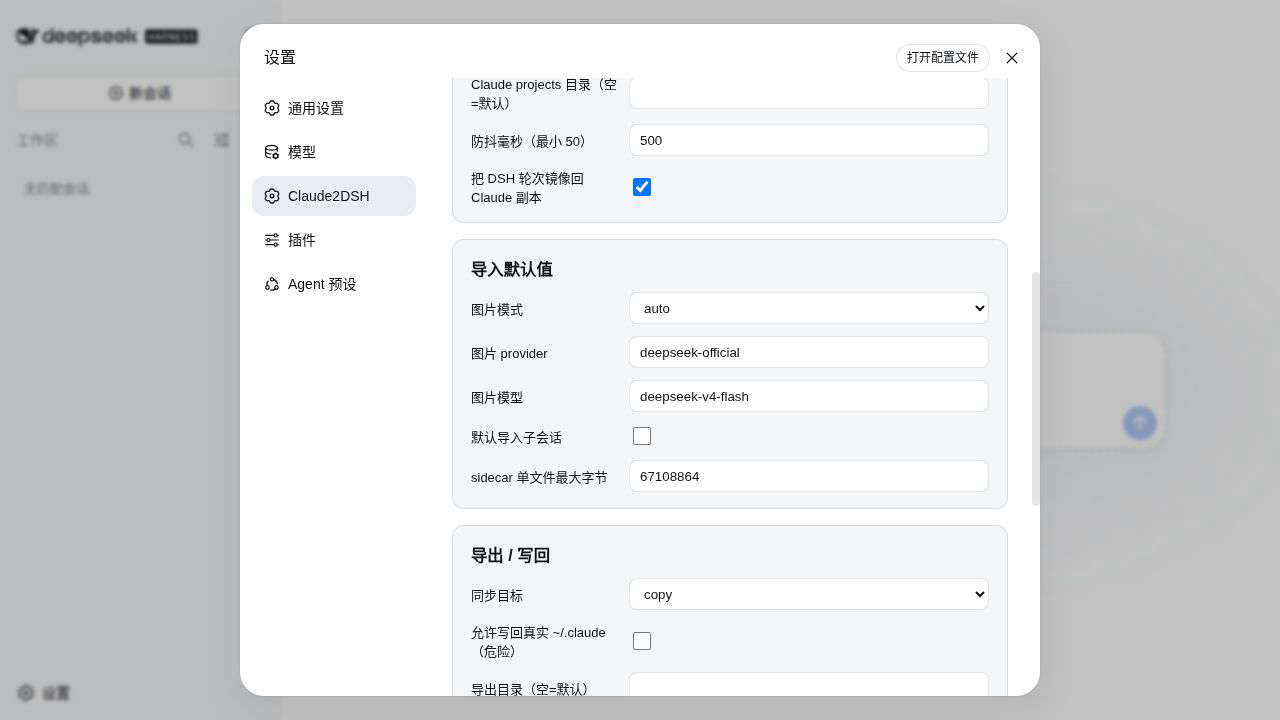
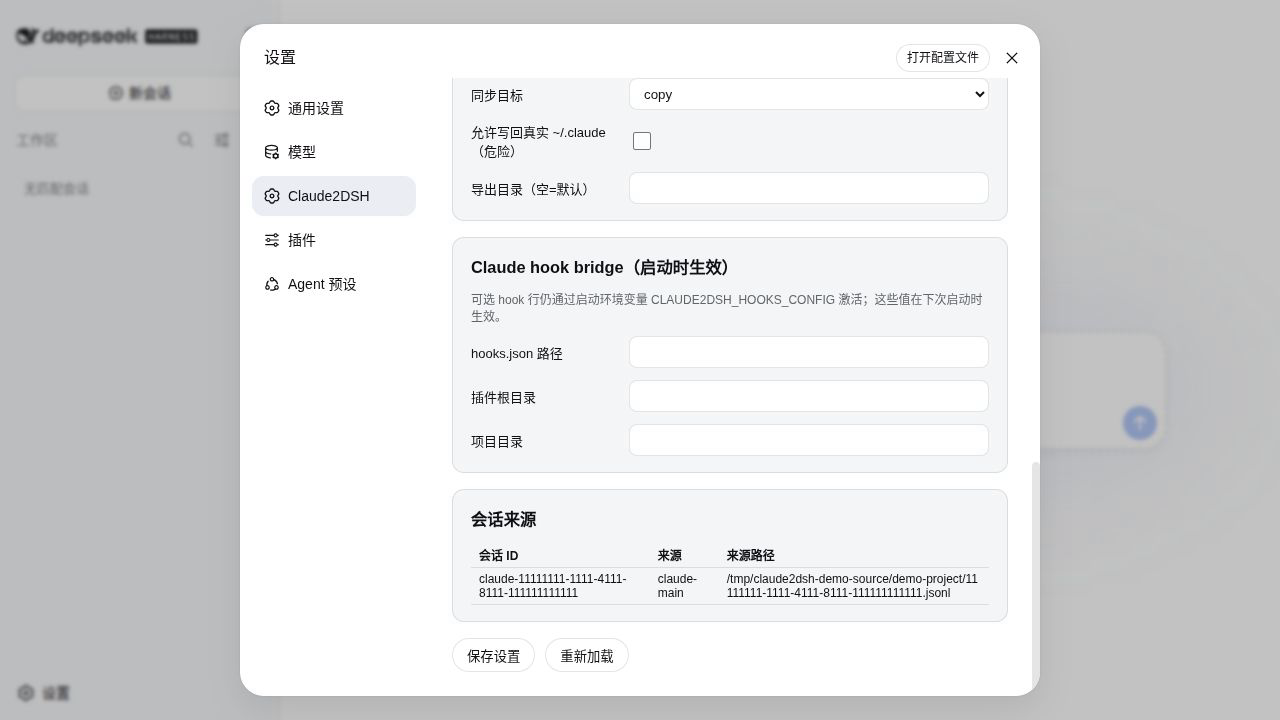
$DSH_HOME/sessions, $DSH_HOME/skills, and $DSH_HOME/claude2dsh.$DSH_HOME/claude2dsh/exports; they do not write the original ~/.claude.allowOriginalClaudeDir: true authorization and remains refused by default.0.3.0 supports DSH >=0.1.5-rc.1 <0.2.0 and refuses to load outside it. Interfaces and on-disk formats are still not presented as a stable compatibility promise; a future Session format change will need a matching plugin release.type: "command" handlers, and partial semantics per supported event. Full hook compatibility is a roadmap goal, not a current claim.claude2dsh_session_sources instead.You probably used a headless profile. Install into the built-in web profile and start dsh web; the page is under Settings → Claude2DSH.
Not during migration. Export and sync also target a safe copy under $DSH_HOME by default. Original-directory write-back requires a separate explicit authorization.
Both can execute work after the first import. They stay opt-in so the user sees and accepts their scope first; the hook bridge is also limited to the documented 7/30 command-only subset.
Claude2DSH is part of a small family of DSH plugins by the same author for people who work across several agent tools:
If you migrated a Claude Code corpus into DSH, CiteCiter is the natural next install for the sessions that end up citing documents.
MIT. The project was designed independently and benefited from the published work of dsh-chat-import (MIT) and dsh-claude-move (Apache-2.0); thanks to both projects for useful reference points. Hook compatibility delegates to the official DeepSeek Harness Claude Code hook bridge package.
CLASSIFICATION EVIDENCE
系统优先读取 GitHub Topics,再与站内分类词典和词根规则比对。当前命中: 无有效分类标签。
deepseek-ai
DeepSeek Harness: Everything is a Plugin.

anywhere-labs
为 DeepSeek Harness (DSH) 插件生态打造的现代化桌面端解决方案。万物皆「插件」,桌面本身也是「插件」。

walkinglabs
Harness engineering beginner tutorial, from 0 to 1