
其他
完整应用

deepseek-harness
deepseek-ai
DeepSeek Harness: Everything is a Plugin.
PROJECT TOPICS
INSTALL REFERENCE
dsh plugin --profile web add github:kirigayakazima/dsh-usage-vendor-stats
该命令指向仓库当前默认分支;尚无绑定当前 commit 的完整验证结果。
PROJECT README
DeepSeek Harness usage statistics plugin: aggregates API usage by vendor (subscription / official API) × KPI, with a GitHub-style calendar heatmap and daily / monthly dashboards.
Distinct from
dsh-usage-stats(which aggregates by workspace): this plugin uses the vendor (provider) as the primary dimension, auto-detectingmessage.source.providerandmessage.source.modelfromassistant/messageevents, and splits KPIs into tokens / cache hits / output / reasoning.
huoshan, hebox, deepseek-official, tokenrhythm, opencode), with manual labels for subscription / official API and aliases (persisted to a KV unit under $DSH_HOME/storages).sessionStats projection.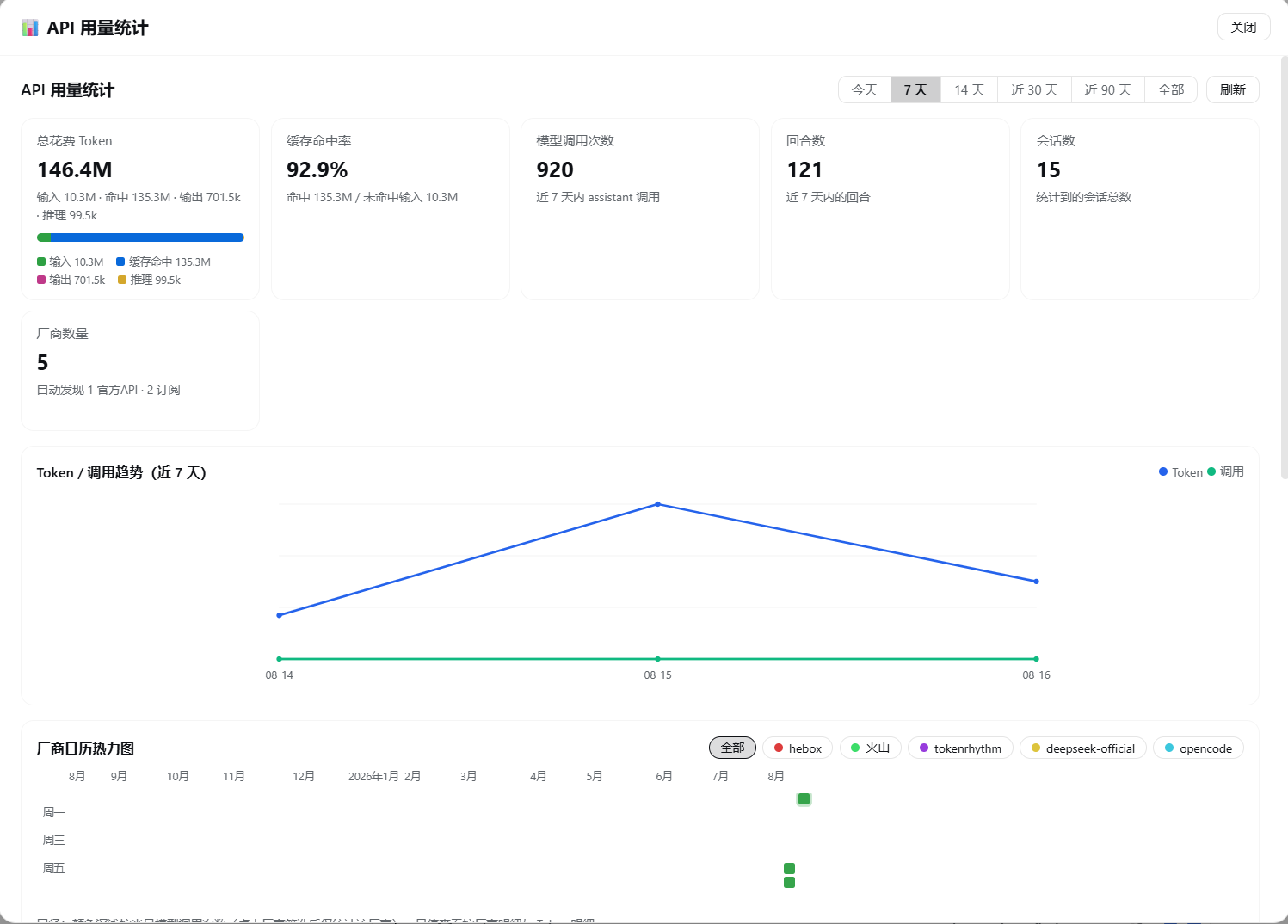
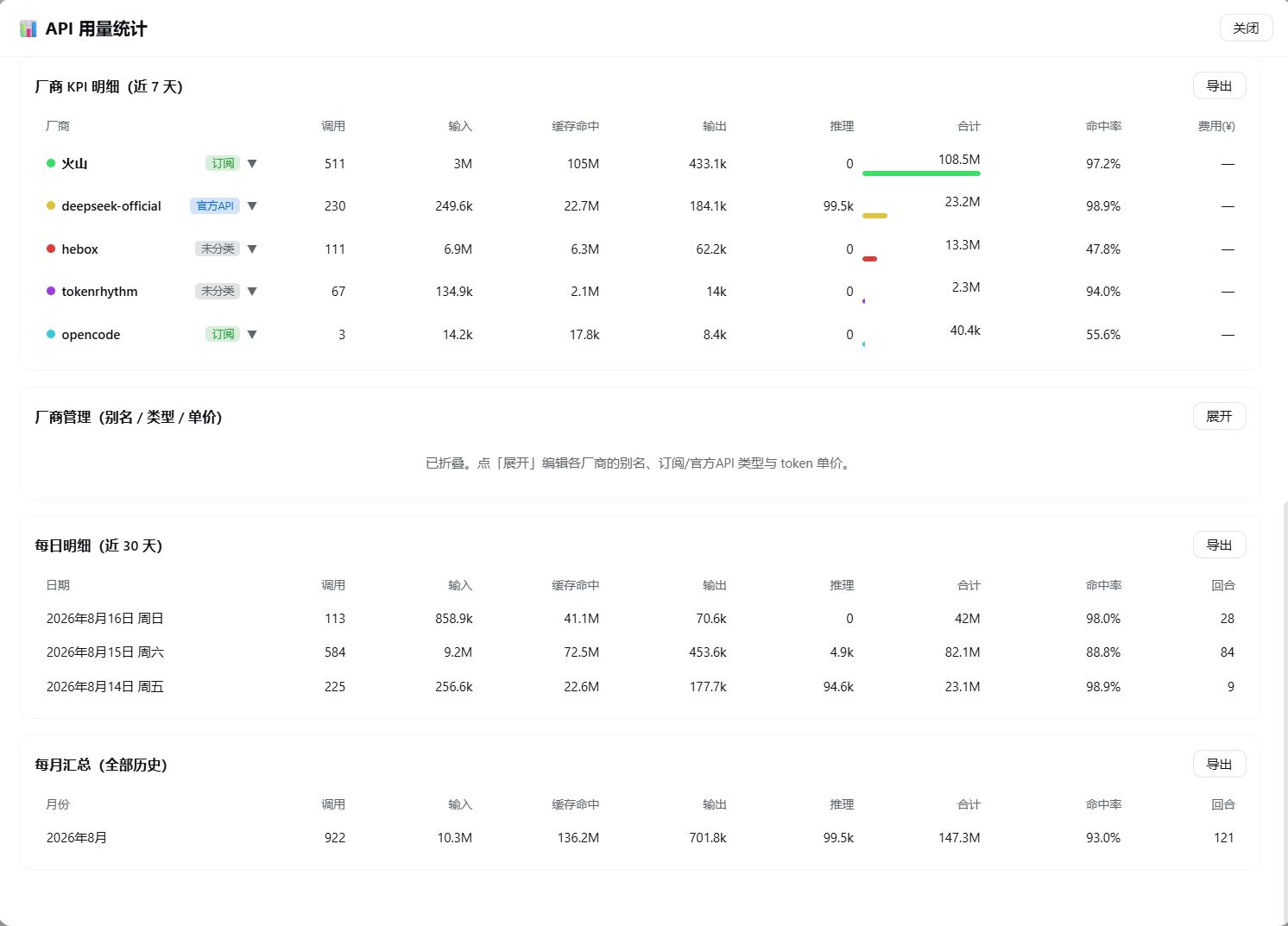
assistant/message events carry usage (token accounting) and message.source.{provider,model} (vendor/model provenance).inputTokens = uncached input, cacheReadTokens = cached input, outputTokens = output, reasoningTokens = reasoning, cacheWriteTokens = cache write.This is a standard DSH community plugin package (declares dsh.bundle manifest + web client half).
dsh plugin --profile web add "github:kirigayakazima/dsh-usage-vendor-stats"Refresh the page after install — no manual config, no restart.
$DSH_HOME/profiles/node_modules/ (use a junction on Windows):New-Item -ItemType Junction -Path "$env:DSH_HOME\profiles\node_modules\dsh-usage-vendor-stats" -Target "<absolute path to this dir>"$DSH_HOME/profiles/web/cordis.patch.yml:- insert:
- id: usage-vendor-stats
name: dsh-usage-vendor-statsThe user patch layer hot-reloads: save and refresh the page.
lib/index.js): scans durable session logs and aggregates usage (assistant/message.usage + message.source), listens to session/event for live folding; serves data routes via the webServer service:GET /api/usage-vendor-stats — stats snapshot (vendors / models / daily / monthly / hourly / totals)POST /api/usage-vendor-stats/vendor — set vendor alias, type, and unit pricelib/client.js): window.__ModuleLoader__ factory-format browser bundle, registering the API Usage Stats settings page (settings.section slot), a sidebar footer entry (sidebar.footer.action), and a fullscreen panel (shell.overlay).lib/index.js / lib/client.js takes effect after a page refresh (client bundle loads with the page); host-half changes require a DSH restart.MIT
DeepSeek Harness 用量统计插件:按厂商(订阅 / 官方 API)× KPI 聚合 API 使用量,带 GitHub 风格日历热力图、趋势折线图与日 / 月 / 小时统计看板。
区别于
dsh-usage-stats(按工作区统计):本插件以厂商(provider)为第一维度,自动识别assistant/message事件里的message.source.provider与message.source.model,拆分 token / 缓存命中 / 输出 / 推理等 KPI。
huoshan、hebox、deepseek-official、tokenrhythm、opencode),可手动标记为「订阅 / 官方API」,设置别名(持久化到 $DSH_HOME/storages 的 KV 单元)sessionStats 投影
assistant/message 事件携带 usage(Token 记账)与 message.source.{provider,model}(厂商/模型来源)inputTokens 为未命中输入,cacheReadTokens 为缓存命中输入,outputTokens 为输出,reasoningTokens 为推理,cacheWriteTokens 为缓存写入本插件是标准的 DSH 社区插件包(声明 dsh.bundle manifest + web client 半)。
dsh plugin --profile web add "github:kirigayakazima/dsh-usage-vendor-stats"安装后刷新页面即可,无需手动改配置、无需重启。
$DSH_HOME/profiles/node_modules/ 下创建指向本目录的符号链接(Windows 用 junction):New-Item -ItemType Junction -Path "$env:DSH_HOME\profiles\node_modules\dsh-usage-vendor-stats" -Target "<本目录绝对路径>"$DSH_HOME/profiles/web/cordis.patch.yml 添加一行:- insert:
- id: usage-vendor-stats
name: dsh-usage-vendor-stats用户 patch 层会被热重载:保存后刷新页面即可。
lib/index.js):扫描持久化会话日志聚合用量(assistant/message.usage + message.source),监听 session/event 实时折叠;通过 webServer 服务注册数据路由:GET /api/usage-vendor-stats — 统计快照(厂商 / 模型 / 日 / 月 / 小时 / 汇总)POST /api/usage-vendor-stats/vendor — 设置厂商别名、类型与单价lib/client.js):window.__ModuleLoader__ 工厂格式的浏览器 bundle,注册设置面板「API 用量统计」页(settings.section 槽位)、侧边栏底部入口(sidebar.footer.action)与全屏面板(shell.overlay)。lib/index.js / lib/client.js 后刷新页面即生效(client bundle 随页面加载);host 半改动通过重启 DSH 生效MIT
CLASSIFICATION EVIDENCE
系统优先读取 GitHub Topics,再与站内分类词典和词根规则比对。当前命中: 无有效分类标签。
deepseek-ai
DeepSeek Harness: Everything is a Plugin.

walkinglabs
Harness engineering beginner tutorial, from 0 to 1

anywhere-labs
为 DeepSeek Harness (DSH) 插件生态打造的现代化桌面端解决方案。万物皆「插件」,桌面本身也是「插件」。