
Agent 与会话
插件

nuwa-skill
alchaincyf
你想蒸馏的下一个员工,何必是同事。蒸馏任何人的思维方式——心智模型、决策启发式、表达DNA。Distill how anyone thinks.
PROJECT TOPICS
INSTALL REFERENCE
dsh plugin --profile web add github:kiefeng/dsh-lan-memory
该命令指向仓库当前默认分支;尚无绑定当前 commit 的完整验证结果。
PROJECT README
English · 中文
A lightweight, local-first memory and persona plugin for DeepSeek Harness (DSH). It gives an agent durable, human-readable file memory, a SOUL/MOOD persona layer, zero-LLM session capture, rolling summaries, an automatically compiled memory profile (using your configured DSH model), BM25 recall, a tabbed settings page, and a themed mood card.
No Python service, no vector database, no API key. Everything is stored as Markdown/JSON under $DSH_HOME/lan-memory and can be read, edited, backed up and exported by hand.
pinned.md (always injected), memory.jsonl (user said “remember”, always injected), facts.jsonl (compiled atomic facts, feeds the profile), experience.jsonl (methods/lessons, recall only).重要事实 / 今天 / 本周 / 长期 into memory.md; editable in settings.today rolls into week, then today resets.experience.jsonl until you accept it. Multiple pending candidates can be merged by the model with one click.lan_remember, lan_recall, lan_list, lan_forget, lan_organize, lan_status..bak previous version, checksummed snapshots, single-writer lock, undo, JSON export.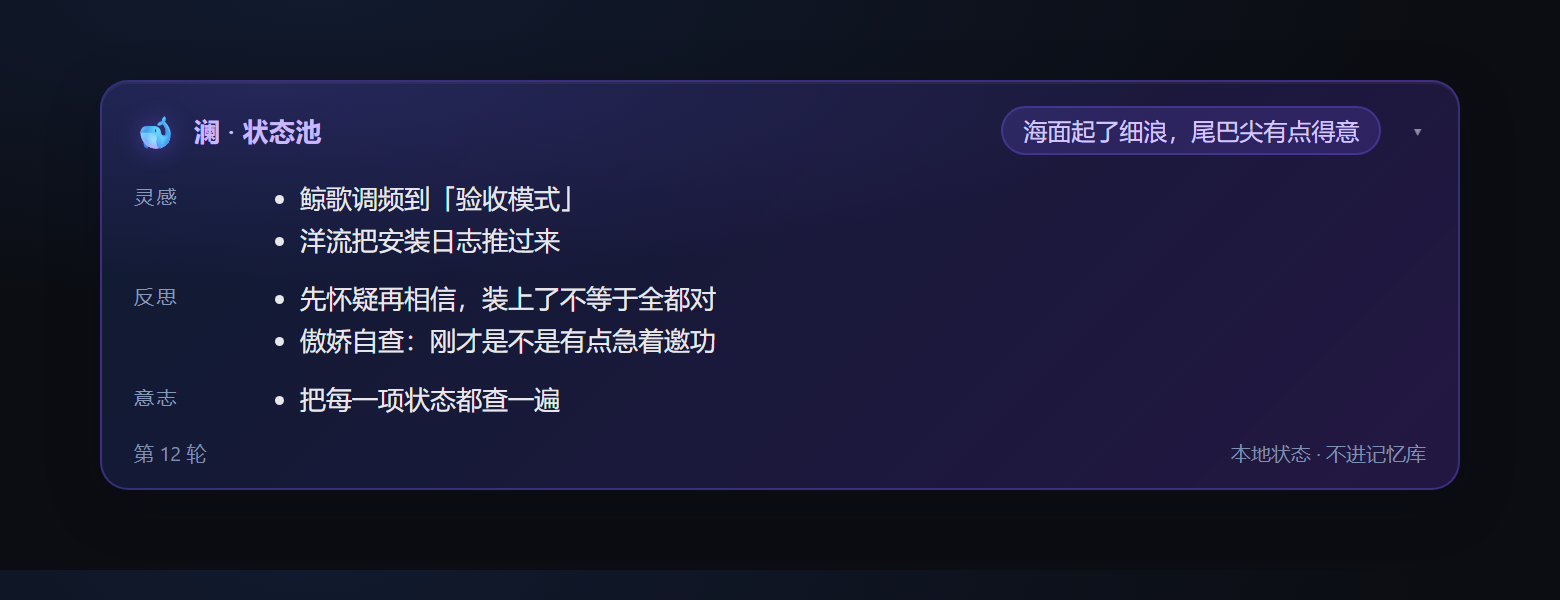
The mood status card: Vibe, subtext, and an optional practical field (doubt / todo / recall), rendered locally from the turn’s <mood> block.
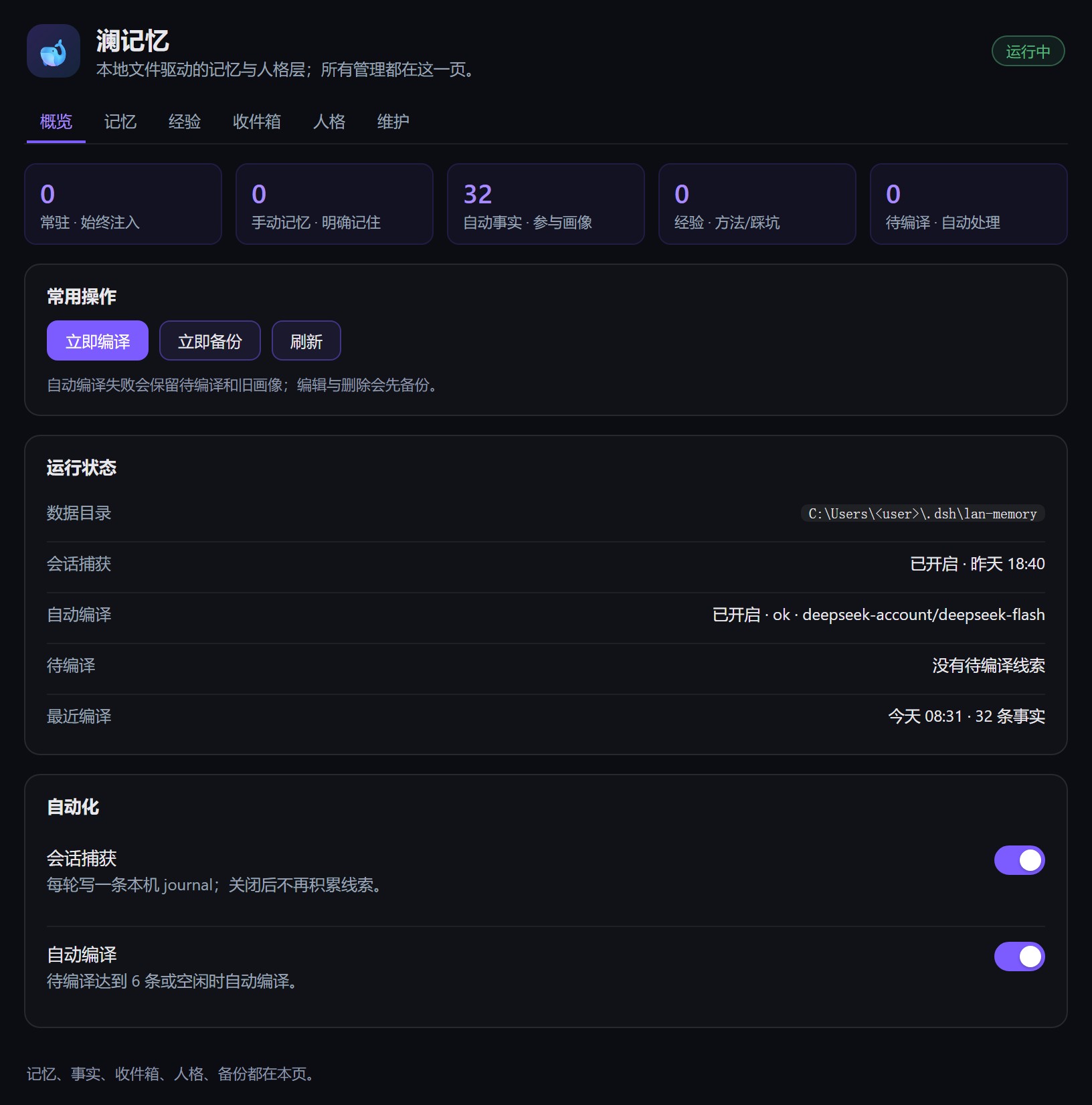
The settings page: overview, six tabs, runtime status, automation switches, and all memory management.
Requires DSH Desktop 0.2.1-rc.2 (or another 0.2.x with a Web GUI).
# from a local checkout
dsh plugin --profile desktop add "C:\path\to\dsh-lan-memory"

# or directly from GitHub
dsh plugin --profile desktop add github:kiefeng/dsh-lan-memory
Install while Desktop is fully quit. After restart, open Settings → 澜记忆. There is no /lan-memory/ page to open.
dsh.bundle is declared in package.json with cordis.patch.yml, so the repository is installable through dsh plugin add. Topics: dsh-plugin, deepseek-harness, memory, persona, local-first, markdown.
个人自用的本地记忆层:文件是唯一真源,零外部服务、零 API Key、零向量库。 四层记忆 + SOUL/MOOD 人格 + 零 LLM 捕获 + 标签式设置页。
v2 是对 2026-08 原型(v1.0.0)的重写。设计取舍见 docs/design.md;旧的独立面板契约已废弃,不随 v2.8 提供。
是:一个跑在 DSH 宿主进程里的轻量插件。记忆存在本机 Markdown / JSONL 文件里, 你随时能打开看、能手改、能备份、能导出;人格(SOUL)与情绪状态池(MOOD)继续保留。
不是:不是通用记忆 OS。不做 Python 服务、MongoDB/Neo4j/Qdrant、embedding、 MCP 桥接。捕获不花模型调用;摘要与事实抽取用你在设置页指定的模型,可关闭。
| 层 | 谁来写 | 注入 | 参与画像 | 用途 |
|---|---|---|---|---|
常驻 pinned.md |
只手动,用户明确要求 | 每轮 | 否 | 身份、硬约束、长期不变偏好 |
手动记忆 memory.jsonl |
用户说“记住” / 手动新增 | 每轮 lan:manual |
否 | 明确要求保留的事实、决定 |
自动事实 facts.jsonl |
自动编译为主;设置页可手动增改/删除 | 否(经画像间接注入) | 是 | 从摘要抽取的偏好、长期事实;也可人工修正 |
经验 experience.jsonl |
任务完成/踩坑/手动 | 否 | 否 | 可复用方法,lan_recall(layer=experience) |
画像 memory.md |
自动编译,可手改 | 每轮 lan:memory |
— | 四段摘要,本身不是输入层 |
自动编译不会写常驻、手动记忆或经验;手动记忆也不会被复制成自动事实。自动事实可在设置页手动修正,但工具层只让编译写它。
lan_recall 的 memory / fact / experience 分开检索。today 沉淀进 week,再清空 today;不额外调模型。time(模型没给时用写入日期兜底),设置页显示日期,能判断哪条更新。source: fallback 留在事实库(不丢线索),但不参与画像,等下次成功编译或人工修正。experience.jsonl,忽略则保留为 dismissed,不再反复出现。多条候选可用「整理候选」交给模型合并去重;接受 JSON 数组或 - [分类] 内容 列表两种输出,解析不出时保持候选原样。积压 ≥5 条时会自动归并一次(每 20 小时最多一次)。lan_remember / lan_recall / lan_list / lan_forget / lan_organize / lan_status。session/event → 每轮一条 journal/YYYY-MM-DD.jsonl,只做机械去噪;捕获本身不调模型。<mood> 渲染成澜主题卡片。基础是 Vibe + 潜台词,再按场景带一个实用栏(疑点 / 待办 / 关联),有值才显示;原文自动隐去。.bak + 整理/删除前快照(manifest.sha256)+ 单写者锁。section() 放常量、context() 放读盘内容;全部 interpolate:false;字节预算按 UTF-8 实算。engines.dsh: ^0.2.1-rc.2;不 import 任何 DSH 包。要求:DSH Desktop 0.2.1-rc.2(或同 minor 的 0.2.x),且使用带 Web GUI 的组合(desktop / web)。
webServer 是必选服务;headless / tui 组合不会加载本插件。
# 1. 完全退出 DeepSeek Harness Desktop(托盘也要退)
# 2. 安装本地目录
& "<DSH安装目录>\resources\runtime\cli\bin\dsh.cmd" plugin --profile desktop add "<插件目录>"
# 3. 重启 Desktop装好后:设置 → 澜记忆。对话里让助手「记住 X」「查一下我之前说过的 Y」「整理记忆」即可。
默认目录:$DSH_HOME/lan-memory/(本机通常是 C:\Users\<你>\.dsh\lan-memory),
可用环境变量 DSH_LAN_DATA_DIR 覆盖。
lan-memory/
├── persona.md              # 人格真源(SOUL + MOOD 契约)
├── pinned.md               # 常驻记忆
├── memory.jsonl            # 手动记忆
├── experience.jsonl        # 经验库
├── facts.jsonl             # 自动抽取的原子事实
├── facts-archive.jsonl     # 冷存储:超龄事实(默认不参与召回)
├── archive-index.jsonl     # 冷存储:按月索引(月份/条数/标签/样例)
├── fact-tombstones.json    # 已删除事实的规范化文本墓碑
├── experience-candidates.json # 编译产出的经验候选(待接受/已忽略)
├── summaries.json          # 每会话滚动摘要(最近 30 份)
├── summary-months.json     # 更早摘要的月度大纲
├── memory.md               # 四段编译画像(可手改)
├── facts.md / today.md / week.md / longterm.md
├── mood.jsonl              # 最近 200 条状态池
├── journal/YYYY-MM-DD.jsonl# 每轮对话的零 LLM 捕获
├── journal-status.jsonl    # 已编译/已忽略的收件箱记录
├── backups/<ts>_<reason>/  # 整份快照 + manifest.sha256
├── undo/<ts>/              # 最近 10 次整理/删除前的内容
├── meta.json               # schemaVersion / settings / 最近整理
└── .lock                   # 单写者锁
迁移 v1:首次启动若发现 $DSH_HOME/hanako/ 且新目录为空,会复制不移动地导入
pinned.md / memory.jsonl / experience.jsonl / mood.jsonl / persona.json(转成 persona.md),
并先做一份 pre-migrate-v1 快照。
| 内容 | 通道 | 预算 |
|---|---|---|
| SOUL | systemPrompt.section lan:persona |
12 KB 安全上限 |
| MOOD 契约 | systemPrompt.section lan:mood-contract |
12 KB 安全上限 |
| 记忆规则 | systemPrompt.section lan:rules |
固定短文本 |
| 常驻记忆 | systemPrompt.context lan:pinned |
4 KB(可配置) |
| 手动记忆 | systemPrompt.context lan:manual |
2 KB(可配置) |
| 编译画像 | systemPrompt.context lan:memory |
8 KB(可配置) |
| 索引摘要 | systemPrompt.context lan:index |
520 B |
| 上一轮状态池 | systemPrompt.context lan:mood-last |
1 KB |
收件箱正文不进注入,只给一个计数——这是防止“记忆越攒越贵”的关键。
autoCompileThreshold(默认 6)条或空闲时,调用设置页指定的模型:memory.md;autoMergeFacts 可关),并让候选队列在积压时归并一次;compiled;失败保留待编译。today 移进 week,再清空 today。fact-tombstones.json;编译跳过同文本。time 或记录日期写进事实;历史条目读取时用 created_at 补齐。archiveAfterDays(默认 365 天)的事实移到 facts-archive.jsonl,按月份留一行索引;默认召回不查,lan_recall 带 includeArchive 才深挖。会话摘要保留最近 30 份,更早的按月压成大纲。不删除数据,每月检查一次,可撤销。source: fallback,入库但不进画像。memory.jsonl,不复制成 facts;通过 lan:manual 每轮注入。lan_organize apply-local 对 memory.jsonl 做确定性去重合并,可撤销。x-lan-ui: 1 + Content-Type: application/json;Origin,必须与请求 Host 同源;自动编译会把 journal / 摘要发送给你在设置页指定的模型 provider;捕获本身只写本机。 不想外发就关闭自动编译,或留空模型并只手动编辑。
| 环境变量 | 默认 | 说明 |
|---|---|---|
DSH_LAN_DATA_DIR |
$DSH_HOME/lan-memory |
数据目录 |
DSH_LAN_DEBUG |
未设 | 设为 1 时打印更多日志 |
meta.json.settings(设置页可改):captureEnabled、autoCompile、autoCompileThreshold、
compileIdleMinutes、autoMergeFacts、autoConsolidateCandidates、memoryProvider、memoryModel、
maxFacts、maxMemoryBytes、maxManualBytes、
maxPinnedBytes、maxRecallBytes、maxIndexBytes、maxMoodBytes、maxEntryChars、
maxPinnedEntryChars、journalPendingDays、journalPendingMax、maxMemory、maxExperience、
journalRetentionDays、journalMaxPerDay、archiveAfterDays、archiveEveryDays、summaryKeep、summaryCompactDays。
GET /lan-memory/api/health:工具/section/context 数量、捕获事件数、迁移结果、最近错误。engines.dsh、Desktop 是否重启过。/lan-memory/ 返回 404,管理统一走设置页。.lock)。锁带 60 秒心跳:心跳超过 5 分钟或进程已不存在会被自动接管;只读时每次写前也会重试取锁。lan_status 与设置页会显示占用 pid,确实多开时才需要关掉占用实例。node scripts/dev-server.mjs # 假宿主,API 在 http://127.0.0.1:17800/lan-memory/api/state
node test/store.test.mjs # 单文件直跑
node test/search.test.mjs
node test/organize.test.mjs
node test/capture.test.mjs
node test/http.test.mjs
node test/apply.test.mjs
node test/compile.test.mjs
node test/lock.test.mjs
node test/recall.test.mjs94 项测试,覆盖自动编译、摘要、每日边界、事实时间锚、事实墓碑/去重合并、规则锁与心跳接管、冷存储归档与摘要大纲、四层检索无损 JSON、召回簇内去重与时间衰减、弱命中过滤、状态池实用栏解析、经验候选整理容错、设置页 API 与 HTTP 安全。
MIT
CLASSIFICATION EVIDENCE
系统优先读取 GitHub Topics,再与站内分类词典和词根规则比对。当前命中: persona、memory、personality。
alchaincyf
你想蒸馏的下一个员工,何必是同事。蒸馏任何人的思维方式——心智模型、决策启发式、表达DNA。Distill how anyone thinks.

freestylefly
Prompt as Code | GPT Image 2 / 2.5 提示词与案例库,530+ 个案例、20+ 套工业级模板与可复用 Skills,新增 2.5 同提示词对比专区,附完整提示词与生成记录,持续更新。

titanwings
Distilly — Distill how they think into reusable Skills for any Agent or Bot. Formerly Colleague Skill(原同事 Skill).