
模型与 MCP
待识别

rea
morluto
Reverse engineer anything with agents, from app behavior down to native binaries.
PROJECT TOPICS
INSTALL REFERENCE
dsh plugin --profile web add github:kiefeng/dsh-avatar-top
该命令指向仓库当前默认分支;尚无绑定当前 commit 的完整验证结果。
PROJECT README
Moves the left sidebar's account avatar (which is also the Settings launcher) out of the bottom strip, so the session list gains the space back. Placement, height and spacing are adjustable from a card on the Plugins page; inline brand row costs zero vertical space.
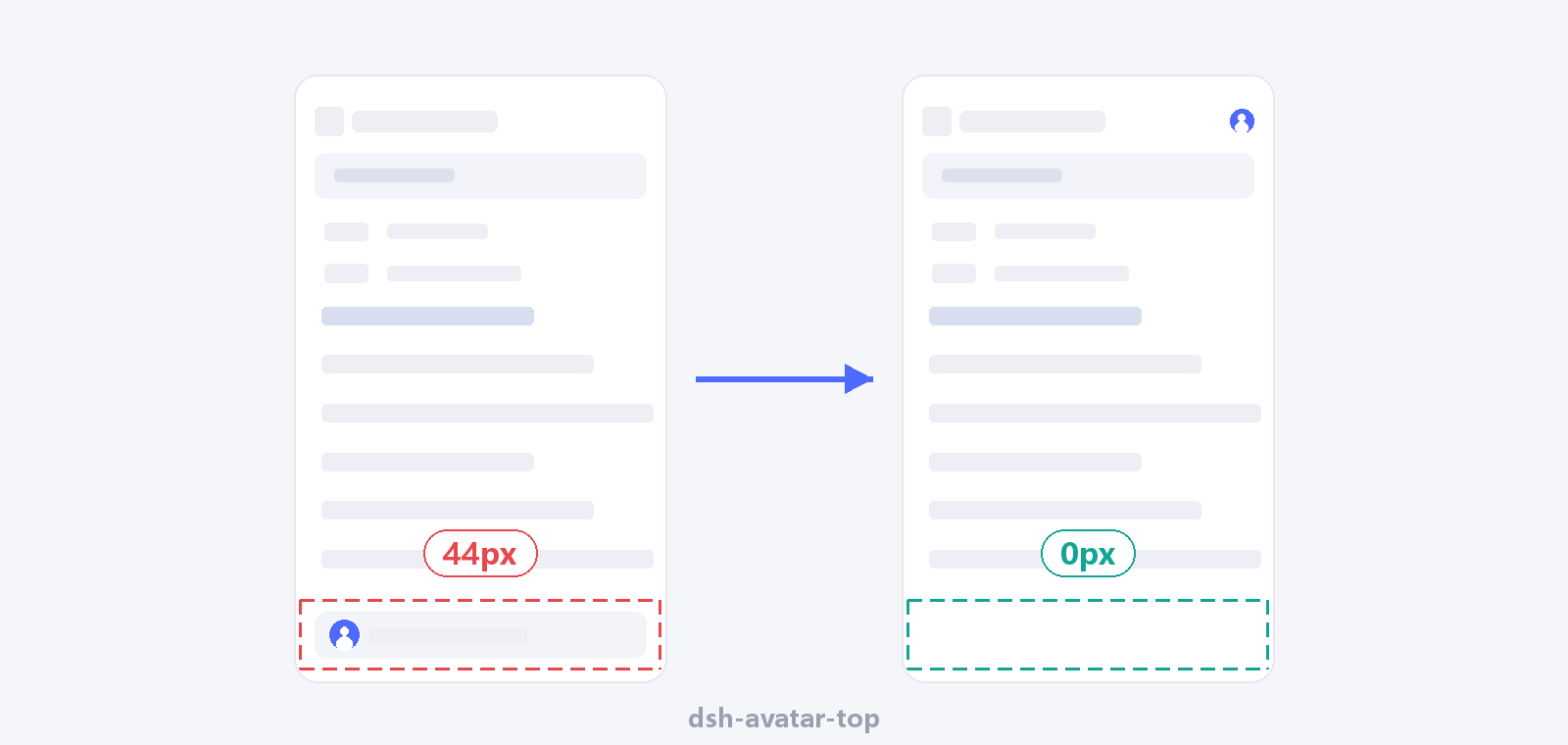
Tested against DeepSeek Harness
0.2.2-rc.2(desktop, Windows). The macOS desktop is left untouched by design; the browser shell works on every platform.
Follows DSH 0.2.2's sidebar rework. The panel list and the workspace/session list now live inside
one scrolling CSS grid, so the order the plugin used to set on the panel list became a no-op
(grid items are placed by grid-area) and is gone. That container carries headroom of its own
(margin-top: 4px plus an 8px lead row), and with below New Session the account row lands right
on top of it, so the spacing came out 12px wider than the configured gap. The container now gives up
its margin and the lead row comes out of the gap, so from 8px up the gap is the real distance. The
settings card also gained a miniature of the sidebar that follows the placement.
Two fixes that only show up on a real desktop:
-webkit-app-region: drag band (DSH paints it with
[data-windows-titlebar] .frame:before). The inline avatar used to sit inside it, so a click
started a window drag. The container and the button now opt out with no-drag.<style> row could
not be removed when the plugin was switched off — the switch looked dead. Every selector is now
gated on :not([data-avatar-top-off]), an attribute the browser half toggles on <html>.DSH pins a footer at the bottom of the left sidebar: the account row (头像 + 账号名) sits next to
sidebar.footer.action, where plugins such as dsh-cost-meter mount their own widgets.
This plugin moves only the account row:
display: contents, so its two children join the sidebar's flex column; the
account row is then reordered while _footerActions keeps its default order and stays pinned at
the bottom. (Moving the whole footer would drag other plugins' widgets along — that was a real
bug in 0.2.1.)position: absolute at the free right end, zero vertical cost).Changes apply immediately — the browser half subscribes to the settings document and rewrites the
stylesheet. Switching the plugin off is immediate too: the boot row a desktop session baked in at
Host start is gated on data-avatar-top-off, so it goes inert without a restart. Settings persist
in the profile's cordis.patch.yml.
| Setting | Values | Default |
|---|---|---|
| Enabled | on / off | on |
| Position | top / below brand / below New Session / inline brand row | top |
| Height | full 44 / compact 32 / avatar only 28 | full 44 |
| Spacing below | 0–24 px | 4 |
| Restore defaults | button | — |
The card draws a miniature of the sidebar and moves the highlighted account row as you change the placement — no need to look back at the real sidebar to check.
Not on npm yet — install from GitHub:
dsh plugin add git+https://github.com/kiefeng/dsh-avatar-topRestart DSH once after installing (the client bundle and package metadata are read at host start). Then open Plugins → dsh-avatar-top to configure it.
The npm name dsh-avatar-top is reserved; once published, dsh plugin add dsh-avatar-top works too.
Self-check: the plugin serves its current stylesheet at /dsh-avatar-top.css (public, read-only),
so a wrong layout can be diagnosed without a session:
http://127.0.0.1:<dsh-port>/dsh-avatar-top.cssThe Host contributes one structured style row through webserver/index-inject:
ctx.on('webserver/index-inject', (table) => {
  table.push({ kind: 'style', text: cssFor(readOptions(config)) })
})
Both shells render that row:
| Shell | Where the page comes from | How the row arrives |
|---|---|---|
Browser / dsh web |
the SPA dist server answers the index over HTTP | renderIndex() renders the rows into the HTML |
| Desktop app | Electron serves dsh-web-frontend/dist/index.html itself over its dsh-app:// scheme |
the Host's injection table is handed to the page over IPC after startup; the page-side interpreter appends style rows to <head> |
ctx.webServer.tapIndex() would only cover the HTTP shell; the desktop window never calls it.
The desktop snapshot is taken at Host start, so the browser half also applies the stylesheet live
(<style id="dsh-avatar-top-live">, appended after the boot row, so it wins) and the boot row only
prevents a flash on first paint.
The sidebar is a flex column; placement is pure order, and selectors key off the stable
CSS-module class-name suffixes (_root, _footArea, _settingsArea, _trigger, _label,
_avatar, _logoRow, _newSession, _scrollRegion) rather than the per-build hash prefix.
_trigger / _label / _avatar come from the settings-account module (AccountMenu); the rest
from ui-sidebar.
html:not([data-platform='darwin']):not([data-avatar-top-off]) [class*='_root']:not([class*='_collapsed']) > [class*='_footArea'] {
  display: contents;
}
… > [class*='_footArea'] > [class*='_settingsArea'] {
  order: -1;
  margin-bottom: 4px;
}:not([data-platform='darwin'])).display:none there anyway)._scrollRegion margin-top 4px + an 8px lead row). Two rules take it back: the container gets
margin-top: 0 (the row's own gap replaces it) and the lead row comes out of the gap —
margin-bottom: max(0px, calc(gap - 8px)), with max keeping the list from riding up onto the
row above. The :has doubles as a new-structure probe (older DSH has no such container, so the
rules do not apply) — and it replaces the column prefix rather than stacking onto it, because
settings already starts with the same prefix; two concatenated _root selectors never match,
which is how the first draft failed silently.inlineBrand lifts the button out of the flow (top: 8px; right: 12px; z-index: 3) and forces
the avatar-only shape. On non-Windows shells it falls back to top. The band it lands in is the
titleBarOverlay drag strip, so both the row and the button carry -webkit-app-region: no-drag.
While the update pill exists (:has([class*='_indicator'])) the row returns to
position: static; order: -3, i.e. a normal 28px row under the brand row.[class*='_trigger']:not([class*='_triggerRow']):not([class*='_triggerLabel']). A bare
[class*='_trigger'] also matches _triggerRow — the flex row holding the account button, the
connection indicator and the update pill — which collapsed the row to 28px and drew the pill
underneath the avatar (0.3.0 bug). The row itself only gets flex-wrap: wrap, so a pill that
cannot fit wraps instead of being pushed out of the sidebar.Config declares four volatile() fields (user settings, not deployment config), so the Host
serves the avatar-top namespace (the loader row id). The browser half binds it through
ctx.configForms.get('avatar-top'), writes through config.set() / config.unset() (which reach
remote.settings.mutate), and registers its card into the plugins.bundle.config keyed slot under
the package name.
sidebar.settings (instead of
sidebar.footer.action) would ride along; no shipped plugin does that today.inlineBrand needs the Windows titlebar (html[data-windows-titlebar]), where the collapse
toggle lives in the native titlebar. Elsewhere it falls back to the top placement.<html> carries no data-platform there — the two shells differ.npm install # @deepseek-ai/schemastery is a real dependency (the Host half imports it)
node --check lib/index.js
node --check lib/client.js
npm testThe smoke test covers the schema defaults and rejections, volatile-ref and plain-value inputs, the
full placement × height × spacing matrix, row de-duplication, the diagnostics route, a regression
assertion that _footerActions is never reordered (so cost meters and friends stay at the bottom),
a guard that the compensation selector names the column exactly once (a duplicated prefix makes it
silently inert), and byte-equality of the two CSS generators across 120 option combinations. The
settings card is asserted too: the preview follows the placement, inline mode draws no separate
account row, and macOS and inline mode each get their hint.
lib/client.js is a hand-written bundle in the DSH client-module format
(window.__ModuleLoader__.load); it has no build step.
MIT
CLASSIFICATION EVIDENCE
系统优先读取 GitHub Topics,再与站内分类词典和词根规则比对。当前命中: deepseek-harness。
morluto
Reverse engineer anything with agents, from app behavior down to native binaries.

deepseek-ai
DeepSeek Harness: Everything is a Plugin.

nexu-io
The 1st Collaborative AI Design Agent Workspace. Local-first and open source. Create motion, prototypes, websites, apps, dashboards, presentations, images, and videos with your team and AI agents. Share work, exchange feedback, and iterate together in one workspace.