
Agent 与会话
插件

OpenViking
volcengine
Self-evolving Context Database for AI Agents. Unify Agent Memory, Knowledge RAG and Skills.
PROJECT TOPICS
INSTALL REFERENCE
dsh plugin --profile web add github:kaka-in-home/dsh-agent-teams-meta
该命令指向仓库当前默认分支;尚无绑定当前 commit 的完整验证结果。
PROJECT README
English | 简体中文


Build the team the task needs. Compose specialists freely, assign every member its own model route, and keep parallel work coordinated until the result is delivered.
A standalone multi-agent team plugin for DeepSeek Harness (DSH). It gives one lead AI a durable team of parallel members, each with its own provider and model route, private mailbox, assigned work, and independently tracked usage.
Some tasks are better split into independent pieces: investigating a bug, reviewing a change, comparing approaches, or checking a release from several angles. dsh-agent-teams-meta lets a lead agent delegate that work to focused members, coordinate their progress, and collect the result in one place.
It is designed for real working sessions rather than a simulated chat room. Members run as durable DSH continuable agents, use the provider/model route assigned to them, and keep their own task context and mailbox across turns.
Everything goes through agent tools with the teams_meta_* prefix:
| Tool | Purpose |
|---|---|
teams_meta_create |
Create a team with a title and purpose |
teams_meta_add_member |
Add a member with a role and a configured provider/model |
teams_meta_remove_member |
Deactivate a member and cancel its open work |
teams_meta_create_task |
Define a task, optionally with an owner and dependencies |
teams_meta_claim_task |
Claim an eligible task (yourself only, after dependencies complete) |
teams_meta_update_task |
Move a task through its states and record a result |
teams_meta_send_message |
Send a durable direct message to a member or the lead |
teams_meta_route_switch |
Change a member's provider/model for the next request |
teams_meta_status |
Inspect members, tasks, routes, your mailbox, and usage |
teams_meta_close |
Archive the team after terminal work (or force-cancel) |
teams_meta_guide |
Return the full operating protocol on demand |
Agents receive the operating protocol automatically and can pull it again with teams_meta_guide.
The lead creates a team, adds a specialist, gives it a concrete task, and sends the relevant context:
teams_meta_create(title="Release audit", purpose="Review the release before publishing")
teams_meta_add_member(name="Reviewer", role="Find regressions", provider="deepseek-official", model="deepseek-v4-flash")
teams_meta_create_task(title="Review routing", owner="Reviewer")
teams_meta_send_message(to="Reviewer", body="Claim the routing task and report material findings.")
From there, members claim eligible tasks, report progress through their mailbox, and mark terminal results. The lead can inspect the team at any time, redirect a member to another configured route, or close the team when the work is complete.
Every member session carries a stable marker route:
agent-teams-meta-route/<team-id>/<member-key>At DSH's public request boundary, the plugin resolves that marker to the member's current real provider/model before DSH prepares the request. Normal DSH request headers, telemetry, and usage continue to use the real route, while route changes remain safe and predictable at request boundaries.
All plugin data remains in the workspace, separate from DSH's session store:
.dsh-agent-teams-meta/
  routes.json        # current marker-to-route bindings
  requests.jsonl     # append-only route usage ledger
  model-catalog.md   # generated configured provider/model catalog
  teams/<team-id>/   # team snapshot and member mailboxes
Team snapshots use atomic replacement with retry for transient Windows file locks. Mailboxes and ledger entries are append-only. The state never stores prompts, model responses, credentials, or endpoint URLs.
^22.19.0 or >=24dsh web) and at least one configured LLM provider/modelThe plugin is a standard npm package. Use either the DSH plugin command or pnpm directly inside the profile.
dsh plugin --profile web add dsh-agent-teams-meta# from the DSH Web profile directory (e.g. ~/.dsh/profiles/web)
pnpm add dsh-agent-teams-metaThen mount it through the profile's cordis.patch.yml:
- insert:
    - id: agent-teams-meta
      name: 'dsh-agent-teams-meta'
      config:
        stateDir: .dsh-agent-teams-meta
        markerProvider: agent-teams-meta-route
Restart DSH after installing or upgrading a host-side plugin.
Clone the repository, install dependencies, and build the plugin locally:
git clone https://github.com/YshuY/dsh-agent-teams-meta.git
cd dsh-agent-teams-meta
pnpm install
pnpm build
Then link the built package into the DSH Web profile:
# from the DSH Web profile directory
pnpm add link:E:/path/to/dsh-agent-teams-meta
A link: install shares the live source tree, so every rebuild is picked up on the next DSH restart.
For active development, the linked install above is the same workflow: edit the source, run pnpm build, then restart DSH to load the changes.
The plugin works out of the box. If you want to customize the state directory or route marker, mount it through a cordis.patch.yml:
- insert:
    - id: agent-teams-meta
      name: 'dsh-agent-teams-meta'
      config:
        stateDir: .dsh-agent-teams-meta
        markerProvider: agent-teams-meta-route
Both keys are optional; these are the defaults.
Can members use different models? Yes. Each member is added with its own provider/model route, and the lead can switch a member to any other configured route at any time.
Where does the data live?
Everything is under .dsh-agent-teams-meta/ in the workspace. Team snapshots are replaced atomically; mailboxes and the usage ledger are append-only. No prompts, responses, credentials, or endpoint URLs are stored.
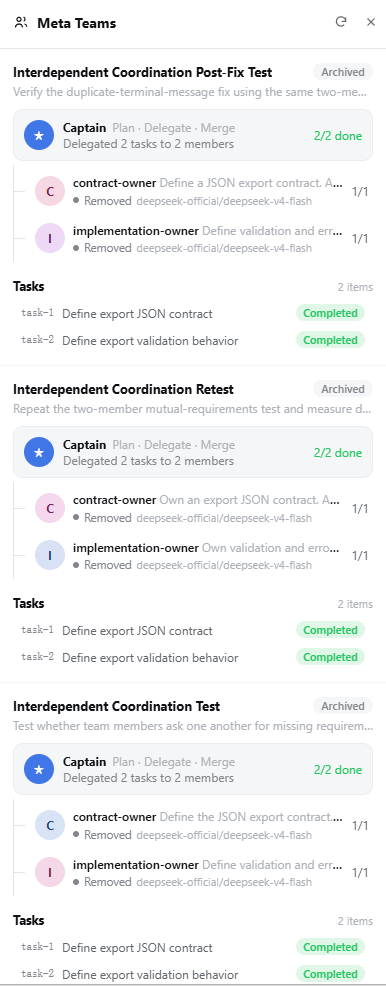
A read-only drawer in the DSH Web sidebar shows the current team snapshot: task progress, members, routes, and phase. All changes still go through the teams_meta_* tools.
pnpm install
pnpm verify
pnpm verify runs type checking, the production build, unit tests, and an integration check for durable member routing.
The repository also includes focused technical notes:
MIT
CLASSIFICATION EVIDENCE
系统优先读取 GitHub Topics,再与站内分类词典和词根规则比对。当前命中: agent-teams。
volcengine
Self-evolving Context Database for AI Agents. Unify Agent Memory, Knowledge RAG and Skills.

EverMind-AI
One portable memory layer for every AI agent: local-first, Markdown-native, user-owned, and self-evolving across apps, tools, and workflows.

freestylefly
Prompt as Code | GPT-Image2 工业级提示词引擎与模板库,470+ 个案例逆向工程,20+ 套工业级模板,并提炼出Skills,持续更新中