
文件与数据
渠道适配

WeKnora
Tencent
Open-source LLM knowledge platform: turn raw documents into a queryable RAG, an autonomous reasoning agent, and a self-maintaining Wiki.
PROJECT TOPICS
INSTALL REFERENCE
dsh plugin --profile web add github:jyh20030112/dsh-visual-plugin
该命令指向仓库当前默认分支;尚无绑定当前 commit 的完整验证结果。
PROJECT README






Analyze images and videos with DSH's native vision models and inspect the results in a Web UI right panel.
A plugin for DeepSeek Harness.
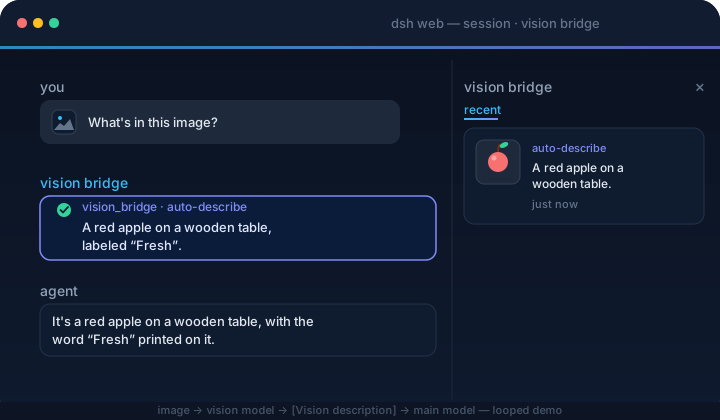
image → DSH native attachment → current image-capable model → final answer
  → /vision-bridge/recent → panel thumbnail + copyable description

video → container validation → H.264/yuv420p normalization → PySceneDetect
  → timestamped keyframes → DSH native image attachments → current model answers
The plugin never rewrites model messages or calls a private vision endpoint. Select an image-capable model in DSH before sending images or asking about a video.
Plugin 0.4.x targets DSH 0.2.0-rc.2; keep plugin 0.3.2 for DSH 0.1.x. No exact-version risk exemption is needed.
Video support requires FFmpeg/FFprobe >= 6.1 from the same major release (with libx264) and PySceneDetect >= 0.7.1 < 0.8 installed on the host:
ffmpeg -version
ffprobe -version
python -m pip install 'scenedetect[opencv]>=0.7.1,<0.8'
scenedetect version
The plugin never downloads these tools or runs installers. Image features remain available when they are missing, and the settings card reports each video dependency issue.
dsh plugin --profile web add dsh-visual-plugin # or: github:jyh20030112/dsh-visual-pluginWhen developing this checkout against a local DeepSeek Harness source tree, install the local package instead:
cd /absolute/path/to/dsh-visual-plugin
npm run bootstrap
dsh plugin --profile web add link:/absolute/path/to/dsh-visual-plugin
bootstrap requires an installed, built dsh-v0.2.0-rc.2 Harness checkout and automatically finds a sibling or ancestor-adjacent checkout.
For another layout, set its location explicitly:
HARNESS=/absolute/path/to/deepseek-harness npm run bootstrapRestart dsh web, then:
Open Settings → Plugins, then the dsh-visual-plugin detail page and its Visual Media configuration. Use Sidebar to show or hide the right panel and adjust advanced video settings. Changes apply immediately, persist in the current profile across restarts, and recover valid archived video preferences without overwriting new settings during upgrades.
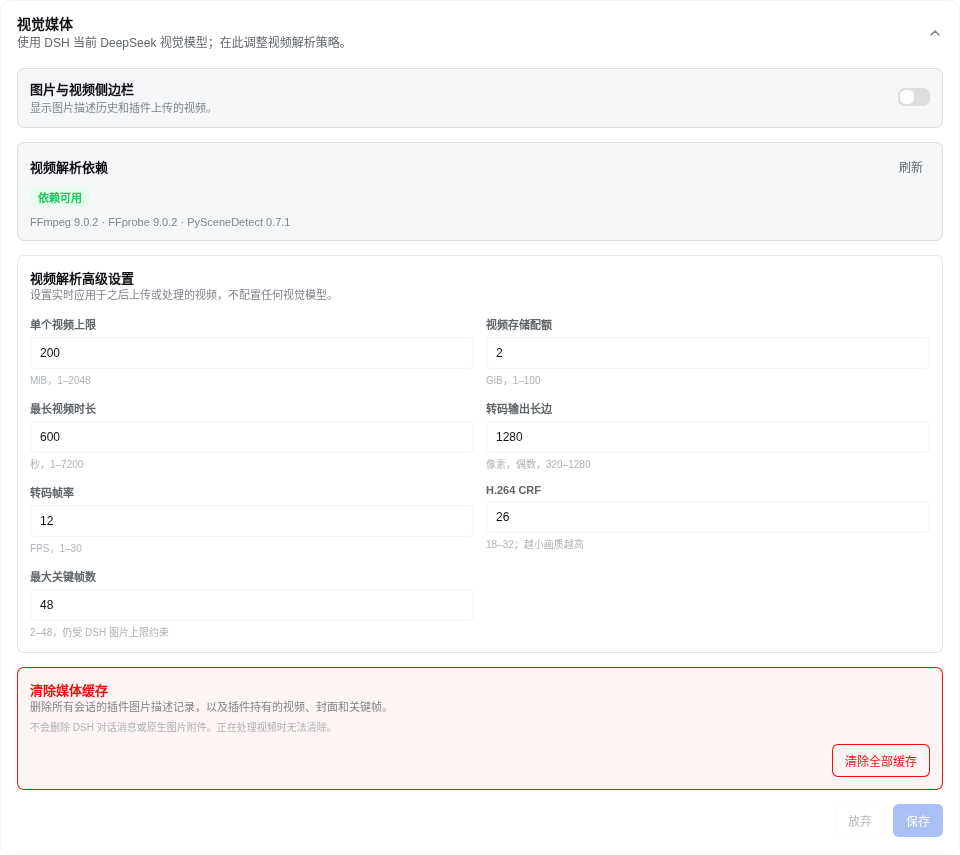
Select an image-capable model in DSH; there is no separate vision-model configuration in this plugin.
Send an image. The current model answers natively, and the image panel records the thumbnail and final answer for copying.
Upload a video from Upload video beside the composer. Once processing finishes, select Videos in the right panel to play it; Ask in chat stages a draft and never submits automatically.
Image and keyframe understanding use the image-capable model currently selected in DSH. Model providers, endpoints, and credentials are managed by DSH rather than this plugin.
dsh plugin --profile web remove dsh-visual-pluginRestart dsh web. The command forwards to pnpm remove inside the profile, and the bundle layer list reconciles to drop the plugin automatically.
src/
  index.ts      native image history, video_describe tool, settings, and HTTP routes
  config.ts     advanced video-processing settings and runtime policy
  video/        upload, container probing, transcoding, scene detection, keyframes, and HTTP Range playback
  client/       image/video panel, upload controls, advanced settings, locales, and CSS
cordis.patch.yml bundle patch layernpm run bootstrap && npm run typecheck && npm run build # needs a local harness checkoutPrebuilt lib/ is committed, so consumers never build.
ci.yml verifies artifacts and the pack contents on every push/PR. release.yml (tag v*) checks the version, packs, creates a GitHub Release, and publishes to npm.
CLASSIFICATION EVIDENCE
系统优先读取 GitHub Topics,再与站内分类词典和词根规则比对。当前命中: image-description、multimodal、openai-compatible、vision。
Tencent
Open-source LLM knowledge platform: turn raw documents into a queryable RAG, an autonomous reasoning agent, and a self-maintaining Wiki.

liustack
The first vision plugin for DeepSeek Harness, and the vision bridge for every text-only coding agent. Paste an image, get structured JSON evidence (OCR, layout, semantics). | 全网最强 DeepSeek Harness 外挂视觉插件,为 DeepSeek、GLM 等纯文本模型外挂视觉能力,粘贴图片即得结构化 JSON 证据(OCR、版面、语义)。

dream-num
An open-source Office workspace where people and AI agents create, collaborate, and review together.