
模型与 MCP
待识别

rea
morluto
Reverse engineer anything with agents, from app behavior down to native binaries.
PROJECT TOPICS
INSTALL REFERENCE
dsh plugin --profile web add github:jy007/dsh-calendar-board
该命令指向仓库当前默认分支;尚无绑定当前 commit 的完整验证结果。
PROJECT README
English · 中文
A month-view calendar board for DeepSeek Harness desktop: your daily notes, the reminders you scheduled inside DSH, inline editing right in the grid — and a little celebration every time you finish something.
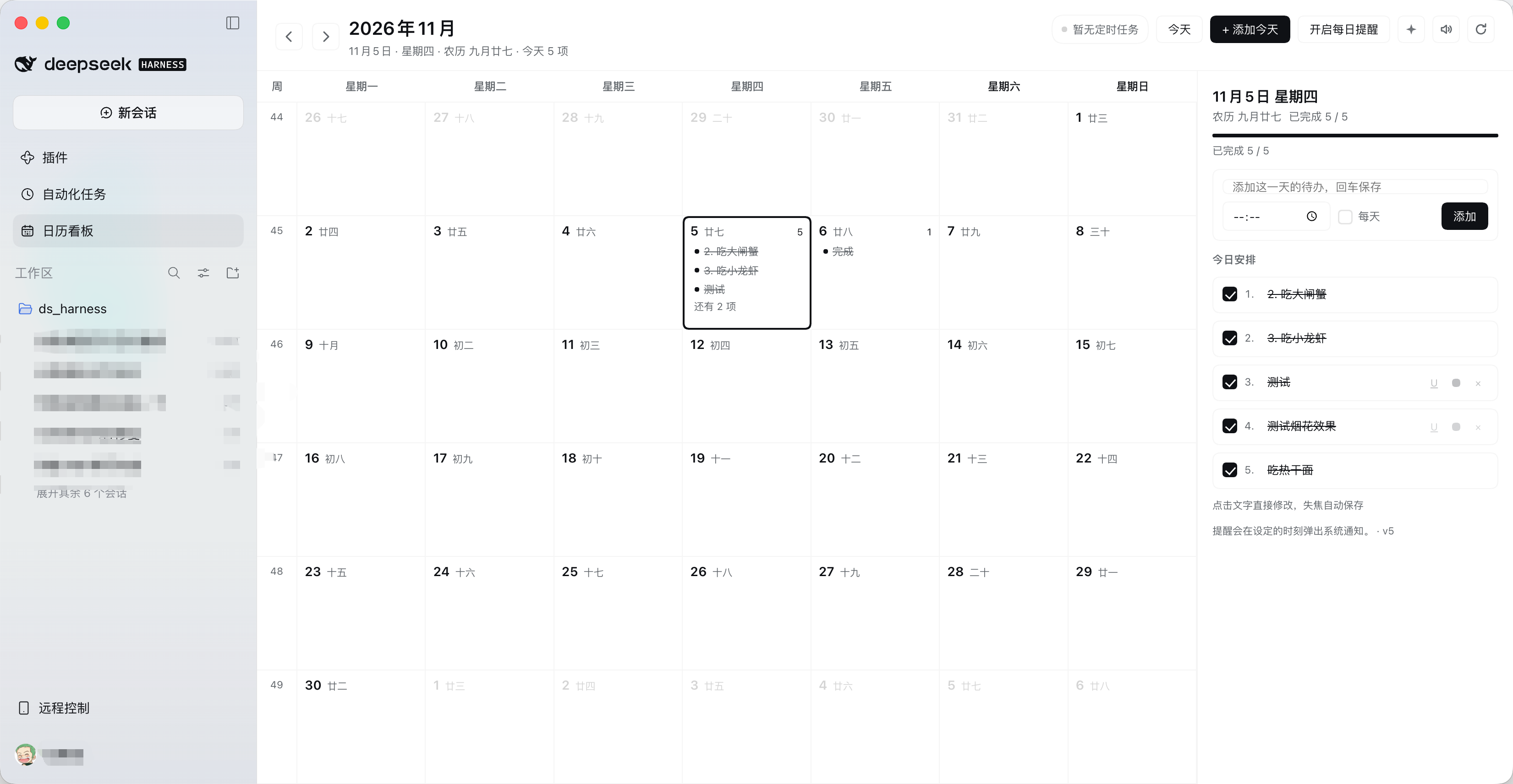
Pure front-end plugin. No build step, no third-party dependencies, no network calls. Your entries live in the page's localStorage; scheduled reminders are read-only.
Month view
Intl's Chinese calendar), a highlighted today, and trailing days from the adjacent monthsInline editing
Per-entry controls
U toggles underline, ● cycles the text color (default / red / amber / green / blue), × deletes1. 2. 3. and shows a completion progress barThis Mac's calendars (zero setup)
Calendar subscriptions
BYDAY / monthly / yearly, COUNT, UNTIL, EXDATE), all-day events, TZID wall times and UTC times are expanded into the visible monthScheduled reminders
schedule service and expands daily / weekly / one-shot / every / cron reminders into the calendar/calendar-board/schedules route as a fallback sourceCompletion celebration
✦ in the header previews the effect at any time; the speaker toggles sound (remembered locally)Extras
Open a new session in DSH and tell your agent:
Install the plugin github:jy007/dsh-calendar-boardThe agent calls the plugin manager's install_bundle. A calendar icon appears in the sidebar afterwards; if it does not, reload the window or restart DSH.
git clone https://github.com/jy007/dsh-calendar-board.git ~/plugins/dsh-calendar-boardThen ask your DSH agent to install ~/plugins/dsh-calendar-board as a bundle, or pick that directory in the plugin manager.
Click + 连接日历 and pick from the 本机日历(macOS) list. The first read asks macOS to let DSH control Calendar (System Settings → Privacy & Security → Automation); allow it once.
cd dsh-calendar-board && git pullThen install github:jy007/dsh-calendar-board again in DSH. The plugin installs a snapshot copy, so it does not follow the repository by itself; the vX.Y.Z in the panel footer is the version currently running.
Remove dsh-calendar-board in the plugin manager. Your entries stay in the browser's local storage.
‹ › month, Today, + Add for today, Daily nudge, ✦ preview the fireworks, speaker to mute, ⟳ resync scheduled remindersThe Host half is the canonical store, so every DSH session can read and edit the board through one tool — no browser scraping, no screenshots:
{ "action": "list", "from": "2026-11-02", "to": "2026-11-08" }
{ "action": "add", "date": "2026-11-06", "title": "给 adon 发邮件", "time": "10:00" }
{ "action": "complete", "id": "itmw3c6bd3c83xd" }
{ "action": "remove", "id": "itmw3c6bd3c83xd" }| action | arguments | meaning |
|---|---|---|
list |
date or from/to, includeDone |
entries with id, date, time, title, done, repeat, color |
Every action answers with the same envelope: { "ok": true, ... } — list adds today, count and items; the others return the touched item or removed.
| add | title, optional date (defaults to today), time, repeat:"daily" | create an entry |
| update | id + any of title/date/time/repeat/color/underline | edit in place |
| complete | id, optional date, done | tick or untick one day of one entry |
| remove | id | delete an entry |
| sources | – | the local, scheduled and subscribed calendars with their colors |
| events | from/to | events of every subscribed feed in a window |
| subscribe | name, url | add an iCal subscription (webcal:// is normalised) |
| unsubscribe | id | remove a subscription |
| toggleSource | id, enabled | hide or show one source |
| calendars | – | the calendars this Mac already syncs (with the ones on the board marked) |
| subscribe | provider:"local", calendarId, color | add one of this Mac's calendars |
Things you can simply say to your agent:
Other plugins can call the same implementation through the calendarBoard Host service.
| What | Where |
|---|---|
| Your entries | <DSH_HOME>/storages/calendar-board/items.json on the Host; the page keeps a localStorage cache |
| Subscribed iCal addresses | <DSH_HOME>/storages/calendar-board/sources.json; their events are cached in memory only |
| Which legend chips are off | browser localStorage: dsh-calendar-board.hidden-sources.v1 |
| Sound preference | dsh-calendar-board.sound.v1 |
| Daily nudge preference | dsh-calendar-board.notify.v1 |
| Scheduled reminders | read-only, from the DSH schedule service, never stored |
The page itself makes no network requests beyond DSH's own local HTTP port. The Host fetches a subscribed iCal URL only when a month is displayed (cached for 10 minutes), so the calendar provider sees a request from this machine — treat the secret iCal address like a password. The panel footer shows 已同步 Host / 仅本机保存 so you can see whether it is talking to the Host store.
desktop-next profile, Web GUI)sidebar.panellist (icon) and main (panel)schedule (without it the header shows "Scheduled reminders unavailable" and everything else still works) and webServer (without it only the remote channel is used)This repository ships its own format-1 market index at dsh-index.json, so it can be added to DSH as a plugin source without any server:
https://cdn.jsdelivr.net/gh/jy007/dsh-calendar-board@main/dsh-index.jsonOpen Plugins → Discover → Add index source, paste that URL, and the plugin shows up searchable with a one-click install.
To reach the wider community market, submit the repo to awesome-dsh-plugin (PR against its list); its catalog is republished daily as the index most DSH markets consume.
Every market-listed version must declare engines.dsh; this package declares >=0.2.1-rc.2 (the DSH runtime bundled with DSH Desktop NEXT 2.0.19).
dsh-calendar-board/
├── package.json        # dsh.bundle / dsh.client manifest
├── cordis.patch.yml    # inserts the calendar-board row
├── index.js            # Host half: read-only schedules route
├── client.js           # Client half: panel + sidebar icon (classic script, IIFE)
├── locale/{zh,en}.json # title and description shown by the plugin manager
└── icon.svg
client.js is loaded by the page as a classic script, and HMR evaluates the same file more than once, so every declaration is wrapped in an IIFE — otherwise the second evaluation throws Identifier '...' has already been declared.
To develop against a checkout, link the directory into your profile:
Install the plugin /absolute/path/to/dsh-calendar-boardEdits to client.js hot-reload; edits to index.js (the Host half) need a DSH restart.
theme/change, native controls get the app's color-scheme, and dark gets stronger control borders and toast shadowexport const inject as a name array, so the tool and HTTP routes register again; the local calendar picker no longer throws when openedcalendarList + events.list sync, and connect / disconnect / accounts / calendars tool actionssources / events / subscribe / unsubscribe / toggleSource tool actionscalendar_board agent tool + calendarBoard service; the panel syncs to the Host store instead of living only in localStorageMIT © 2026 jy007
CLASSIFICATION EVIDENCE
系统优先读取 GitHub Topics,再与站内分类词典和词根规则比对。当前命中: deepseek-harness。
morluto
Reverse engineer anything with agents, from app behavior down to native binaries.

deepseek-ai
DeepSeek Harness: Everything is a Plugin.

nexu-io
The 1st Collaborative AI Design Agent Workspace. Local-first and open source. Create motion, prototypes, websites, apps, dashboards, presentations, images, and videos with your team and AI agents. Share work, exchange feedback, and iterate together in one workspace.