Agent 与会话
插件

nuwa-skill
alchaincyf
你想蒸馏的下一个员工,何必是同事。蒸馏任何人的思维方式——心智模型、决策启发式、表达DNA。Distill how anyone thinks.

joyboy-yy/dsh-windows-monitor
System monitor overlay for DeepSeek Harness: a corner pill showing live CPU and memory, expanding into disk activity and throughput, per-volume capacity, network state, uptime and battery. Windows collector.
PROJECT TOPICS
INSTALL REFERENCE
dsh plugin --profile web add github:joyboy-yy/dsh-windows-monitor
该命令指向仓库当前默认分支;尚无绑定当前 commit 的完整验证结果。
PROJECT README
English | 简体中文


A system monitor overlay for DeepSeek Harness: a compact pill in the bottom-right corner showing live CPU and memory, expanding into a detail card with disk activity and throughput, per-volume capacity, network state, uptime and battery.
Runs on Windows.
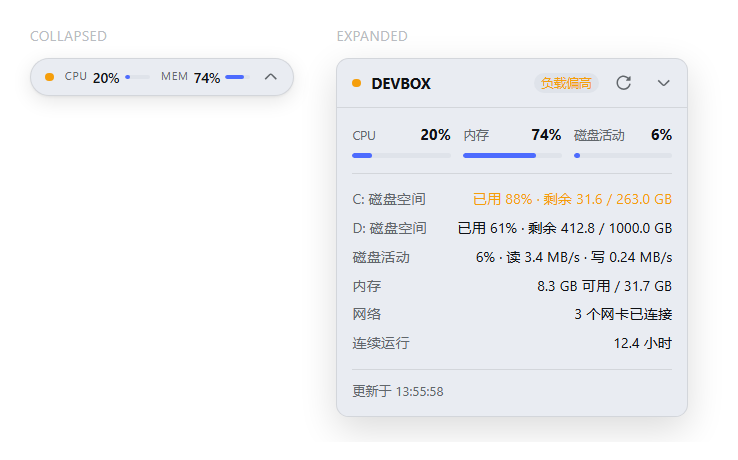
--dsh-frame-top-clearance / --dsh-frame-overlay-top, so the panel never covers the titlebar or the minimize, maximize and close buttons. Native fullscreen uses the collapsed inset automatically.localStorage and restored on the next launch, then clamped into the current safe area if the window is smaller.100 − PercentIdleTime. Fullness is a separate per-volume row. A static "93% full" number sitting next to a live CPU reading reads as a stuck or broken dial, so it is never what the gauge shows.-- rather than 0%. A zero would be a claim about an idle disk that nothing actually measured.prefers-reduced-motion.^22.19.0 || >=24.0.0 (to build from source).No administrator rights are needed, and nothing is installed system-wide.
Windows only, and that is deliberate. The plugin is named for Windows, its headline reading (disk activity) comes from a Windows performance counter, and a collector the maintainer cannot run is a collector whose bugs they cannot reproduce. Shipping Linux and macOS collectors that were written from documentation — and that the author could never exercise on their own hardware — traded a promise the project could not keep for two code paths it could not maintain.
The host picks the collector from process.platform, never from the request.
| Platform | Collector |
|---|---|
| Windows | PowerShell + CIM/WMI (Win32_Processor, Win32_OperatingSystem, Win32_LogicalDisk, Win32_Battery, Win32_PerfFormattedData_PerfDisk_PhysicalDisk) and Get-NetAdapter. Verified by the author on Windows 11 |
| Anything else | None. The route answers 501 with an explicit unsupported-platform body, and the panel renders that instead of empty gauges |
linux and macOS collectors did ship in 0.1.0; they were removed in 0.2.0. See the changelog.
CI still runs on all three runners, and that is also deliberate. windows-latest exercises the collector for real, while ubuntu-latest and macos-latest prove the negative contract: with no collector the plugin must answer the error rather than pretend. See .github/workflows/ci.yml.
Known limitations:
-- instead of failing the snapshot.key=value with . as the decimal separator, so a comma-decimal locale would otherwise emit unparseable numbers.PercentDiskTime several times above 100, which is why busy time is derived from the idle complement instead.From npm — prebuilt, and the only path that needs no build permission:
dsh plugin --profile web add dsh-windows-monitorFrom a local checkout — this is the path to use while developing:
dsh plugin --profile web add D:\path\to\dsh-windows-monitor
dsh --profile web --dump-config   # confirm the windows-monitor row is composed
dsh --profile web
From a release tarball (prebuilt, no build permission needed):
dsh plugin --profile web add .\dsh-windows-monitor-<version>.tgzFrom a pinned source tag — see releases for the current one:
dsh plugin --profile web add github:joyboy-yy/dsh-windows-monitor#v0.3.0A git install fetches source and runs this package's prepare build, which means package code executes on your machine outside the agent sandbox. pnpm refuses that until the profile's pnpm-workspace.yaml explicitly allows it:
allowBuilds:
  dsh-windows-monitor: true
Read the source and pin a tag before granting that. A release tarball ships prebuilt files and needs no such permission.
This bundle inserts one Host/Client row, declared in cordis.patch.yml:
- insert:
    - id: windows-monitor
      name: dsh-windows-monitor
      inject: [shell, sandboxPolicy, webServer]
Override that row in your profile or home cordis.patch.yml to disable it or change its position in the tree.
Browser-local preferences are limited to one value: the panel's position and dock anchor, stored under the dsh-windows-monitor:position localStorage key. The current shape is versioned ({ version: 2, placement: { kind: 'anchor', x, y, gap } } or { kind: 'free', x, y }), and the plain { x, y } coordinates written by 0.2.4 and earlier are still read on upgrade. It is written only when a drag ends or a custom position is chosen; there is no separate restore button, because bottom-right is one of the eight dock choices. The plugin stores no metrics.
The Host half registers one read-only route and runs the collector for its own platform through the harness shell service:
GET /api/windows-monitor/snapshotThe collector prints one key=value fact per line. A line format — rather than JSON — is deliberate: emitting correct JSON from PowerShell without assuming a JSON library is a portability trap, whereas key=value is trivial to produce and trivial to parse (and unit-test) on the TypeScript side. The host converts facts into the snapshot the client renders and stamps the timestamp itself.
The shell seam is driven through both of its entry points. DSH renamed ctx.shell.run(spec) to ctx.shell.execute(spec), which resolves with a handle whose result() carries the outcome, so the host prefers execute and falls back to run. Hard-coding either one breaks the plugin on the harness versions that expose the other — 0.2.3 did exactly that and answered every poll with ctx.shell.run is not a function. tests/collectors.test.ts now covers both, plus a seam with neither.
Results are cached for 5 seconds, and concurrent polls share a single in-flight collection instead of racing, so the browser's polling never multiplies collector runs.
The Client half registers into the frame-wide shell.overlay slot. That layer is click-through by design — the panel opts into pointer events, so it never blocks the app underneath.
Neither half touches the model, the session, or the transcript. The plugin registers no tools.
Read this before installing.
Get-NetAdapter. Nothing writes, installs, or changes machine state.danger-full-access sandbox policy so the shell can run. The commands are read-only, but the policy is not — it is the main thing to review, and it lives in src/index.ts and src/collectors/.process.platform; a request cannot select a different collector.pnpm install
pnpm run typecheck
pnpm run test
pnpm run buildpnpm run test runs the parser suite everywhere plus the collector integration test on Windows. On any other platform it instead asserts the unsupported-platform contract — that selectCollector returns nothing and the route answers 501 rather than serving empty gauges. CI covers both.
pnpm run build produces lib/index.js + lib/index.d.ts (Host, ESM) and lib/client.js + lib/client.js.map (Client, wrapped in the window.__ModuleLoader__ envelope the harness expects).
lib/ is committed on purpose: the harness activates a plugin by reading lib/client.js from disk, and a GitHub install does not necessarily run a build. CI fails if the committed lib/ drifts from a clean build.
The client bundle must never inline React. tsdown.config.ts marks react and react/jsx-runtime as never-bundle so they resolve from the harness module table.
The collector scripts are JavaScript template literals, so a literal ${ would be interpolated at build time and silently corrupt the shell script — tests/collectors.test.ts guards against that. For the same reason a stray backtick inside a script terminates the literal early; that one fails loudly at build time rather than at collection time, so it needs no test.
Issues and pull requests are welcome. CONTRIBUTING.md covers the build, test and verification workflow; security-relevant reports go through SECURITY.md.
The scope is intentionally Windows-only, so the most useful contributions are Windows ones: a machine where the performance-counter provider is unavailable, a locale other than en-US or zh-CN, a Windows build where a CIM class behaves differently. A report with the raw key=value output is enough to work from.
CLASSIFICATION EVIDENCE
系统优先读取 GitHub Topics,再与站内分类词典和词根规则比对。当前命中: memory。
alchaincyf
你想蒸馏的下一个员工,何必是同事。蒸馏任何人的思维方式——心智模型、决策启发式、表达DNA。Distill how anyone thinks.

freestylefly
Prompt as Code | GPT Image 2 / 2.5 提示词与案例库,530+ 个案例、20+ 套工业级模板与可复用 Skills,新增 2.5 同提示词对比专区,附完整提示词与生成记录,持续更新。

titanwings
Distilly — Distill how they think into reusable Skills for any Agent or Bot. Formerly Colleague Skill(原同事 Skill).