
DeepDeck
Build and reuse WebMCP tools in a macOS desktop workspace for DeepSeek Harness.
Download for Mac · Apple Silicon / Intel ·
Website ·
Try it ·
Browser guide
Describe a website task. DeepDeck's Agent can use the site's existing WebMCP tools, or explore its interface and build tools you can inspect and reuse later. Source and saved versions stay available for review, disabling, and rollback.
| Build tools for a website |
Reuse them for a task |
 |
 |
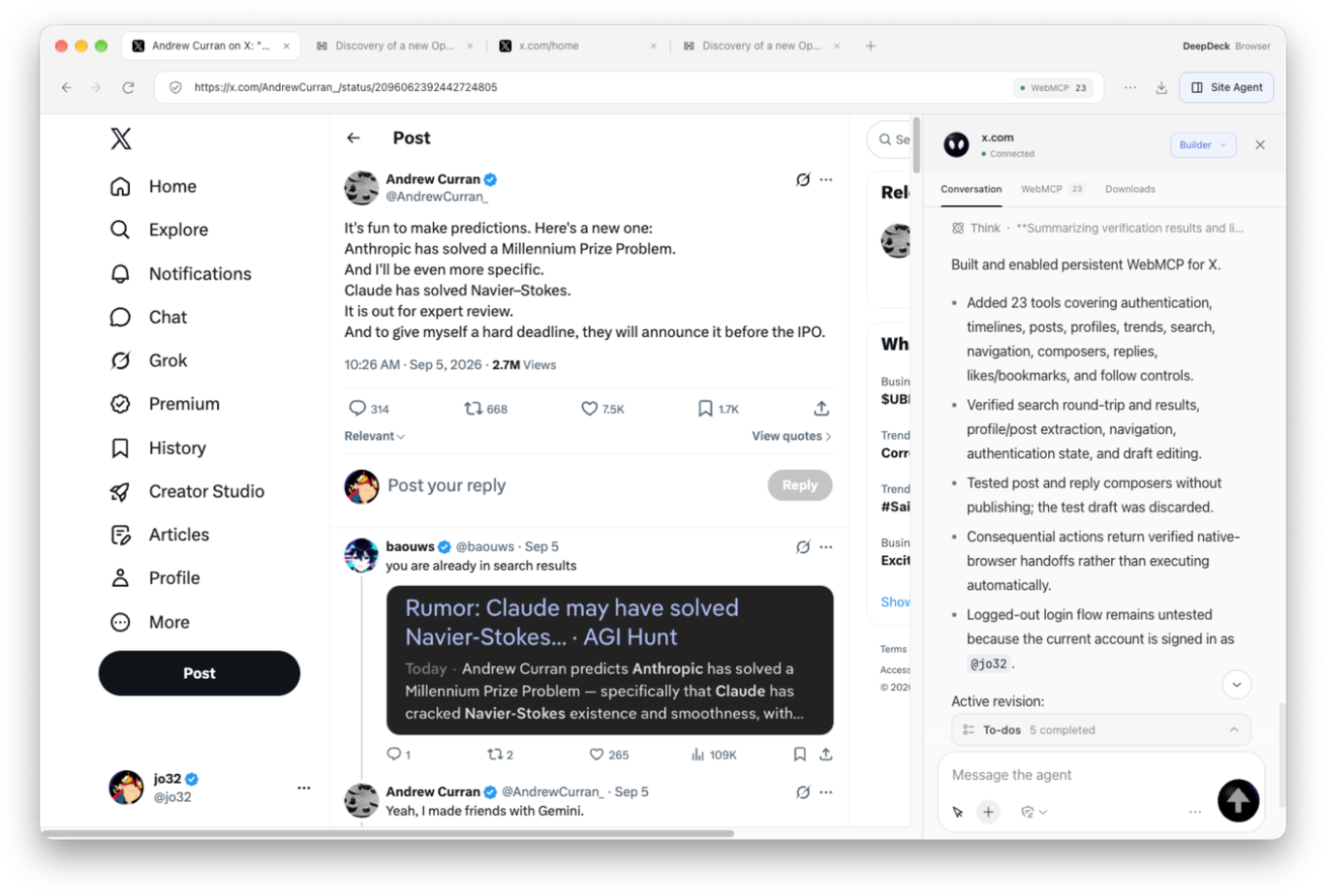
| In this X example, Builder creates 23 tools for reading pages, searching, and editing drafts. |
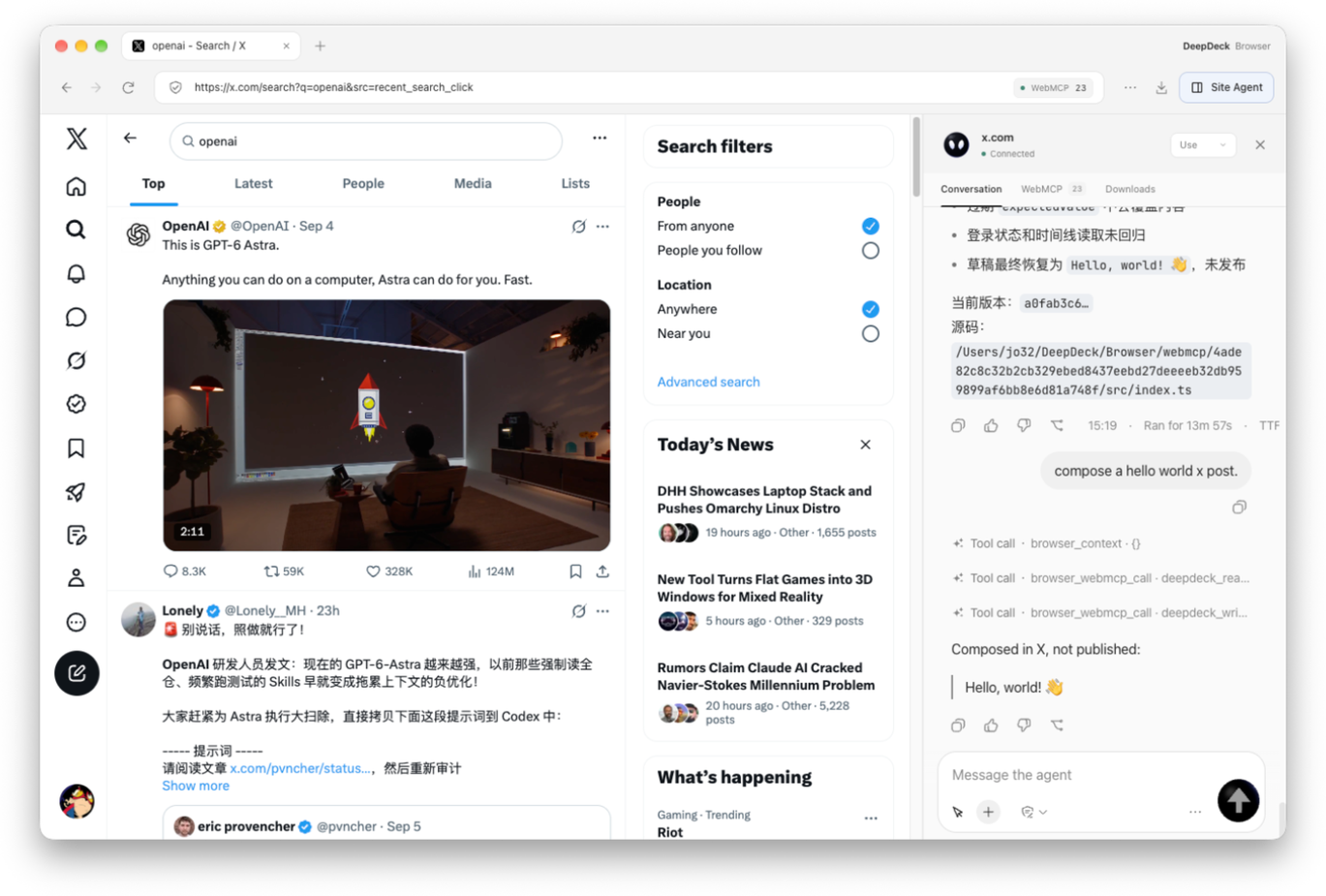
Switch to Use and ask for a Hello world draft. The example fills the draft without publishing it. |
Initial exploration and verification take time and tokens. Reuse benefits depend on the task and tool design; site changes can require revalidation. Measured savings are not yet established.
Try it
- Download the latest release, choose the DMG for your Mac, and open DeepDeck. Set up a model in Settings if you have not already configured Harness.
- Open Browser, visit a site, and open Site Agent → WebMCP to inspect any tools the website provides.
- If a needed tool is missing, switch to Builder and describe what it should do. Review the generated tools and validation results, then return to Use and ask for the task.
DeepDeck is a macOS desktop application. Install it from Releases; a generic dsh plugin add command does not install the desktop app or its native browser bridge. For development from source, see First run.
Highlights
Browser + WebMCP
Download the latest DeepDeck release for Apple Silicon and Intel Macs.
Let the Agent use a website, then keep what it learns as WebMCP tools. You describe the goal. The Agent explores the real site, tries its workflows, checks the results, and saves the working operations as reusable tools. Building WebMCP is like preserving the Agent's experience of using the website, so future tasks can reuse it without a person writing step-by-step instructions.
That experience lives in inspectable, executable tools: how to search, read results, or edit and verify a draft. DeepDeck Browser supports both reusing WebMCP tools that already exist and quickly building tools for websites that do not have them, making existing products easier for agents to work with.
What is WebMCP?
WebMCP is a proposed web API that lets websites expose JavaScript functions or HTML forms as tools with natural-language descriptions and structured input schemas. An agent can discover what a website does, supply the right arguments, and call its tools within the current page, sharing the user's browser context and visible interface. It complements backend MCP integrations.
WebMCP vs. ordinary computer use
Computer use operates a website through its interface: observe, locate controls, click or type, then observe again. WebMCP exposes named capabilities with descriptions and input schemas, so the model can call a tool and read its result. See the WebMCP project's motivation and goals.
|
Ordinary computer use |
WebMCP |
| Understanding |
Infer functionality and state from screenshots or page structure. |
Discover explicit tool names, descriptions, and parameters. |
| Execution |
Locate and operate controls across multiple observation/action steps. |
Supply arguments to a tool; it performs the corresponding operations and returns a result. |
| Reuse |
Usually repeat the UI steps; reuse requires separately saving a script or workflow. |
DeepDeck saves verified operations as tools that later tasks can reuse. |
| Time and tokens |
Repeated page reads and model decisions add overhead. |
For tasks covered by tools, fewer observation and interaction rounds can save time and tokens. |
| Best suited to |
Exploring sites and handling interactions without existing tools. |
Calling existing tools and reusing recurring website workflows. |
For example, searching for a keyword and reading the results with computer use typically means finding the search field, typing, submitting, reading the new page, and extracting results. With WebMCP, the Agent calls a search tool with the keyword and reads the result, using a separate results-reading tool if needed.
DeepDeck combines both approaches. The Agent explores and verifies a website through browser interaction, then saves working operations as WebMCP tools. Later tasks can reuse that experience, with browser interaction available for anything the tools do not cover. Initial tool building takes exploration and verification; savings depend on the website, tool design, and task, and site changes may require tool updates.
1. Reuse existing WebMCP
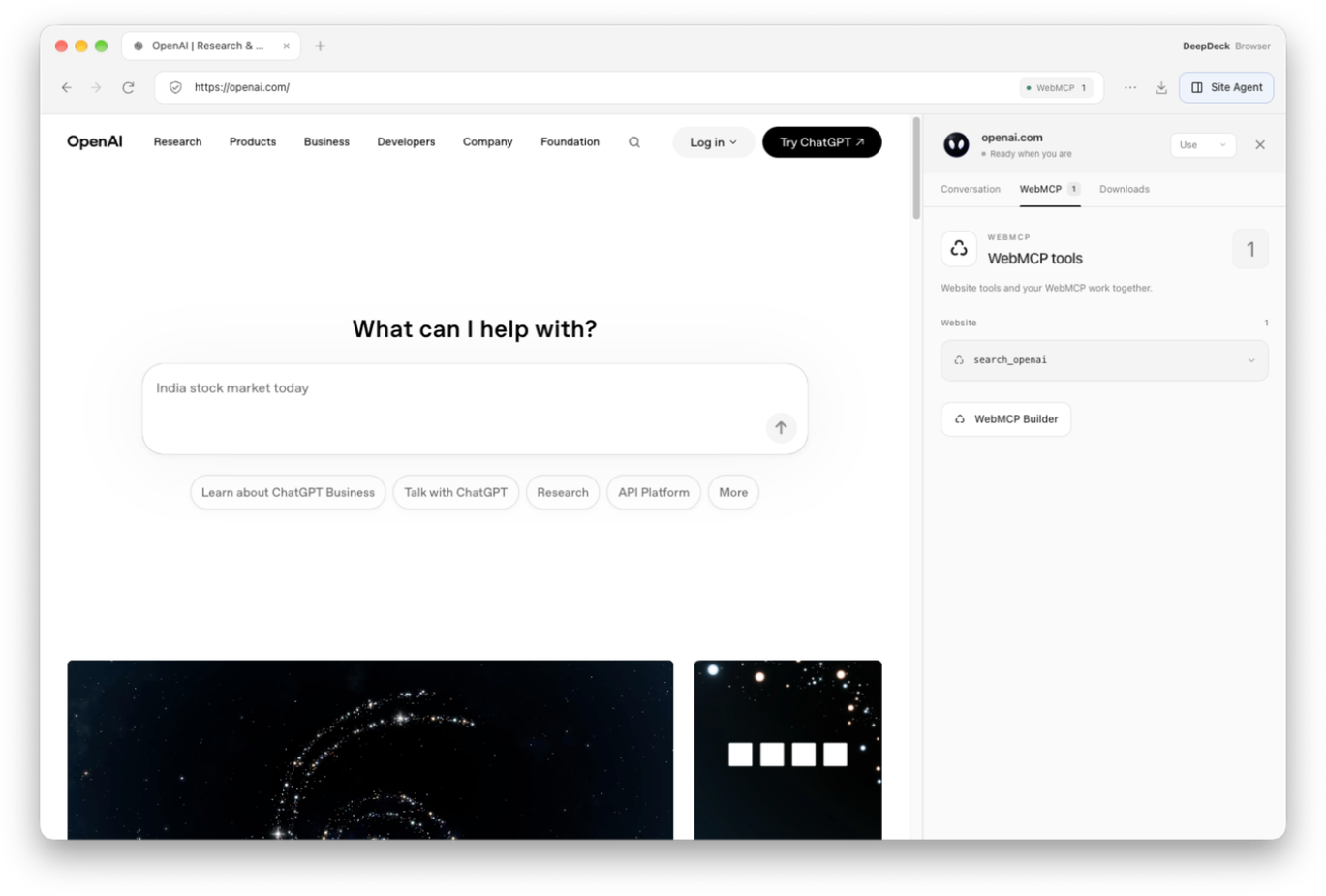
Open a website, select Site Agent → WebMCP, and inspect the tools discovered under Website. In Use mode, describe your task and the Agent can call the available tools. The screenshot below shows DeepDeck discovering search_openai on openai.com.
2. Quickly add WebMCP to an existing website
For a site without WebMCP, open WebMCP Builder or switch the Site Agent to Builder. Describe the capabilities you want, for example: “Build WebMCP tools for this site so I can search, read posts, and edit drafts.” You provide the goal; the Agent works out how to use the site. Builder explores its real controls, tries the relevant workflows, and turns verified operations into tools. This saves that experience in DeepDeck without needing to modify the website's source or deploy a separate MCP server.
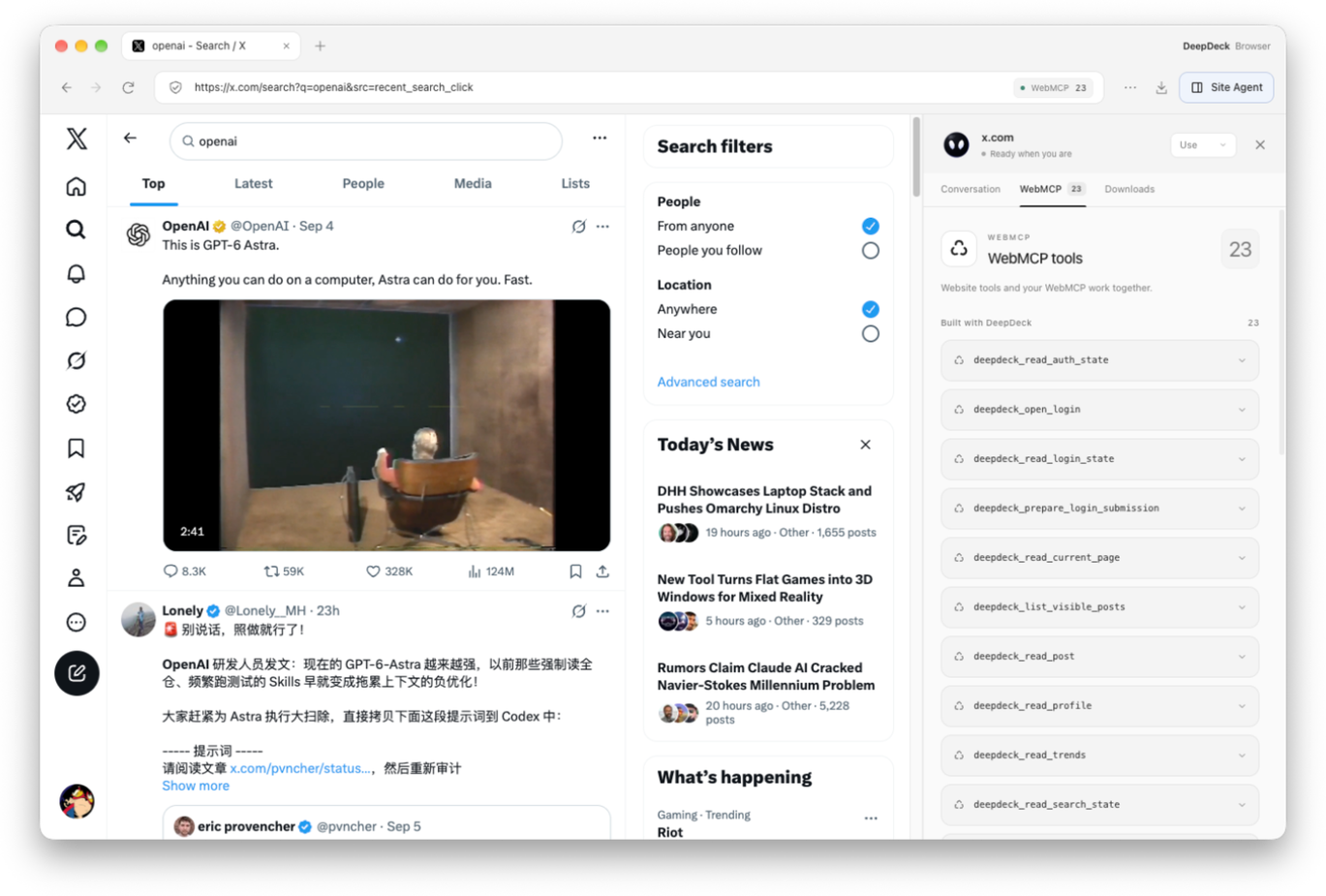
The X example produces 23 tools, shown under Built with DeepDeck, including reading account state, posts, profiles, and search state. Website-provided tools and tools built with DeepDeck appear together, with their sources distinguished. Enabled tools are saved per website and load again when you return; source and saved versions remain available for inspection and rollback.
Switch back to Use and ask for the task. In this example, “compose a hello world x post” calls WebMCP tools to prepare Hello, world! 👋 as a draft. The post is not published; filling and submitting are separate actions. Use and Builder share the site's conversation, so you can build the missing capability and continue your work in place.
Explore → use → verify → save → reuse. The Agent's work on a website becomes a reusable capability for the next task, helping an existing product become easier to use through an agent while keeping its familiar web interface.
See the Browser guide for details and the website updates for feature announcements.
Apps and the desktop workspace
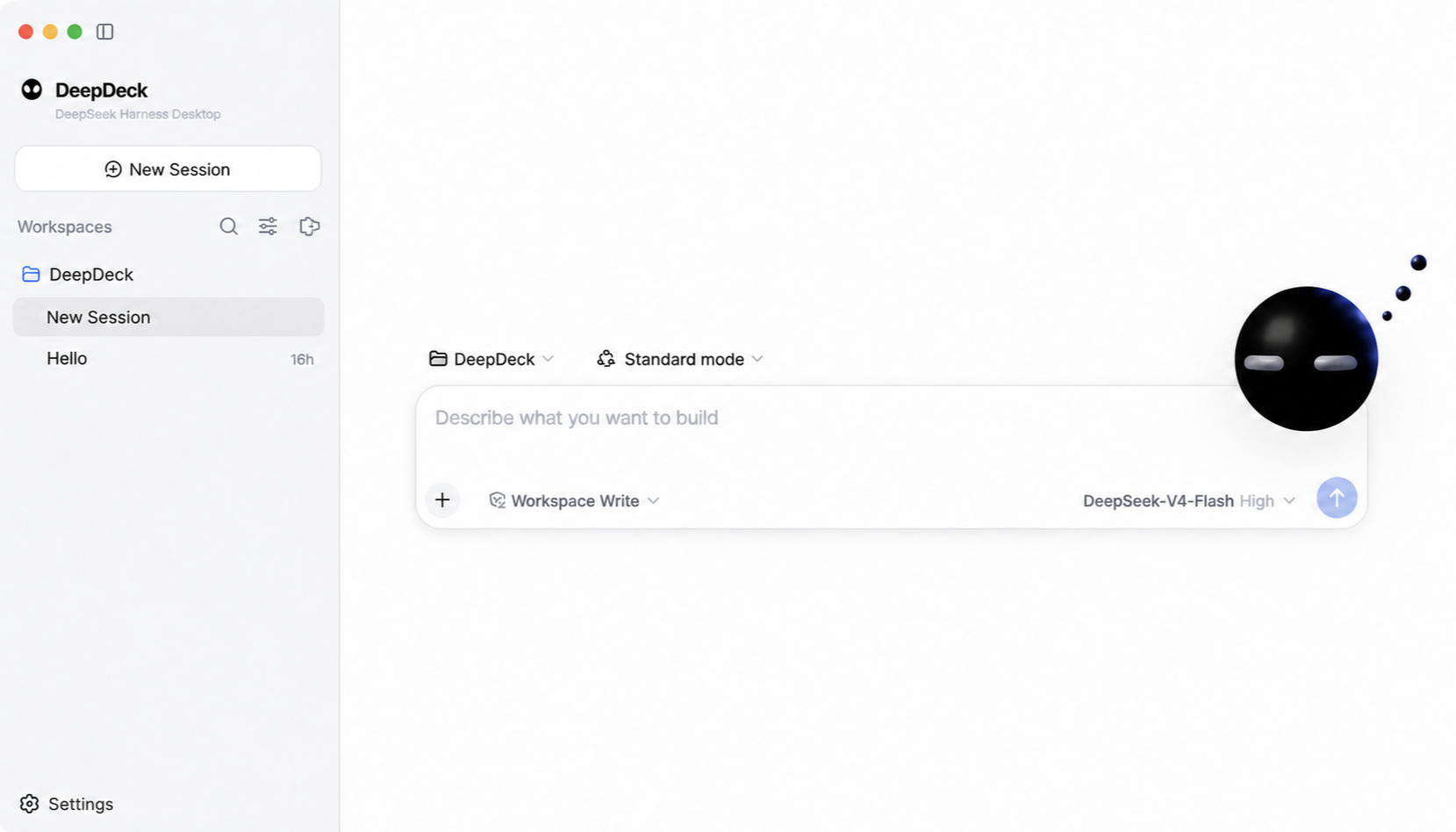
- Extend your workspace. Discover and install Harness plugins from Settings → Apps, or build trusted local plugin source with Bun Builder.
- Keep familiar Harness settings. Use compatible profiles, model settings, credentials, and installed plugins in a desktop app with native browser tabs, downloads, and automatic update support.
Architecture
DeepDeck is a native-feeling desktop client built on DeepSeek Harness. The upstream project is pinned to 0.1.7-rc.2 (477b4f4205) as a shallow Git submodule at vendor/deepseek-harness; this repository owns the desktop lifecycle, plugin-composed interface, branding, packaging, and automatic-update layer. dsh-codex-connect remains a separate pinned checkout and is preloaded as an ordinary Cordis bundle.
DeepDeck reuses the official web profile and its complete plugin-composed UI. The desktop host starts the Harness process on an OS-assigned loopback port, waits for it to become ready, then opens the local UI in the application window. Closing the app shuts the Harness process down cleanly.
Plugins can be discovered and installed from the dshfind-backed market in Settings → Apps. DeepDeck treats dshfind as a discovery catalog: it validates the selected GitHub repository and DSH bundle, previews the build plan, installs dependencies with lifecycle scripts disabled, and requires confirmation before running the plugin's own build script. Trusted local plugin source can also be compiled from Settings → Plugins → Bun Builder.
First run
Prerequisites: Node.js ^22.19.0 or >=24.0.0, Corepack, and Git.
git submodule update --init --depth 1
pnpm install
pnpm bootstrap
pnpm start
pnpm bootstrap installs and builds the pinned Harness and Codex Connect sources, then builds the desktop app. Later pnpm start runs reuse the existing desktop artifacts while source, build configuration, and dependencies are unchanged; relevant changes or missing artifacts trigger a rebuild automatically. After a pull updates the Harness submodule, startup installs its pinned dependencies and rebuilds the engine before compiling desktop plugins. pnpm check and desktop builds perform the same engine readiness check. Use pnpm start:rebuild to force a desktop rebuild.
The desktop uses the standard Harness home ($DSH_HOME, or ~/.dsh when unset), so profiles, model settings, credentials, patches, and installed plugins remain compatible with the upstream CLI. Set DSH_HOME before launch if an isolated desktop profile is desired.
On first launch, DeepDeck adds its desktop bundle to the web profile and keeps its local plugin links available. Bundle defaults are applied before the user patch, so settings remain writable under Harness 0.1.7. An existing profile manifest is backed up as package.json.deepdeck-before-bundle.
Branding
User-facing branding lives outside the upstream submodule in branding/brand.json. Replace the referenced wordmark, mark, favicon, and app icon files to rebrand the desktop without editing vendor/deepseek-harness. Set DESKTOP_BRAND_PATH to load a different manifest at launch.
Useful commands
pnpm start             # reuse fresh artifacts, rebuild changed code, and launch
pnpm start:rebuild     # force a desktop rebuild and launch
pnpm start:packaged    # rebuild and launch the packaged desktop client
pnpm check             # type-check desktop main, preload, and renderer code
pnpm test              # run focused desktop tests
pnpm test:harness-ui   # verify real Electron + Harness with an isolated profile
pnpm test:questions    # verify question cards against recorded model output
pnpm package:local     # build and verify an unsigned local macOS package
pnpm package:mac       # build signed production macOS packages
pnpm harness:build     # rebuild the pinned Harness checkout
The DeepDeck WebMCP benchmark guide explains how to
edit the local corpus in benchmarks/webmcp, add your own task files, and run
Docker websites through isolated DeepDeck Agent sessions. Start with
pnpm benchmark:webmcp for the available commands.
See docs/architecture.md for the dependency boundary and the plugin integration direction.
Desktop updates
Packaged builds check for an update shortly after launch. When a release is available, the desktop sidebar shows an update indicator; the user starts the download explicitly and sees native updater progress. After the download completes, the desktop safely stops its Harness process, installs the update, and restarts automatically. Development launches do not contact an update service.
electron-updater reads the release provider generated into app-update.yml by the packaging pipeline. DEEPSEEK_DESKTOP_UPDATE_URL can override that provider with a generic HTTP(S) feed for controlled builds and update testing. Production updates are published to https://deepdeck-updates.getmegaportal.com. The feed contains platform metadata, signed artifacts, and blockmaps; macOS releases include the ZIP update target alongside the DMG.
See docs/release.md for the signed release process and rollback model.
Community
LINUX DO
License
DeepDeck is available under the MIT License. The pinned DeepSeek Harness submodule and other third-party dependencies retain their own licenses.
直接测试网站的 WebMCP 增量:pnpm benchmark:webmcp ablate --url https://your-website.example --query "你的任务" --n 3。无需 Docker;详见 benchmark 文档。


