
模型与 MCP
待识别

rea
morluto
Reverse engineer anything with agents, from app behavior down to native binaries.
PROJECT TOPICS
INSTALL REFERENCE
dsh plugin --profile web add github:jiayiliust-ops/dsh-live-doc
该命令指向仓库当前默认分支;尚无绑定当前 commit 的完整验证结果。
PROJECT README
Live co-editing for DeepSeek Harness. The agent writes, you edit the same document in a real-time panel, and the agent reads your edits before it writes again — no "finish the whole thing, then paste my version back into the chat" round trip.


中文文档:README.zh-CN.md
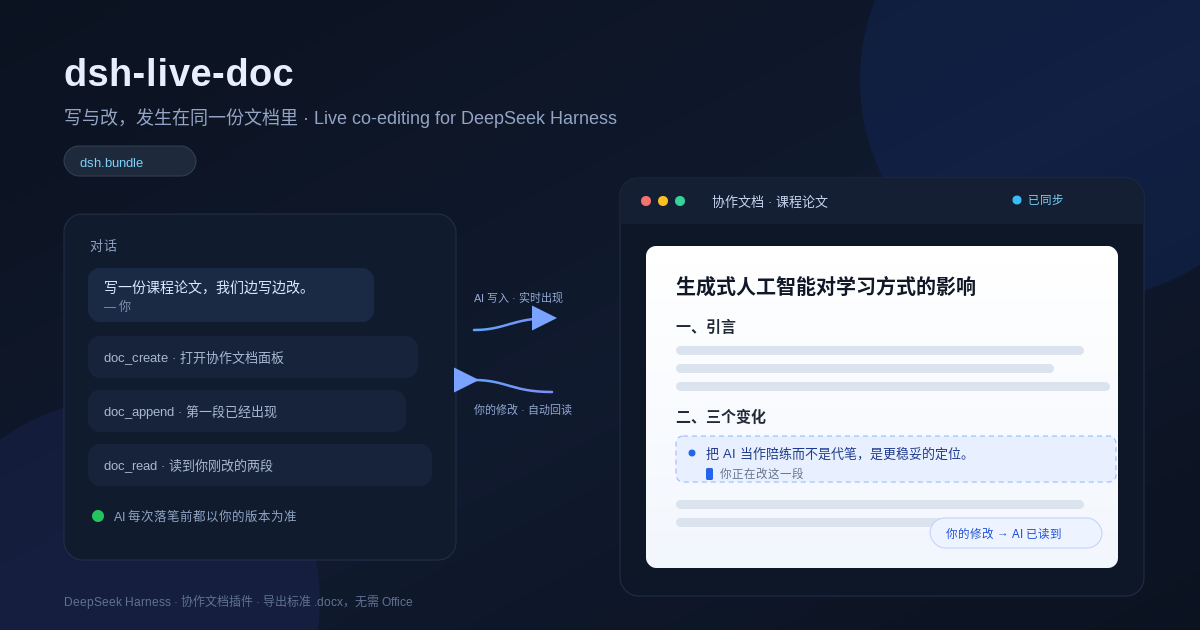
Long documents are painful to generate in one shot: the model writes 5,000 words, you read them, you change three paragraphs, and then you have to explain every change back. This plugin flips that around.
doc_read returns your version plus a list of what you changed.doc_read reports “the user changed N paragraphs after your last read” with before/after snippets, and tells the model to follow your version.doc_replace takes an expect prefix and refuses to touch a paragraph whose text moved; the agent must re-read first..docx (A4, 宋体 body, 1.5 line spacing, Word heading styles, real bullet/number lists) with no Office installation, no python-docx, and no build step. Markdown export is available too.$DSH_HOME/live-doc/; the panel reopens the document you were working on.>= 0.2.1-rc.2 < 0.3.0 (verified on the Desktop profile of 0.2.2-rc.3).>= 22.19.0 (the DOCX writer uses node:zlib's crc32).Plugins → Add plugin and enter dsh-live-doc. After installation, reload the page once (Cmd+R / Ctrl+R) so the browser half is registered.
dsh plugin --profile web add dsh-live-doc
# or straight from GitHub:
dsh plugin --profile web add github:jiayiliust-ops/dsh-live-doc
Restart DSH if the plugin manager reports a restart requirement.
npm pack                       # produces dsh-live-doc-1.0.0.tgz
dsh plugin --profile web add file:/absolute/path/dsh-live-doc-1.0.0.tgz
Installing a tarball is the most durable option: the profile keeps its own copy, so moving or deleting the checkout later does not break the plugin.
Ask for a document and the co-editing workflow, for example:
写一份课程论文,题目是……,我们边写边改。
The agent calls doc_create; the 协作文档 / Live document panel opens on the right. You can also open the full-page workspace from the Live document row in the left sidebar, or the button in the session header.
The agent calls doc_append one to three paragraphs at a time. Edit anything you like in the panel while it works.
When the agent continues, it calls doc_read first, sees your edits, and follows them.
Ask for the export; doc_export writes <workspace>/<title>.docx. The panel stays open, and exporting again overwrites the same file.
The panel's own 导出 DOCX button flushes unsaved keystrokes first and then exports.
| Tool | Purpose | Required |
|---|---|---|
doc_create |
Create a document and open the panel; optional export path | title |
doc_append |
Append Markdown paragraphs (headings, lists, quotes, fenced code) | markdown |
doc_insert |
Insert after a paragraph id, or at end |
after, markdown |
doc_replace |
Rewrite one paragraph, guarded by an expect prefix |
blockId, markdown |
doc_delete |
Delete one paragraph | blockId |
doc_read |
Read the current Markdown and the pending user edits | – |
doc_export |
Export .docx or .md |
– |
doc_list |
List all live documents | – |
All tools accept an optional docId; without it they use the panel's active document.
A document is a flat list of blocks:
{ "id": "b_...", "type": "p", "html": "正文 <strong>加粗</strong>", "rev": 7, "by": "user", "ts": 1794... }DocumentStore per profile, persisted atomically as ~/.dsh/live-doc/<docId>.json.POST /live-doc/api/state every 900 ms and renders the block list.POST /live-doc/api/patch with the block's baseRev. If the block changed since the browser last read it and the agent wrote it, the host keeps your text, marks the edit as a conflict, and tells the model on its next read.doc_read drains the pending-edit journal and returns your before/after snippet. The agent's own doc_replace clears that block's journal entries, so a finished rewrite does not keep reporting stale edits.x-live-doc: 1; it is served behind DSH's normal browser authentication.See docs/ARCHITECTURE.md for the block model, the RPC surface, and the export pipeline.
The exporter builds the whole package itself ([Content_Types].xml, relationships, document.xml, styles.xml, numbering.xml, settings.xml, core properties) and zips it with node:zlib. Output is a standard Word file:
numbering.xml$DSH_HOME/live-doc/ (default ~/.dsh/live-doc/), one JSON file per document. Set DSH_LIVE_DOC_DIR to move the directory..docx files..docx files are not imported. The plugin owns documents it creates.There is no build step — plain ESM on the host and a plain browser module on the client.
npm test          # node:test suite: store, DOCX package, tool compiler, manifest
node --check src/host/index.js
node --check src/client/index.js
To iterate against a running install, use a local checkout and re-enable the plugin row after host changes (Node caches imported ESM modules; a full DSH restart is the reliable path). See CONTRIBUTING.md.
MIT © dsh-live-doc contributors
CLASSIFICATION EVIDENCE
系统优先读取 GitHub Topics,再与站内分类词典和词根规则比对。当前命中: deepseek、deepseek-harness。
morluto
Reverse engineer anything with agents, from app behavior down to native binaries.

deepseek-ai
DeepSeek Harness: Everything is a Plugin.

nexu-io
The 1st Collaborative AI Design Agent Workspace. Local-first and open source. Create motion, prototypes, websites, apps, dashboards, presentations, images, and videos with your team and AI agents. Share work, exchange feedback, and iterate together in one workspace.