
模型与 MCP
待识别

rea
morluto
Reverse engineer anything with agents, from app behavior down to native binaries.
PROJECT TOPICS
INSTALL REFERENCE
dsh plugin --profile web add github:jeremytenjo/dsh-plugin-backlog-md
该命令指向仓库当前默认分支;尚无绑定当前 commit 的完整验证结果。
PROJECT README
Native Backlog.md task management inside DeepSeek Harness. The plugin adds a Backlog launcher beside Source Control, renders the task view in Harness's native right-side panel, and starts and manages the official Backlog.md local server for the active workspace.
Backlog.md remains the single source of truth. The plugin never creates a second task database and never writes task Markdown itself.
ListTodo button beside Source Control, with the same dimensions, hover
treatment, tooltip, focus ring, and panel-toggle behaviour. It highlights while Backlog is active.backlog browser when needed, waits for health, and connects.
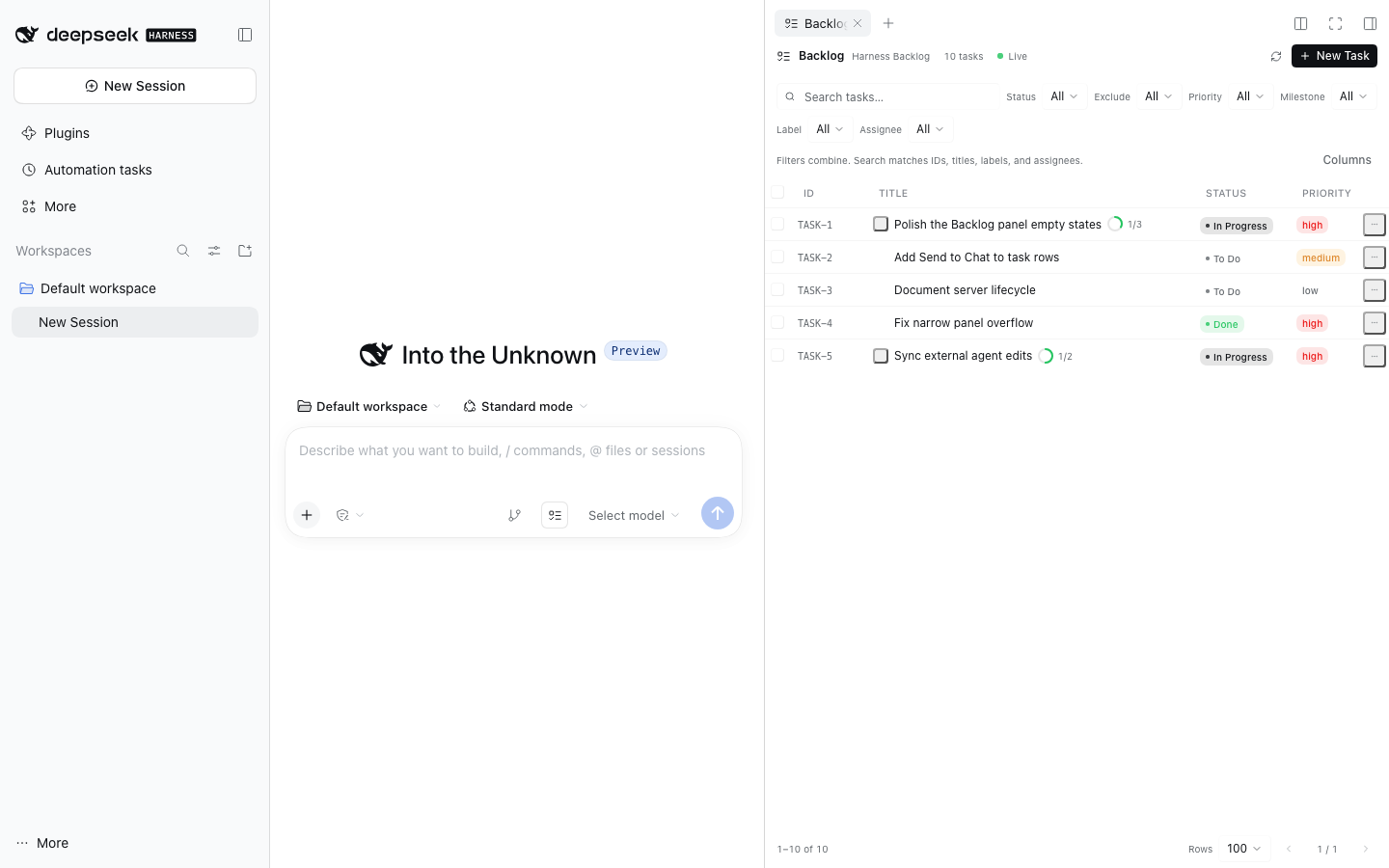
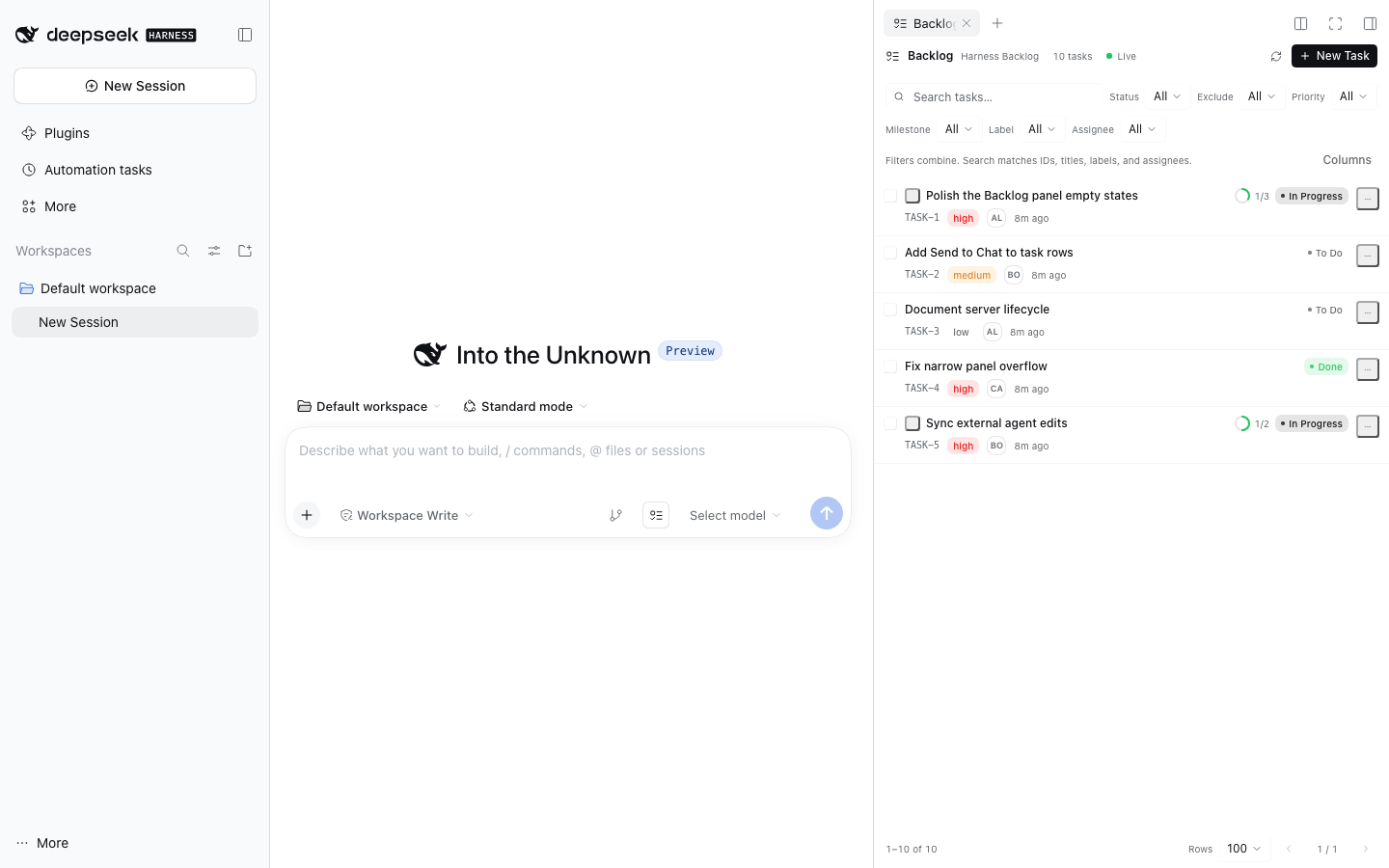
Users never run backlog browser by hand.| Full table | Narrow panel |
|---|---|
|
 |
| Task details | Filtered table |
|---|---|
 |
 |
The launcher sits directly beside Source Control in the composer:

| Component | Supported |
|---|---|
| DeepSeek Harness | 0.2.1-rc.3 tested. The plugin uses the public Cordis lifecycle, slots, locale, sidebarRightTabs, sidebarRight, webServer, subprocess, sessions, and workingDirectory services. |
| Backlog.md | 1.55.3 tested; 1.54.0 also verified in the Harness UI. Supported range: >=1.30.0 <2.0.0. |
| Node | 22 or newer on the Host. The shipped plugin has no runtime npm dependencies. |
| OS | macOS, Linux, and Windows where Backlog.md's native CLI runs. |
Backlog.md must be installed in the workspace (node_modules/.bin/backlog) or available on
PATH. A workspace-local install wins. An initialized Backlog.md project is required; the panel
shows the exact backlog init commands when it is missing.
The desktop profile is managed by the Electron application, so the Settings flow is the supported installation path there.
Clone the repository and add it to a profile:
git clone https://github.com/jeremytenjo/dsh-plugin-backlog-md.git
dsh plugin --profile <profile> add ./dsh-plugin-backlog-md
A GitHub spec also works:
dsh plugin --profile <profile> add github:jeremytenjo/dsh-plugin-backlog-mdUse the profile that serves your Harness instance (for example web). The package ships its built
client.js, so installation does not need a build step.
Install Backlog.md in the workspace or on PATH:
npm install --save-dev backlog.md
# or: pnpm add -D backlog.md
# or: npm install -g backlog.md
Initialize the project once, if it is not already:
backlog init
# or non-interactive defaults:
backlog init --defaults
Open a Harness session in that workspace and click Backlog beside Source Control.
The panel starts the server itself. No backlog browser command is needed.
The Backlog button is registered in the composer's conversation.input.right slot at order 11,
immediately after the Source Control trigger (order 10). Clicking it opens the backlog-md tab in
the native right sidebar. Clicking again when Backlog is active follows Harness's native panel
toggle. The panel is registered with keepMounted: true, so closing and reopening it preserves its
state.
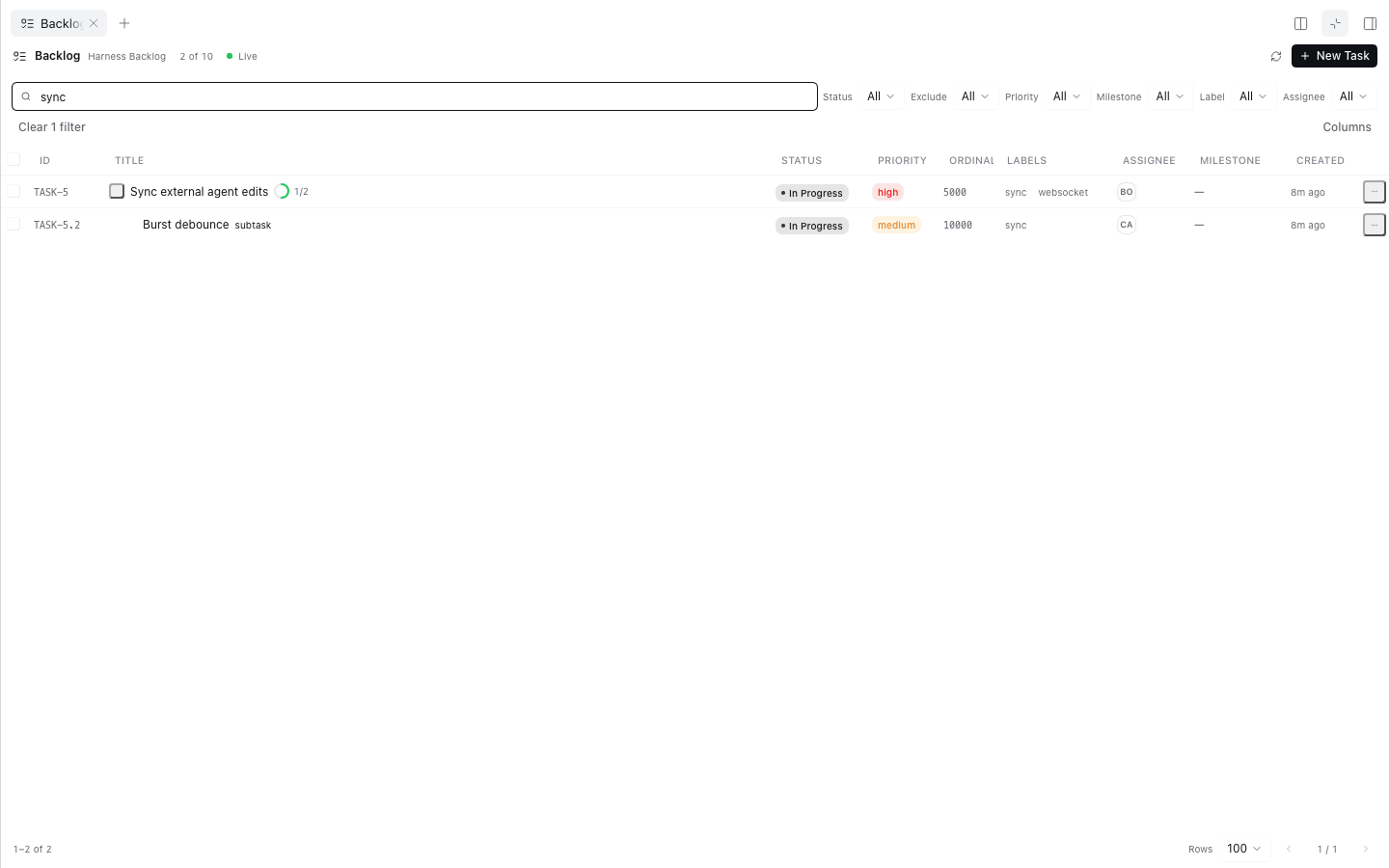
The status strip above the list shows a count per status and doubles as the status filter. Search
narrows it further; Exclude status, Priority, Milestone, Label, and Assignee live behind the
Filters control and combine without reloads. The header shows the filtered count; Clear
filters resets everything. Filter, sorting, column visibility, and page size are persisted per
workspace in localStorage; no task data is stored there.
Both presentations open in attention order: In Progress first, To Do second, Done last, with the Backlog.md ordinal then natural ID as the tie-breaker inside a status. Clicking a column header overrides that default for the current workspace.
Columns: ID, Title (with subtask progress), Status, Priority, Ordinal, Labels, Assignee, Milestone, Created, and row actions. The table has sticky headers, compact rows, hover and focus states, column sorting, row selection (send selected tasks to the composer), expandable subtasks, and configurable column visibility. At narrower panel widths, fixed-layout columns leave the DOM and become available again as the container grows.
Below the panel container's 640px breakpoint, the compact list shows the title, ID, subtask progress, status, priority, assignee, and relative creation time. It never requires horizontal scroll. Both presentations read the same TanStack Table instance, so switching widths keeps the same filter, sort, selection, expansion, pagination, and detail handlers.
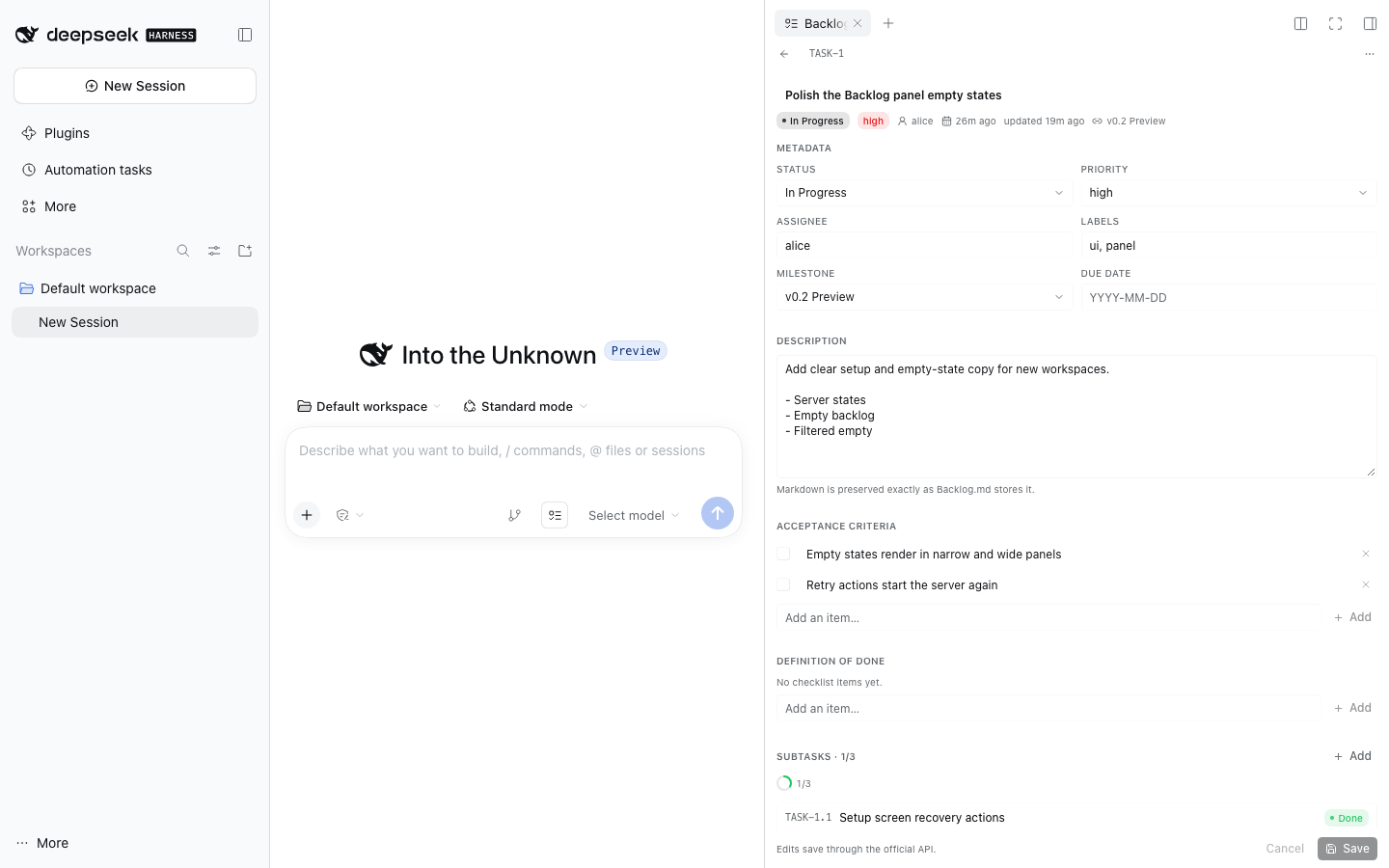
Clicking a row drills into details inside the same panel. The header has a back button, task ID, editable title, and actions. Metadata includes status, priority, assignee, labels, milestone, parent task, dependency links, created and updated dates, and the server ownership/source. Content includes the Markdown description source, acceptance criteria, Definition of Done checklist, subtasks, and dependencies. Comments are shown read-only.
The footer shows unsaved state and provides Save/Cancel. The detail view:
The row menu and detail menu include Send to Chat. It identifies the current Harness session, builds a prompt such as:
Implement TASK-20.4 "Wire real-time sync" using its Backlog.md task definition. Follow AGENTS.md,
update task status as work progresses, and verify all acceptance criteria.
and calls the official composer inputActions.setDraft(...). It does not submit. The full prompt is
visible and editable before the user sends it.
A coding agent can keep using the Backlog.md CLI or MCP server normally:
ContentStore detects the change.Rapid bursts are debounced. A reconnect requests a full resync so missed events are recovered.
┌──────────────────────────── DeepSeek Harness ────────────────────────────┐
│                                                                          │
│  React panel (client.js)                  Host plugin (index.js)         │
│  ┌────────────────────────┐   same-origin  ┌──────────────────────────┐  │
│  │ BacklogPanel           │   POST /__dsh/ │ BacklogBridge            │  │
│  │  TanStack Query        │   backlog-md   │  session → workspace     │  │
│  │  TanStack Table        │ ─────────────► │  fixed action allowlist  │  │
│  │  shadcn/ui + Tailwind  │ ◄───────────── │  typed validation        │  │
│  └────────────────────────┘   JSON + long  └──────────┬───────────────┘  │
│             │                       poll              │                  │
│             │                                         ▼                  │
│             │                              ┌──────────────────────────┐  │
│             │                              │ BacklogServerManager     │  │
│             │                              │  one record per realpath │  │
│             │                              │  port allocation         │  │
│             │                              │  health + version gate   │  │
│             │                              │  crash budget + cleanup  │  │
│             │                              └──────────┬───────────────┘  │
│             │                                         │ spawn            │
│             │                                         ▼                  │
│             │                              ┌──────────────────────────┐  │
│             │                              │ backlog browser          │  │
│             │                              │ 127.0.0.1:<dynamic port> │  │
│             │                              └──────────┬───────────────┘  │
│             │                                         │                  │
│             │         WebSocket notifications         │                  │
│             │                              ┌──────────▼───────────────┐  │
│             └──────────────────────────────│ BacklogEventHub          │  │
│                                            │ ring buffer + long poll  │  │
│                                            └──────────────────────────┘  │
└──────────────────────────────────────────────────────────────────────────┘

Backlog.md Markdown files (single source of truth)The browser never sends a filesystem path. It sends the active Harness session ID. The Host resolves
the Session with ctx.sessions.get, then the working directory with
ctx.workingDirectory.get, canonicalizes it with realpath, and walks up to the nearest
Backlog.md project (backlog/config.yml, .backlog/config.yml, backlog.config.yml, or
backlog.json). The canonical project root is the server-ownership identity.
BacklogServerManagerAllocates a free loopback port with net and starts the official CLI:
backlog browser --port <port> --no-openIf the CLI selects a different port because of a race, the manager parses the URL it prints and uses the actual port.
Probes GET /api/status and GET /api/version until healthy, validating the reported
projectPath against the canonical workspace and the version against the supported range.
Reuses a healthy managed server. Concurrent calls share a single in-flight start.
Checks the project's configured default_port for an already-running compatible server and adopts
it with owned: false when its project identity and version match. It is never terminated.
Tracks crashes with a bounded restart budget, removes dead records, and lets the next panel request start a fresh server.
Binds servers to 127.0.0.1 only. Dynamic ports are never exposed to the browser.
Stops only owned processes on plugin disposal and idle cleanup (30 minutes by default).
One exact route, POST /__dsh/backlog-md, is the plugin's only browser-facing surface. It:
POST with application/json;ctx.webServer.getOrigin()), and rejects
Sec-Fetch-Site: cross-site;status, tasks.list, tasks.get, tasks.create, tasks.update,
tasks.archive, tasks.delete, tasks.reorder, milestones.list, milestones.create,
search, server.restart, events);filePath and rawContent from task responses and mcp, onStatusChange, and other
command-bearing configuration from /api/config.events is a long poll (12 second waiting window) over the Host's WebSocket relay. This keeps the
browser on one same-origin, validated transport and works through Harness's Electron fetch bridge.
| Purpose | Official endpoint |
|---|---|
| Project identity / health | GET /api/status |
| Version gate | GET /api/version |
| Configuration | GET /api/config |
| Statuses | GET /api/statuses |
| List tasks | GET /api/tasks |
| Task detail + dependency graph | GET /api/task/:id |
| Create task / subtask | POST /api/tasks |
| Update task | PUT /api/tasks/:id |
| Archive task | POST /api/tasks/:id/archive |
| Reorder task | POST /api/tasks/reorder |
| Milestones | GET /api/milestones, POST /api/milestones |
| Search | GET /api/search |
Backlog.md has no HTTP hard-delete endpoint. Delete permanently archives through the official API,
then invokes the official CLI (backlog task delete <id>) with an argv array and no shell. The
default destructive action is Archive, which preserves the Markdown record, ID, and links.
BacklogEventHub owns one WebSocket client per managed server. It understands the messages the
current server publishes: tasks-updated, milestones-updated, config-updated, loaded,
loading-state JSON, and pong. Events are stored in a 200-entry ring with monotonic sequence
numbers. A cursor older than the ring returns resync, and every reconnect also requests a full
resync. Waiters are bounded by timeout and cancellation. The React hook debounces invalidation by
150 ms, reconnects with bounded exponential backoff (1 s to 15 s), and refetches all affected caches
after a gap.
The Backlog.md server is a powerful local HTTP service with no built-in authorization. Exposing its port to the page would make it reachable from any local script or browser origin and would bypass Harness's session authorization. The bridge keeps the server on loopback and gives the browser only the actions the panel needs, for the workspace belonging to the active Harness session.
pnpm install
pnpm typecheck   # TypeScript, tests included
pnpm lint        # Biome
pnpm test        # 21 client tests + 20 host tests (real Backlog.md CLI)
pnpm build       # regenerates client.js (Tailwind + esbuild bundle)
pnpm verify      # lint, typecheck, test, build
src/client.tsx is the browser entry. src/server/** is the Host half. client.js is generated and
committed; update it with pnpm build whenever client source changes.
The host integration tests install and exercise the pinned backlog.md dev dependency. They create
temporary projects, start real servers on dynamic ports, test reuse/adoption/crash recovery/port
conflicts/workspace isolation, exercise every mutation, verify the WebSocket relay, and confirm the
loopback and origin fences. Tests were executed with DeepSeek Harness 0.2.1-rc.3 and Backlog.md
1.55.3 on macOS.
index.js                     Host plugin entry: route + manager lifecycle
src/server/                  workspace, CLI, API client, manager, event hub, bridge
src/client.tsx               Cordis client registration
src/client/components/       panel, table, list, details, dialogs, shadcn/ui primitives
src/client/hooks/            TanStack Query hooks, connection relay, persisted UI state
src/client/api/bridge.ts     typed bridge client
src/client/lib/              task tree, filters, formatting, utilities
test/                        client (Vitest) and host (node:test) suites
docs/ screenshots127.0.0.1; no public API exposure.| Panel state | Action |
|---|---|
| Backlog.md is not installed | Install backlog.md in the workspace or on PATH, then press Retry. |
| Initialize Backlog.md | Run backlog init in the workspace, then press Retry. |
| Backlog.md needs an update | Install a 1.x release at or above 1.30.0. |
| Backlog.md is unavailable / crashed | Press Retry or Restart server. Retry also resets the crash budget. |
| Server starts but tasks never sync | Check that the workspace is the intended project and that no firewall blocks loopback. Reopen the panel to force a resync. |
| A port is occupied | The manager lets the CLI choose the next free port automatically. |
1.54.0 returns naive YYYY-MM-DD HH:mm timestamps from some HTTP endpoints; the UI
parses those as UTC. ISO timestamps with Z are handled normally.1.55.3 is the pinned test version. The manager refuses 2.x and versions older than
1.30.0 with an actionable error.default_port and reports the same canonical projectPath and a supported version. Arbitrary
ports are not scanned.backlog task delete CLI; it can
refuse a task that still has subtasks or links, and the panel reports that refusal.inputActions.setDraft when the
panel receives it, with a launcher event fallback. If the composer is unavailable, the panel reports
that it could not reach it.MIT. See LICENSE.
Backlog.md is a separate MIT-licensed project by Alex Gavrilescu. This plugin is an independent integration and is not affiliated with the Backlog.md maintainers.
CLASSIFICATION EVIDENCE
系统优先读取 GitHub Topics,再与站内分类词典和词根规则比对。当前命中: deepseek-harness。
morluto
Reverse engineer anything with agents, from app behavior down to native binaries.

deepseek-ai
DeepSeek Harness: Everything is a Plugin.

nexu-io
The 1st Collaborative AI Design Agent Workspace. Local-first and open source. Create motion, prototypes, websites, apps, dashboards, presentations, images, and videos with your team and AI agents. Share work, exchange feedback, and iterate together in one workspace.