模型与 MCP
待识别

rea
morluto
Reverse engineer anything with agents, from app behavior down to native binaries.
PROJECT TOPICS
INSTALL REFERENCE
dsh plugin --profile web add github:jeremytenjo/dsh-plugin-always-on-top
该命令指向仓库当前默认分支;尚无绑定当前 commit 的完整验证结果。
PROJECT README

Pin the DeepSeek Harness desktop window above every other app, straight from the composer.
A pin button sits between the source-control and backlog triggers. It is a grey outline while the window is normal. Click it and the icon becomes a filled white pin; the Harness window now floats above other windows. Click again to release it.
| Off | On |
|---|---|
 |
 |
Hovering shows a native title, matching the other composer actions:
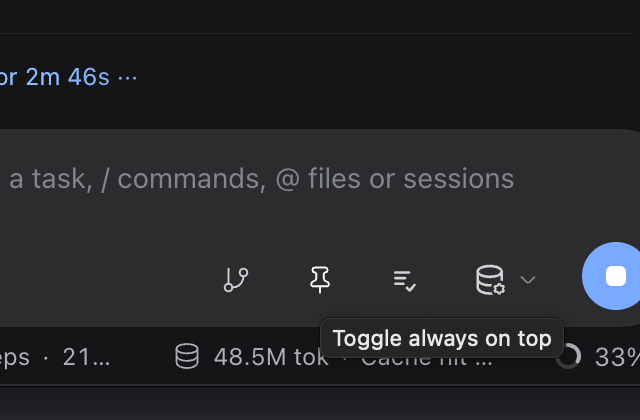
BrowserWindow.isAlwaysOnTop() state, not a UI-only flag.The desktop app does not ship a dsh command, so the reliable path is a local checkout plus a
profile link.
git clone https://github.com/jeremytenjo/dsh-plugin-always-on-top.git
cd dsh-plugin-always-on-top
python3 scripts/install-local.py
The script:
~/.dsh/profiles/desktop/package.json,"dsh-plugin-always-on-top": "link:/path/to/this/checkout" to dependencies,dsh-plugin-always-on-top to dsh.profile.bundles,node_modules symlink.Then quit DeepSeek Harness completely (tray icon → Quit; closing the window only hides it) and reopen it. The pin appears in the composer.
Set DSH_DESKTOP_PROFILE to point at a different profile.
If you prefer editing by hand, add the dependency and append the bundle name to the existing
dsh.profile.bundles array in ~/.dsh/profiles/desktop/package.json — do not replace the array:
"dependencies": {
  "dsh-plugin-always-on-top": "link:/absolute/path/to/dsh-plugin-always-on-top"
}
"bundles": [
"…your existing bundles…",
"dsh-plugin-always-on-top"
]ln -s /absolute/path/to/dsh-plugin-always-on-top \
~/.dsh/profiles/desktop/node_modules/dsh-plugin-always-on-topQuit and reopen the app.
cd dsh-plugin-always-on-top
python3 scripts/install-local.py --uninstall
Quit and reopen the app. The package.json.bak-always-on-top backup is left in place for reference.
The Desktop Host is a Node-mode child process and has no BrowserWindow access. The shell also ships
no IPC channel for window levels. Patching app.asar is the usual workaround, but on macOS it
invalidates the app's code signature and needs two launches.
This plugin takes a smaller route:
client button
   │  GET/POST /__dsh/always-on-top
   ▼
Host half (Node-mode child)
   │  SIGUSR1  (asks the Electron main process for its Node inspector)
   ▼
Electron main inspector
   │  BrowserWindow.setAlwaysOnTop(value, 'floating')
   │  BrowserWindow.isAlwaysOnTop()
   ▼
inspector.close()
The expression evaluated in the main process is fixed and only interpolates a boolean. The inspector
is opened for the few hundred milliseconds a toggle takes and is closed in a finally block. If an
inspector was already open before the plugin touched it, the plugin leaves it alone.
Nothing under /Applications is modified.
This is a local power-user tool, and it deliberately uses a debugger as its control channel.
While a toggle is in flight, the Electron main process exposes its Node inspector on
127.0.0.1:9229 (or the next free port). Any local process that connects during that short window
could evaluate code in the main process. The plugin closes the inspector as soon as the toggle
finishes, and it never leaves a long-lived eval endpoint behind.
If that trade-off is not acceptable to you, do not install this plugin. A plugin such as
dsh-window-control takes the app.asar route
instead and comes with its own signing caveats.
The bridge reads Electron's fuse wire before it signals anything. The current build (0.2.1-rc.3,
Electron 44) has EnableNodeCliInspectArguments enabled. If a future build disables it, the plugin
refuses to send SIGUSR1 — which would terminate the app — and the button reports that window
debugging is unavailable.
dsh web started from a terminal has no Electron parent; the button renders
disabled with an explanation.process._debugProcess and is untested.setAlwaysOnTop controls the window level, not Space membership. A full-screen app on another
Space can still cover Harness.Tested with DeepSeek Harness 0.2.1-rc.3 and Electron 44.7.0 on macOS (Apple silicon).
pnpm install
pnpm test      # host helpers
pnpm build     # src/client.js -> client.js
client.js is generated by scripts/build-client.mjs; do not edit it by hand. CI runs the tests,
rebuilds the client, and fails if the committed bundle is stale.
Layout:
| Path | Role |
|---|---|
index.js |
Host half: loopback route and the inspector bridge |
src/client.js |
Browser half: the composer button |
client.js |
Generated browser bundle |
cordis.patch.yml |
Bundle layer that inserts the Host plugin |
scripts/install-local.py |
Links a checkout into the Desktop profile |
test/bridge.test.mjs |
Pure-function tests for the bridge |
MIT © 2026 Jeremy Tenjo
CLASSIFICATION EVIDENCE
系统优先读取 GitHub Topics,再与站内分类词典和词根规则比对。当前命中: deepseek-harness。
morluto
Reverse engineer anything with agents, from app behavior down to native binaries.

deepseek-ai
DeepSeek Harness: Everything is a Plugin.

nexu-io
The 1st Collaborative AI Design Agent Workspace. Local-first and open source. Create motion, prototypes, websites, apps, dashboards, presentations, images, and videos with your team and AI agents. Share work, exchange feedback, and iterate together in one workspace.