
其他
完整应用

deepseek-harness
deepseek-ai
DeepSeek Harness: Everything is a Plugin.
PROJECT TOPICS
INSTALL REFERENCE
dsh plugin --profile web add github:jasonguide/dsh-skills-hub
该命令指向仓库当前默认分支;尚无绑定当前 commit 的完整验证结果。
PROJECT README

中文版: README.zh.md
Cross-platform AI Skills manager for the DeepSeek Harness (DSH).
Install one skill from the central skills library ~/.agents/skills into multiple agent tools (Claude Code, Cursor, Codex, Gemini CLI, Trae, Windsurf, Qoder, CodeBuddy, ...) via system symbolic links — one source of truth driving many coding agents.
One source of truth, driving many AI coding tools.
| OS | Link type | Privileges |
|---|---|---|
| Windows | Directory Junction | No admin required |
| macOS | Directory symlink | No admin required |
| Linux | Directory symlink | No admin required |
Zero third-party runtime dependencies (Node.js built-ins only). DSH runs on Windows / macOS / Linux, so this plugin works across all three.
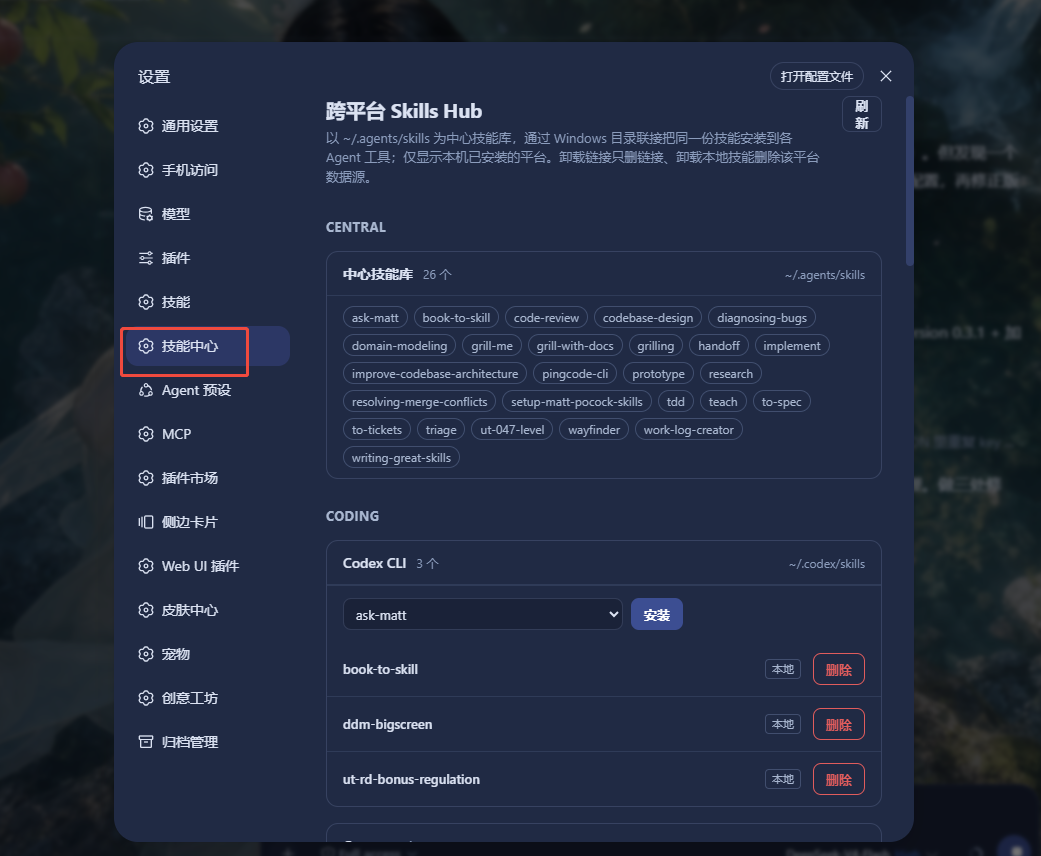
~/.agents/skills.~/.skillsmanage/config.json.Settings → 技能中心 (Skills Hub) — the central skills library and platform cards, grouped by category; only platforms installed on this machine are shown.
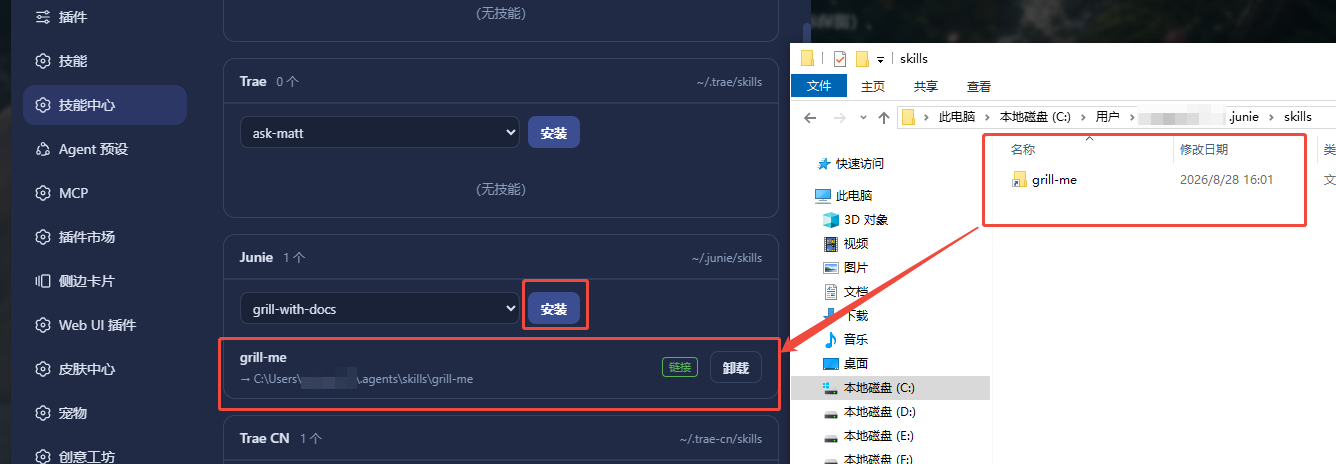
Install a central skill into a platform — a link is created pointing back to the central library:
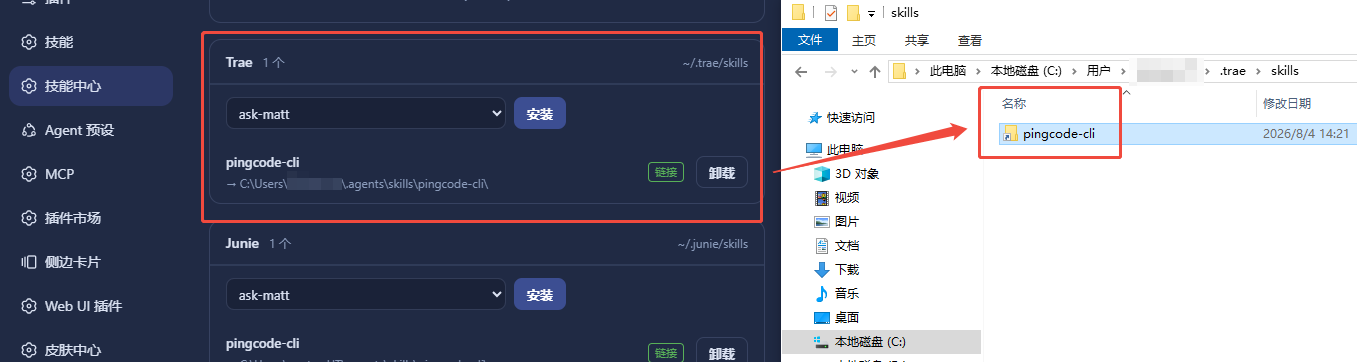
Uninstall a link entry — removes the link only, the central data source stays untouched:
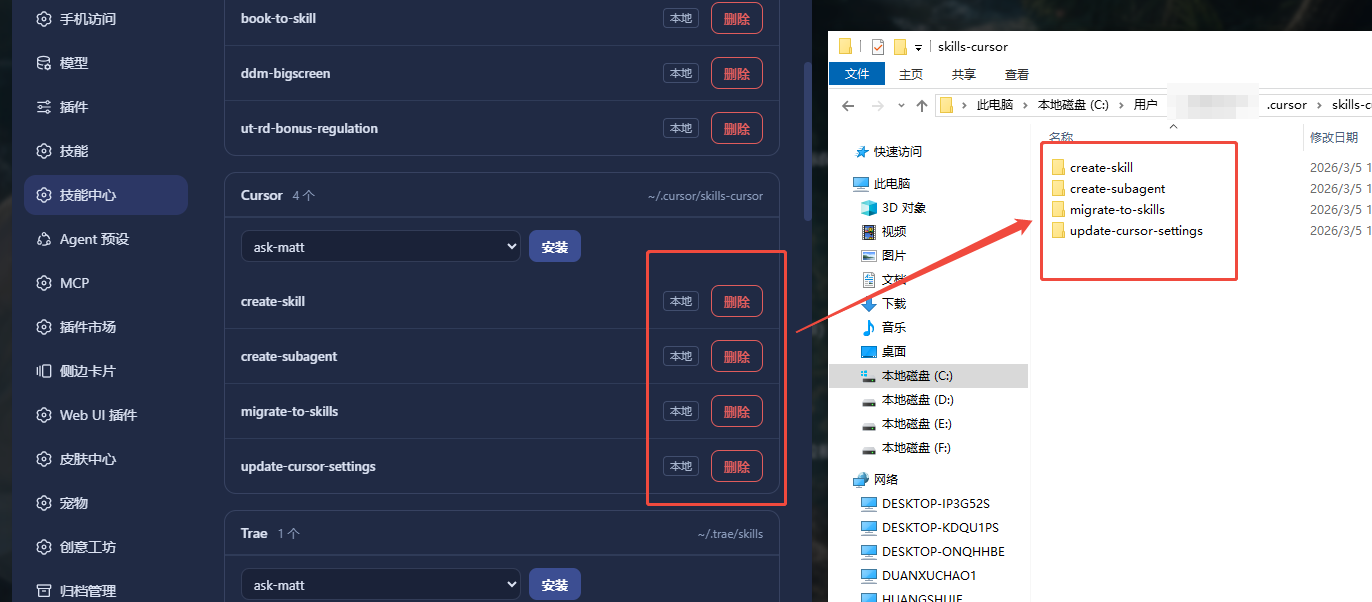
Delete a local skill — removes that platform's own data source:
| Requirement | Minimum |
|---|---|
| OS | Windows / macOS / Linux |
| Node.js | >= 20 (engines in package.json) |
| DSH (DeepSeek Harness) | installed, dsh command on PATH |
| pnpm | installed (used by dsh plugin internally) |
The plugin itself runs with zero runtime dependencies; Node.js is provided by the DSH host process.
DeepSeek Harness (DSH) installed, with the dsh command on PATH.
pnpm installed:
npm install -g pnpmRun inside the repository root:
Windows (PowerShell)
powershell -ExecutionPolicy Bypass -File scripts/install.ps1
# or
pwsh scripts/install.ps1
macOS / Linux
bash scripts/install.shThe script runs dsh plugin --profile web add <this directory> — pnpm-installs and mounts the plugin automatically; no manual configuration.
dsh plugin addFrom local source (in the repository root):
dsh plugin --profile web add .From npm:
dsh plugin --profile web add dsh-skills-hub
dsh plugin addautomatically appends packages that declaredsh.bundle.patchtodsh.profile.bundlesand applies the plugin's owncordis.patch.yml— no manual profile edits. Re-run the same command to upgrade.
# 1. Edit ~/.dsh/profiles/web/package.json
#    add to dependencies:  "dsh-skills-hub": "link:<absolute path>"
# 2. Install in the profile directory
cd ~/.dsh/profiles/web
pnpm install
After any install method, restart DSH for the plugin to take effect.
Open DSH Settings → 技能中心 (Skills Hub):
Built-in mapping (conventional directories; only platforms that exist on this machine are displayed):
| Category | Platform | Skills directory | Writable |
|---|---|---|---|
| Central | Central library | ~/.agents/skills |
data source |
| Coding | Claude Code | ~/.claude/skills |
read-only |
| Coding | Codex CLI | ~/.codex/skills |
✅ (excludes .system) |
| Coding | Cursor | ~/.cursor/skills-cursor |
✅ |
| Coding | Gemini CLI | ~/.gemini/skills |
✅ |
| Coding | Trae | ~/.trae/skills |
✅ |
| Coding | Factory Droid | ~/.factory/skills |
✅ |
| Coding | Junie | ~/.junie/skills |
✅ |
| Coding | Qwen | ~/.qwen/skills |
✅ |
| Coding | Trae CN | ~/.trae-cn/skills |
✅ |
| Coding | Windsurf | ~/.windsurf/skills |
✅ |
| Coding | Qoder | ~/.qoder/skills |
✅ |
| Coding | Augment | ~/.augment/skills |
✅ |
| Coding | OpenCode | ~/.opencode/skills |
✅ |
| Coding | KiloCode | ~/.kilocode/skills |
✅ |
| Coding | OB1 | ~/.ob1/skills |
✅ |
| Coding | Amp | ~/.amp/skills |
✅ |
| Coding | Kiro | ~/.kiro/skills |
✅ |
| Coding | CodeBuddy | ~/.codebuddy/skills |
✅ |
| Coding | Hermes | ~/.hermes/skills |
✅ |
| Coding | Copilot | ~/.copilot/skills |
✅ |
| Coding | Aider | ~/.aider/skills |
✅ |
| Lobster | OpenClaw | ~/.openclaw/skills |
✅ |
| Lobster | QClaw | ~/.qclaw/skills |
✅ |
| Lobster | AutoClaw | ~/.openclaw-autoclaw/skills |
✅ |
| Lobster | WorkBuddy | ~/.workbuddy/skills-marketplace/skills |
✅ |
The built-in mapping lives in the
PLATFORMSconstant inlib/index.js— edit it to add/remove platforms, or add custom platforms in the Settings UI (persisted to~/.skillsmanage/config.json).
dsh-skills-hub/
├── package.json          # plugin manifest (dsh.client / dsh.bundle.patch)
├── cordis.patch.yml      # bundle patch (insert entry, applied automatically by dsh plugin add)
├── lib/
│   ├── index.js          # Host half: node:fs symlinks + webServer routes
│   └── client.js         # Client half: settings UI (__ModuleLoader__.load)
├── scripts/
│   ├── install.ps1       # Windows one-click install script
│   └── install.sh        # macOS / Linux one-click install script
├── test/core.test.js     # unit tests (link primitives + uninstall semantics + cross-platform link type)
├── README.md             # this file (English)
├── README.zh.md          # Chinese translation
├── LICENSE
└── CHANGELOG.mdlocalhost / 127.0.0.1) and require a custom marker header (DNS rebinding protection).[a-zA-Z0-9._-] (no path traversal).MIT
CLASSIFICATION EVIDENCE
系统优先读取 GitHub Topics,再与站内分类词典和词根规则比对。当前命中: 无有效分类标签。
deepseek-ai
DeepSeek Harness: Everything is a Plugin.

anywhere-labs
为 DeepSeek Harness (DSH) 插件生态打造的现代化桌面端解决方案。万物皆「插件」,桌面本身也是「插件」。

awesome-dsh-plugin
A curated list of plugins for DeepSeek Harness (dsh) · DeepSeek Harness 插件精选列表