

模型与 MCP
待识别

rea
morluto
Reverse engineer anything with agents, from app behavior down to native binaries.
PROJECT TOPICS
INSTALL REFERENCE
dsh plugin --profile web add github:jalilahmad/deepseek-peak-indicator
该命令指向仓库当前默认分支;尚无绑定当前 commit 的完整验证结果。
PROJECT README



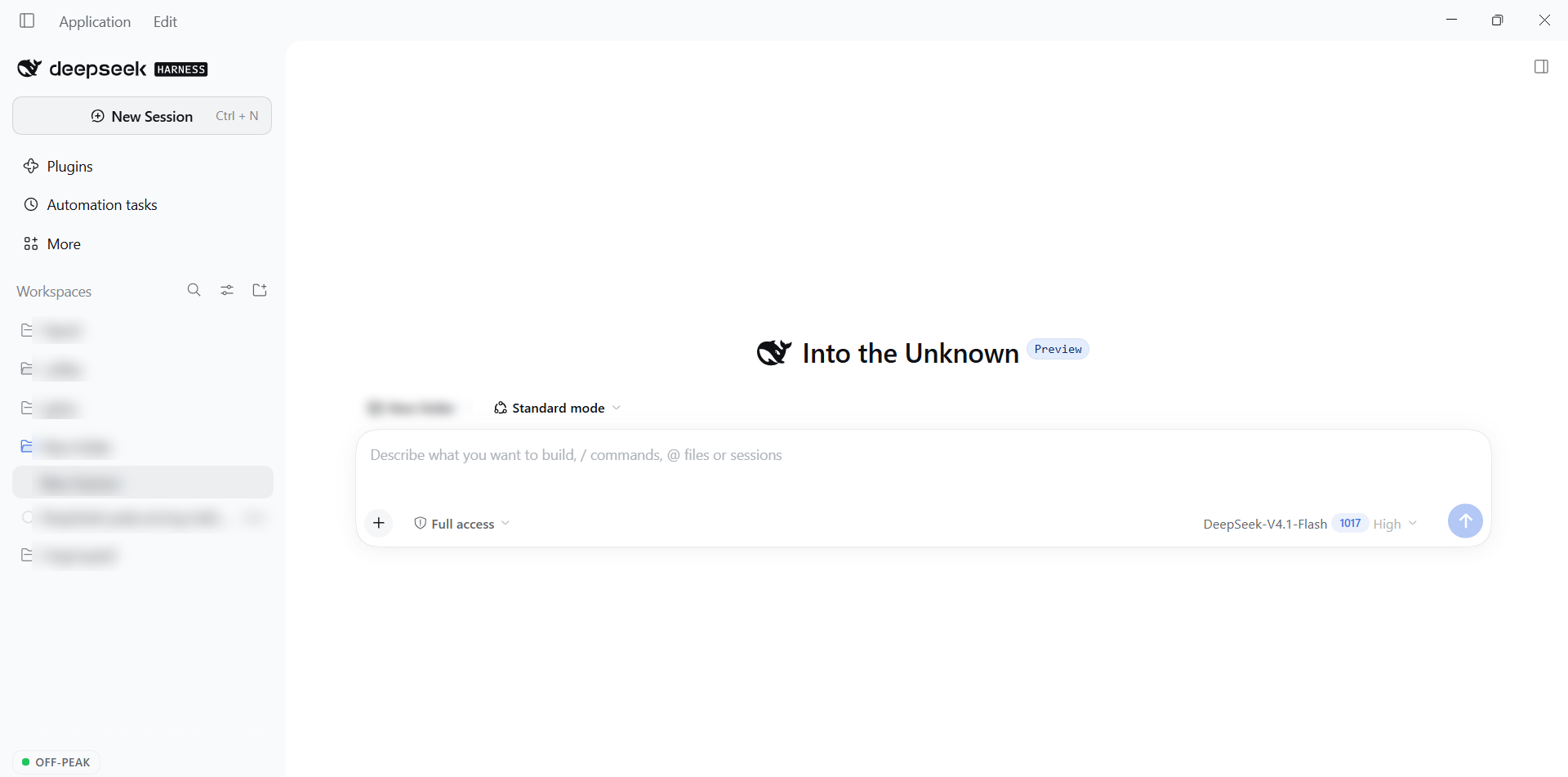
A lightweight DeepSeek Harness plugin that shows the current DeepSeek API pricing period — Peak or Off-Peak — directly in the sidebar footer, from application start, with no Session open. Click it to see the countdown to the next pricing transition.
It needs no API key, makes no network requests and does not poll anything: the schedule is computed locally from the clock and a bundled, verified Chinese holiday calendar.
Peak means the official API pricing period, not server congestion or server health. The indicator reports the billing period defined by DeepSeek; it says nothing about API load, latency or availability. Peak prices are the higher peak rate; Off-Peak is the half-price rate.
Requires DeepSeek Harness Desktop v0.2.1-rc.5 or later. The plugin's runtime behavior is unchanged. No extra runtime, build step or npm dependency is needed.
The package is @jalilahmad.fazeli/deepseek-peak-indicator. Install it from npm or directly from
GitHub:
dsh plugin --profile web add @jalilahmad.fazeli/deepseek-peak-indicatordsh plugin --profile web add github:jalilahmad/deepseek-peak-indicatorReload the Harness Web GUI (or restart DeepSeek Harness Desktop) after installing. On a harness with HMR a page refresh is usually enough.
@jalilahmad.fazeli/deepseek-peak-indicator, or the GitHub spec
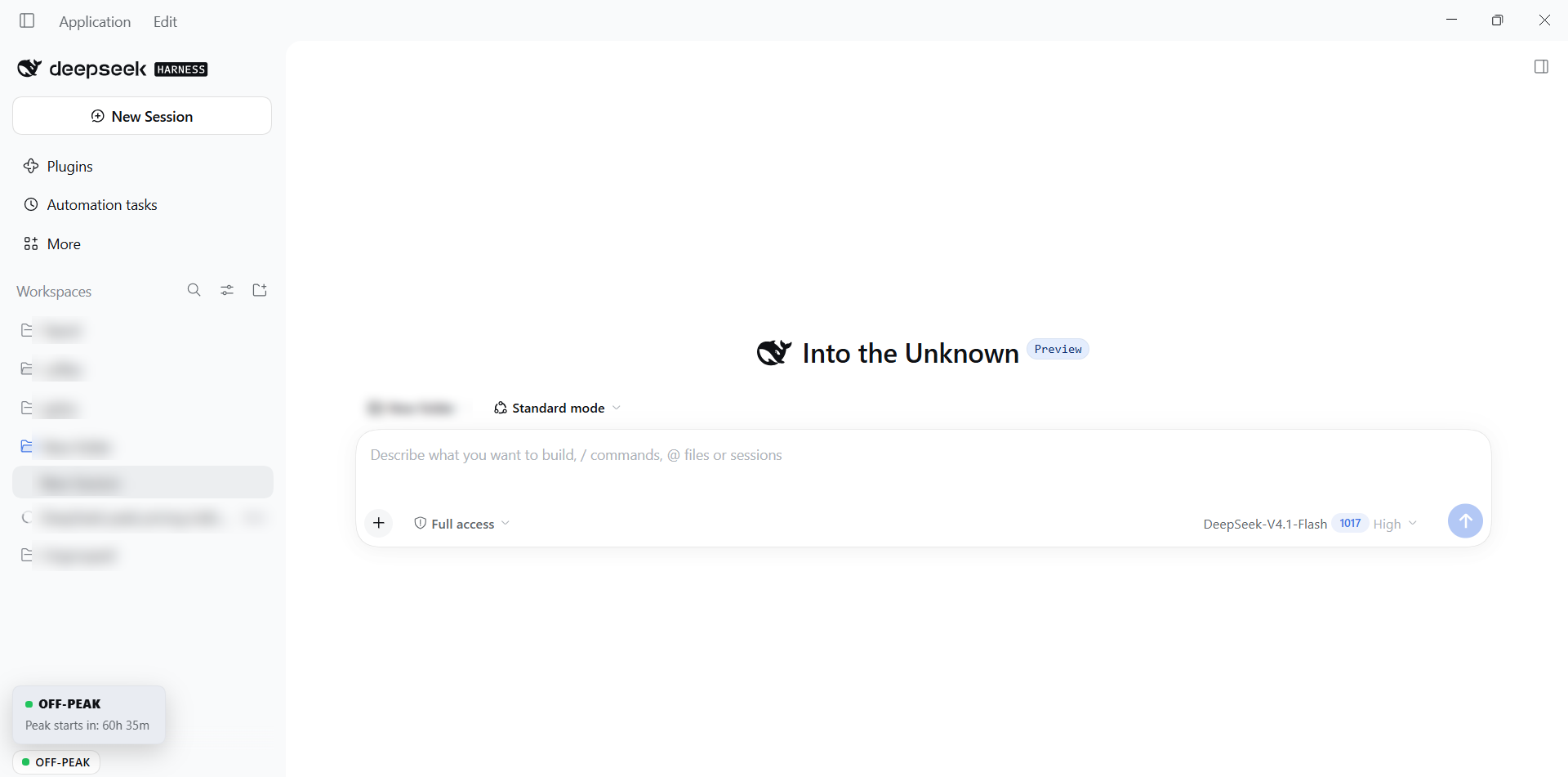
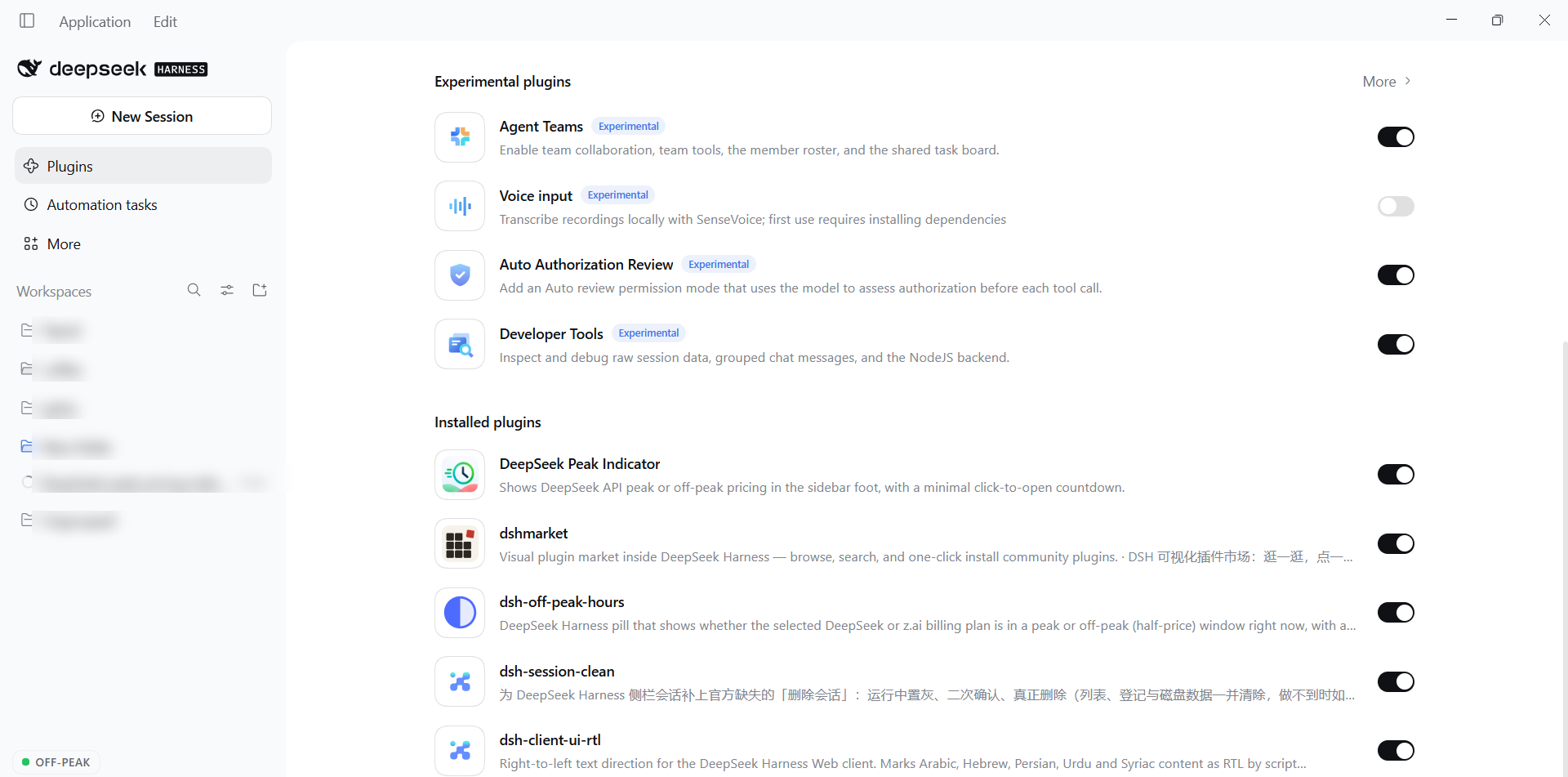
github:jalilahmad/deepseek-peak-indicator.OFF-PEAK, 🔴 PEAK, ⚪ UNKNOWN.Intl database (no hardcoded offsets, DST-safe).Real captures from DeepSeek Harness Desktop v0.2.1-rc.5 running this plugin. Workspace names and session titles are blurred for privacy.
Full application — indicator in the sidebar footer
OFF-PEAK with the minimal popover
Plugin entry in the Plugin Manager
The PEAK and UNKNOWN captures are still pending because those states require real schedule conditions that did not exist at capture time: PEAK occurs only in the official weekday peak windows, and UNKNOWN only when the current year's Chinese holiday calendar is not verified. They will be added after the next real PEAK window; see docs/screenshots/SCREENSHOTS_NEEDED.md for the exact conditions and capture steps.
The indicator registers in sidebar.footer.action, the root-scoped list slot beside Settings,
declared by the shipped @deepseek-ai/dsh-client-ui-sidebar package. It is part of the permanent
application shell, so it does not depend on a Session, Conversation or Composer. The expanded
sidebar shows a small pill (dot + label); the 56 px rail shows the dot-only compact form.
| State | Meaning |
|---|---|
| 🔴 PEAK | Inside an official peak window, Monday–Friday, and the date is not a verified Chinese public holiday. Higher API price applies. |
| 🟢 OFF-PEAK | Everything else: outside the two daily peak windows, on a weekend, or on a verified Chinese public holiday. Half-price API price applies. |
| ⚪ UNKNOWN | Inside a weekday peak window, but the local holiday calendar for that year is not verified (missing, unpublished or malformed). The plugin refuses to guess. |
Weekends are off-peak for the whole day, including weekend makeup workdays (调休), following DeepSeek's wording that weekends and holidays are off-peak “in full”.
Click the indicator; click it again, press Escape, or click outside to close it. The popover has
exactly two lines:
🔴 PEAK
Off-Peak starts in: 2h 13m
🟢 OFF-PEAK
Peak starts in: 61h 29m⚪ UNKNOWN
Next transition cannot be reliably determined.The countdown is whole hours and minutes only (never seconds). It refreshes once a minute, while an exact transition timer flips the status at the official boundary. If the end of the current period would fall into an unverified holiday year, the plugin shows the UNKNOWN line instead of inventing a countdown.
Asia/Shanghai calendar date of the instant.Intl (16:00 UTC for Asia/Shanghai) —
computed, never hardcoded.Asia/Kabul as the default display zone
(DISPLAY_TIME_ZONE in client.js); the current minimal popover intentionally shows
only durations, so timezone handling does not affect what is displayed, only correctness.Per the official DeepSeek pricing documentation:
| Period | When (UTC) | Price |
|---|---|---|
| Peak | Monday–Friday, 01:00–04:00 and 06:00–10:00 — excluding Chinese public holidays | Full peak price |
| Off-Peak | All other hours, weekends, and Chinese public holidays in full | Half of peak |
Beijing-time equivalents: 09:00–12:00 and 14:00–18:00. Peak/off-peak pricing was introduced at 16:00 UTC on 2026-08-16 according to the official change log; always confirm current numbers on the official pricing page.
Official sources: DeepSeek pricing · Chinese pricing page · Change log.
Holiday dates live in the editable holidays.json and are inlined into the browser
bundle by tools/sync-holidays.mjs (a browser bundle cannot read a
sibling file at runtime).
verified: true, a non-empty official source, and
well-formed, real calendar dates.To add a year: edit holidays.json, run node tools/sync-holidays.mjs, then run the tests.
client.js contains no fetch,
XMLHttpRequest, WebSocket, EventSource or dynamic import(); it reads the local clock and
the bundled holiday table only.The plugin is a DSH bundle with an empty Host half and a browser-side Client half:
package.json declares dsh.bundle (the Cordis patch that inserts the Loader row) and
dsh.client (the browser entry).cordis.patch.yml inserts the plugin row; index.js is a deliberately empty apply().client.js registers a lazy module factory, adds the locale dictionaries, and registers the
indicator in sidebar.footer.action through ctx.slots.The complete design, status algorithm, transition search and cleanup rules are in
docs/architecture.md.
engines.dsh allows this version
and all later DSH versions, including prereleases; later versions are not verified here and may
introduce breaking changes. Other clients and platforms are not claimed compatible.@jalilahmad.fazeli/deepseek-peak-indicator; this is
also the Harness module/package identity used by both npm and GitHub installs. Installations made
before this rename (under @local/deepseek-peak-indicator) should be removed first and then
reinstalled. The plugin row id deepseek-peak-indicator and all runtime behavior are unchanged.Update — DeepSeek Harness does not update arbitrary installed bundles in place:
dsh plugin --profile web remove @jalilahmad.fazeli/deepseek-peak-indicator).If you installed the earlier pre-npm bundle, remove the old package first:
dsh plugin --profile web remove @local/deepseek-peak-indicator.
Uninstall — Plugins → DeepSeek Peak Indicator → Remove, or:
dsh plugin --profile web remove @jalilahmad.fazeli/deepseek-peak-indicatorThe plugin stores nothing outside its own bundle, so uninstalling leaves no data behind.
No build step and no dependencies. The only Node.js scripts are the test suite and the holiday sync tool.
deepseek-peak-indicator/
├── client.js                 # browser half: schedule core, sidebar indicator, popover, timers
├── index.js                  # empty Host half (Loader row)
├── package.json              # bundle manifest, dsh.bundle / dsh.client, metadata
├── cordis.patch.yml          # Loader patch inserting the plugin row
├── holidays.json             # editable Chinese public holiday calendar
├── icon.svg                  # previous plugin icon (retained as backup)
├── locale/                   # plugin display metadata (en, zh)
├── tools/sync-holidays.mjs   # inlines holidays.json into client.js
├── test/schedule.test.mjs    # 22 Node tests (schedule, popover, registration)
├── docs/                     # architecture, marketplace notes, screenshot instructions
├── assets/                   # README banner, runtime plugin icon, marketplace icons
├── screenshots.json          # marketplace storefront screenshot list
├── README.md · README.fa.md · README.zh-CN.md
├── CHANGELOG.md · CONTRIBUTING.md · SECURITY.md · LICENSE
└── .gitignore · .gitattributes
assets/readme-banner.png is the README hero banner. assets/icon-512.png (512×512 PNG, 58.6 KiB,
within DSH's 256 KiB plugin-icon limit) is the runtime plugin icon, exported through the existing
./icon manifest export; it was verified live in the Plugin Manager. icon.svg is retained as the
previous icon/backup, and assets/icon-180.png remains a smaller marketplace fallback.
Run the tests:
node --test test/schedule.test.mjsExpected result: 22 tests, 22 pass, 0 fail (verified with Node.js v24.21.0, the runtime bundled with DSH Desktop v0.2.1-rc.5). The suite covers both peak windows, off-peak hours, weekends and makeup workdays, holiday overrides, the unpublished-2027 UNKNOWN state, exact transition instants, countdown formatting, the two-line popover model, the wide/compact forms, the single slot registration, the Intl-derived China-midnight boundary and malformed-date rejection.
Local development install:
git clone https://github.com/jalilahmad/deepseek-peak-indicator.git
dsh plugin --profile web add <absolute-path-to-checkout>
Contributions are welcome — see CONTRIBUTING.md and SECURITY.md.
Architecture notes: docs/architecture.md; marketplace/submission notes:
docs/marketplaces.md.
MIT © 2026 Jalil Ahmad Fazeli · @jalilahmad · repository · issues
This is an independent community plugin, not affiliated with DeepSeek.
Credits and official sources:
dsh.bundle patch + dsh.client browser half + ctx.slots registration).Intl/IANA timezone data comes from the browser runtime; react and react-dom are provided by
the Harness browser module table. No third-party source code is vendored.CLASSIFICATION EVIDENCE
系统优先读取 GitHub Topics,再与站内分类词典和词根规则比对。当前命中: deepseek-harness、deepseek-harness-desktop、deepseek-harness-plugin、deepseek-harness-plugins。
morluto
Reverse engineer anything with agents, from app behavior down to native binaries.

deepseek-ai
DeepSeek Harness: Everything is a Plugin.

nexu-io
The 1st Collaborative AI Design Agent Workspace. Local-first and open source. Create motion, prototypes, websites, apps, dashboards, presentations, images, and videos with your team and AI agents. Share work, exchange feedback, and iterate together in one workspace.