
模型与 MCP
待识别

rea
morluto
Reverse engineer anything with agents, from app behavior down to native binaries.
PROJECT TOPICS
INSTALL REFERENCE
dsh plugin --profile web add github:j4ckzh0u/dsh-command-monitor
该命令指向仓库当前默认分支;尚无绑定当前 commit 的完整验证结果。
PROJECT README
在 DeepSeek Harness Web GUI 里实时看到 AI 执行命令的悬浮窗:右下角一颗可拖动的悬浮按钮,点开就是「执行过程」面板——命令、输出、退出码、耗时一览,可上下翻、可选中复制、可导出 Markdown / 文本 / JSON。



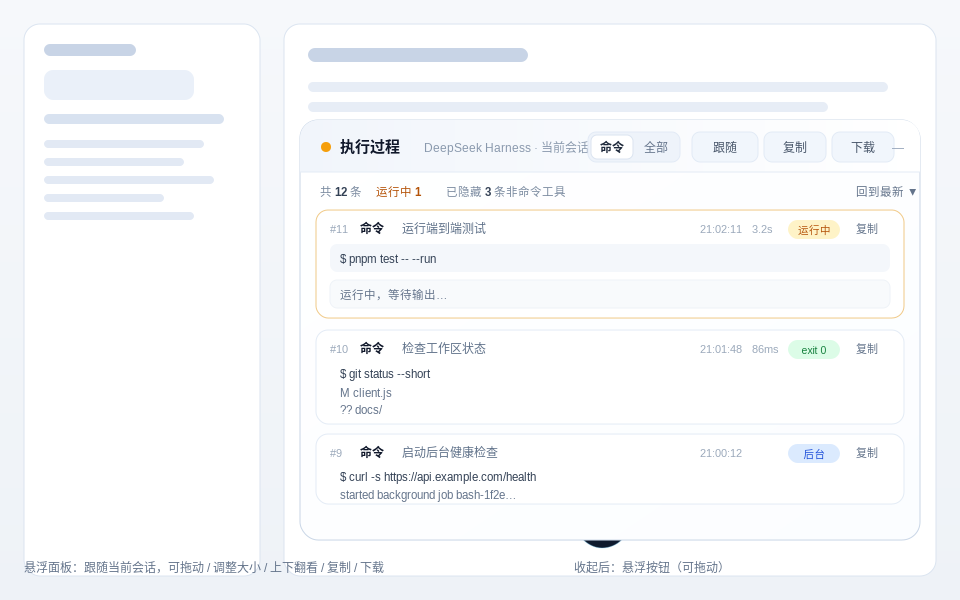
(图为界面示意,实际配色跟随 dsh 的浅色 / 深色主题。)
dsh 的会话视图里,工具调用一直存在,但命令执行过程被折叠在对话流里。dsh-command-monitor 把这些执行记录抽成一个始终在视野里的悬浮窗:
插件是纯浏览器插件:不新增宿主服务、不抓 DOM、不重启 dsh web,只读取当前页面已经加载的会话数据。
| 能力 | 说明 |
|---|---|
| 悬浮按钮 / 面板 | 收起为圆形按钮;点开为「执行过程」面板;按钮和面板都可拖动,位置与大小会记住 |
| 两种视图 | 命令:只看 bash / pwsh / terminal_*;全部:显示所有工具调用(读文件、搜索、编辑、MCP、子代理……) |
| 智能跟随 | 新记录自动滚到底部;往上翻自动暂停跟随,点「跟随」或「回到最新」恢复 |
| 完整条目 | 工具名、描述、开始时间、耗时、状态、cwd、命令、stdout+stderr、退出码;后台 / 超时 / 沙箱拒绝 / 输出截断都有标记 |
| 选择与复制 | 正文可自由选中;单条「复制」(命令 + 完整输出);顶部「复制」复制当前筛选下全部记录 |
| 下载 | Markdown、纯文本、JSON 三种格式,文件名 dsh-commands-<会话>-<时间>.<ext> |
| 会话跟随 | 自动跟随当前主会话;切换会话自动切换;离开对话视图时保留最后数据并标记「暂停更新」 |
| 主题自适应 | 使用 dsh 的 --dsw-* 设计 token,浅色 / 深色主题都正常 |
| 项目 | 要求 |
|---|---|
| dsh | 0.2.1-rc.2 或更新(实测 0.2.1-rc.5;范围见 package.json#engines.dsh) |
| 运行环境 | dsh Web GUI(dsh web / Web profile) |
| 浏览器 | 现代 Chromium / WebKit(需要 backdrop-filter、color-mix()、Pointer Events) |
| Node(安装环境) | ^22.19.0 || >=24.0.0 |
| 宿主平台 | macOS / Linux / Windows(插件本身不区分平台) |
插件安装进 dsh profile:包放进 profile 的 node_modules,再把包名加入 dsh.profile.bundles。
git clone https://github.com/j4ckzh0u/dsh-command-monitor.git
cd dsh-command-monitor

# 默认安装到 web profile;也可以传其它 profile 名
./scripts/install.sh            # 等价于 ./scripts/install.sh web
脚本会:
$DSH_HOME/profiles/<profile>/node_modules/dsh-command-monitor/;package.json(dependencies + dsh.profile.bundles);安装后 dsh 的 HMR 会自动重组插件图。通常无需重启 dsh web;如果页面没出现悬浮按钮,刷新一次页面即可。完整步骤、验证、升级、卸载见 部署手册。
cp -R . "$HOME/.dsh/profiles/web/node_modules/dsh-command-monitor"然后编辑 ~/.dsh/profiles/web/package.json:
{
  "dsh": {
    "profile": {
      "bundles": ["…", "dsh-command-monitor"]
    }
  },
  "dependencies": {
    "dsh-command-monitor": "file:/absolute/path/to/dsh-command-monitor"
  }
}
$DSH_HOME默认是~/.dsh。Windows 下路径与命令请按 PowerShell 语法调整。
echo hello),面板里应出现对应条目。点开悬浮窗后:
详细说明(条目字段、跟随逻辑、下载格式、存储键、FAQ)见 使用手册。
| 文档 | 内容 |
|---|---|
| 使用手册 | 界面说明、全部交互、跟随 / 复制 / 下载细节、FAQ、限制 |
| 部署手册 | 安装 / 验证 / 升级 / 卸载 / 回滚 / 多 profile / 故障排查 |
| 开发手册 | 架构、数据流、slot 机制、HMR 调试、发布清单 |
| CHANGELOG | 版本变更记录 |
dsh-command-monitor/
├── client.js              # 浏览器半侧:悬浮 UI + 会话数据订阅 + 复制/下载(无构建)
├── index.js               # 宿主半侧:空 apply,只为成为 Loader 条目
├── cordis.patch.yml        # 作为 bundle 加载时插入的 Loader 行
├── package.json            # dsh.bundle / dsh.client / exports 声明
├── icon.svg                # 插件图标
├── docs/                   # 使用、部署、开发手册 + 示意图
├── scripts/                # install / uninstall / check / sync-dev
├── .github/workflows/      # CI:语法与清单校验
└── README.mdshell.overlay(root scope,整框浮层、可点击穿透),只占一个入口,不替换任何现有 UI。chat target——即聊天里已经装配好的 tool/call / tool/result 节点;不抓 DOM,也不重复解析网络数据。conversation.session.header.utilities 的 headless 组件,用 useChat 读取当前会话,去抖后发布到模块级 store;切换会话自动重绑。client.js 直接遵循 dsh 的 window.__ModuleLoader__.load CJS 协议,只依赖 react。--dsw-* token + --dsh-* 字体变量,跟随主题与字号设置。架构图与实现细节见 开发手册。
index.js 是空实现,不注册工具、不读写文件。A floating command/tool execution monitor for the DeepSeek Harness Web GUI. It registers one entry in the shell.overlay slot, follows the active conversation's Chat target (no DOM scraping), and renders a draggable pill / panel with command output, smart scroll-follow, per-entry copy, and Markdown / text / JSON export. Pure client-side plugin; no host service, no restart required.
MIT © 2026 j4ckzh0u and contributors.
CLASSIFICATION EVIDENCE
系统优先读取 GitHub Topics,再与站内分类词典和词根规则比对。当前命中: deepseek-harness。
morluto
Reverse engineer anything with agents, from app behavior down to native binaries.

deepseek-ai
DeepSeek Harness: Everything is a Plugin.

nexu-io
The 1st Collaborative AI Design Agent Workspace. Local-first and open source. Create motion, prototypes, websites, apps, dashboards, presentations, images, and videos with your team and AI agents. Share work, exchange feedback, and iterate together in one workspace.