
模型与 MCP
待识别

rea
morluto
Reverse engineer anything with agents, from app behavior down to native binaries.
PROJECT TOPICS
INSTALL REFERENCE
dsh plugin --profile web add github:inezmitche46-maker/dsh-usage-stats
该命令指向仓库当前默认分支;尚无绑定当前 commit 的完整验证结果。
PROJECT README
Two small, local-first plugins for DeepSeek Harness (DSH) that make token usage visible:
| Plugin | Where it appears | What it shows |
|---|---|---|
dsh-usage-stats |
Sidebar → Usage Statistics page | All-session token totals, peak session, usage streaks, 53-week activity heatmap, 7/30-day trend, per-model usage and a session ranking |
dsh-session-token-stats |
Composer dock → Token usage pill | The current session's token total; expanding it shows uncached input, cache read, cache write, output and the cache-hit share |
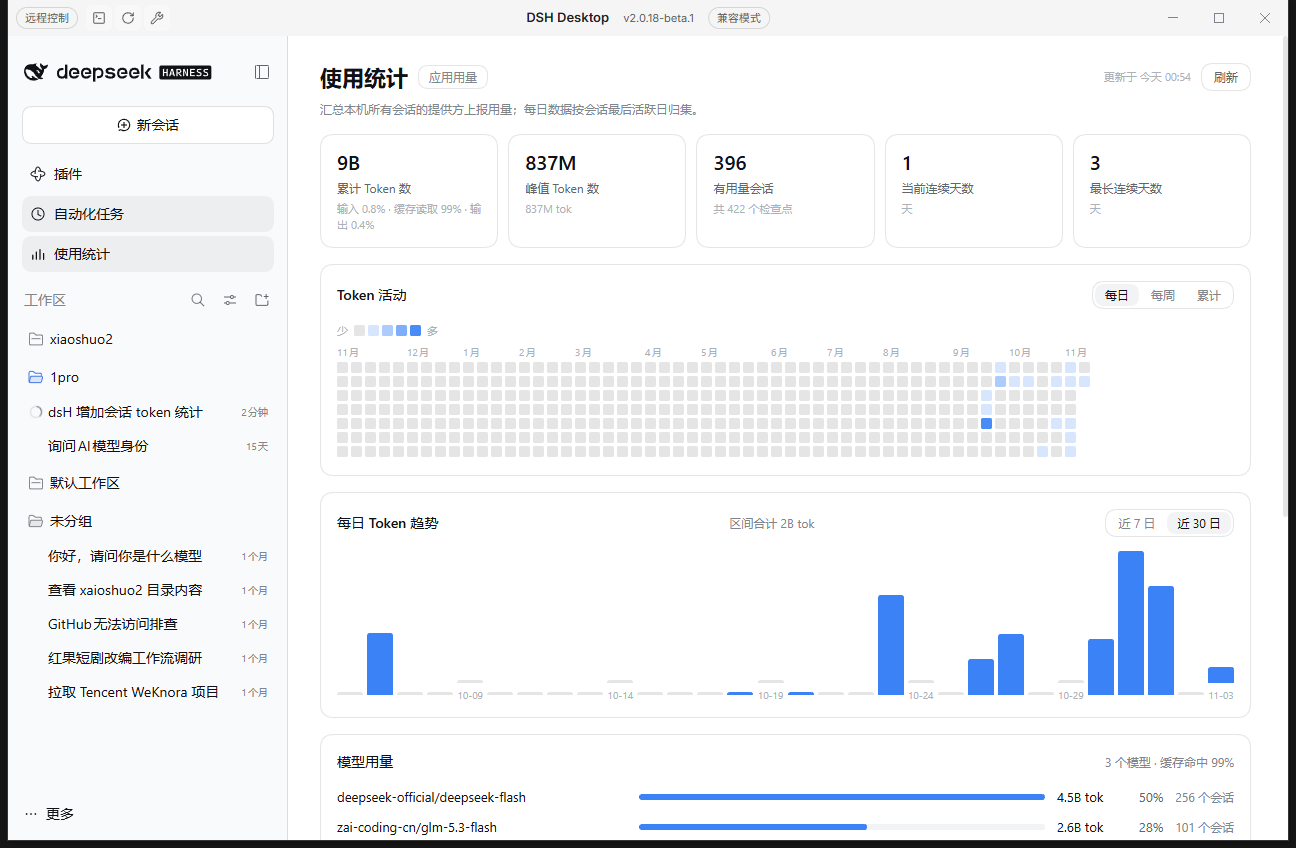
Requires DSH >=0.2.1-rc.1 <0.3.0 (Web / Desktop) and Node >=22.19.
The two plugins are separate bundles — install either one or both:
# all-session usage dashboard (sidebar page)
dsh plugin --profile desktop add "github:inezmitche46-maker/dsh-usage-stats#path:/packages/dsh-usage-stats"

# session token pill in the composer
dsh plugin --profile desktop add "github:inezmitche46-maker/dsh-usage-stats#path:/packages/dsh-session-token-stats"
Use --profile web on a Web profile. To pin a reproducible revision, replace the branch with a commit hash: github:inezmitche46-maker/dsh-usage-stats#<sha>&path:/packages/dsh-usage-stats.
After installing, restart DSH Desktop (or reload the Web page). dsh plugin add records each package in the profile's dsh.profile.bundles, and the package's own cordis.patch.yml inserts its plugin row.
<DSH_HOME>/storages/session_projcache/sessions/*.json — the tokenUsage, sessionStats, modelSelection and sessionListMetadata rows. It never writes session logs or profile files.GET /usage-stats/summary; requests whose peer is not the local machine get 403, responses carry cache-control: no-store, and results are cached in memory for 30 seconds.tokenUsage session projection registered by @deepseek-ai/dsh-token-meter; its Host half registers nothing.0.2.1-rc.2 (DSH Desktop Beta 2.0.18-beta.1), Web surface.main + sidebar.panellist for the dashboard, conversation.composer.dock for the pill.profileContext.home and webServer.register({ kind: 'prefix' }) from the published @deepseek-ai/dsh-* packages.HIDE_BUILTIN_USAGE_PILL = false at the top of packages/dsh-session-token-stats/client.js to keep both.dsh plugin --profile desktop remove dsh-usage-stats dsh-session-token-statsOr disable / remove them from Settings → Plugins.
MIT
CLASSIFICATION EVIDENCE
系统优先读取 GitHub Topics,再与站内分类词典和词根规则比对。当前命中: deepseek-harness。
morluto
Reverse engineer anything with agents, from app behavior down to native binaries.

deepseek-ai
DeepSeek Harness: Everything is a Plugin.

nexu-io
The 1st Collaborative AI Design Agent Workspace. Local-first and open source. Create motion, prototypes, websites, apps, dashboards, presentations, images, and videos with your team and AI agents. Share work, exchange feedback, and iterate together in one workspace.