
模型与 MCP
待识别

rea
morluto
Reverse engineer anything with agents, from app behavior down to native binaries.
PROJECT TOPICS
INSTALL REFERENCE
dsh plugin --profile web add github:imnotRiv3r/dsh-download-dock
该命令指向仓库当前默认分支;尚无绑定当前 commit 的完整验证结果。
PROJECT README
English · 中文
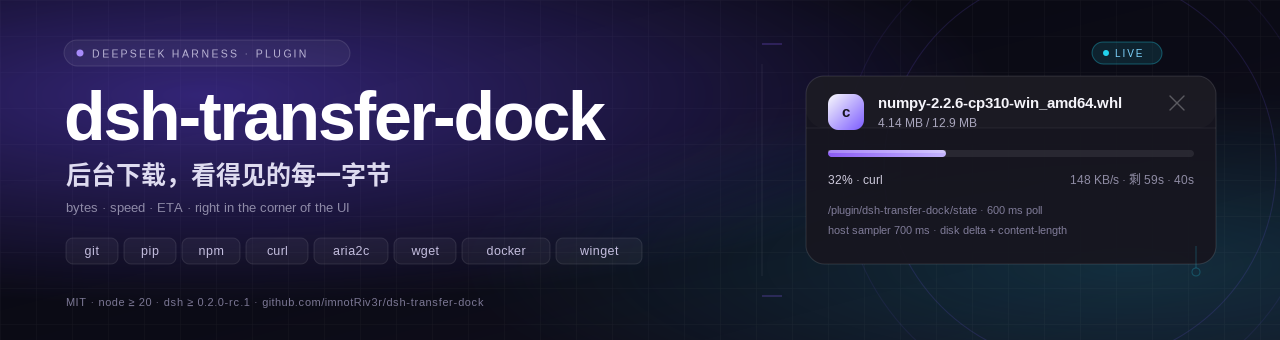





A background download shouldn't be one word: "Running".
dsh-transfer-dock grows a live card in the bottom-right corner: file, progress, bytes, speed and ETA.
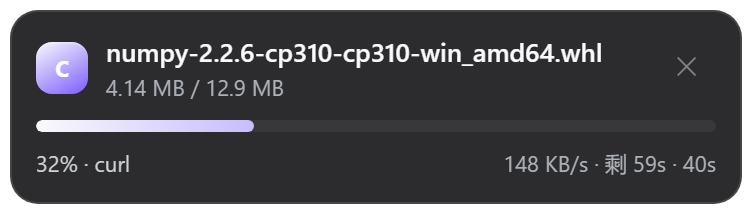
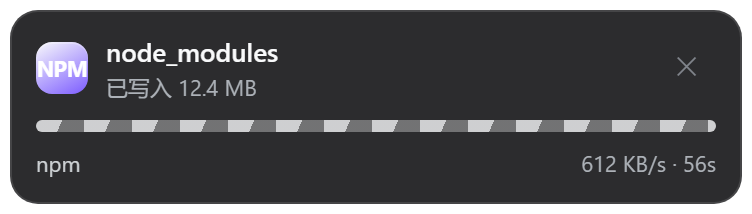
Left: the total is known → a real percentage and an ETA. Right: no single total → moving stripes plus bytes written (a deliberate third state, not a failure).
You start a 2 GB model download in Harness and it goes to the background. The corner of the UI says nothing; the job row says "Running". You can't tell whether it's downloading at full speed, stuck on DNS, or already dead.
dsh-transfer-dock turns those forty seconds into one card: file name, 32%, 4.14 MB / 12.9 MB, 148 KB/s, 59s left. No second window, no wrapped commands, no takeover — it observes and draws the result where you are already looking.
Harness pushes download commands into background jobs (run_in_background: true) so they don't block the turn. The cost: the UI keeps a single status row, and the next real signal is a completion notice a dozen seconds later. Everything in between is invisible.
dsh-transfer-dock fills that gap, and it only observes:
| It does | It doesn't |
|---|---|
| Subscribe to job registry events and detect download commands | Consume the model's job cursor |
| Sample disk bytes, probe totals (Host) and parse job output (browser) | Change job state, send signals or kill processes |
| Expose a read-only JSON route to the browser half | Read or write the downloaded files |
| Render a card in the bottom-right corner | Pop dialogs, steal focus or block input |
It never asks you to wrap a command. git clone, pip install, curl -o, npm install and winget install work as they are; progress-friendly flags only make the card more precise (see What it watches).
A card is 366 px wide (clamped to 100vw - 36px on narrow screens), fixed 18 px from the bottom-right corner, with a blurred glass background that follows Harness' light and dark theme variables. Top to bottom:
| Part | Content | Notes |
|---|---|---|
| Tool badge | git / py / npm / a2 / c / w / web / app / rs / go / dk |
Derived from the detected tool |
| Title | File, repo or package name | e.g. numpy-2.2.6-cp310-win_amd64.whl, dsh-transfer-dock, lodash; falls back to the first 60 characters of the command |
| Subtitle | Byte progress or status text | 4.14 MB / 12.9 MB, 12.4 MB written, Completed, Download failed, Cancelled, Stopping… |
| Bar | Filled bar or moving stripes | Filled when the total is known; stripes otherwise (see Stripes are not a bug) |
| Bottom left | Percentage + tool | The tool alone means indeterminate |
| Bottom right | Speed · ETA · elapsed | Only elapsed once finished |
| Error line | Failure reason | failed only; first line of the job's detail |
Status maps directly onto the visuals:
| Status | Bar | Subtitle | Bottom right |
|---|---|---|---|
running |
filled or striped | bytes / status text | speed · ETA · elapsed |
stopping |
unchanged | Stopping… |
speed no longer updates |
completed |
green, 100% | Completed |
total elapsed |
failed |
red | Download failed + error line |
total elapsed |
killed |
red | Cancelled |
total elapsed |
The ✕ button only removes the card from the current page — it never stops the job. Reloading brings the card back if the job is still running.
The plugin is split into two halves that talk over a single read-only JSON route:
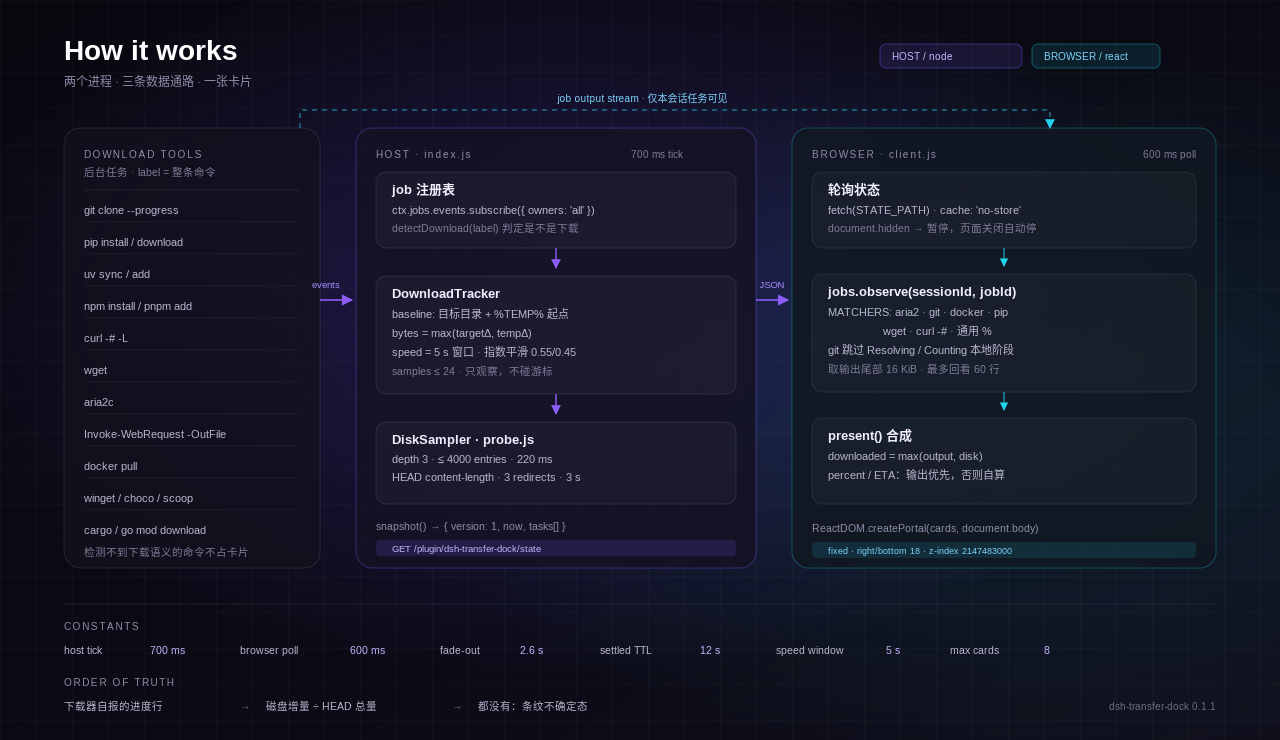
| Half | Files | Runtime | Responsibility |
|---|---|---|---|
| Host | index.js + lib/* |
Harness main process (Node.js) | Subscribe to job events, detect downloads, sample disk, probe totals, expose the state route, inject a prompt section |
| Browser | client.js |
Web GUI (React) | Poll state, read job output, parse progress, merge into cards, portal into document.body |
flowchart LR
    A["Background job starts"] --> B{"detectDownload()<br/>is this a download?"}
    B -- no --> X["No card"]
    B -- yes --> C["Record baselines<br/>target dirs + %TEMP%"]
    C --> D["HEAD probe for total<br/>single URL only"]
    C --> E["Sample every 700 ms<br/>disk byte delta"]
    D --> F["present() merge<br/>output first, disk as fallback"]
    E --> F
    F --> G["Browser polls every 600 ms<br/>renders the card"]
    G --> H{"Job finished?"}
    H -- no --> G
H -- yes --> I["completed / failed / killed<br/>fades out after 2.6 s"]run_in_background: true and the job registry emits an event.detectDownload(label) decides whether it is a download and resolves candidate output paths.%TEMP% entries.HEAD request and reads content-length as the total.settledTtlMs) so the browser can render the final state./plugin/dsh-transfer-dock/state every 600 ms and pauses while the page is hidden.The browser subscribes to the job's output and scans its last 16 KiB (up to 60 lines) for progress frames:
| Downloader | Sample output | Parsed fields |
|---|---|---|
| aria2c | [#1a2b3c 12MiB/45MiB(26%) CN:1 DL:1.2MiB ETA:30s] |
percent, downloaded, total, speed, ETA |
| git clone | Receiving objects: 45% (1234/2740), 1.20 MiB \| 2.30 MiB/s |
percent, downloaded, speed |
| docker pull | 45%\|████ \| 12.3MB/27MB |
percent, downloaded, total |
| pip | 12.9/12.9 MB 491.0 kB/s eta 0:00:00 |
downloaded, total, speed, ETA |
| wget | 0K .......... .......... 45% 1.2M 3s |
percent, speed, ETA |
curl -# |
################# 45.0% |
percent |
| generic | any line containing 45% |
percent |
A few details that matter:
Downloading https://.../p.whl (9.7 MB) is remembered separately; later progress frames only carry bytes downloaded, and the two together produce a percentage.Receiving objects. Resolving deltas, Counting, Compressing, Writing, Updating and Enumerating are local phases; treating their 100% as download progress makes the bar jump backwards.MiB/s, the parser also looks for a standalone X MB/s token in the same line.curl -# ... | Select-Object and friends eat stdout/stderr; that data source is unavailable and only disk sampling remains.The browser cannot read the filesystem, so the Host samples. Targets aren't guessed — they are parsed from the command text:
| Clue | Sampled target |
|---|---|
| A URL's file name | <cwd>/<file>, <file>.part, <file>.tmp |
-o / -O / --output / -OutFile / -Destination / --dir and friends |
The resolved real path |
git clone |
The target repo's .git (the working tree is never walked) |
npm / pnpm / yarn / uv |
node_modules and .venv under the working directory |
$dir="D:\dl" in the command |
Expanded before resolution; if a variable cannot be resolved the path is skipped rather than guessed |
| Everything | %TEMP% entries matching the downloader's prefix, plus .part / .partial / .crdownload / .opdownload staging files |
%TEMP% matching is scoped by downloader prefix (pip-, uv-, npm-, pnpm, npx-, yarn-, git-, winget-, choco-, scoop- …) because a Windows temp directory routinely holds hundreds of unrelated .tmp files.
Sampling has hard budgets so a huge directory can't stall the main process:
| Parameter | Value | Purpose |
|---|---|---|
| Per-round budget | 220 ms (50–2000, configurable) |
Stops walking as soon as the budget is spent |
| Target / temp split | 45% / 55% | Neither path can starve the other |
| Recursion depth | 3 levels | Avoids descending into nested node_modules |
| Entry cap per round | 4000 | Keeps giant trees from eating the whole budget |
| Sampling tick | 700 ms | Smooth enough, cheap enough |
| Speed window | 5 s | Byte delta between the window's first and last sample |
| Smoothing | 0.55 × old + 0.45 × new | Damps sampling jitter |
Every byte count is a delta: the Host records the target directory and %TEMP% baselines when the task opens, then counts only growth. Files that were already in the directory never count as this download.
For a single-file URL (exactly one HTTP(S) address in the command), the Host sends one HEAD request:
content-length counts (a 404 error page has a length too, and it would be wrong);The browser merges the two paths like this:
| Field | How it merges |
|---|---|
downloaded |
max(job output, disk delta) — either can lead temporarily, and the max means progress never steps backwards to zero |
total |
job output (including pip's (9.7 MB)) → HEAD content-length; neither → stripes |
percent |
job output → downloaded / total × 100; neither → stripes |
speed |
job output → disk sampling speed; neither → hidden |
eta |
job output → (total − downloaded) / speed; neither → hidden |
A real percentage appears only when the job output carries one, or when the output/HEAD supplies a total. Everything else degrades honestly.
Moving stripes mean the plugin is in its indeterminate state: it knows a download is running, how many bytes have landed and how fast, but not the total, so it honestly refuses to invent a percentage.
There are only three ways to end up without a total:
curl -s, wget --quiet, or output swallowed by a pipe);probeTotals is disabled.This is not a fallback to failure but a deliberate third state: don't fake certainty. The card still shows 12.4 MB written and a live speed, so the information isn't zero.
When you will always see a percentage:
| Scenario | Percentage | Total source |
|---|---|---|
curl -# -L -o file URL |
✅ | Hash progress line |
curl -s -L -o file URL |
✅ | HEAD probe |
git clone --progress |
✅ | Receiving objects |
aria2c |
✅ | Its own progress line |
docker pull |
✅ | Its own progress line |
wget |
✅ | Its own progress line |
pip install / python -m pip download |
✅ | pip's (9.7 MB) + disk delta (when the output carries a total) |
npm install / pnpm add |
❌ stripes | Dozens of packages, no single total |
Multi-URL curl / wget |
❌ stripes | Same reason |
| Silent download from a server without HEAD | ❌ stripes | No source at all |
Detection looks only at the command text (job.label) and takes the first matching rule, in a fixed order:
| Tool | Matching commands | Progress source | Badge |
|---|---|---|---|
| git | git clone / fetch / pull / submodule update / lfs pull |
output lines + .git sampling |
git |
| pip | pip install / download / wheel, including python -m pip |
output lines + %TEMP% sampling |
py |
| uv | uv pip install / add / sync / lock / download / export |
disk sampling + %TEMP% |
py |
| npm family | npm / pnpm / yarn / bun with i, install, ci, add, dlx, create, update, fetch, rebuild |
disk sampling (node_modules) |
npm |
| curl | Any curl call that has a URL or an output flag |
-# output + target sampling |
c |
| wget | Any wget call |
output lines + target sampling | w |
| aria2 | aria2c |
output lines + target sampling | a2 |
| PowerShell | Start-BitsTransfer; Invoke-WebRequest / iwr / Invoke-RestMethod / irm with -OutFile |
target sampling | web |
| Package managers | winget install / download, choco install, scoop install / update, nuget install, dotnet tool install / add package |
%TEMP% sampling |
app |
| Rust / Go | cargo install / fetch / vendor / update, go get / mod download |
%TEMP% sampling |
rs / go |
| Docker | docker pull / load / save / build |
output lines | dk |
Explicitly ignored (no card, no sampling):
git status, git log, git commit and other non-fetching commands;curl --version, wget --help, aria2c -h — version/help only, with neither a URL nor an output flag;pip list, pip freeze — no install/download action;Invoke-WebRequest without -OutFile (usually an API call read into memory, not a download);npm run build, npm test — run isn't a download verb;Prerequisites:
>= 0.2.0-rc.1 < 0.3.0-0 (from dsh.compatibility in package.json);>= 20;desktop; substitute yours).The plugin is listed in the awesome-dsh-plugin catalog, so the market inside DeepSeek Harness — dsh-market, under UI Enhancements — lists it with a one-click Install. The market runs exactly the CLI command below, so either entry point ends in the same profile state.
dsh plugin --profile desktop add github:imnotRiv3r/dsh-transfer-dockThat one command is the whole install: it adds the dependency to the profile's package.json and appends dsh-transfer-dock to dsh.profile.bundles. There is no npm package — the GitHub source is the only release channel. To pin a commit:
dsh plugin --profile desktop add github:imnotRiv3r/dsh-transfer-dock#b2404e2Uninstall is symmetric — it drops the dependency and the bundles row together:
dsh plugin --profile desktop remove dsh-transfer-dockThe repo has no build step (no prepare/install script, and exports points straight at the source), so the first install does not raise pnpm's allowBuilds prompt.
dsh plugin --profile desktop add 'link:E:\dshWorkspace\dsh-transfer-dock'The profile now points at your checkout, so edits are live: the Host half hot-reloads with the profile, the browser half needs one page refresh. pnpm warns that a link: dependency does not resolve peerDependencies from the target — the only one this package declares is @deepseek-ai/schemastery, which a DSH profile already provides through @deepseek-ai/dsh-base.
Prefer a frozen copy, where edits require re-running the command? Use file:E:\dshWorkspace\dsh-transfer-dock instead of link:....
| Change | Takes effect |
|---|---|
Host half (index.js, lib/*) |
Hot reloads with profile changes |
Browser half (client.js) |
One page refresh |
Config (cordis.patch.yml) |
Hot reload; the browser half picks it up after a refresh |
locale/en.json and locale/zh.json carry meta.title and meta.description, and icon.svg is the plugin-page icon (through the icon field in package.json plus ./locale/*.json and ./icon in exports). After install, rename or update, refresh the page once and the plugin page shows "Download dock" / "下载坞" with its icon. If it still falls back to the package name or default artwork, the host has not re-read the package manifest yet — restart DSH.
# Is the Host half alive? `hits` grows once the browser half attaches (use your DSH Web port).
Invoke-RestMethod http://127.0.0.1:2482/plugin/dsh-transfer-dock/state
A healthy response looks like:
{ "version": 1, "now": 1731427200000, "tasks": [], "poll": { "hits": 412, "lastHitAt": 1731427200000, "build": "0.1.1" } }Now trigger a visible download (rate-limited to 300 KB/s so the card has time to appear):
curl.exe -L -# --limit-rate 300k -o "$env:TEMP\probe.bin" `
  https://mirrors.aliyun.com/pypi/packages/a3/dd/4b822569d6b96c39d1215dbae0582fd99954dcbcf0c1a13c61783feaca3f/numpy-2.2.6-cp310-cp310-win_amd64.whl
It must be a background job (
run_in_background: true, or a foreground command promoted to background on timeout). Foreground commands have no job row, so there is nothing to observe — that follows from Harness' job model.
The row id is transfer-dock; edit it in the profile's cordis.patch.yml:
- id: transfer-dock
  name: dsh-transfer-dock
  config:
    enabled: true
    guidePrompt: true
    settledTtlMs: 12000
    maxTasks: 8
    sampleBudgetMs: 220
    probeTotals: true
workingDirectory: ''| Field | Type | Default | Range | Meaning |
|---|---|---|---|---|
enabled |
boolean | true |
— | Master switch: off means no detection, no sampling, no route |
guidePrompt |
boolean | true |
— | Add the download guidance section to the system prompt |
settledTtlMs |
number | 12000 |
1000–120000 | How long the Host keeps returning a finished task |
maxTasks |
number | 8 |
1–32 | Maximum cards rendered at once |
sampleBudgetMs |
number | 220 |
50–2000 | Per-round disk sampling budget; lower it on huge directories |
probeTotals |
boolean | true |
— | HEAD-probe single file URLs for a total; off means silent downloads stay indeterminate |
workingDirectory |
string | process cwd | — | Base for resolving relative paths; empty uses the Harness process cwd |
With guidePrompt on, the plugin injects a short system-prompt section: for download commands prefer run_in_background: true, and add progress-friendly flags (git clone --progress, curl -# -L; wget and aria2c already report progress). That section is what determines how often cards actually appear — the model has to put downloads in the background before there is anything to observe.
Config values are normalized on the Host side (numbers clamped to range and rounded, blank strings fall back to the process cwd), so a malformed value can't crash the plugin.
GET /plugin/dsh-transfer-dock/state returns a read-only JSON snapshot (cache-control: no-store):
{
  "version": 1,
  "now": 1731427200000,
  "tasks": [
    {
      "id": "job_7f3a",
      "sessionId": "sess_2b91",
      "tool": "pip",
      "fileName": "numpy-2.2.6-cp310-win_amd64.whl",
      "label": "python -m pip download numpy --no-deps -d E:\\ws",
      "status": "running",
      "startedAt": 1731427188000,
      "finishedAt": null,
      "elapsedMs": 12000,
      "bytes": 4140000,
      "speed": 148000,
      "total": 12900000,
      "detail": null,
      "source": "temp"
    }
  ],
  "poll": { "hits": 412, "lastHitAt": 1731427200000, "build": "0.1.1" }
}| Field | Meaning |
|---|---|
version |
Snapshot format version, currently 1 |
now |
When the Host built the snapshot |
tasks[].id |
Harness job id |
tasks[].sessionId |
Owning session; null for ownerless jobs, which can only show bytes (their output stream is unavailable) |
tasks[].tool |
Detected tool (git, pip, npm, curl …) |
tasks[].fileName |
Card title (file / repo / package name) |
tasks[].label |
Full command text (shown as the card's hover title) |
tasks[].status |
running / stopping / completed / failed / killed |
tasks[].elapsedMs |
Milliseconds elapsed (total once finished) |
tasks[].bytes |
Monotonic disk delta in bytes |
tasks[].speed |
Smoothed bytes per second |
tasks[].total |
Total size; null when unknown |
tasks[].detail |
Failure reason (null on success) |
tasks[].source |
Whether bytes mainly came from target or temp |
poll.hits |
Requests to this route — direct evidence the browser half is mounted |
poll.build |
Build marker of the Host that answered |
For debugging, add ?diag=... to the URL: the value is truncated to 4000 characters and echoed in poll.diag, so you can confirm which build the browser actually reached.
| Symptom | Likely cause | Fix |
|---|---|---|
| No card at all | Not a background job | Use run_in_background: true; foreground downloads never show a card |
| Command doesn't look like a download | Check it against the list above; npm run build and git status don't count |
|
| Browser half not loaded | Refresh the page; confirm dsh-transfer-dock is in bundles |
|
| Plugin disabled | Check enabled; look for disabled by config in the Host log |
|
webServer not ready |
The plugin retries every 500 ms, 20 times; after that you'll see webServer never became available |
|
| Card appears but bytes stay at 0 | Download doesn't hit disk, or lands somewhere unresolved | Use an explicit -o / -OutFile; make sure $var paths expand to real absolute paths |
| Directory too deep / too many entries | Raise sampleBudgetMs, or download into a shallower directory |
|
| Card always shows stripes | No total available | HEAD only runs for a single HTTP(S) URL with probeTotals: true; multi-package / multi-URL downloads have no single total |
| Card flashes and disappears | Task was very short | Cards stay hidden for the first 500 ms of a run; finished cards still show for 2.6 s, so a quick fade-out is normal |
| Card only appears after a refresh | The browser half doesn't hot reload | Expected — client.js changes require a page refresh |
| Numbers freeze mid-download | The job itself is stuck (DNS, TLS, silent server) | The card truthfully shows the last byte count and a zero speed; it does not guess |
| Speed curve wobbles on huge directories | Sampling budget too small | Raise sampleBudgetMs, or accept the estimate (see Limitations) |
Two pip runs bleed into each other |
%TEMP% is shared |
Prefix filtering makes it rare, but concurrent runs of the same tool can still mix; run them serially |
Three-state diagnosis with poll.hits:
hits |
Meaning | Next step |
|---|---|---|
| Not growing | Browser half isn't loaded | Refresh; check profile bundles; check the browser console |
| Growing, no card | Mounting or data problem | Check whether /state returns non-empty tasks; verify the page renders outside shell.overlay |
| Growing, card present, numbers frozen | Sampling isn't matching | Inspect tasks[].source and bytes; check targets and permissions |
run_in_background is the only entry point.npm install and multi-URL batch downloads have no single total by design.pip / npm print no live progress in a non-TTY pipe. The percentage is disk delta ÷ total; pip's total comes from its own opening line, and npm has even less, so it usually stays indeterminate.%TEMP% is shared. Two concurrent pip downloads can bleed into each other's byte counts; prefix filtering only makes it rare, not impossible.maxTasks × 2 tasks and the snapshot exports the first maxTasks.git clone https://github.com/imnotRiv3r/dsh-transfer-dock.git
cd dsh-transfer-dock
node test/smoke.mjs # detection, parsing, merging, browser-half registration — fully offline
npm run check # node --check on every source fileProject layout:
| File | Responsibility |
|---|---|
index.js |
Host entry: config normalization, job subscription, state route, prompt injection |
lib/detect.js |
Command detection, URL / output-flag / variable expansion, target resolution |
lib/tracker.js |
Task ledger, 700 ms sampling tick, speed smoothing, snapshot export |
lib/sampler.js |
Budgeted directory byte counting, %TEMP% prefix filtering, baselines |
lib/probe.js |
HEAD content-length probe (timeouts, redirects, status validation) |
client.js |
Browser half: polling, output parsing, merging, card rendering and portal mounting |
test/smoke.mjs |
Offline smoke test built from excerpts of real command output |
docs/*.svg, docs/*.png |
README artwork and card renders |
The smoke test covers 10 commands that must be detected, 7 that must not, shell variable expansion, pip -d exclusion, invalid probeContentLength inputs, git / aria2 / wget / curl progress frames, present()'s percentage and ETA, and client.js's module and slot registration. Fixtures are excerpts of real output, and nothing touches the network.
| Decision | Why |
|---|---|
Mount with ReactDOM.createPortal into document.body |
The shell.overlay container carries transform / overflow, so a position: fixed card inside it gets clipped or positioned against that ancestor — the component runs but nothing is visible |
| 700 ms sampling / 600 ms polling | Fast enough to look continuous, cheap enough to leave the main process and browser alone |
downloaded = max(output, disk) |
Either path can lead temporarily; taking the max avoids progress stepping backwards |
| Deltas, not absolute sizes | Download folders usually contain old files that must not count toward this download |
| HEAD for single URLs only | Multi-URL downloads have no single total, so any probe result would be wrong |
| Observe, never intervene | The plugin must not affect job lifecycle, completion notices or model context |
No hot reload for client.js |
Harness registers browser modules at page load; edits require a refresh |
MIT © imnotRiv3r
If this card saves you a few terminal stares, a ⭐ is enough.
CLASSIFICATION EVIDENCE
系统优先读取 GitHub Topics,再与站内分类词典和词根规则比对。当前命中: deepseek-harness。
morluto
Reverse engineer anything with agents, from app behavior down to native binaries.

deepseek-ai
DeepSeek Harness: Everything is a Plugin.

nexu-io
The 1st Collaborative AI Design Agent Workspace. Local-first and open source. Create motion, prototypes, websites, apps, dashboards, presentations, images, and videos with your team and AI agents. Share work, exchange feedback, and iterate together in one workspace.