
模型与 MCP
待识别

rea
morluto
Reverse engineer anything with agents, from app behavior down to native binaries.
PROJECT TOPICS
PROJECT README





Immersive weather for DeepSeek Harness — rain, snow, hearth, and a painted backdrop behind the glass, with real recordings and a night mode.
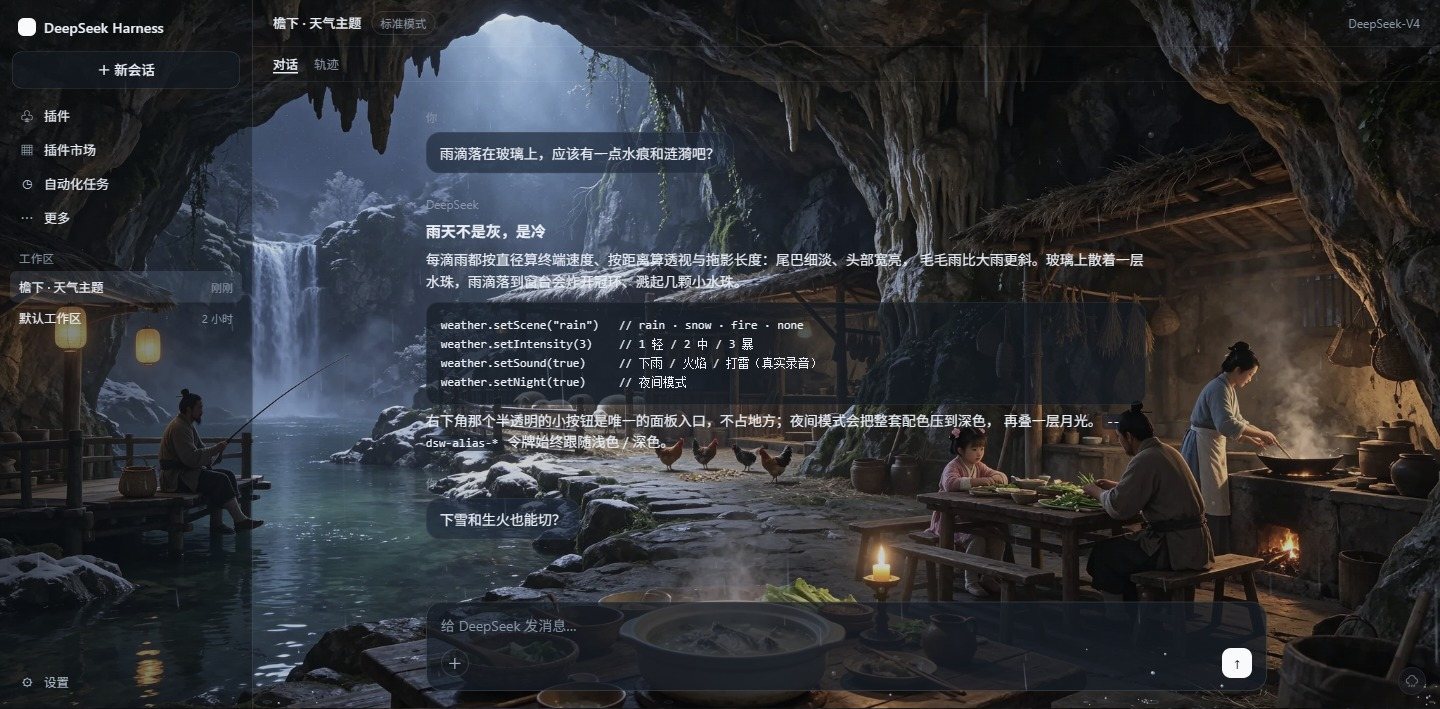
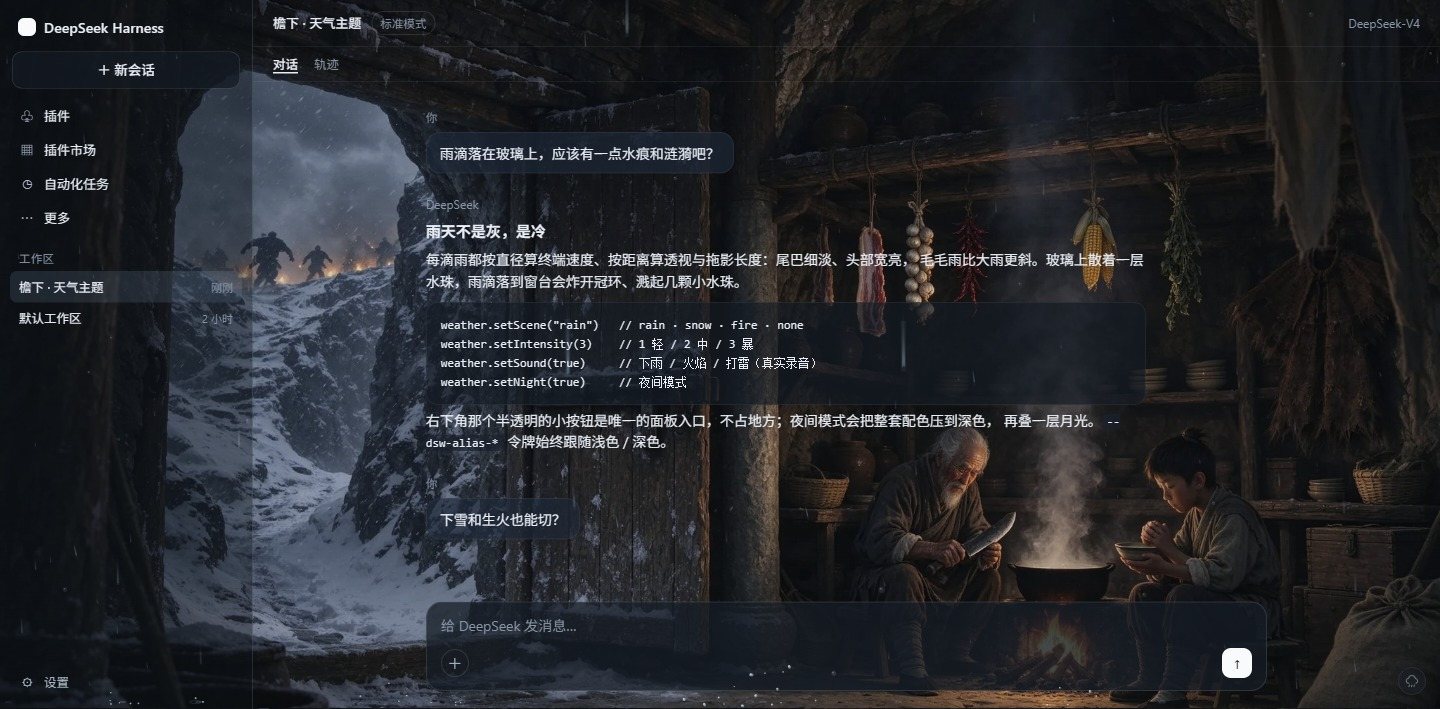
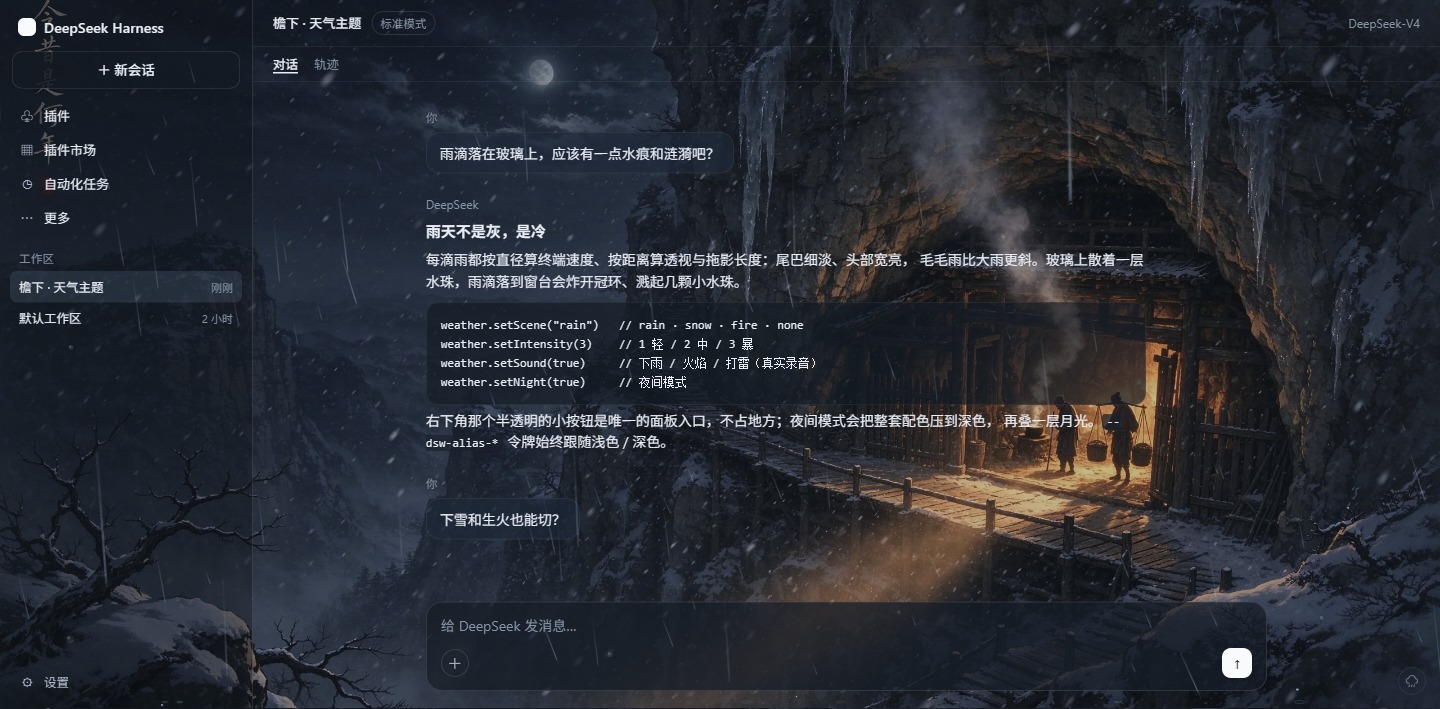
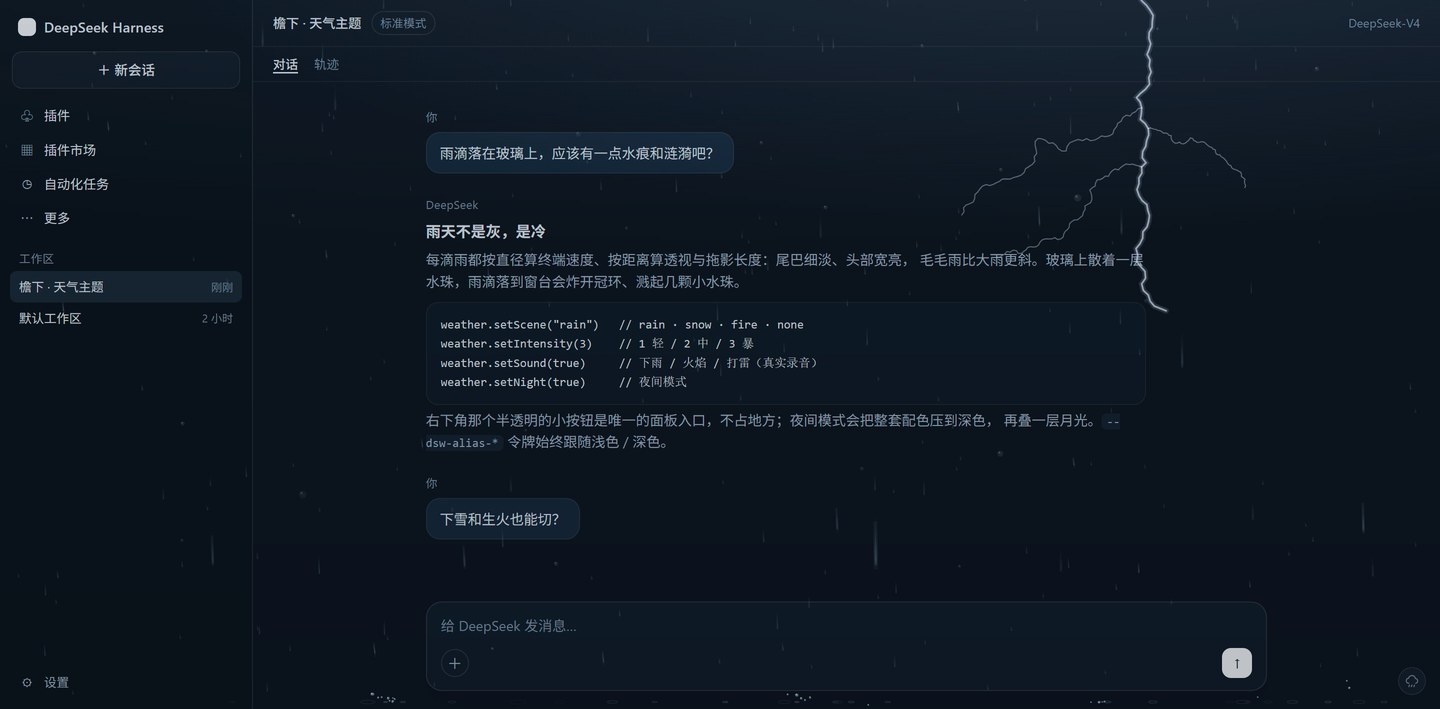
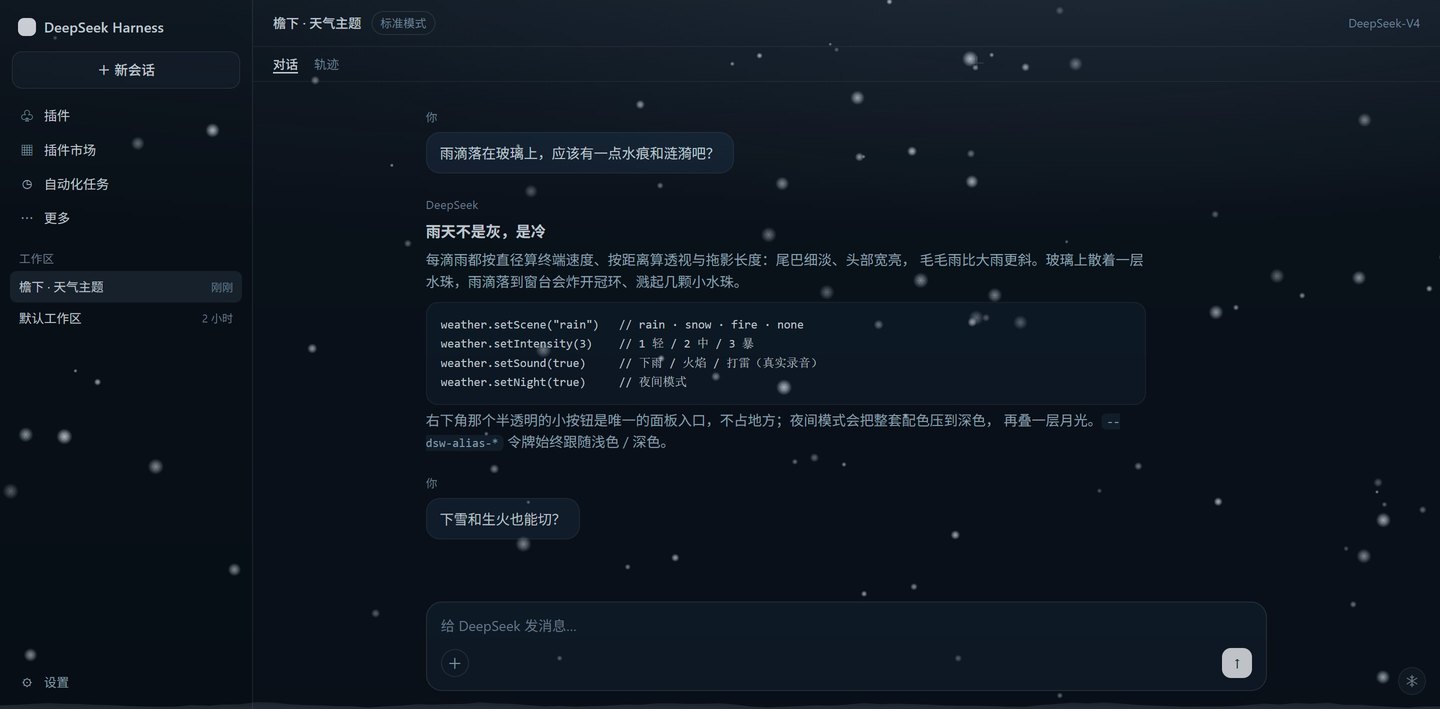
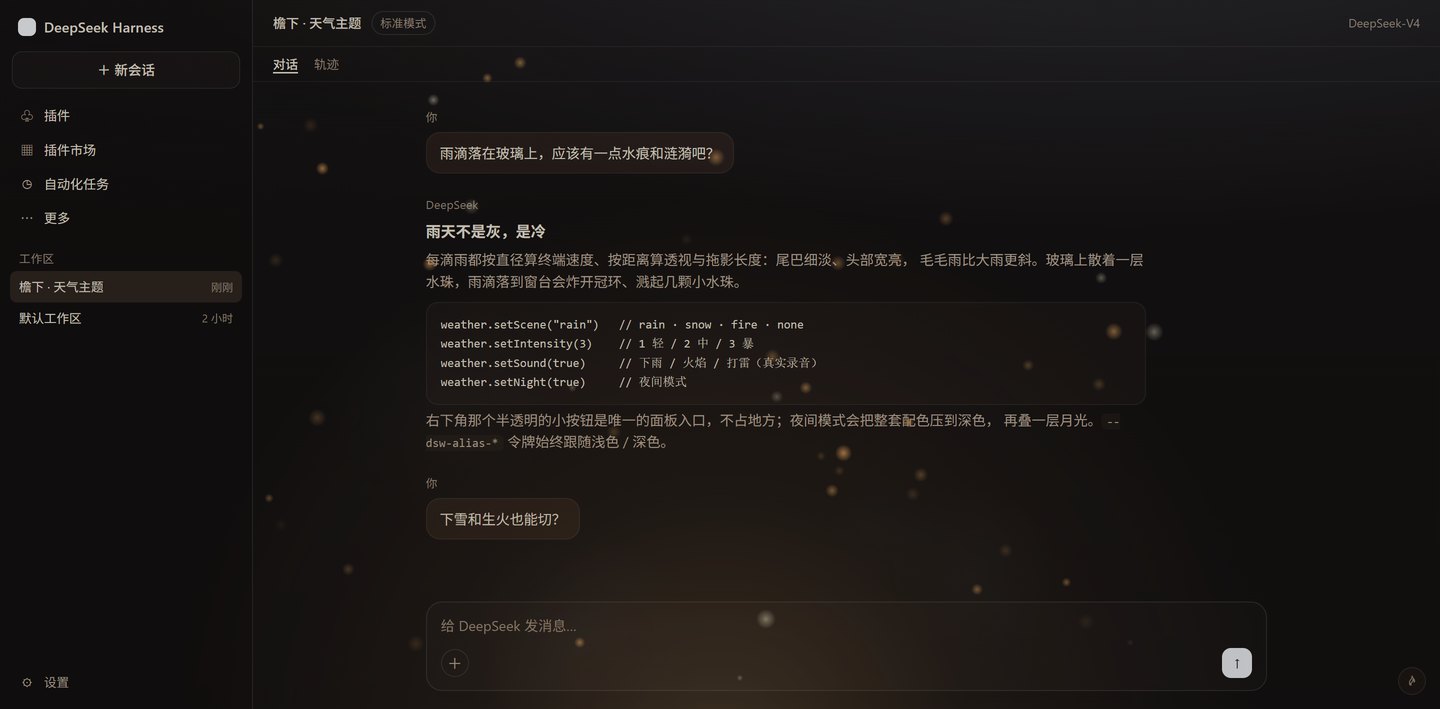
Contents: Scenes · Wallpapers · Install · Usage · Audio · How it works · Development · Release · Credits
Shelter is a thin layer of weather over the DeepSeek Harness web GUI. Rain leaves beads on the glass; snow drifts slowly outside; a fire glows under the composer. Behind all of it sits one of twenty-five paintings — a lit doorway in a snowbound cliff, a watchtower over a burning ridge — seen through a shell whose surfaces have turned to glass.
It changes nothing about how DSH works — only the air you sit in while working. The entry point is a 28 px button in the bottom-right corner; the rest of the time it just rains, quietly.
| Scene | What you see | Palette |
|---|---|---|
| Rain | Streaks that each fall at their own speed, slant with the wind, and splash where they land | Cool blue-grey, deep navy shadows |
| Snow | Two kinds of crystal drifting through one wind field, over a bank that grows as it snows | Colder and whiter, icy-blue accents |
| Fire | A warm pulse from below, rising embers, sparks, slow smoke | Warm neutrals, amber accents |
Semantic colors (error red, success green, warning amber) are untouched in every scene.
Twenty-five wallpapers, every one a different picture. Four are the hero paintings; eighteen are a story series drawn from the same world — mountain villages at dawn, a refuge in bad weather, a hidden valley, a melon patch at dusk; and three are painted procedurally by tools/make-wallpapers.py. The panel labels them in Chinese; the names below are their translations.
| Hero painting | What you get |
|---|---|
| Moon Cliff | the default: a doorway lit under a cliff, the moon above the snow |
| Watchtower | a wooden tower lit by lanterns, a fire burning on the far ridge |
| Homeward | an old traveller following his own tracks toward a lit cave door |
| Village Snow | a thatched yard under snow, warm windows, a dog by the fence |
The story series (18): Morning Stockade (a hamlet at first light) · Chimney Smoke (smoke over the same hamlet) · Snow Steps (a stair cut into a frozen cliff) · Hearth Room (the fire indoors, the door open to the snow) · Night Crossing (a boat in a storm) · Mooring (moored under the water pavilion) · Cave Feast (a feast inside the rock) · Peach Valley (the peach-blossom valley) · Blossom Stream (the same valley, blossoms in front) · Cliff Dwellings (rooms cut into the cliff face) · Snow Path (two figures on a snowy path) · By the Fire (two by the fire in a cave) · Cave House (a wooden house built into a cave) · Cave Pool (dinner beside a turquoise pool) · Water Veil (the same pool behind a waterfall) · Warm Pool (the pool, blossoms in the light) · Vine House (a house in a melon field) · Summer Yard (a summer night yard, watermelon and a cat).
The painted atmospheres (3): Night Wood (misty wood) · Eaves Rain (wet pane and bokeh) · Aurora (light curtains over a ridge).
The picker is a 3-column strip that scrolls after three rows, and it scrolls the current wallpaper into view when the panel opens.
Framing and grading are independent of the image, so every wallpaper — yours included — can be re-cropped and recoloured:
| Control | Effect |
|---|---|
| Framing | Full / Left / Right — the side crops zoom 1.5× toward that edge, so a wide painting gets a new composition |
| Grade | Original / Cool / Warm / Ink — a cool wash, a warm sepia, or monochrome |
| Glass | Light / Medium / Heavy — how much the veil dims the picture; cards and the composer stay solid enough to read |
| Frost | blurs the picture only; the chrome keeps its own contrast |
Your own image. Click the + tile and pick a file, or drop an image anywhere on the panel. It is capped at 2560×1600, re-encoded as WebP when that saves bytes, and kept in IndexedDB — it survives reloads and never leaves the browser. Click the tile again to replace it; the small × on the selected tile deletes it.
A folder of wallpapers. Images dropped into ~/.dsh/wallpapers/ — $DSH_HOME/wallpapers/ when the home is overridden — show up as extra tiles the next time the panel opens (PNG, JPEG, WebP, AVIF, GIF; the plugin only ever reads that folder).
Glass. A wallpaper has to be let through. While one is active the plugin makes the page sheet itself fully transparent — the shell paints that single token on body, the frame and the tab host, so any leftover alpha compounds into mud — then lays one tinted veil over the image and keeps cards, menus and the composer nearly solid. That is what makes the picture sharp and full-strength in the gutters while text still has a surface to sit on. Everything else in the panel works as before.
Requires DeepSeek Harness (desktop or web).
cd "$env:USERPROFILE\.dsh\profiles\desktop"
pnpm add "C:\path\to\dsh-theme-shelter"
Then append dsh-theme-shelter to dsh.profile.bundles in the profile package.json, and reload the window (Ctrl+R) or restart DSH.
It is also on npm as dsh-theme-shelter: npm i dsh-theme-shelter installs the same bundle, and the plugin market installs it from there. The install is about 15 MB — the 25 wallpapers (6.8 MB) and the ambience recordings (7.7 MB) are almost all of it; the code is a few hundred KB.
On npm 12+ a tarball or git URL is refused by default (install-time security defaults) — add --allow-remote for a remote tarball, or --allow-git for a git dependency. This package ships no install scripts, so nothing else is affected.
Manual alternative — add to ~/.dsh/profiles/desktop/cordis.patch.yml:
- insert:
    - id: theme-shelter
name: dsh-theme-shelterClick the small button in the bottom-right corner:
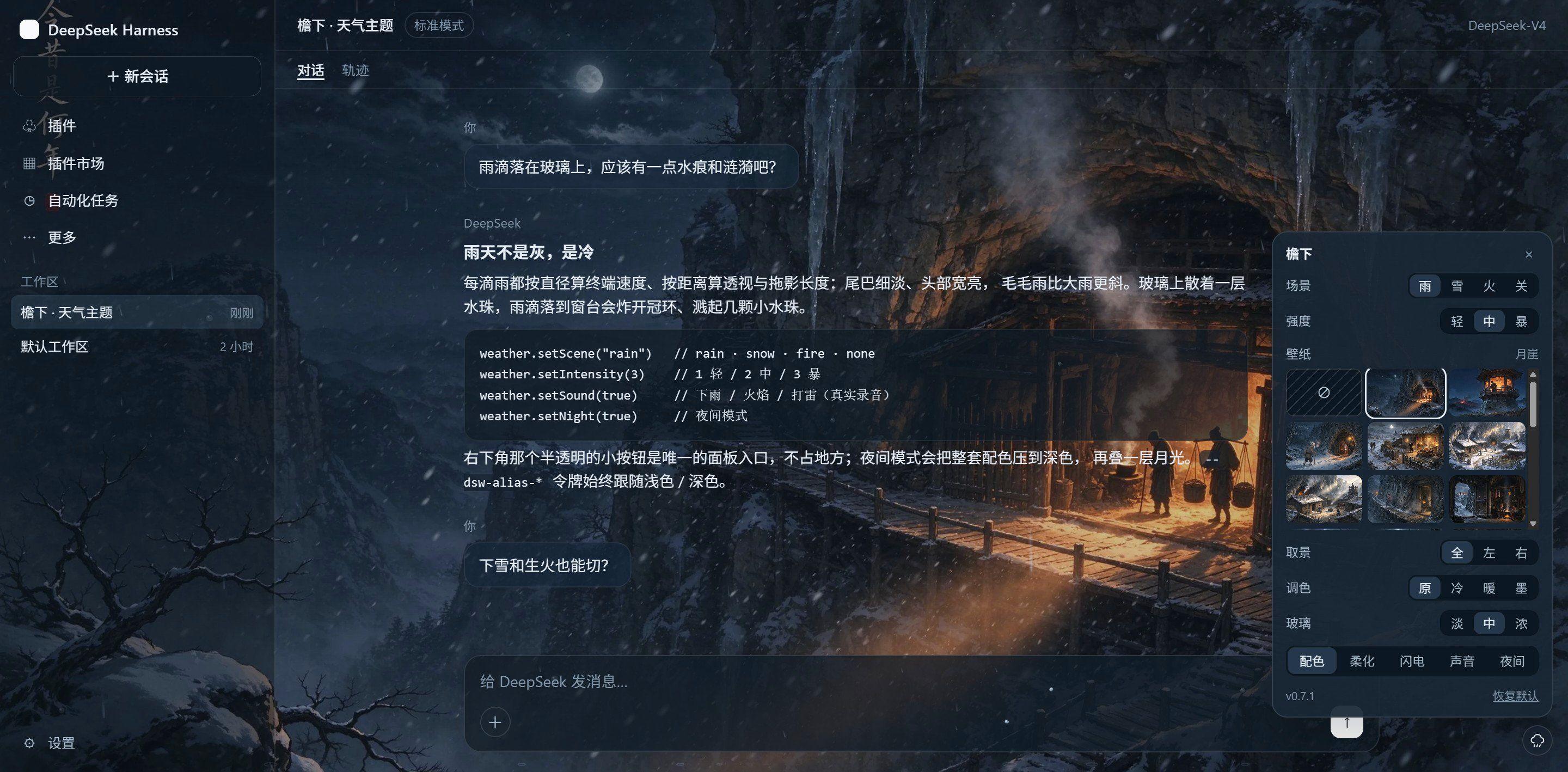
| Control | Effect |
|---|---|
| Scene | rain / snow / fire / off |
| Intensity | light / medium / heavy |
| Wallpaper | none · 25 wallpapers · your own image — plus any file in ~/.dsh/wallpapers |
| Framing | Full / Left / Right: crop and zoom the chosen wallpaper |
| Grade | Original / Cool / Warm / Ink: recolour it |
| Glass | Light / Medium / Heavy: how much the veil dims the picture |
| Frost | soften the image; the rest of the chrome keeps its own contrast |
| Palette | theme colors on or off — the animation runs either way |
| Lightning | rain only: bolt, flash, thunder |
| Sound | rain and fire recorded, snow wind generated |
| Night | dark palette plus a moonlight wash |
Lightning. A strike draws a branched bolt across the sky, flashes the pane, then bangs. The delay encodes distance — 0.3–0.9 s when close, 1.5–2.8 s when far — and a close strike leaves a cracked pane for 5–9 s. Strikes land every 2–9 s, denser at intensity 3.
Sound. Browsers refuse audio until the page has seen a click or a keypress, so the first sound arrives after your first interaction.
Settings live in localStorage["dsh-theme-shelter/v2"] and survive reloads; a picked wallpaper image is the one thing that lives in IndexedDB instead, because a photo does not fit in the 5 MB quota.
First run. On a fresh install a small bubble appears above that button with a one-line hint (“click here to switch the weather”, in the UI's own language). It never takes a click itself: any click or keypress anywhere dismisses it, and so does twelve seconds passing. If you miss it, the button is always in the bottom-right corner: 28 px, with a cloud, umbrella, snowflake or flame depending on the scene.
Console API:
__dshWeather.setScene("fire")     // rain · snow · fire · none
__dshWeather.setIntensity(2)      // 1 light / 2 medium / 3 heavy
__dshWeather.setPalette(false)    // animation only, default colors
__dshWeather.setWallpaper("tower") // an id from __dshWeather.wallpapers, or none / custom / "u:<file>"
__dshWeather.setWallCrop("left")  // full · left · right
__dshWeather.setWallTone("warm")  // none · cool · warm · ink
__dshWeather.setWallDepth(3)      // 1 light / 2 medium / 3 heavy
__dshWeather.setWallBlur(true)    // frosted image
__dshWeather.setSound(true)
__dshWeather.setNight(false)
__dshWeather.reset()Rain and fire are recordings (about 6.7 MB). The host half serves them read-only at /dsh-theme-shelter/audio/* with Range (206), HEAD, a one-year immutable cache, and a 403 for cross-origin Origin.
Snow has no recording, because real snowfall is nearly silent: it is a looped brown-noise bed through a lowpass that breathes over roughly fifteen seconds, held at a whisper (0.04 / 0.07 / 0.11 against rain’s 0.18 / 0.30 / 0.42). It needs no asset and starts before any file has loaded.
ctx.theme.overrideTokens() overrides 47 --dsw-alias-* tokens: surfaces, text, borders, code blocks, scrollbars. Button fills, brand colors, links and focus rings are deliberately left alone.z-index: -1: below every surface, above the canvas that body's background propagates to. Two child layers crossfade between images; a third carries the tint. Framing is a transform (scale 1.5 anchored just outside the left or right edge, so the blur bleed never exposes a seam) and grading is one filter, so neither needs another asset. Built-ins are served by the host; a picked image is an object URL over an IndexedDB blob.--dsw-alias-bg-base on body, the frame and the tab host at once, so leaving any alpha there compounds three times and turns the picture into mud. Wallpaper mode therefore makes that one token fully transparent and splits the remaining surfaces into page / panel / content, each with its own opacity (about 0.44 / 0.84 / 0.78 at depth 2 in the light scheme; a little lower in dark). A single veil over the image then owns contrast — 0.34 light, 0.24 dark at depth 2 — and the weather mist, which sits above the UI, is switched off because the wallpaper already supplies the haze. Text, borders and interaction tints stay fully opaque.v = 9.2·√(d/3) (0.5 mm ≈ 2.2 m/s, 3 mm ≈ 8.5 m/s); screen speed and width scale by 1/z; the streak is speed × 6 ms exposure, clamped to 7–70 px; the angle is atan(wind / speed), so drizzle leans further than heavy rain, over a slow gust envelope. Streaks taper from a thin tail to a bright head and are baked into sprites (5 width × 4 length buckets) so each drop costs one drawImage.z; screen size is size × 1800 / z. They ride a position-coherent wind field (a slow base drift plus turbulence sampled from x, y and time) instead of each flake swaying on its own, and landings deposit mass into an accumulation ridge that grows while it snows instead of appearing pre-formed.<audio> on the client for rain and fire, fading out and releasing between scenes, and a Web Audio graph for the snow wind./dsh-theme-shelter, carrying audio/, the bundled wallpapers/, the user folder at wallpapers/u/<file> and a wallpapers/list.json listing. A bundled wallpaper is served only when its name is a plain <slug>.webp and the file exists in wallpapers/, so adding an image needs no second list; the user branch accepts one plain file name with an image extension, re-checks containment, and sends X-Content-Type-Options: nosniff.prefers-reduced-motion draws a single static frame and skips the wallpaper crossfade. Each wallpaper decodes exactly once (50–512 KB WebP, up to 2560 px wide) and the panel thumbnails are separate 2–21 KB copies; the picker only decodes the thumbnails, and an idle wallpaper layer drops its filter so no third offscreen buffer stays alive.preview/preview.html is a standalone harness: it fakes the module loader, ctx.theme and the asset base, so you can open it directly to see all three scenes, night mode, the wallpapers, framing, grading and the panel. It also exercises the custom-image path — dropping a file there stores it in IndexedDB like the real GUI does.
The profile links this package with link:, so editing client/client.js only needs a DSH restart. Wallpaper assets are regenerated with python tools/make-wallpapers.py wallpapers (three illustrations, deterministic from the script's seed); the supplied paintings are converted to WebP and thumbnails separately. Adding a wallpaper means dropping <id>.webp and <id>-thumb.webp into wallpapers/ and adding an entry to WALLPAPERS in client/client.js — the host serves any <slug>.webp that exists there, so there is no second list to keep in sync.
Three things have to agree: the git tag, package.json, and npm. The market reads the GitHub entry and maps it to the npm package by its repository field — when the tag and the npm version drift apart, users are told an update exists and then install the old code.
version in package.json and const VERSION in client/client.js (the panel footer shows that one). Changing only one leaves the panel reporting the previous release.git commit -am "chore: release 0.7.3"
git tag -a v0.7.3 -m "0.7.3"
git push --follow-tagspublishConfig already points at the origin registry, so no --registry is needed even when the machine-level .npmrc uses a China mirror:npm publishNothing else to upload by hand: the tarball: in the market entry points at a GitHub Release asset and only covers installs that cannot reach npm.
npm is the only registry. The Packages panel on GitHub stays empty on purpose — it lists GitHub Packages only, and nothing here is published to npm.pkg.github.com. A mirror would have to be scoped (@ifer47/dsh-theme-shelter), which is a second package name for the same code and only adds "which one do I install" confusion. Install from npm, or from the plugin market.
--dsw-* tokens; a component with a hardcoded background would sit on top of the wallpaper;~/.dsh/wallpapers/ for files that should travel with the machine;wallpapers/;Twenty-two supplied paintings ship with the plugin — the default cliff scene, the watchtower, the old traveller coming home, the village yard, and the eighteen-scene story series — as WebP assets under wallpapers/. They are bundled so a fresh install already has a backdrop. The other three wallpapers (forest, rain, aurora) are generated by tools/make-wallpapers.py in this repository, so they carry no third-party licence.
The ambience recordings come from Pixabay and are used under the Pixabay Content License: free for commercial and non-commercial use, no attribution required, but the files may not be redistributed as standalone assets. They are bundled here as part of a larger work.
| File | Use |
|---|---|
audio/rain.mp3 |
rain loop |
audio/fire.mp3 |
hearth loop |
audio/thunder.mp3 |
one-shot thunder after a flash |
Drop a replacement with the same filename into audio/ to swap a sound.
MIT © ifer47
CLASSIFICATION EVIDENCE
系统优先读取 GitHub Topics,再与站内分类词典和词根规则比对。当前命中: deepseek、deepseek-harness。
morluto
Reverse engineer anything with agents, from app behavior down to native binaries.

deepseek-ai
DeepSeek Harness: Everything is a Plugin.

nexu-io
The 1st Collaborative AI Design Agent Workspace. Local-first and open source. Create motion, prototypes, websites, apps, dashboards, presentations, images, and videos with your team and AI agents. Share work, exchange feedback, and iterate together in one workspace.