
其他
完整应用

deepseek-harness
deepseek-ai
DeepSeek Harness: Everything is a Plugin.
PROJECT TOPICS
INSTALL REFERENCE
dsh plugin --profile web add github:idoall/dsh-quick-replies
该命令指向仓库当前默认分支;尚无绑定当前 commit 的完整验证结果。
PROJECT README
Manageable one-tap replies in the DeepSeek Harness session composer.


English | 中文
What it does · Quick start · Usage · Uninstall · Changelog
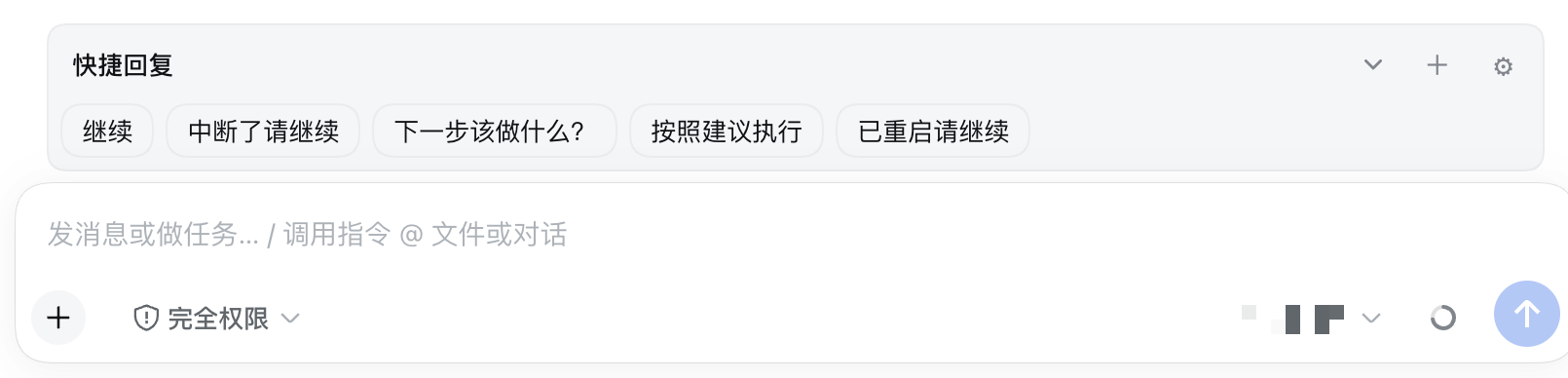
DSH Quick Replies is a DeepSeek Harness community plugin. It mounts above the current session composer and does not modify DSH source.
A row of stored text chips sits above the input. A tap sends them as an ordinary user message: queue while idle, steer when the top-level session is running (handled at the next safe boundary). The plugin never rewrites the draft, never cancels, and never stops work.
The reply library lives in the DSH Host global settings namespace quick-replies, shared across browsers and devices on the same Host. Fold preferences are remembered per browser.
prompt API. Draft text, citations, images, and the cursor are left alone.Requirements:
0.1.5-rc.1 (plugin 0.1.2)If the dsh command is already installed:
dsh plugin --profile web add dsh-quick-replies@latestFrom DeepSeek Harness source:
corepack enable; pnpm install
pnpm dsh plugin --profile web add dsh-quick-replies@latest
Or install via the plugin market (optional):
dsh plugin --profile web add dshmarketRestart DSH, then search for dsh-quick-replies under Settings → Plugin market.
Local development (link this repo):
pnpm install
pnpm run build
dsh plugin --profile web add "link:$(pwd)"
Refresh the web UI after install. The host half registers the settings namespace through cordis.patch.yml; the client mounts the bar on conversation.input.dock. The library is stored in the quick-replies section of ~/.dsh/settings.yaml, not in the plugin install directory.
Four defaults ship with the plugin and can all be deleted; they are not recreated automatically: continue, continue after interrupt, what should I do next?, continue after restart.
DSH disables Host settings persistence for any page whose origin is not a loopback authority (the official dsh-client-ui-settings README states it plainly: Non-loopback pages get no durable settings). settingsScope then answers unavailable and never sends settings.describe, so every settings-backed surface goes inert — this bar showed “Reply library unavailable” when the Web UI was reached from another machine through a LAN bridge such as dsh-lan-proxy, dsh-bridge, or dsh-mobile.
From 0.1.3 the plugin falls back to the SAME public Remote the official settings client speaks (settings.describe / settings.mutate) and therefore keeps reading and writing the one shared Host namespace quick-replies. Reads, edits, import/export and the revision fence behave exactly as they do on a loopback page; a refused write surfaces as a conflict instead of a silent overwrite.
If you want DSH's stock policy instead (a non-loopback page never persists settings), stay on 0.1.2, or let the bridge declare itself the Host: inject window.__DSH_TRANSPORT__ = { fetch: (input, init) => window.fetch(input, init), ownsHost: true } into the served HTML before __DSH_BOOT__. DSH's ctx.connection.isLoopback then reads true and every settings-backed surface — including the Settings pages — comes back. The dsh-mobile gateway already does this.
Current release: plugin 0.1.3 is verified against DeepSeek Harness 0.1.5-rc.1.
| Plugin | Verified DeepSeek Harness |
|---|---|
0.1.0–0.1.1 |
0.1.2-rc.1 |
0.1.2 |
0.1.5-rc.1 |
0.1.3 |
0.1.5-rc.1 |
Use 0.1.3 on DSH 0.1.5-rc.1. Stay on 0.1.1 (or earlier) while still on DSH 0.1.2-rc.1. Newer DSH releases are not auto-declared compatible. If incompatible, disable or uninstall the plugin — do not patch DSH core.
dsh plugin --profile web remove dsh-quick-repliesUninstall does not delete the settings library. To wipe it, export JSON from Manage first, then remove the quick-replies namespace from settings.
pnpm install
pnpm run test
pnpm run build
Pushing a v* tag runs GitHub Actions: tests, pack, optional npm publish when NPM_TOKEN is set, and a GitHub Release.
MIT. See LICENSE.
CLASSIFICATION EVIDENCE
系统优先读取 GitHub Topics,再与站内分类词典和词根规则比对。当前命中: 无有效分类标签。
deepseek-ai
DeepSeek Harness: Everything is a Plugin.

anywhere-labs
为 DeepSeek Harness (DSH) 插件生态打造的现代化桌面端解决方案。万物皆「插件」,桌面本身也是「插件」。

awesome-dsh-plugin
A curated list of plugins for DeepSeek Harness (dsh) · DeepSeek Harness 插件精选列表