

模型与 MCP
待识别

rea
morluto
Reverse engineer anything with agents, from app behavior down to native binaries.
PROJECT TOPICS
PROJECT README
One MCP registry for the whole profile — declare an MCP server once, choose it per workspace, and manage every server from a panel in the DeepSeek Harness sidebar.
English | 简体中文






If this plugin saves you a round of hand-editing JSON, a ⭐ star helps the next person find it.
MCP servers are declared per workspace, so the same server description gets copied into every workspace file that needs it — and drifts. This plugin splits the two questions that were tangled together:
| Question | Where it is answered now |
|---|---|
| What servers exist? | once, in a profile-scoped registry |
| Which ones does this workspace use? | a use list in that workspace's file |
Servers move between the two files without translation, both stay hand-editable, and a workspace that never adopts the plugin keeps working exactly as before: a missing use means its inline mcpServers mount as they always did.
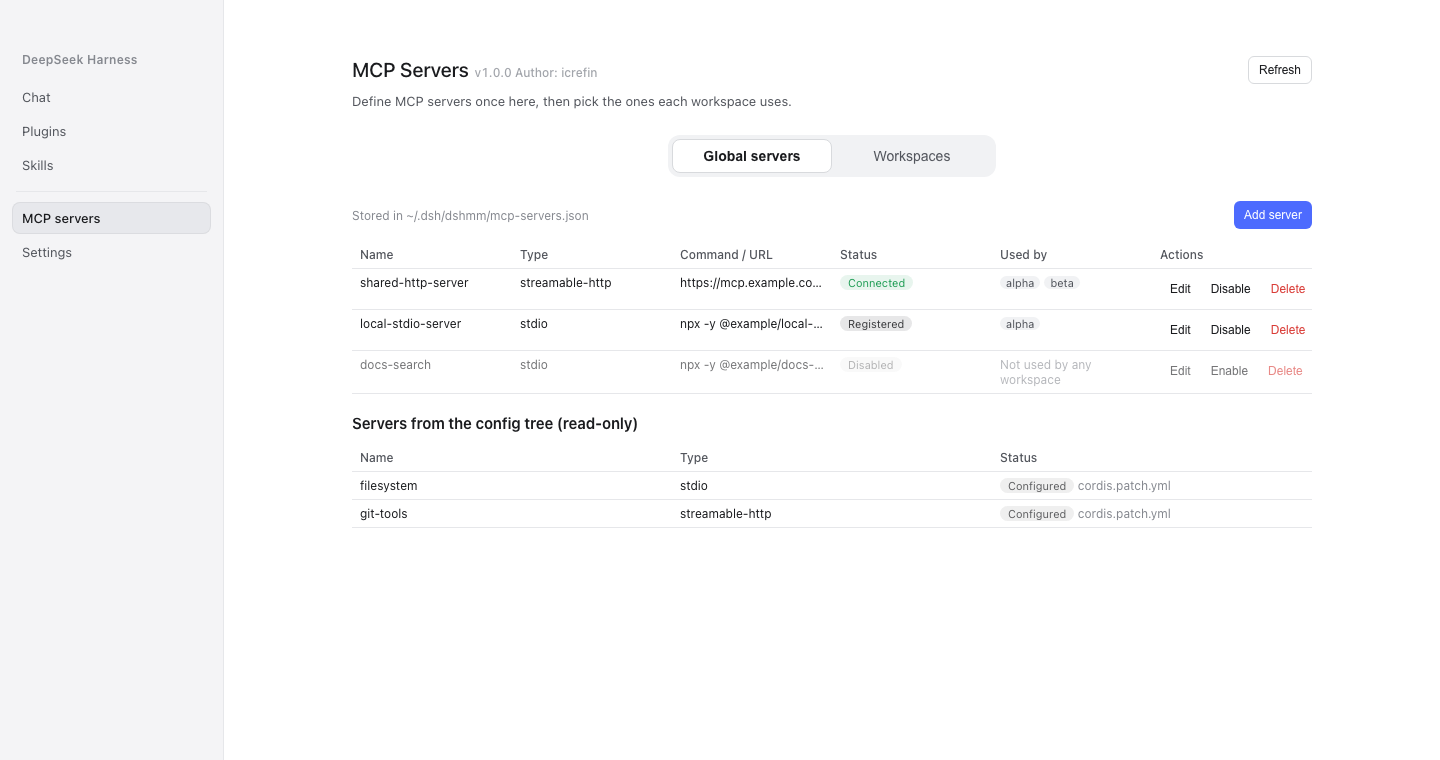
Global servers — add, edit, delete, enable or disable a server, with the profile-level mcp-client registrations shown as read-only rows.
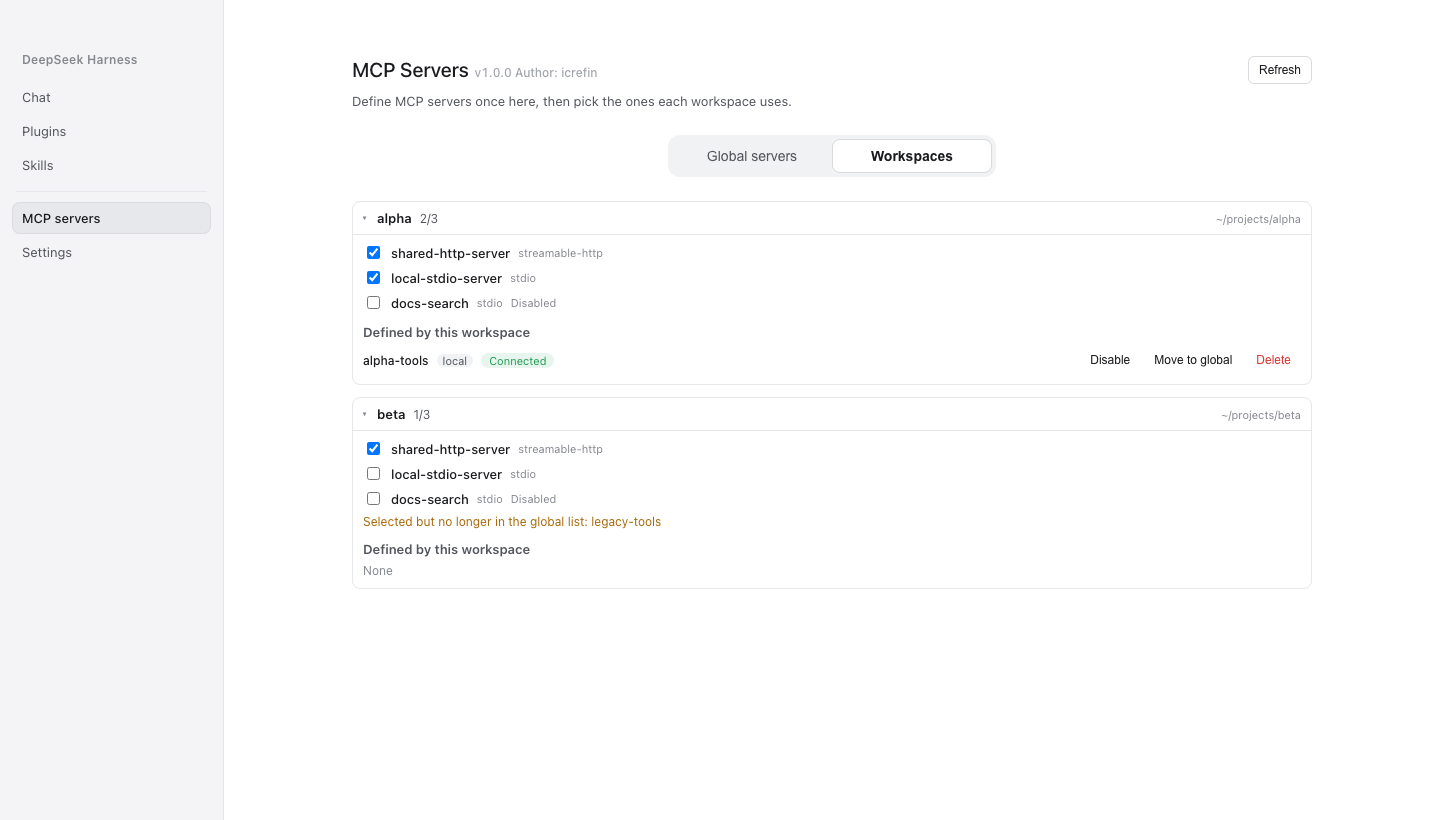
Workspaces — which global servers each workspace selects, plus its own local servers, dangling references and parse errors.
<profile>/.dsh/dshmm/mcp-servers.json     every server definition, shared
<workspace>/.dsh/dshmm/mcp.json           `use: [...]` selects from it,
                                          and may still declare inline servers
A selected global server mounts once for the whole profile; inline servers mount per workspace. Strict mode mounts only the active workspace's servers.
| Surface | What it does |
|---|---|
| Sidebar row | sits directly under Plugins (order: 1) and opens the MCP Servers page in the centre column |
| Global servers tab | the registry: add / edit / delete / enable a server, plus the profile-level mcp-client registrations as read-only rows |
| Workspaces tab | per-workspace selection as checkboxes, each workspace's own local servers, dangling references, parse errors |
| JSON editing | paste a whole mcpServers object or one server's JSON; the host validates it and reports per-entry errors |
| Bulk import | import several servers at once, answering its own report |
| Tools | servers are registered through mcp-client; workspace tools use the mcp__<serverName>__<tool> convention |
| Panel polish | optimistic selection toggles, a 60-second background refresh, tab and scroll position preserved across reloads, and a version chip carrying the installed plugin version |
>=24.9.00.2.2-rc.2 installation (the plugin composes into a profile)pnpm 11.20.0 (packageManager in the root manifest pins it)Build both packages, pack them and hand them to the profile:
pnpm install
pnpm check                        # typecheck → build → verify, both packages
sh tools/install-into-profile.sh desktop
Restart DeepSeek Harness afterwards; the sidebar entry appears directly under Plugins.
There are two packages, and both are Loader rows of their own:
| Package | Role |
|---|---|
dsh-mcp-mgr |
the host half: the registry, the sync layer, and the mcpMgr Typert Remote contract |
dsh-mcp-mgr-ui |
the browser half: the sidebar row and the page it opens |
Installing the host alone leaves the sidebar row without the page it opens, so the two are built and installed together. The packages are not on npm: the profile installs them from this repository.
dsh plugin (a pnpm passthrough into the profile directory) is what the script uses; the Plugins page does the same thing. The desktop profile is owned by the Electron application, so dsh --profile desktop itself refuses to compose it, while dsh plugin still works.
Open MCP Servers in the sidebar.
On Global servers, add a server — by form or by pasting JSON:
{
  "shared-http-server": {
    "type": "http",
    "url": "https://mcp.example.com/mcp"
  }
}
Switch to Workspaces and tick that server for the workspaces that should see it.
Restart, or let the panel's refresh confirm the new snapshot; the server's tools appear as mcp__shared-http-server__*.
Rules that apply to either file:
type is treated as Streamable HTTP; ${VAR} expansion is supported;cwd uses the workspace root;serverName must match ^[A-Za-z0-9_-]{1,32}$ and is globally unique — duplicates surface as conflicts;"enabled": false disables an entry without removing it; absent means enabled.The profile registry is created on the first save from the panel. Neither file has to be created by hand.
Fourteen methods on the mcpMgr namespace, declared once in src/typert.descriptors.ts and wrapped as the host manifest and the browser contribution, so the two faces cannot disagree about a wire name or a codec:
| Method | Purpose |
|---|---|
version |
this package's installed version, for the title chip |
snapshot |
the whole management view |
setStrictMode · setActiveWorkspace |
gateway state, answering the refreshed snapshot |
apply · removeServer · setServerEnabled |
workspace-local servers |
saveGlobalServer · saveGlobalServerJson · removeGlobalServer · setGlobalServerEnabled |
the global registry |
setWorkspaceSelection · importLocalServer |
which servers a workspace selects |
importJson |
bulk import, answering its own report |
mcp__<name>__* present in the tool registry), not that the network is live. mcp-client exposes no live connection state, so a real disconnect cannot be detected without changing dsh itself. A connection that drops keeps its last tool generation and reconnects with backoff.MIT — see LICENSE. The host and UI packages derive from dsh-mcp-mgr 0.2.0 by yangfch3 (MIT); that copyright line is kept in the LICENSE file, and this repository is an independent, source-built rewrite rather than a vendored copy of the published bundle.
The panel registers into the same slots dsh's own pages use (sidebar.panellist and main), and follows the platform's STYLES.md contract for page geometry and the version chip.
Stars are how small projects survive. If this one earned yours, tap ⭐ — it costs nothing and helps someone else find it.
CLASSIFICATION EVIDENCE
系统优先读取 GitHub Topics,再与站内分类词典和词根规则比对。当前命中: mcp、model-context-protocol、mcp-client、mcp-manager、deepseek-harness。
morluto
Reverse engineer anything with agents, from app behavior down to native binaries.

deepseek-ai
DeepSeek Harness: Everything is a Plugin.

nexu-io
The 1st Collaborative AI Design Agent Workspace. Local-first and open source. Create motion, prototypes, websites, apps, dashboards, presentations, images, and videos with your team and AI agents. Share work, exchange feedback, and iterate together in one workspace.