
其他
完整应用

deepseek-harness
deepseek-ai
DeepSeek Harness: Everything is a Plugin.
PROJECT TOPICS
INSTALL REFERENCE
dsh plugin --profile web add github:ice5kysl/dsh-workspace-kit
该命令指向仓库当前默认分支;尚无绑定当前 commit 的完整验证结果。
PROJECT README

GitHub: https://github.com/ice5kysl/dsh-workspace-kit | MIT License | Target dsh:
@deepseek-ai/dsh≥ 0.1.1-rc.2 | English · 简体中文
A dsh (DeepSeek Harness) plugin written to official conventions, in the Cordis "bundle" form. It solves two pain points:
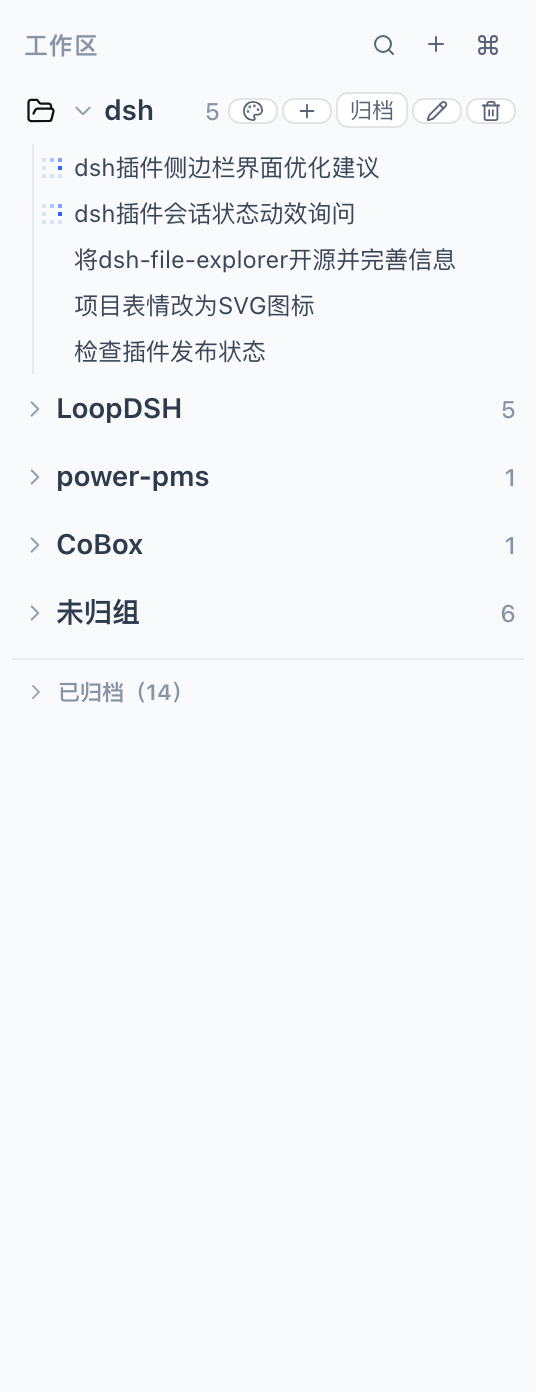
sidebar.workspaces slot at low priority (-1), replacing the shipped workspace browser — archived workspaces leave the "Workspaces" list and move into a collapsible "Archived (N)" section where you can restore / open / start a new session; ungrouped sessions live in their own section too.The plugin ships two faces carried by a single Loader entry (dsh-workspace-kit):
| Face | File | Responsibility |
|---|---|---|
| Host (node) | lib/index.js |
workspace_find / workspace_list model tools; /workspace-find, /workspace-list slash commands (read-only lookup; write actions stay in the GUI) |
| Browser (client) | lib/client.js |
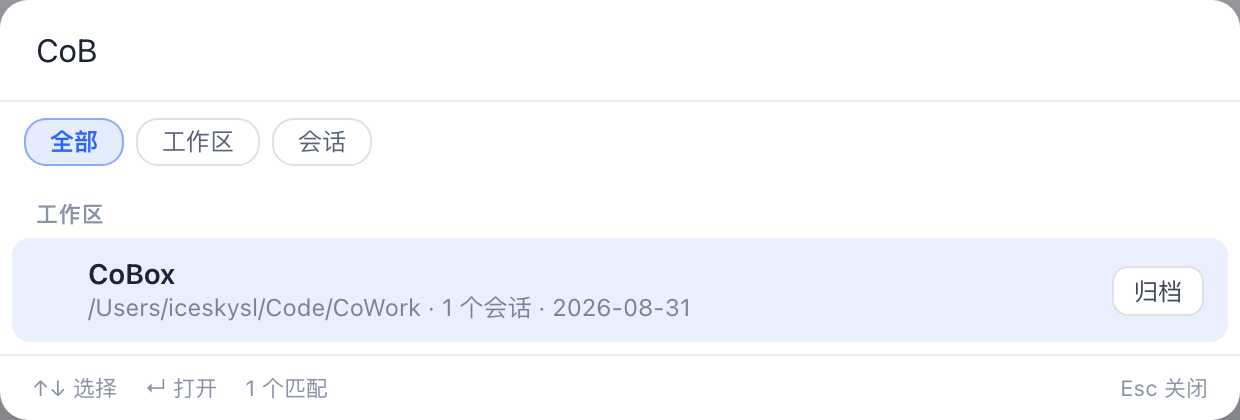
Spotlight palette (registered into the official, otherwise-empty shell.overlay slot) + soft-archive store (localStorage-persisted) + enhanced sidebar browser |
Design rationale: dsh's official model only has session-level (irreversible) archiving and the shipped sidebar browser has no per-row hide seam, so this plugin takes a "view-layer soft archive + shadow the sidebar browser" approach: archive state is managed by the plugin (browser-persisted) and, by shadowing
sidebar.workspaceswith its own browser that carries the collapsible "Archived" section, archived workspaces truly leave the main sidebar list. The v1 capability boundary of the replacement browser is documented in known-limitations.md.
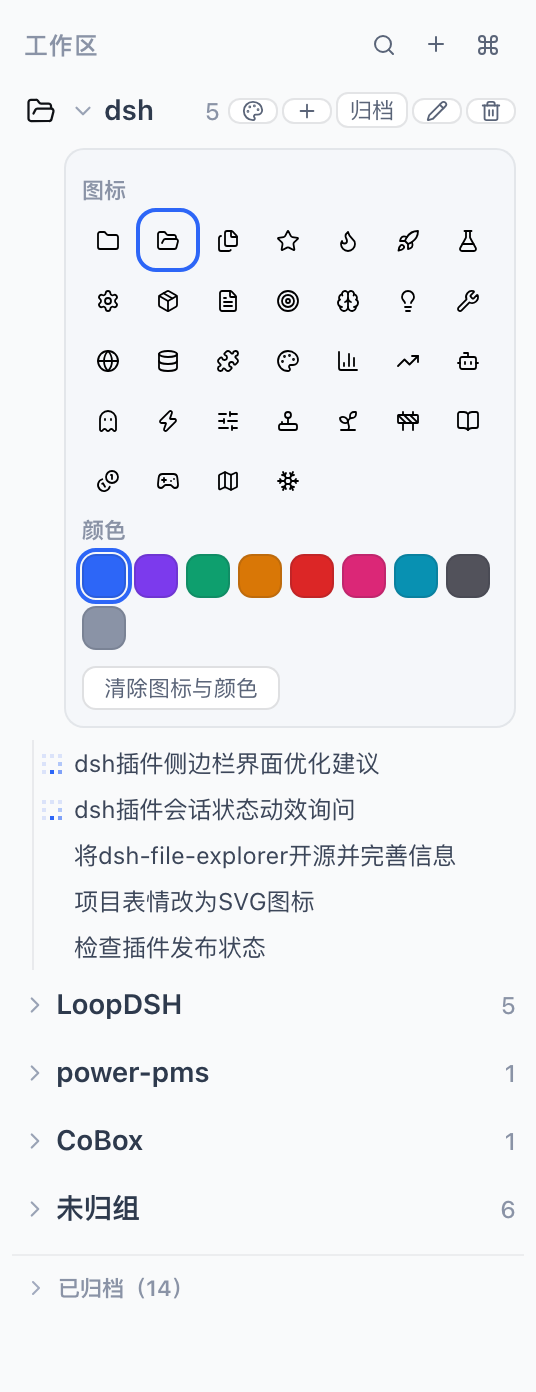
Beyond archive/restore, the enhanced sidebar (when active) adds:
insertBefore; drag sessions within their workspace → insertSessionBefore; once a workspace is manually dragged its sessions switch to the manual (account) order, matching the shipped Manual semantics.prompt/confirm.You can also say things like "use workspace_find to find the pms workspace" in a session, or type /workspace-find pms.
| Enhanced workspace sidebar | Per-workspace icon & color picker | ⌘K Spotlight search |
|---|---|---|
 |
 |
 |
All user-facing copy is bilingual (Simplified Chinese / English):
localStorage key dsh.workspace-kit.locale (zh | en) when set, otherwise from navigator.language(s) (zh* → Chinese, anything else → English).WSKIT_LOCALE environment variable (zh | en) when set, otherwise from LC_ALL / LANG (zh* → Chinese), defaulting to English.L('中文', 'English', vars?) helper backed by src/shared/i18n.ts; see the per-side src/client/locale.ts and src/host/locale.ts for detection.Published on npm — if you already run dsh Web, install in one line:
dsh plugin --profile web add dsh-workspace-kitThe git route below is for development / running the latest source.
Prerequisites: dsh on PATH (@deepseek-ai/dsh ≥ 0.1.1-rc.2), Node 20+.
# 0. Get the source (or use a local directory)
git clone https://github.com/ice5kysl/dsh-workspace-kit && cd dsh-workspace-kit

# 1. Build (produces lib/index.js + lib/client.js; the prepare hook of
#    npm install already runs the build for you)
npm install                # installs build-time deps (typescript/esbuild/@types …)
npm run build

# 2. Install into your web profile (equivalent to the official `dsh plugin add`)
bash scripts/install-personal.sh
#    The script locates this directory itself and runs
#    `dsh plugin --profile web add .`, which appends the package to
#    `dsh.profile.bundles` in ~/.dsh/profiles/web (after dsh-web-app) and
#    lets the in-package cordis.patch.yml insert the single Loader row.

# 3. Verify the composition (no restart needed)
dsh --profile web --dump-config | grep -n "workspace-kit"

# 4. Restart the GUI to activate
#    Quit the current dsh web (Ctrl+C or kill the process), run `dsh web`
#    again, then refresh the browser at http://127.0.0.1:3080
Also usable as a monorepo subdirectory (e.g.
plugins/dsh-workspace-kit): the install script walks up frompackage.jsonto find the plugin directory, so both layouts need no command changes.
npm pack          # produces dsh-workspace-kit-0.1.0.tgz (prebuilt lib/; prepack builds automatically)
# Other machine: dsh plugin --profile web add ./dsh-workspace-kit-0.1.0.tgznpm run typecheck # tsc --noEmit (host + client sources)
npm run build # esbuild: src/host → lib/index.js; src/client → lib/client.js
npm test # standalone smoke test of the host workspace tools/slash commandsSource layout:
src/host/      Host side: locale.ts (env-based locale), util.ts (search/list pure
               functions), tools.ts (model tools), commands.ts (slash commands),
               index.ts (apply: registers per service availability)
src/client/    Browser side: locale.ts (navigator-based locale), archive-store.ts
               (defineStore soft-archive set + appearance, persist localStorage),
               dialogs.tsx, SidebarToggle.tsx, Spotlight.tsx (⌘K palette),
               WorkspaceSidebar.tsx, index.ts (apply: slot registrations + closures)
src/shared/    i18n.ts (pure locale helpers shared by both faces)
cordis.patch.yml bundle layer: inserts the single Loader entry `dsh-workspace-kit`dsh.bundle.patch) + a browser face (dsh.client.platform: 'web' + the ./client export). The host scans enabled Loader entries; one package provides both the node and the browser side from the same entry, and one package may only have one entry (multiple entries resolving to the same package name are rejected by the client module system).shell.overlay (list/root) — the official slot reserved for whole-window custom overlays. The sidebar registers into sidebar.workspaces (single/root) at priority -1 to shadow the built-in occupant (lower priority renders; only equal priorities conflict) — the officially allowed "full replacement" route, at the cost of re-implementing some built-in browser capabilities yourself (see known-limitations).useWorkspaces / useSessions / useStore); actions go through registered inject closures that call the official session service: ctx.workspaces.startSession(workspaceId) (reuse/create and open that workspace's session) and ctx.sessions.open(id).defineStore + persist (bare JSON in localStorage under dsh.workspace-kit.archive.v1), the same mechanism as built-in view preferences (e.g. dsh.workspace.view.v5).window keydown listener is attached (⌘K/Ctrl+K); the palette stays mounted and renders null while closed to keep the listener alive.@deepseek-ai/dsh v0.1.1-rc.2 (dsh web, profile web). The browser face targets that release's shell.overlay / IWorkspaces / ISessions contracts; re-validate against the upstream contract on version upgrades.CLASSIFICATION EVIDENCE
系统优先读取 GitHub Topics,再与站内分类词典和词根规则比对。当前命中: 无有效分类标签。
deepseek-ai
DeepSeek Harness: Everything is a Plugin.

anywhere-labs
为 DeepSeek Harness (DSH) 插件生态打造的现代化桌面端解决方案。万物皆「插件」,桌面本身也是「插件」。

awesome-dsh-plugin
A curated list of plugins for DeepSeek Harness (dsh) · DeepSeek Harness 插件精选列表