

模型与 MCP
待识别

rea
morluto
Reverse engineer anything with agents, from app behavior down to native binaries.
PROJECT TOPICS
INSTALL REFERENCE
dsh plugin --profile web add github:iArxic/dsh-agents-notch
该命令指向仓库当前默认分支;尚无绑定当前 commit 的完整验证结果。
PROJECT README
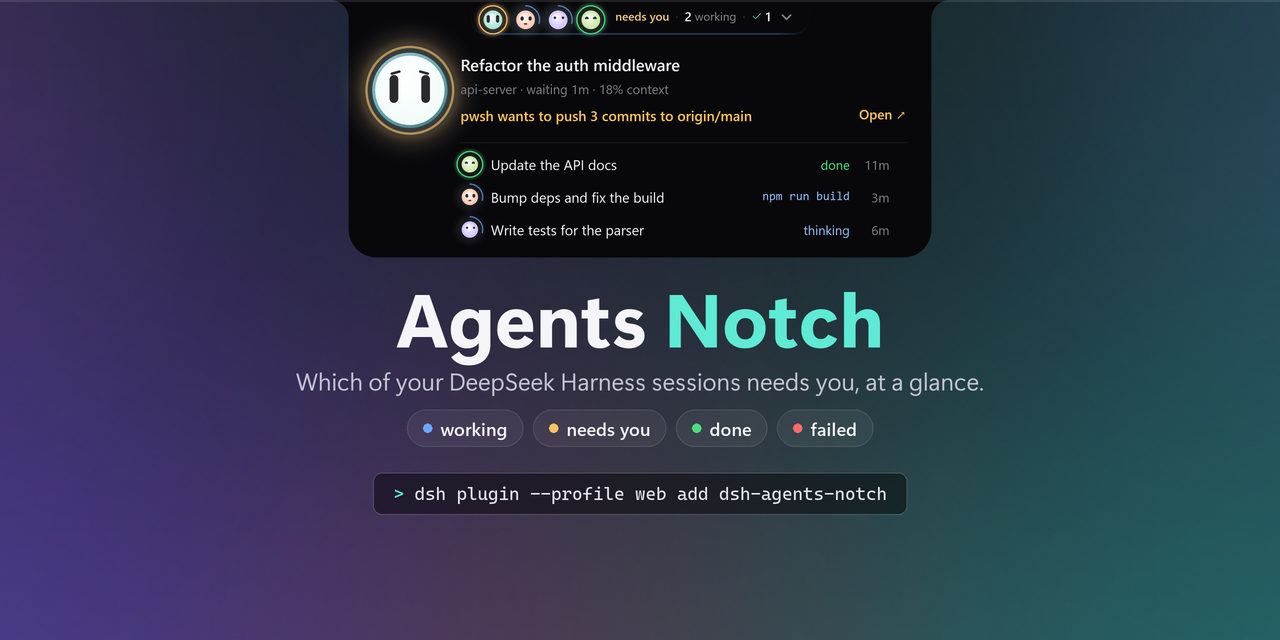
An always-on-top notch for DeepSeek Harness that answers one question: which of my sessions needs me right now?



Install · What it shows · Configure · Limits · Develop · 中文

Recorded from the window itself (--record), frame by frame — not a mock-up.
If you run more than a couple of sessions, finding out whether anything is waiting on you costs a context switch every time:
| what you do today | what it costs |
|---|---|
| alt-tab between windows and read each sidebar | the thing you were doing, every time |
| wait for a desktop notification | one per session, and none of them say which one is blocked |
| leave the sidebar visible | it is only visible when the app is in front — which is when you do not need it |
The notch is a small always-on-top tab that never takes focus, hides under a full-screen app, and shows the one thing the sidebar cannot while you are in another window: a session stuck on you. When one gets stuck, the tab grows into an alert that says why, with an Open button that switches the app to that session — from wherever it is, minimized or in the tray. And it never gets in the way: pass over it and it fades and lets your click through; rest on it and the board unfolds.
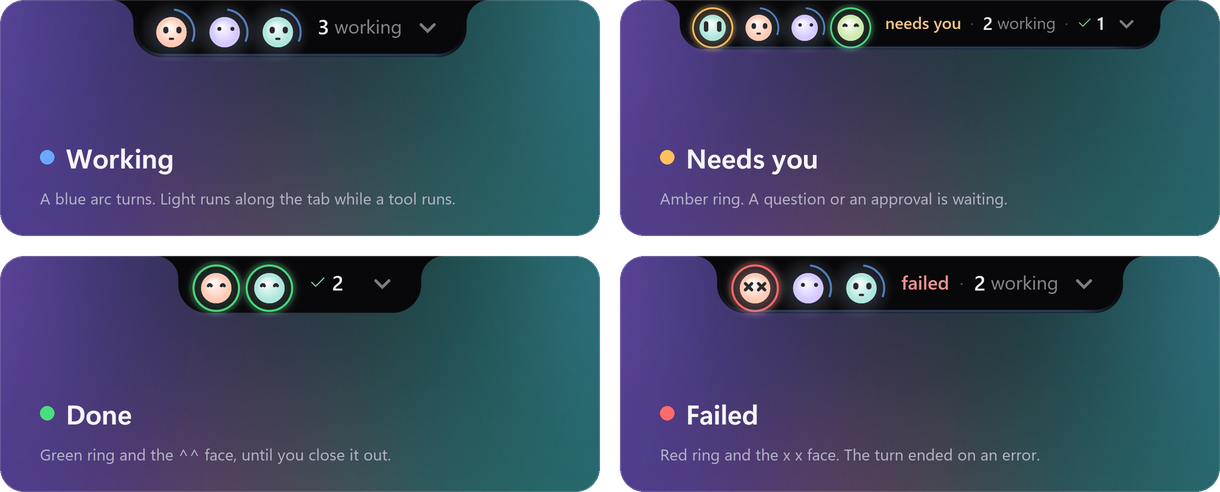
That strip is the whole visual language. Working wears a slow blue arc and nothing else, because working is the quiet default — and while any session is running a tool, light runs along the tab's lower edge. Needs you wears amber, done green, failed red. Every session keeps its own colour on the bot's rim, so three sessions read as three sessions rather than three copies of one.
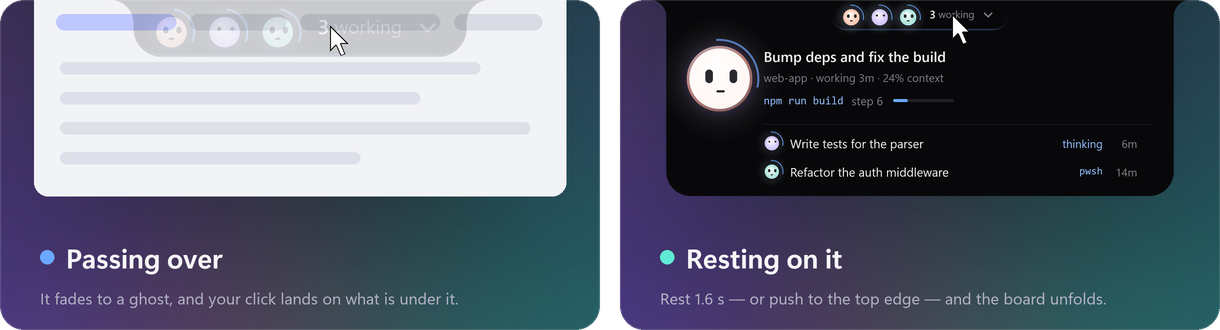
The tab sits where you reach for tabs and title bars, so it steps aside. A pointer passing over it
turns it into a faint ghost that clicks go straight through — to the browser tab or the menu under it.
Only a pointer that rests there for 1.6 s unfolds the board, and pushing it against the top edge of
the screen opens it at once. All three are settings (hoverMode, holdMs, topEdgeOpens); open
brings back unfold-on-hover.
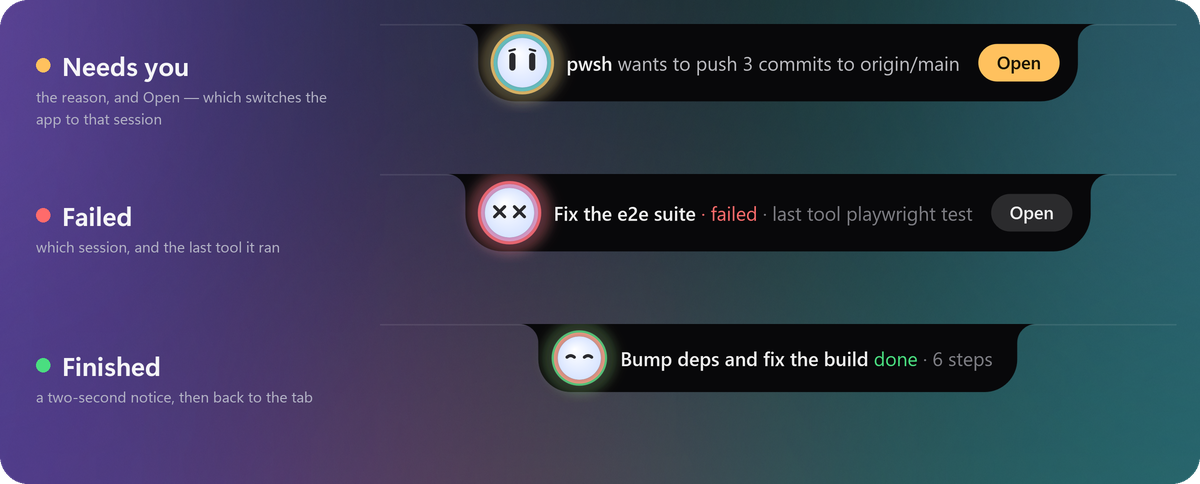
When something new happens — a session asks for you, fails, or finishes — the tab grows into an alert for a few seconds and then folds back. Open takes you straight to that session. Only fresh events are announced: a question that has been waiting for an hour is on the board, not in your face.
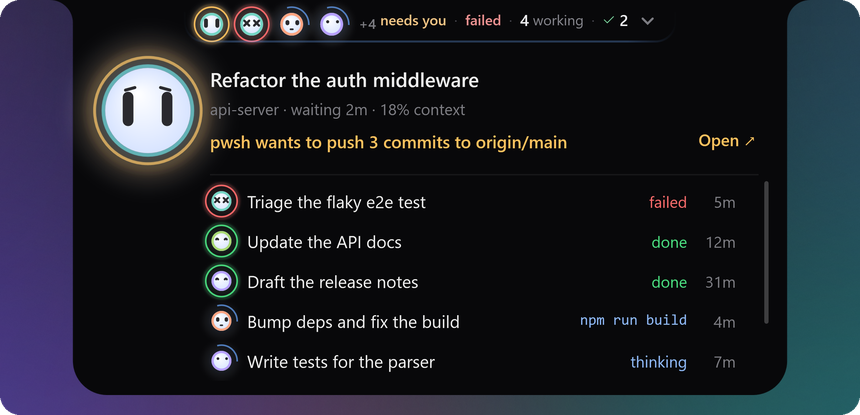
Rest the pointer on the tab, or push it against the top of the screen, and the board unfolds. At the top is the session that changed most recently, so a finish or a question is what you see first: its title, its project and age, how full its context is, and one line of what it is doing — the tool it is running and the step, the question it is asking in full, or how it ended. Below it, every other session in one list: what it is doing in a word and how long ago. More sessions than fit? The list scrolls.
Click a row to put that session on the big bot. Double-click a row, or press Open ↗, and the app switches to it. A finished or failed row has a ✕ that closes it out — the same as ticking it in the app.
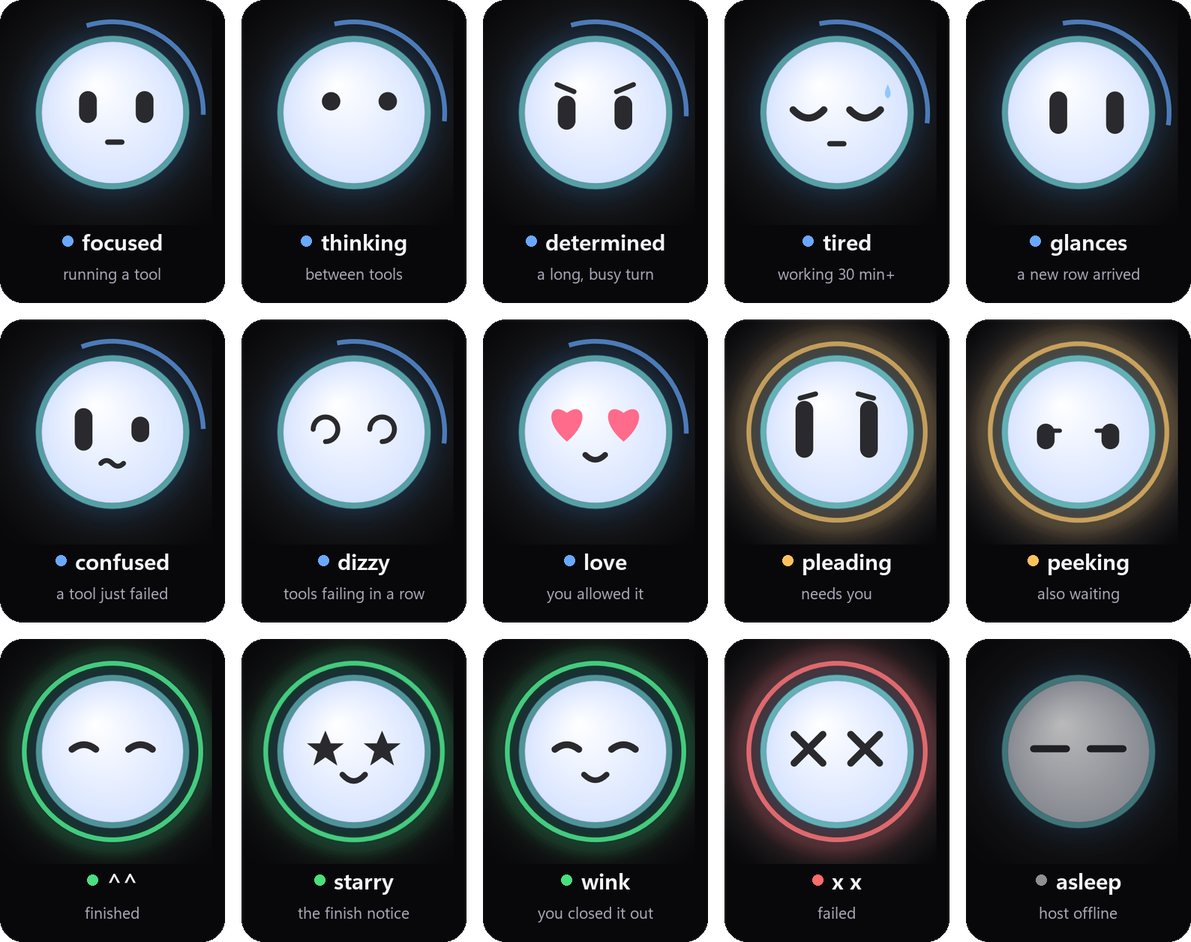
The bot's face is the state, read closer. A working bot is focused in a tool and thinking between
tools, determined on a long busy turn and tired after half an hour; it is confused when a tool
just failed and dizzy when they keep failing. It pleads when it needs you, squints ^^ when it is
done, and falls asleep when the host goes quiet. It blinks, follows your pointer with its eyes, and
plays a short motion on each change — once, and then it rests. A board that keeps celebrating something
that finished an hour ago is noise.
|
🫥 Never in the way |
↗️ Open goes there |
📏 Honest numbers |
|
🎛️ A Settings pane of its own |
🧘 Respects reduce-motion |
📦 One command, no runtime |
package.json declares "os": ["win32"].session/event
({ global: true }), ctx.webServer, ctx.agents and sessionQuery, and the in-app half uses
uiWorkspace; an older build may lack one. Nothing is checked before mounting — see
Limits.session-finished plugin, which is what retires a finished row
(What earns a row).dsh plugin --profile web add dsh-agents-notchRunning the harness under another profile? Put its name in place of web.
The plugin is ~30 KB. The first time it runs, it downloads its window (one 65 MB file, no .NET runtime needed) from this repo's GitHub release and checks it against the published SHA-256. A few seconds later the notch is at the top of your screen.
No notch? Look at the last line of $DSH_HOME\state\agents-notch\host-report.jsonl: it says where
the host looked for the window, whether the download worked, and the command that fixes it.
The notch has a pane of its own: Settings → Agents Notch. Size, anchor, display, rows, opacity, motion and the text switches live there, and a change lands on the notch immediately — the window re-reads its state on the next tick, so nothing restarts.
Three layers decide a value, each beating the one above it:
config: — the file you edit, which nothing overwrites;$DSH_HOME/state/agents-notch/settings.json, written by the pane, one click at a time.Both doors are clamped by the same rules, so a slider and a YAML line behave identically. Reset in the pane clears the third layer and the row decides again. The pane keeps its own file because a browser cannot safely rewrite YAML that other sessions also edit.
Defaults live in the package's own cordis.patch.yml. To change one, put a row with the same id
in your profile's patch layer ($DSH_HOME/profiles/web/cordis.patch.yml) — a row without insert: is
an override of a row that already exists:
- id: agents-notch
  config:
    contextBudget: 1000000     # your route's context window, in tokens
    anchor: top-right
scale: 1.25| key | default | meaning |
|---|---|---|
spawnWindow |
true |
false runs the host without a window — useful for tests |
pollMs |
340 |
how often the state file is rebuilt |
maxRows |
6 |
3–10, how many sessions the board shows before its list scrolls |
contextBudget |
null |
your route's context window in tokens; null = unknown (see below) |
contextHotAt |
0.5 |
the fraction where the bar turns amber — the route's compaction trigger |
anchor |
top-center |
top-center · top-left · top-right |
screen |
primary |
primary · cursor · 1 · 2 … (as Windows numbers them) |
scale |
1 |
0.75–2 |
hideFullscreen |
true |
hide under a full-screen app |
opacity |
1 |
0.35–1, how much of the desktop the notch sits in front of |
motion |
auto |
auto follows Windows' reduce-motion setting; on forces the animation, off draws each state's settled face and nothing else |
showProject |
true |
the project name in the headline's sub line |
showDone |
true |
false keeps finished sessions off the board entirely (and out of the count) |
hoverMode |
ghost |
ghost: the tab fades and lets clicks through until the pointer rests on it; open: hover unfolds the board at once |
holdMs |
1600 |
500–4000, how long the pointer rests on the tab before the board unfolds |
topEdgeOpens |
true |
push the pointer against the top edge over the tab to open it without waiting |
ghostOpacity |
0.18 |
0.05–0.6, how faint the tab goes while it steps aside |
alerts |
all |
the pop-up on the tab: all, needs-you (questions and failures only), or off |
finishedFallbackMs |
900000 |
how long a settled row survives when session-finished is absent |
stateDir |
$DSH_HOME/state/agents-notch |
where the state file, the logs and the window live |
exePath |
— | force one window binary |
autoDownload |
true |
fetch the window from the release when it is missing |
downloadUrl |
— | fetch from a mirror instead of the release |
contextBudget is not guessed. The context window belongs to the model route, and nothing in
the session feed carries it, so this plugin defaults it to null — and with null you get a token
count and no percentage, no bar and no amber. A percentage against an invented denominator is a lie
that looks like information, which is worse than a number with units.
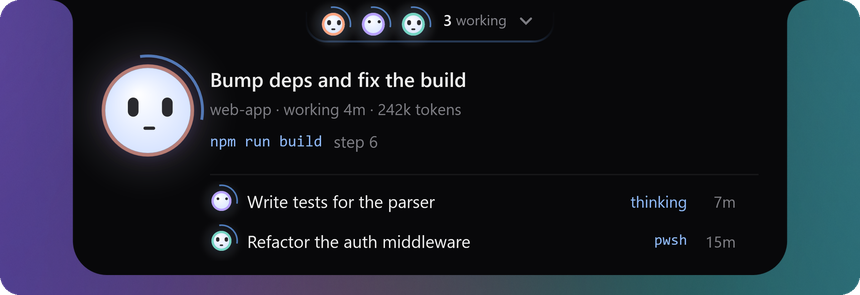
Set it to your route's real window (this build's DeepSeek V4 routes: 1000000) and the percentage and
the bar appear.
A session is on the board because something happened to it: it is working, it is blocked on an approval or a question, it failed, or it finished and you have not closed it out. Merely being open never earns a row, however many sessions are attached.
A session that delegated work is one row, not six. While a subagent runs, the board shows the session
that delegated it with ×3 after its title — how many are running under it right now — and the subagent
gets no row of its own. A teammate that is waiting on you, or that failed, does keep a row, because a
number cannot be answered. Finished teammates drop out of the count, and a session with nothing running
under it shows no number at all.
Finished and failed rows do not expire on a timer. They leave when the harness's own close-out
verdict says so — the ✓ that the session-finished plugin puts in the sidebar, read over that
plugin's HTTP route, or the ✕ on the row. If that plugin is not installed, this one notices after three
failed probes and retires settled rows after 15 minutes instead, and says so in its report
(host-report.jsonl).
When the host stops answering, the board stops pretending — the tab goes grey, the bot falls asleep, and the sub line dates the last heartbeat instead of repeating a summary nobody is updating:
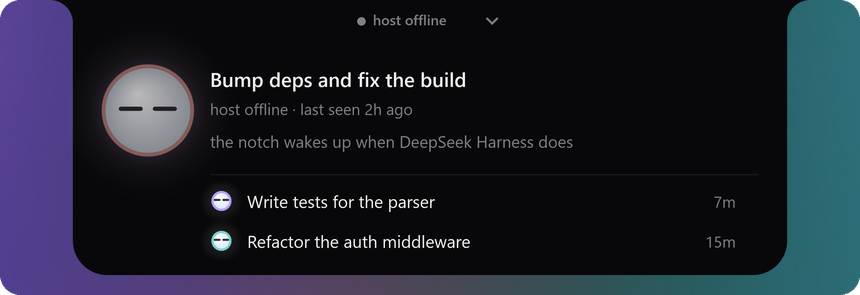
0.2.1-rc.2; if a field is missing on your build, the host keeps serving and the log
says what failed rather than the tab lying.session-finished is optional but recommended — without it, closed-out sessions linger for
the 15-minute fallback.anchor and screen.dsh plugin --profile web remove dsh-agents-notch
Remove-Item -Recurse "$env:DSH_HOME\state\agents-notch" # state, logs, window binary, unpack cachenpm test # 65 tests, node --test, no harness, no window, no network
npm run window:build # dotnet build desktop/AgentsNotch.csproj -c Release
npm run window:publish # self-contained single file + SHA256 into dist/win-x64
# a still of the board, from a fixture, without a harness:
desktop/bin/Release/net9.0-windows/AgentsNotch.exe --state desktop/fixtures/working.json --open --shot dist/shots/working.pngThe window takes --shot, --record, --open, --freeze, --face <name>, --island x1|x4|d1,
--log, --fps, --no-effects and --probe-rect, and desktop/fixtures/ holds schema-4 state
files, so every state, face and alert can be photographed with no harness running. Every picture in this
README is drawn by the window itself: python tools/readme-media.py shots|record|art renders the
stills, records the demo frame by frame on the window's own clock, and lays them out.
Installing the window by hand (offline, or a build of your own): autoDownload: false in the
plugin row turns the download off, downloadUrl: <url> points it at a mirror, and
tools/install-window.ps1 -Url <release asset> or -FromPath dist\win-x64 puts a window where the
host looks for one.
docs/CONTRACT.md — the interface between the two halves; frozen, and both
halves and the tests are written against it.docs/INTERNALS.md — the engineering record: every measurement that decided
a shape, and the traps that cost a day each. The most useful file here if you change something.CHANGELOG.md — what changed, per version.docs/PUBLISHING.md — the checklist for cutting a release.Agents Notch 是一个 DeepSeek Harness 插件:在屏幕顶部挂一个始终置顶的“刘海”,每个会话一个小机器人,一眼就能看出 哪个会话正在等你。
^^ 表情;失败是红色光圈和 x x 表情。dsh plugin --profile web add dsh-agents-notch仅支持 Windows 10/11 x64。插件本体约 30 KB,首次运行时会从对应版本的 GitHub Release 自动下载窗口程序并校验 SHA256,无需安装 .NET 运行时。
CLASSIFICATION EVIDENCE
系统优先读取 GitHub Topics,再与站内分类词典和词根规则比对。当前命中: deepseek-harness。
morluto
Reverse engineer anything with agents, from app behavior down to native binaries.

deepseek-ai
DeepSeek Harness: Everything is a Plugin.

nexu-io
The 1st Collaborative AI Design Agent Workspace. Local-first and open source. Create motion, prototypes, websites, apps, dashboards, presentations, images, and videos with your team and AI agents. Share work, exchange feedback, and iterate together in one workspace.