dsh-krill-theme
v1.0.0 · 浮游主题(Krill)· 深海世界 + 浅海世界 双模式主题插件
磷虾(krill)是蓝鲸的餐桌,也是这个插件名字的来源——「浮游主题」让磷虾般的荧光粒子
在对话栏里静静漂游:一个插件覆盖 DSH Web 的深 / 亮两套外观,深色模式 = 深海世界,
亮色模式 = 浅海世界。纯客户端 CSS 插件,零依赖、零侵入——不改 dist、不碰组件逻辑,
一处生效全站。
🖼 效果预览
| 深海 · 深色模式 |
浅海 · 亮色模式 |
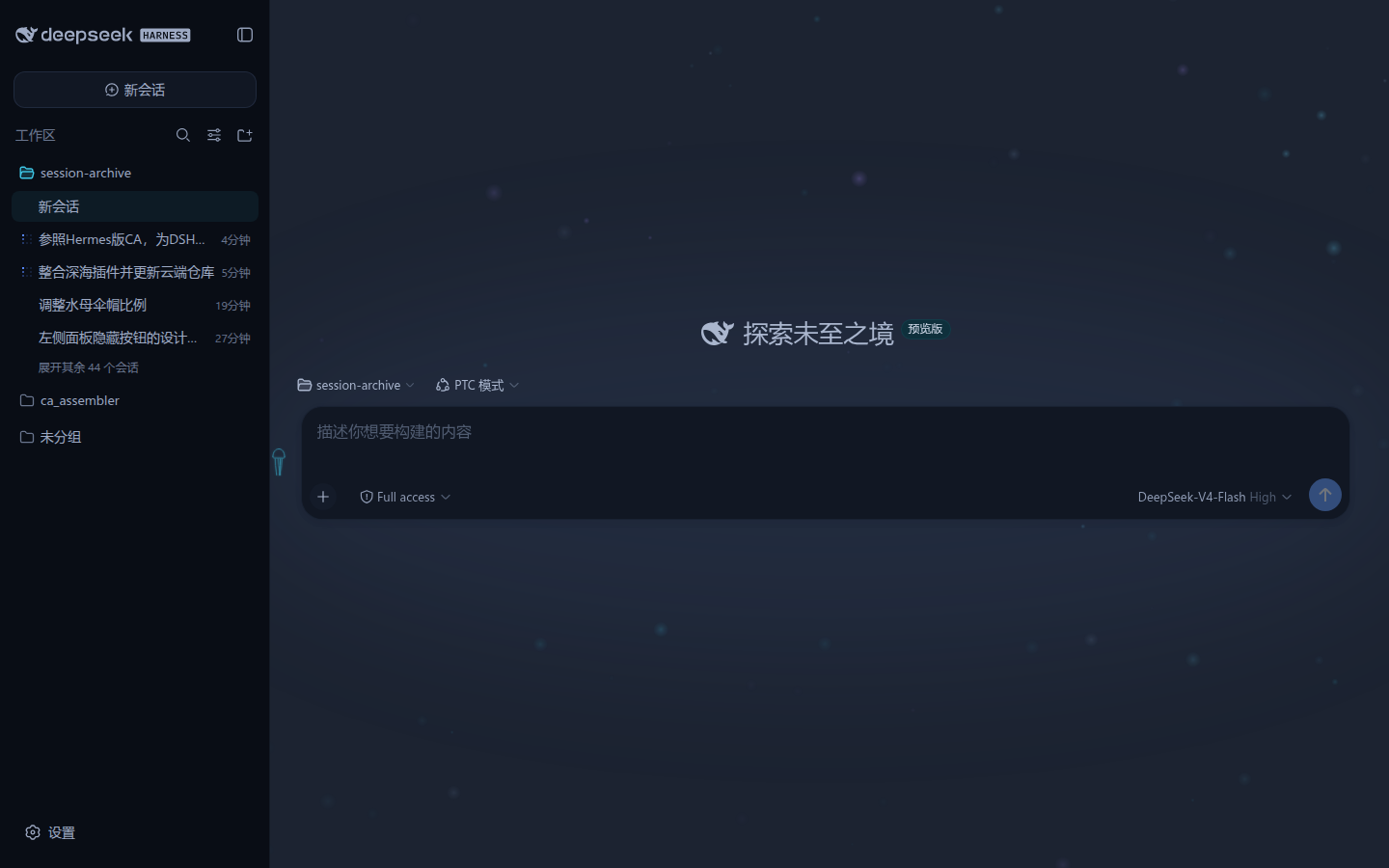 |
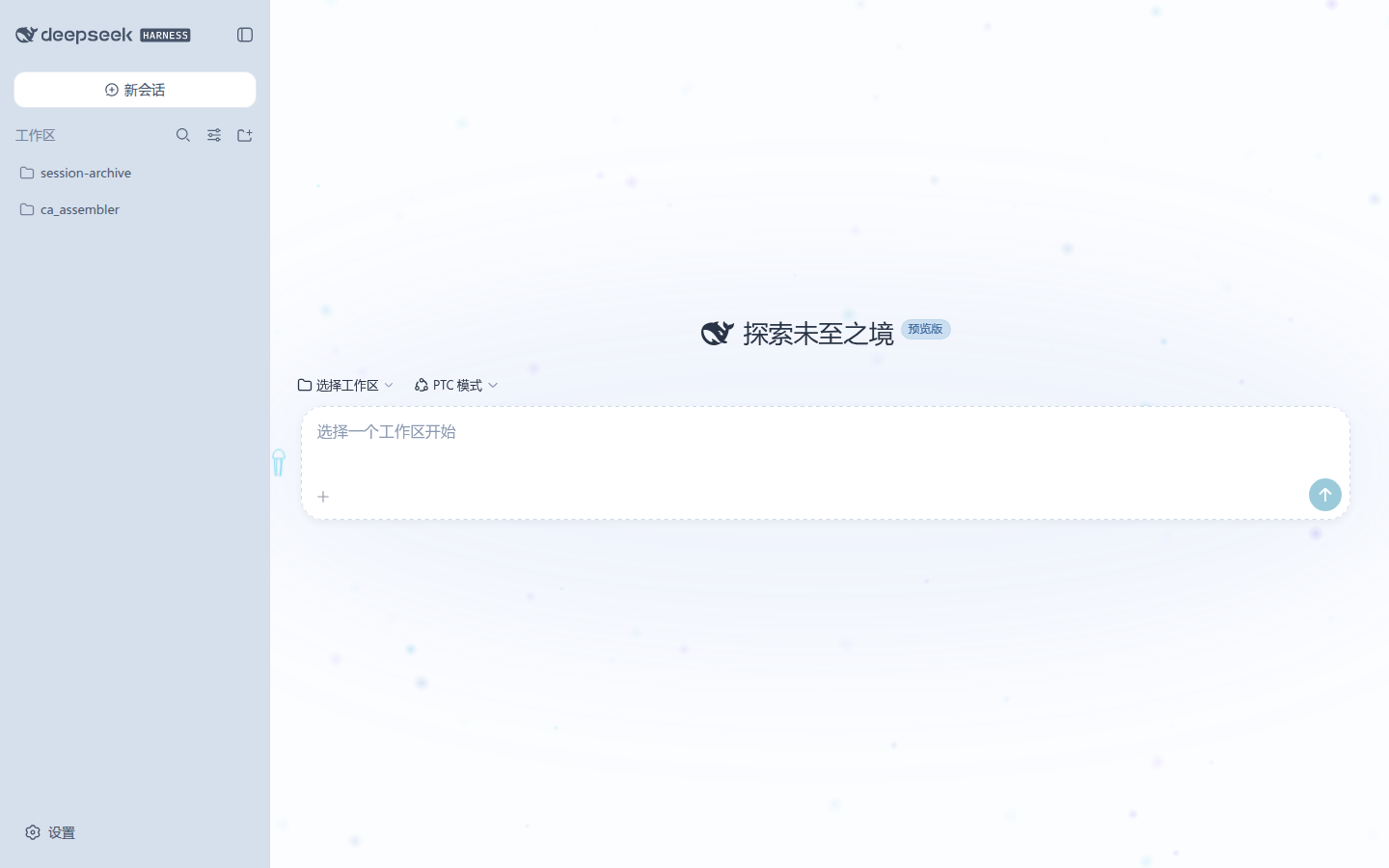 |
深色 = 深海世界(对话栏 rgb(28,35,49),正文生物荧光软白);亮色 = 浅海世界(对话栏「阳光水面」全站最白,环境海沫灰蓝退后)。
对话栏的浮游生物动画背景(APNG 真彩,实拍 30 帧,无限循环):

GIF 兜底(256 色):assets/plankton-1.0.gif
✨ 插件特色
1. 双模式一体,一个插件管两套外观
- 深色(深海世界):以「光的亮度」编码信息重要程度——越重要越亮,用户按亮度自然形成注视顺序;环境沉入深海蓝黑,几乎隐形。
- 亮色(浅海世界):深海亮度逻辑的反演——以「清澈度」编码,越重要越清;对话栏 = 阳光水面全站最白,正文深海军墨,环境海沫灰蓝退后。
- 深/亮两段写在同一个样式表里,选择器互斥(
body[data-ds-dark-theme] ↔ body:not([data-ds-dark-theme])),跟随系统外观自动切换。
2. 零侵入的 token 级覆盖
- 所有组件都读取
--dsw-alias-* / --dsw-specific-* / --shiki-* token,插件只需在 body 上重定义约 95+ 个 token 声明 = 一处生效全站(侧栏 / 对话栏 / dock / 浮层 / 菜单 / 设置全部跟随)。
- 不修改 dist、不依赖具体组件类名,升级换代时仅需复查 token 键名 + 3 个组件哈希类名。
3. 浮游生物动画背景(对话栏)
- 对话栏(L2 阅读区)带一层极轻量的深海浮游生物动画:canvas 预渲染发光 sprite,无任何依赖。
- 洋流驱动:所有粒子同向漂移,流向 / 流速周期性变化,个体仅微小游动扰动——安静、不干扰阅读。
- 实时调参(无需重启):水母按钮参数面板 /
window.__DSH_DEEPSEA__.setPlankton() / CSS 变量三种方式,见「使用与调参」。
prefers-reduced-motion 时自动退化为静态帧(无障碍友好)。
4. 深潜("Deep diving…")工作态增强
- 生成期间浮游生物进入深潜模式:全体粒子 ~40× 流速近乎竖直上冲 + 周期性涌浪(≈3.1s 呼吸节奏);
- 额外涌出更小更亮的光点(从底部升起,结束即退场);整体亮度 ×1.15;
- 对话栏背景叠一层下深上白的竖向渐变柔光,随上涌节奏温和呼吸——把"正在深潜"的等待感变成体验的一部分。
5. 水母参数入口 + 参数面板
- 对话栏右上角一只水母按钮(浮动 + 光晕呼吸,触手各自摆动),点击弹出参数面板(青色亮调);
- 粒子数、透明度、流速、流向、摆动、潮汐脉动、深潜倍率等全部可调,实时生效、无需重启。
6. 全站一致的细节
- 侧栏文字降噪(作用域覆盖:只暗化侧栏容器内文字,不碰对话栏);
- 滚动条、状态色(成功荧光绿 / 警告深海琥珀 / 错误珊瑚红)、发送按钮深海脉动、对话栏 header 渐变衔接;
- 代码高亮双模式适配:深色 = shiki 荧光系(柔雾玫瑰关键字 / 荧光绿字符串 / 荧光青常量 / 荧光紫函数),亮色 = 白底可读系。
安装
社区安装(git)
# 在 profile 目录(如 ~/.dsh/profiles/web)执行:
dsh plugin --profile web add git+https://github.com/i1j/dsh-krill-theme.git
# Gitee 镜像(国内更快):
dsh plugin --profile web add git+https://gitee.com/elite1j/dsh-krill-theme.git
然后把 dsh-krill-theme 加入 profile 的 dsh.profile.bundles,重启 dsh web。
profile 手动方式
// <profile>/package.json
{
  "dependencies": {
    "dsh-krill-theme": "link:/path/to/dsh-krill-theme"
  },
  "dsh": {
    "profile": {
      "bundles": [ /* ...已有 bundle... */, "dsh-krill-theme" ]
    }
  }
}
然后在 profile 目录执行 pnpm install 并重启 dsh web。
仓库已打上 GitHub dsh-plugin 主题标签,可被社区插件搜索
(find_dsh_plugin / dsh-recommend 榜单)发现。
使用与调参(浮游生物)
对话栏(L2 阅读区)带一层极轻量的深海浮游生物动画(canvas 预渲染发光 sprite,
无依赖;洋流驱动:所有粒子同向漂移、流向/流速周期性变化、个体仅微小游动扰动)。
prefers-reduced-motion 时只渲染静态帧。
亮色(浅海)下粒子仍为深海荧光色板,不做主题切换(用户裁定,2026-08-15)。
参数(默认值)
| 参数 |
CSS 变量 |
默认 |
说明 |
| count |
--dsh-plankton-count |
90 |
粒子数 |
| opacity |
--dsh-plankton-opacity |
0.32 |
整体透明度(低,不干扰阅读) |
| speed |
--dsh-plankton-speed |
0.0007 |
洋流基准流速(视口比例/秒) |
| baseAngle |
--dsh-plankton-angle |
-1.28 |
基准流向(弧度,-π/2=竖直向上,默认斜竖向向上) |
| swing |
--dsh-plankton-swing |
0.18 |
流向周期摆动幅度(弧度) |
| swingPeriod |
--dsh-plankton-swing-period |
55 |
流向摆动周期(秒) |
| flowPulse |
--dsh-plankton-flow-pulse |
0.45 |
流速脉动深度(0..1,潮汐感) |
| flowPulsePeriod |
--dsh-plankton-flow-pulse-period |
42 |
流速脉动周期(秒) |
| diveCountScale |
--dsh-plankton-dive-count-scale |
1.6 |
深潜时光点倍率(额外小光点从底部涌出) |
| diveBrightness |
--dsh-plankton-dive-brightness |
1.15 |
深潜时整体亮度倍率 |
| diveGlow |
--dsh-plankton-dive-glow |
0.22 |
深潜时面板辉光强度(0 关闭;呼吸幅度温和) |
三种调参方式
- 加载前(window 配置):
// 页面加载前(如注入脚本/书签)设置
window.__DSH_DEEPSEA_PLANKTON__ = { speed: 0.0004, count: 70 }
- 实时调参(无需重启):
window.__DSH_DEEPSEA__.setPlankton({ speed: 0.001, baseAngle: -1.2 })
window.__DSH_DEEPSEA__.getPlankton()
- CSS 变量(自己的样式表里覆盖):
:root { --dsh-plankton-speed: 0.0004; --dsh-plankton-angle: -1.2; }
关闭:window.__DSH_DEEPSEA_PLANKTON__ = false(加载前设置)。
深潜("Deep diving..." 工作态)增强
生成期间(对话栏出现 Deep diving... 状态)浮游生物进入深潜模式:
- 加速上涌:全体粒子以 ~40× 流速近乎竖直上冲,叠加各自相位的周期性涌浪
(2.0 rad/s ≈ 3.1s 周期),像随深潜节奏呼吸。
- 更多光点:按
diveCountScale 额外涌出更小更亮的光点(从底部边缘下方
升起,深潜结束即退场)。
- 整体调亮:粒子亮度乘
diveBrightness(默认 1.15),生物荧光更明显。
- 面板辉光脉动:对话栏背景叠一层预渲染柔光——下深上白的竖向渐变(顶部
近海面的柔白光,向底部渐隐入深海暗色),透明度随上涌节奏(同 2.0 rad/s,
单相位)在 70%..100% 强度间温和呼吸,总强度由
diveGlow 控制(0 关闭)。
开销:预渲染渐变仅随 resize 重建,每帧只多 1 次 drawImage,可忽略。
prefers-reduced-motion 时深潜动画同样退化为静态帧(无循环、无辉光脉动)。
版本
- v1.0.0(2026-08-15):1.0 定版——整合深海(深色)+ 浅海(亮色)双模式为单一插件;
水母按钮 / 图标 / 参数面板定稿;README 新增实拍配图(深浅双模式截图 + 浮游生物动画——
APNG 真彩 30 帧无限循环,GIF 256 色兜底);
发布 GitHub + Gitee 双镜像仓库。
- v0.2.2(2026-08-15):水母伞帽调大约 1/5(bell ×1.2,锚定伞檐、触角不动)。
- v0.2.1(2026-08-15):水母按钮缩小到约 2/3(40px → 27px,图标 27×44 → 18×29)。
- v0.2.0(2026-08-15):浅海世界亮色色系归并(v1.5),双模式;
参数面板中性化。
- v0.1.0(2026-08-14):深海世界深色主题 + 浮游生物背景 + 水母参数入口。
构建
pnpm install
pnpm typecheck   # tsc --noEmit
pnpm bundle      # tsdown → lib/index.js + lib/client.js
npx tsc -p tsconfig.build.json   # lib/types/*.d.ts
文件
src/client/deepsea.css —— 主题样式唯一事实源(分段注释,可裁剪;深色段 + 浅海段)src/client/index.ts —— client 入口(样式注入 + 浮游生物挂载 + 水母按钮)src/client/plankton.ts —— 浮游生物动画(画布粒子 + 深潜辉光)src/client/params-panel.ts —— 参数面板(青色亮调)src/client/icons.ts —— 水母按钮图标(定稿:净修长款)src/index.ts —— host 入口(空)tsdown.config.ts —— raw-css 虚拟插件:.css 内联为字符串并自注入assets/ —— README 配图与动画(深浅双模式截图 + 浮游生物动画 APNG / GIF)
设计逻辑
以「光的亮度」编码信息重要程度(深色)或「清澈度」编码(亮色,反演):
| 层级 |
界面元素 |
深色(深海)视觉编码 |
亮色(浅海)视觉编码 |
| L0 环境 |
全局背景 / 侧栏 / dock |
最暗深海蓝黑,近乎隐形 |
海沫灰蓝,退后 |
| L1 结构 |
面板 / 边框 / 代码块 |
略亮蓝灰,只勾勒轮廓 |
海沫白,只勾勒轮廓 |
| L2 阅读区 |
对话栏 |
深海军蓝,唯一焦点区 |
阳光水面,全站最白 |
| L3 正文 |
LLM 回答 / 用户问题 |
生物荧光软白,最亮 |
深海军墨,最重 |
| L4 强调 |
链接 / 按钮 / 状态 / 行内代码 |
荧光色系局部点亮 |
浅海青(白底加深档) |
| L-1 降噪 |
时间戳 / 元信息 |
暗灰,视线自动跳过 |
浪沫灰,退后 |
机制
- 插件样式在 bundle 求值时注入
document.head(幂等 style[data-plugin-css="dsh-krill-theme/DeepSeaTheme.css"] 守卫),晚于 dist token 样式表加载,同特异性下后写覆盖先写。
- 升级换代的复查面:仅 token 键名 + 3 个组件哈希类名(
wSkVaW_root / Sxvs8a_body / hHd-Xa_root,来自 @deepseek-ai/dsh-client-ui-conversation dist)。
范围说明
- 本插件只做主题与颜色;布局类改动(宽对话栏 1360px、用户气泡对齐、隐藏
tool-call 节点、隐藏 reasoning、wide.dock 双栏)由 dsh-wide-dock 插件承接。
- 深色 token 层为深色模式专用;亮色 token 层(浅海段)为亮色模式专用——
亮色模式默认浅海化(取舍:若日后要"原版亮色"需另加开关层);
若只要纯深色主题,注释文件末尾的浅海段即可。
- markdown 配色段(行内代码跟随 shiki keyword、引用蓝条、h6 灰、表头底色)双模式生效。
License
MIT


