
Agent 与会话
插件

nuwa-skill
alchaincyf
你想蒸馏的下一个员工,何必是同事。蒸馏任何人的思维方式——心智模型、决策启发式、表达DNA。Distill how anyone thinks.
PROJECT TOPICS
INSTALL REFERENCE
dsh plugin --profile web add github:hyzmm/dsh-notch-pet
该命令指向仓库当前默认分支;尚无绑定当前 commit 的完整验证结果。
PROJECT README

Your DSH agent, living at the top of the screen.
On macOS it tucks into the MacBook notch. On Windows it floats at the top
center of the primary display. Either way it shows the current session, the
exact step the agent is on, and how far the turn has come — without opening a
window.



DSH Notch Pet shows the session title and the live step line that DSH shows in the chat. Hover and it unfolds into a compact status card with elapsed turn time, task or goal progress, the session's token usage, the active-agent count, the model, and one-click access back to DSH.
Jump to: Screenshots · Highlights · Install · Controls · Settings · Architecture · Troubleshooting · License

macOS, collapsed: the title and live step sit beside the notch, with a progress hairline underneath. It never adds height to the strip.
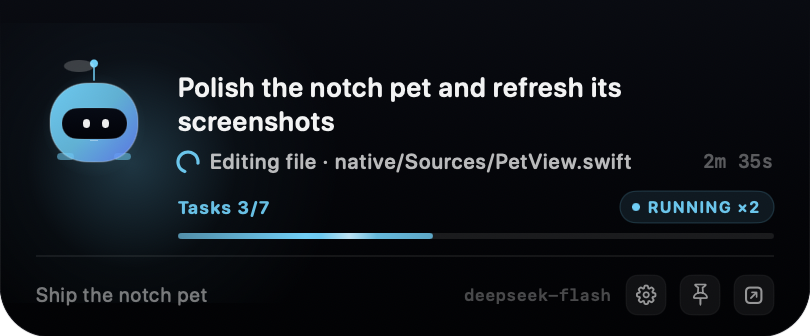
macOS, expanded: up to two title lines, live step, elapsed time, Tasks 3/7,
active agents, the session's token usage and cache hit, the goal, the model, and
the controls.
Editing file · native/Sources/PetView.swift while a tool runs, and
elapsed turn time on the right. It deliberately avoids the finished assistant
reply.todo_write completion when
DSH has tasks, and falls back to goal rounds when it does not. With no
countable unit, the bar shimmers indeterminately while the agent works, then
freezes or disappears when it stops.tokenUsage projection as DSH's own Usage pill: cumulative
billed input plus output, with the cache-hit share beside it. No estimator and
no extra model calls.A notched MacBook is not required: on other Macs the panel floats at the top center of the main display with rounded top corners. Windows PCs have no hardware notch, so they always use that rounded-top presentation.
dsh-notch-pet into the dialog:Prefer the terminal? The same bundle installs from a public repository with:
dsh plugin --profile web add github:hyzmm/dsh-notch-petweb is the DSH Desktop profile; keep the profile you actually run.
The pet appears at the top of the display a moment later. If it does not, make sure the plugin is enabled in Plugins, disable and re-enable it, or restart DSH.
The Windows helper is an unsigned, locally built .exe. DSH launches it
directly, so no installer or background service is involved. When the plugin is
disabled or DSH quits, the helper stops with it.
| Input | Result |
|---|---|
| Hover the panel | Expands, and stays open while the pointer is inside. |
| Click the robot | Pins or unpins the panel. A pinned panel ignores hover-out and Only while working. |
| Gear in the footer | Opens settings. |
| Pin / Open DSH in the footer | Pin the panel, or return to DSH — the desktop app, falling back to the web origin. |
| Right-click the panel | Open DSH, pin or unpin, open settings, or quit. |
| Pawprint in the menu bar / system tray | Appears while the panel is hidden: Settings, Open DSH, the Only while working and Hide pet switches, and Quit. |
| Launch | Peeks open for about three seconds, then settles back to the collapsed strip. |
| Click an accent, toggle, or drag the picker | Applies immediately and is remembered for the next launch. |
The panel focuses one session: a running root session when there is one, preferring the most recently active. If only subagents are running, the most recent subagent takes the spotlight. Running subagents count toward the active-agent total.
The title is DSH's own session title, so an auto-generated or user-renamed title wins. The first prompt is a fallback, then the workspace folder name.
The narrow line mirrors the live step, not the final answer. While the model is
thinking it is Thinking · <latest reasoning>, built from reasoning deltas and
trimmed to a sentence-aligned preview that keeps changing. While a tool runs it
is Editing file · native/Sources/PetView.swift, Running command · Build the native app, and so on. The elapsed time on the right is the current turn's
duration.
The collapsed strip has room for two compact lines under the top edge, so it shows the session title plus the live step. The new information uses the empty width beside the panel instead of adding height.
With a todo_write list, the bar tracks Tasks 3/7. Without tasks but with a
goal that has rounds, it tracks Goal 2/6 rounds. Without either, it becomes an
indeterminate band while the agent is busy. When the agent is idle, the
indeterminate band is hidden and any determinate bar is frozen, so the panel
does not keep flashing.
The expanded footer shows the focused session's cumulative provider-reported
tokens — the same tokenUsage projection behind DSH's own Usage pill — as
21.9K tok · 94% hit. The total is billed input (uncached, cache read, and cache
write) plus output; hit is the cache-read share of prompt-side input, and a
partial hit never rounds up to 100%. Hover the readout for the exact breakdown.
If dsh-token-meter is not mounted, the host falls back to folding each
assistant/message usage record.
The expanded panel also shows the goal objective, the last error, or a short status hint in the footer. The step text itself does not move; the loading arc and the progress shimmer animate while the agent works.
The gear opens the same settings popover on both platforms:
On Windows the pawprint is a notification-area icon; on macOS it is a menu-bar status item. Both open the same menu.
DSH host (Cordis plugin, index.js)
  │  normalizes agent/status, tool/call, todo_write, usage, turn and goal events
  │
  ├── macOS:  private Unix socket (~/Library/Application Support/DSHNotchPet)
  │           └── native/DSHNotchPet.app  (Swift · AppKit · SwiftUI)
  │
  └── Windows: per-user named pipe (\\.\pipe\dsh-notch-pet-<pid>)
              └── native/windows/bin/DSHNotchPet.exe  (C# · WPF)
                  and a user-local snapshot fallback in
                  %LOCALAPPDATA%\DSHNotchPet\state-<pid>.json
The host half is shared and platform-neutral above the transport layer. It builds a single snapshot from DSH's own services and events, so the two helpers render the same data model. The Windows helper is a native WPF overlay compiled against .NET Framework 4.8; it does not require Electron, a browser, or a developer SDK at install time. It is nonactivating, has no taskbar button, sits above normal windows, and uses per-monitor DPI scaling.
From a normal PowerShell on Windows:
powershell -ExecutionPolicy Bypass -File native/windows/build.ps1The script uses the in-box .NET Framework csc.exe and writes
native/windows/bin/DSHNotchPet.exe. It needs no Visual Studio installation.
The source is under native/windows/src.
Everything stays on your computer. On macOS the host writes the current state to
a per-process Unix socket (0600) under
~/Library/Application Support/DSHNotchPet/, and the panel reads it. On Windows
the state goes to a per-user named pipe and, when no pipe client is attached, to
a user-local snapshot under %LOCALAPPDATA%\DSHNotchPet\. The plugin makes no network
calls, collects no telemetry, and needs no account. The Windows fallback exists
for managed environments that deny named-pipe clients; it never leaves the
user's profile.
Logs are local too:
~/Library/Logs/DSHNotchPet.log and DSHNotchPet-host.log%LOCALAPPDATA%\DSHNotchPet\logs\DSHNotchPet.log and
DSHNotchPet-host.logdsh web in a terminal has no window, so the
browser is the right destination.%LOCALAPPDATA%\DSHNotchPet\logs\DSHNotchPet-host.log and
DSHNotchPet.log. Confirm .NET Framework 4.8 is installed. If you are
developing the helper, rebuild it with native/windows/build.ps1.native/build.sh if you
changed the Swift sources; otherwise check the logs above.DSH_NOTCH_PET_DISABLE_OVERLAY=1 before
starting DSH to skip the native overlay, then inspect current.json and the
host log.MIT © 2026 WengXiang. See LICENSE.
Built with AppKit, SwiftUI, WPF, a Unix socket, and a named pipe.
CLASSIFICATION EVIDENCE
系统优先读取 GitHub Topics,再与站内分类词典和词根规则比对。当前命中: ai-agent。
alchaincyf
你想蒸馏的下一个员工,何必是同事。蒸馏任何人的思维方式——心智模型、决策启发式、表达DNA。Distill how anyone thinks.

freestylefly
Prompt as Code | GPT Image 2 / 2.5 提示词与案例库,530+ 个案例、20+ 套工业级模板与可复用 Skills,新增 2.5 同提示词对比专区,附完整提示词与生成记录,持续更新。

titanwings
Distilly — Distill how they think into reusable Skills for any Agent or Bot. Formerly Colleague Skill(原同事 Skill).