

其他
完整应用

deepseek-harness
deepseek-ai
DeepSeek Harness: Everything is a Plugin.
PROJECT TOPICS
INSTALL REFERENCE
dsh plugin --profile web add github:hytime/dsh-thinking-effort
该命令指向仓库当前默认分支;尚无绑定当前 commit 的完整验证结果。
PROJECT README
A DSH (DeepSeek Harness) plugin that adds configurable reasoning effort levels to hand-declared llm-pi-ai models and sets a default reasoning effort for subagents.


Compatibility boundaries: DSH Runtime compatibility covers the Settings transport only: modern DSH exposes
remote.settings, while legacy DSH exposesconnection.api.settings. The plugin detects the available runtime capability and keeps the legacy fallback optional, so the settings page does not require a Remote provider on older DSH builds.Gateway Protocol compatibility is a separate layer. When the DSH schema exposes them, the plugin supports 18 common scalar
llm-pi-ai.compatfields, grouped into role/reasoning, format/output, streaming/tools, and storage/cache. Boolean fields offerAuto, supported, and unsupported; enum fields offerAutoand their concrete values; number fields takeAutoor an integer. DSH0.1.0-rc.7does not provide gateway compat settings. DSH0.1.0-rc.8through<0.1.2-alpha.1provide the other fields, but notsupportsFinishReasonorsupportsThinkingTokenBudget; DSH0.1.2-alpha.1through<0.1.3-alpha.2expose 15 of them, and0.1.3-alpha.2and later expose all 18 when supported by the schema. The optionaldsh-llm-openai-completionstransport can take over eligible custom OpenAI-compatible thinking providers when it is installed and enabled.Autounsets the current-layer override and restores the next value in the inheritance chain.DSH
0.1.2-alpha.1and later accept language-pack locale IDs throughLocaleRuntime. This plugin registersjaandkodynamically, so no DSH core fork is required. Older DSH builds that only expose built-in locale IDs supportzhandenonly.The published runtime entries are
lib/index.js(Host) andlib/client.js(Client). After changing TypeScript or locale sources, runnpm run buildbefore running DSH or packing the plugin. Current DSH does not expose a public semver metadata contract, so runtime capability detection is authoritative. An optional version is used only when explicit metadata or test input supplies it; unknown valid versions still use the detected capabilities. The plugin supports both modernremote.settingsand legacyconnection.api.settings.The Host registers its
dsh-thinking-effortSettings namespace through the host-provided SettingsinstallSectionwhen available, and falls back to the legacyregisterpath otherwise. Under the0.1.7+ entry-config model neither path exists, and the section comes from the exportedConfiginstead. It does not depend on@deepseek-ai/dsh-settingsat runtime, so the package installs cleanly into DSH profiles configured withautoInstallPeers: falsewithout introducing a second Cordis runtime.
| DSH range | Gateway compatibility settings |
|---|---|
0.1.0-rc.7 |
Not available |
0.1.0-rc.8 to <0.1.2-alpha.1 |
Available when exposed by the DSH schema, but without supportsFinishReason and supportsThinkingTokenBudget |
0.1.2-alpha.1 to <0.1.3-alpha.2 |
15 fields when exposed by the DSH schema; thinkingTokenBudgetField, vllmPriority, and supportsMaxOutputTokens are not offered yet |
0.1.3-alpha.2 to <0.2.1-0 |
All 18 fields when exposed by the DSH schema. This spans the 0.1.7 settings rewrite and the 0.2.0 line, both verified to keep the same editable field set. Releases at or beyond the newest bound are unmapped: the plugin keeps working and follows the capabilities the running host reports instead |
From DSH 0.1.0-rc.8 onward, field availability follows the runtime schema. The table shows the maximum field set for each DSH version; the route protocol can further reduce it.
A gateway compat field can be configured only when the DSH version, runtime schema, and route's api protocol all support it. Unsupported fields stay hidden and are not written to Settings. Among these 18 fields, openai-completions supports all but supportsMaxOutputTokens, while openai-responses, azure-openai-responses, and openai-codex-responses support only supportsDeveloperRole, supportsStrictMode, supportsLongCacheRetention, and supportsMaxOutputTokens. If api is missing or unrecognized, the runtime schema and DSH validation remain the final authority.
DSH 0.1.7 and later derive each settings form from the Loader entry's own Config schema (the entry-config model); a plugin that exports none gets no form at all. This plugin exports that schema, so on 0.1.7+ its section is the Loader entry id thinking-effort, while 0.1.0-rc.7 through 0.1.6 keep the registered namespace dsh-thinking-effort; the Client resolves whichever id the running Host publishes. subagentEffort now lives in this plugin's own section, and on 0.1.7+ the old llm-pi-ai location is no longer a fallback: that section's schema declares only providers, so the Host refuses a write to any other path and drops undeclared keys from the user layer it reports. An existing subagent default therefore reads as unset there and has to be chosen again in the plugin's settings card. A snapshot this plugin exported before 0.1.7 still carries the value inside llm-pi-ai; importing it migrates the value into the plugin's own section, which is also what lets its providers import, because the Host refuses the whole batch when any op path is not volatile. On 0.1.7+ settings are stored in the active profile's cordis.patch.yml instead of ~/.dsh/settings.yaml, which 0.1.7 no longer uses.
The llm-pi-ai adapter supports hand-declared third-party models, but those entries often do not declare reasoningEfforts. As a result, Composer does not show a reasoning effort selector, and gateway-specific values such as ultra cannot be mapped to DSH's standard levels.
This plugin provides the configuration layer needed to:
off, high, and max options to models your own profile declares without a declaration; a model that only a composition base or a schema default supplies is left unfilled and counted in the Host log;high to a gateway value such as ultra;The plugin is usually unnecessary when you only use built-in DSH models and their reasoning controls already work.
These identifiers have different responsibilities:
| Identifier | Purpose |
|---|---|
@hytime/dsh-thinking-effort |
npm package, browser bundle path, loader ID, and host/client runtime ID |
thinking-effort |
Cordis composition entry ID and settings Slot ID |
| Feature | Description |
|---|---|
| Default levels | Adds off, high, and max without overwriting custom values, for the models your user layer declares; a model only a composition base or a schema default supplies is left unfilled and counted in the Host log |
| Per-model editor | Select levels and configure gateway values for both catalog/modelOverrides and models[] entries in Settings |
| Gateway compatibility | Configure 18 common scalar fields globally per provider or separately per model, grouped by role/reasoning, format/output, streaming/tools, and storage/cache; groups are collapsed by default |
| OpenCode session Header | Enable a dynamic x-opencode-session per exact model. By default a deterministic ses_… generator bound to the DSH session (with template / expression / script modes to survive upstream format changes), without storing a fixed Header value |
| OpenCode user-agent override | Rewrite the user-agent header per provider/model (custom routes included) to mimic an upstream client, with optional per-route values; off by default |
| Gateway mapping | Send ultra when the user selects DSH high |
| Backup and profiles | Export the current configuration as a JSON file for migration; save named profiles locally and switch between them; choose merge or replace before importing, with an impact preview |
| Composer effort slider | Registers an optional Composer seat when the Web runtime exposes modelDirectories, with host-resolved tiers for the current provider/model |
| Subagent default | Apply a default effort only when a subagent request has no explicit value |
| Multilingual settings | Includes Chinese, English, Japanese, and Korean dictionaries; Japanese/Korean switching uses DSH language-pack support |
| Version watermark | Show the installed plugin version in the bottom-right corner |
Use the official DSH CLI to manage the plugin profile. A plain npm install does not register a DSH profile bundle.
# Install the latest version
dsh plugin --profile <profile> add @hytime/dsh-thinking-effort

# Install a specific version
dsh plugin --profile <profile> add @hytime/dsh-thinking-effort@0.3.7

# Upgrade
dsh plugin --profile <profile> update @hytime/dsh-thinking-effort

# Remove
dsh plugin --profile <profile> remove @hytime/dsh-thinking-effort
rm -f "${DSH_HOME:-$HOME/.dsh}/thinking-effort-loaded.json"
See INSTALL.md for profile discovery, migration, validation, and troubleshooting.
Open DSH Settings → Model capabilities and effort.
Use the Page language selector at the top to choose 中文, English, 日本語, or 한국어. DSH uses the persisted locale first, then the browser language, then English as the fallback.
Choose a subagent default from the Subagent default effort card, then click Apply.
Use Quick settings to apply the official DeepSeek or generic preset to all models, or expand a provider and model for detailed configuration.
Use the search field to filter models by name or ID. Model rows show text/image input capability badges, a context-window badge when declared, and a settings button for per-model editing.
Select a reasoning level and enter the exact gateway value. For example:
| DSH level | Gateway value |
|---|---|
off |
Leave empty to omit the parameter |
high |
ultra |
max |
max |
In the model editor, optionally enable OpenCode session Header for the exact model that needs x-opencode-session. It is off by default, sends a deterministic ses_… value generated from the current DSH session, does not inherit across models or providers, and saves immediately when toggled — there is no separate save button. See the generator section when the upstream changes its expected format.
Return to Composer, choose the configured model, then use its reasoning-effort slider.
When the DSH Web runtime exposes modelDirectories, the client registers an optional conversation.input.model seat that deliberately shadows the shipped model selector — on this single slot a lower priority wins — and it does not modify Composer itself. The slider reads the host-resolved reasoning.efforts array for the current exact provider/model, so it shows only the tiers currently effective for that model. Changing a level submits the ordinary session model selection; it does not mutate the plugin Settings document.
The model's defaultEffort is shown through the matching tier. If the host model has no defaultEffort, the panel also provides Follow model default, which submits a selection without a reasoning-effort override. The control uses the host --dsw-* semantic tokens and therefore follows the active light or dark theme without its own theme preference.
The seat is not registered when the runtime does not provide modelDirectories; the Settings page and its legacy Settings transport behavior continue to work. This plugin does not modify the DSH Composer, ui-conversation, or ui-model-selection packages.
The settings page shows the installed version as a small watermark such as v0.1.14 in the bottom-right corner.
The provider compat block is the global default for every model under that provider. The Settings page groups the 18 fields into four sections that are collapsed by default. Configure provider defaults with the official DSH YAML shape:
providers:
  qwen-gateway:
    compat:
      supportsDeveloperRole: false
      maxTokensField: max_tokens
    models:
      - id: qwen-plus
      - id: qwen-thinking
        compat:
          maxTokensField: max_completion_tokens
Field-by-field, each value resolves independently in this order: model → provider → base/catalog → protocol. URL/hostname detection is not used as a compat source. A model value overrides only that field. Auto removes the current-layer value, restores provider inheritance when applicable, and lets the next value in the chain take effect. Provider defaults apply to every model on the route; a model edit changes only the current model. For a route/provider, non-empty models[] and non-empty modelOverrides are mutually exclusive; the official schema rejects this invalid configuration, and the plugin fails closed for malformed data.
The provider area in Settings edits defaults for all models. Both catalog models and custom YAML models[] entries expose a single-model compat editor: catalog models write only the target fields with field-level set/unset operations under modelOverrides.<model>.compat, while models[] models write one complete providers.<route>.models array set while preserving other entries and fields. A model edit does not change other models.
These compat values are control plane configuration. They do not implement or replace the gateway transport; an external transport remains responsible for network requests.
The model editor has a separate OpenCode session Header switch, stored in the plugin's own settings section, not in llm-pi-ai.compat. Enable it only for the exact provider/model that requires x-opencode-session; another model on the same route, including a GPT model, does not inherit it. Flipping the switch saves immediately — there is no separate save button — and reopening the model shows the persisted value.
When enabled and no format is configured, the Host sends a deterministic value in the canonical ses_ shape derived from the current DSH session: ses_ + 12 hex characters (a 48-bit millisecond timestamp minted once per session) + 14 Base62 characters (an 80-bit digest of the normalized DSH session id). The same DSH session always sends the same value: the value is stickied per session, and eviction from the bounded value cache drops only the cached value — never the first-use mint — so an evicted session keeps its value when revisited. Only a DSH restart re-mints the hex timestamp, and only in firstUse mode (time: hash needs no state at all). The 14-character suffix is stable across DSH restarts because it is derived, not stored. Different sessions — including each subagent run — derive distinct values.
The generator is configurable either from the Session value generator card on the settings page or by hand in the settings document: on 0.1.7+ it is the opencodeSession.format section of the active profile's cordis.patch.yml (addressed by the Loader entry id thinking-effort); on 0.1.0-rc.7 through 0.1.6 it is dsh-thinking-effort.opencodeSession.format, for example in ~/.dsh/settings.yaml. The two are equivalent. Four modes cover upstream format changes without rebuilding the plugin:
ses-derive (default) — the canonical generator above. time: firstUse mints the hex block once per session; time: hash derives it from the session digest so the whole value is identical on every machine.passthrough — the previous behavior: send the raw DSH session id.template — a string with {hex12}, {tail62}, {sessionId}, {rawSessionId}, {sha256}, {now}, {provider}, {model} placeholders.expression — a safe additive expression with the same context plus sha256, slice, lower, upper helpers, e.g. 'ses_' + hex12 + tail62.script — an absolute path to a JS file exporting format(context), hot-reloaded on file change; on load or evaluation errors it falls back to ses-derive.An optional validate regex plus onInvalid: warn | drop | send checks the produced value against the latest upstream expectation (warn is the default). An x-opencode-session already supplied by the adapter or caller is always preserved and never overwritten. The setting does not choose or change openai-completions, openai-responses, or anthropic-messages. See INSTALL.md for the full configuration reference.
Sub2API, CPA, and other forwarding gateways must preserve and forward x-opencode-session to the OpenCode upstream. A static route setting such as llm-pi-ai.providers.<route>.headers.x-opencode-session is not an equivalent replacement: it uses one value for every conversation and cannot provide per-conversation routing or prompt-cache affinity. Restart DSH after Host changes and refresh the Web page after Settings or Client changes.
Some upstreams also fingerprint the user-agent header. The llm-pi-ai adapter forces its attribution user-agent (deepseek-harness/…) on every provider request and strips any provider-configured value, so the header cannot be changed through DSH itself. This plugin rewrites it at the last layer before the request leaves — scoped per provider/model and off by default. The YAML below shows the namespace shape the releases before 0.1.7 read:
dsh-thinking-effort:
  opencodeSession:
    userAgent:
      value: "opencode/1.18.31 ai-sdk/provider-utils/4.0.23 runtime/bun/1.3.14"
      providers:
        opencode-go:
          enabled: true              # whole route
        sundrawnewapi-private:
          value: "opencode/1.18.31"  # optional per-route value
          models:
            mimo-v2.5-free: true     # exact model
value is the master switch: empty or absent disables the override everywhere.enabled flag is true (all models) or the exact model is toggled on; custom routes work by their provider name.value wins over the master value.user-agent untouched.It composes with the session Header above (same request layer), so enabling both fully mimics an upstream client. See INSTALL.md for the reference; restart DSH after Host changes.
The Backup and profiles card, below the language selector and the Subagent default effort card, exports the current configuration, keeps named profiles on this machine, and imports a file exported earlier.
dsh-config-<timestamp>.json. The file holds the llm-pi-ai user layer and this plugin's own settings section as written: those sections are keyed dsh-thinking-effort on 0.1.0-rc.7 through 0.1.6 and by the Loader entry id thinking-effort on 0.1.7+. No credential value is exported — a provider keeps only the name of the environment variable holding its key (apiKeyEnv) — but every value stored in those layers is copied verbatim, and a plaintext token kept in provider headers is one of them. Keep it safe.Export and import reuse the existing Settings channel, so the card works with both modern Remote Settings and the legacy connection.api.settings. When the result reports a namespace that takes effect on restart, restart DSH.
When importing a snapshot, only capability configuration is migrated by default. A provider's baseURL, apiKeyEnv, and headers, along with opencodeSession.format.script, are local deployment wiring and take effect only when you explicitly select Also import endpoints and credentials (advanced) in the preview.
DSH 0.1.7 renames settings.yaml and imports it exactly once, and plugin releases before this one failed to load on that version, so a thinking level or a model toggle you configured earlier can survive only inside settings.yaml.imported. On startup the plugin scans that document, a not-yet-renamed settings.yaml, and the live llm-pi-ai user layer. When it finds values this plugin owns that your own settings section does not already declare, it asks in a dialog above the settings page: Migrate writes them into this plugin's settings section, Later postpones the question for this page load, and Don't ask again records that exact offer, which returns only if the legacy data later changes. No legacy values are written before you choose Migrate, and the migration only fills in values you have not set, so it never overwrites one. The settings that stand right now are saved into the Backup and profiles rollback slot (autoBackup, marked sourceProfile: migration) in the same write batch as the migrated values. To look for legacy items on demand, use Rescan legacy data in the Backup and profiles card.
The page header contains the language selector. Below it, the Subagent default effort card controls the default for requests without an explicit effort. The Quick settings controls apply a preset across models. Provider sections can be expanded or collapsed; each model row exposes input capabilities, context length, and gateway compatibility controls in its settings area. models[] saves use one complete array set rather than an array-index path operation.
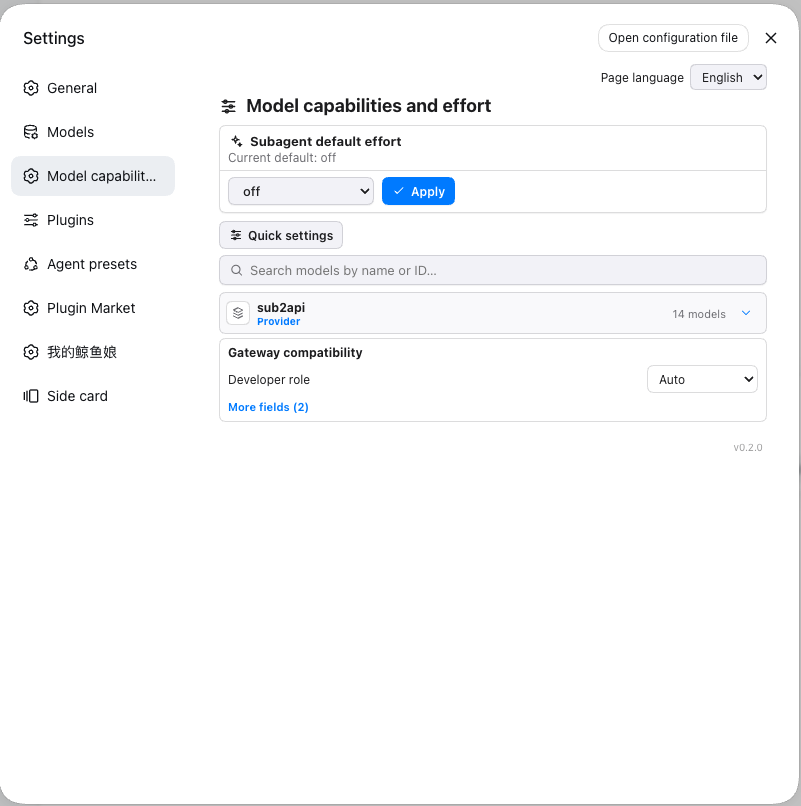
See the complete Chinese, English, Japanese, and Korean screenshot gallery in docs/SCREENSHOTS.md.
llm-pi-ai models and modelOverrides on startup and settings changes, adding defaults only where reasoningEfforts is missing. It writes through the user layer only, so it covers the models your own profile declares: a model a composition base or a schema default supplies has no entry in that layer to write into, so it is left alone and the Host logs how many were skipped. It also observes the model-level OpenCode session setting and injects the generated x-opencode-session (default ses-derive, configurable per opencodeSession.format) only into matching llm/stream requests, and rewrites user-agent for models opted into opencodeSession.userAgent (otherwise forced by the llm-pi-ai adapter's attribution header).ctx.remote.settings) and, when the runtime exposes modelDirectories, registers the optional Composer seat that deliberately shadows the shipped model selector on this single slot (a lower priority wins) plus a host-resolved effort slider. The model editor stores OpenCode session Header settings in the plugin namespace, separately from llm-pi-ai.compat. Chinese, English, Japanese, and Korean dictionaries are maintained separately in src/locales/zh.json, src/locales/en.json, src/locales/ja.json, and src/locales/ko.json, then generated into the client bundle before publishing.subagentEffort in the plugin's own settings section on 0.1.7+ (the llm-pi-ai user layer on 0.1.0-rc.7 through 0.1.6). The Host reads the plugin's own section first and falls back to llm-pi-ai, where the value can only live on the releases before 0.1.7 — the entry-config llm-pi-ai section declares only providers, so its user layer never carries the key. The agent/request waterfall only fills requests that do not already specify an effort.off, high, or max; the request omits reasoning and the gateway decides its own default behavior.llm-pi-ai exposes seven standard levels: off, minimal, low, medium, high, xhigh, and max.off levels require a gateway value. An empty off value means that the parameter is omitted.UNSUPPORTED_REASONING_EFFORT.off and an unset effort may both omit reasoning; whether this disables thinking depends on the gateway protocol.modelDirectories service. The seat is not registered when that service is unavailable, and the plugin leaves Composer unchanged.main run the quality matrix on Node 22.19.0 and 24.x.npm ci; maintainers must commit package-lock.json when dependencies change.v<version> tag through publish.yml.package.json version and CHANGELOG.md files, commit those changes, and create the matching v<version> tag. The tag must point to a commit in the main history.hytime/dsh-thinking-effort and workflow publish.yml. The workflow publishes provenance through GitHub OIDC and does not require NPM_TOKEN.dsh-v0.1.0-rc.7 (0.1.0-rc.7), dsh-v0.1.1-rc.2 (0.1.1-rc.2), dsh-v0.1.3-alpha.2 (0.1.3-alpha.2), dsh-v0.1.6-alpha.1 (0.1.6-alpha.1), and dsh-v0.1.7-alpha.1 (0.1.7-alpha.1), using the official dsh plugin command and real compatibility checks. The 0.1.6-alpha.1 (namespace model) and 0.1.7-alpha.1 (entry-config model) representatives both run the real-browser DOM probe.CHANGELOG file automatically; an existing npm version also blocks publishing.CLASSIFICATION EVIDENCE
系统优先读取 GitHub Topics,再与站内分类词典和词根规则比对。当前命中: 无有效分类标签。
deepseek-ai
DeepSeek Harness: Everything is a Plugin.

anywhere-labs
为 DeepSeek Harness (DSH) 插件生态打造的现代化桌面端解决方案。万物皆「插件」,桌面本身也是「插件」。

walkinglabs
Harness engineering beginner tutorial, from 0 to 1