
文件与数据
渠道适配

WeKnora
Tencent
Open-source LLM knowledge platform: turn raw documents into a queryable RAG, an autonomous reasoning agent, and a self-maintaining Wiki.
PROJECT TOPICS
INSTALL REFERENCE
dsh plugin --profile web add github:hyper-dsh-plugins/dsh-open-eyes
该命令指向仓库当前默认分支;尚无绑定当前 commit 的完整验证结果。
PROJECT README

Let the multimodal model you choose become DeepSeek's eyes.
English · 中文
dsh-open-eyes adds configurable vision to DeepSeek Harness. Attach a screenshot, photo, chart, or interface to a conversation, and the main model can delegate the visual work to a multimodal model of your choice. The analysis returns as text in the same conversation, so the main model itself does not need native image support.
Open Eyes supports OpenAI Responses, OpenAI Chat Completions, and Anthropic Messages endpoints. It is provider-neutral: you choose the API endpoint, model, and credentials.
Unofficial community plugin:
dsh-open-eyesis an independent community project. It is not affiliated with, endorsed by, or maintained by DeepSeek.
Requires Node.js >=22.19.0. Open Eyes requires exact one-to-one version matching with DSH; releases are neither forward nor backward compatible.
| DeepSeek Harness version | Install command |
|---|---|
0.1.0-rc.6 |
dsh plugin --profile web add dsh-open-eyes@0.1.0 |
0.1.1-rc.2 |
dsh plugin --profile web add dsh-open-eyes@0.1.1-rc.2 |
0.1.2-alpha.1 |
dsh plugin --profile web add dsh-open-eyes@0.1.2-alpha.1 |
0.1.2-rc.1 |
dsh plugin --profile web add dsh-open-eyes@0.1.2-rc.1 |
Restart DSH Web after installation, then reload the page. DSH profiles are independent, so install the plugin separately in every profile where you want to use it.
Open Settings → Plugins → Plugin configuration and expand Open Eyes. The card is named Open Eyes in English and 开放视觉 in Chinese, following the DSH interface language.
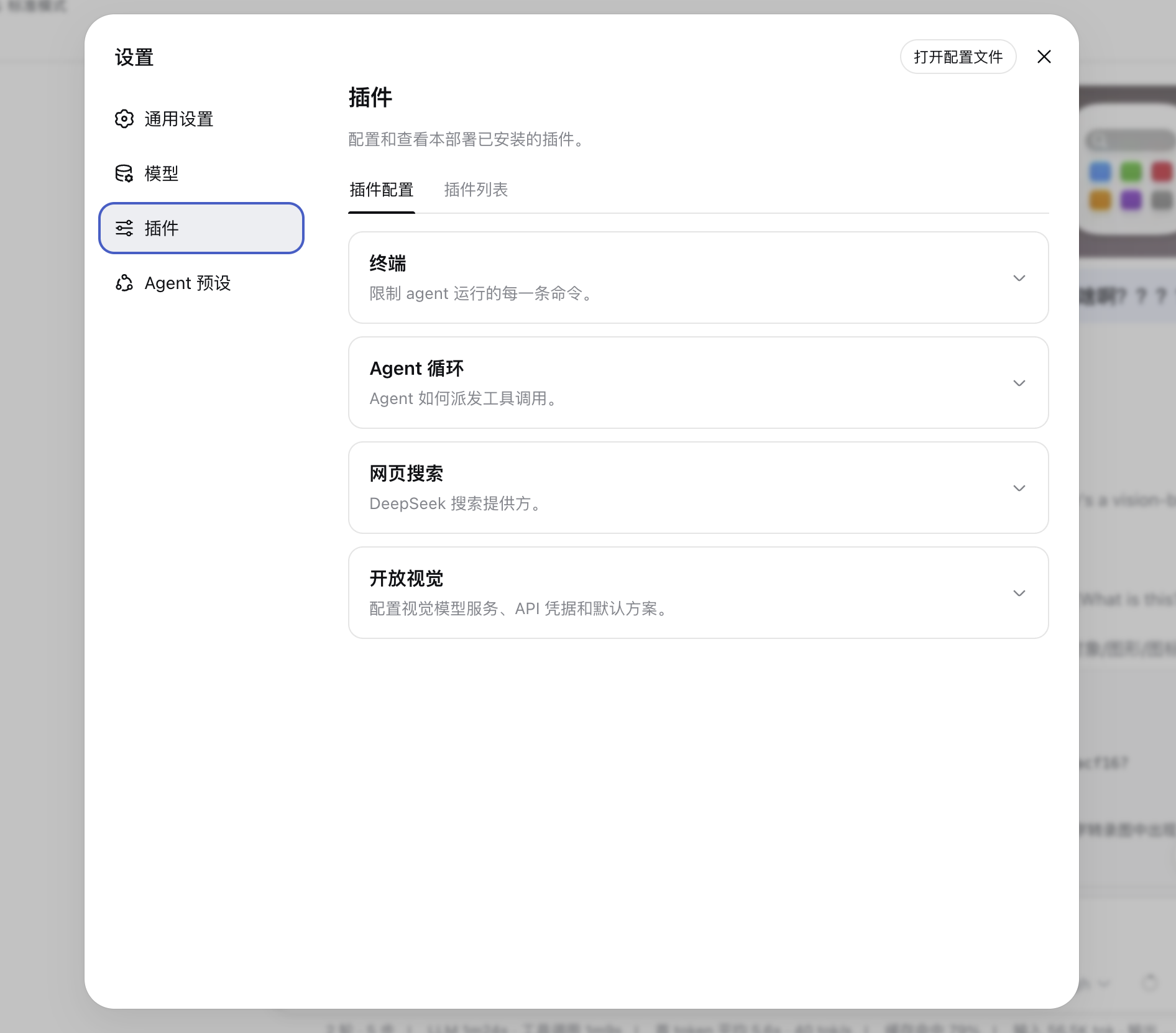
Open Eyes lets you create multiple vision schemes and switch the active default at any time. Each scheme has an optional display name, API endpoint, model, and API Key. The editor accepts either a service base URL or the complete endpoint for the selected protocol.
Three protocols are available:
openai-responsesopenai-chat-completionsanthropic-messagesYou can enter a model manually or use Fetch models to read the service's model list. Because a model catalog does not reliably declare image capability, confirm that the model you select is multimodal. Validate connection sends one tiny test image through the real configured model, while Save and validate checks a new or edited scheme immediately.
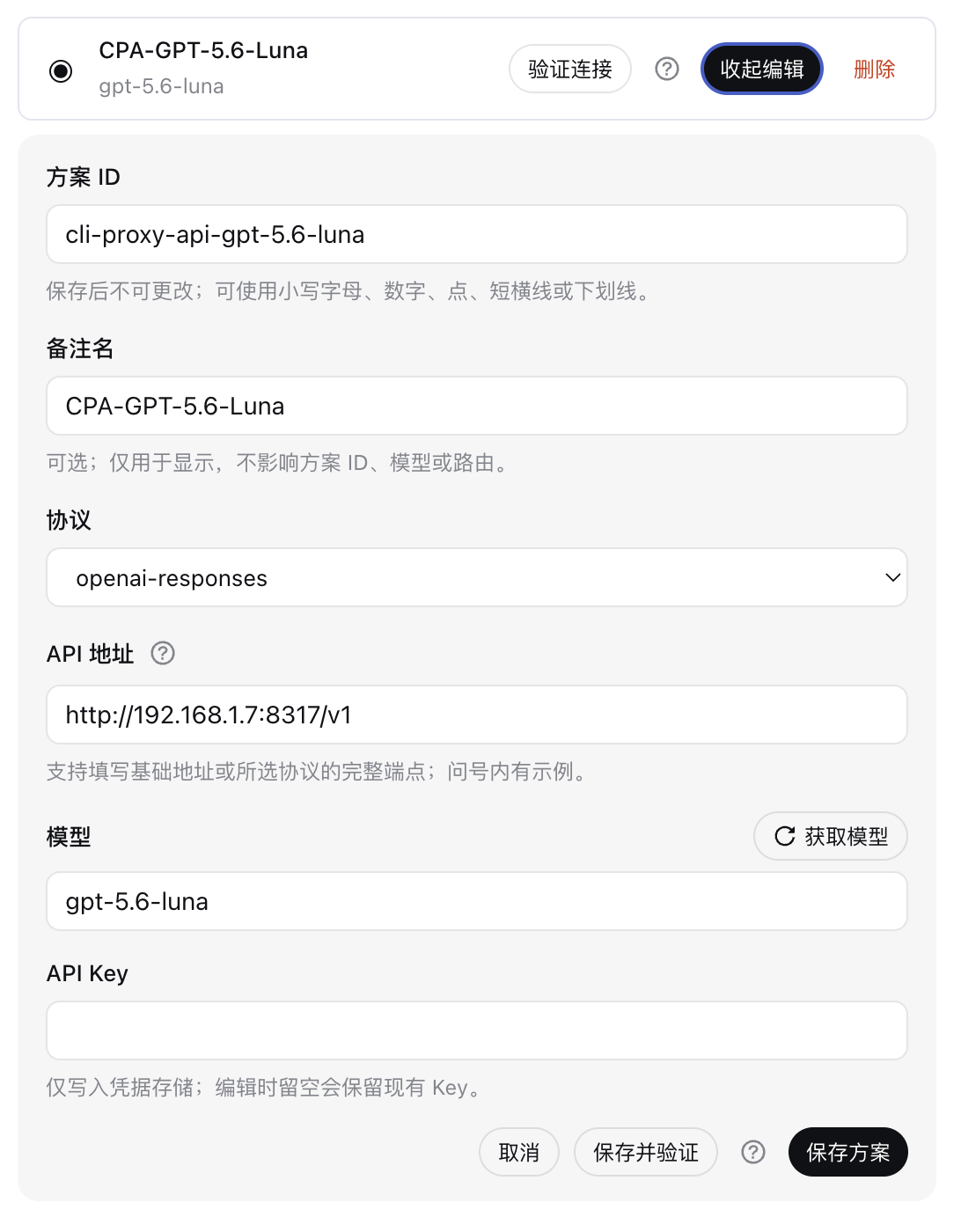
The compact scheme list shows only the display name and model. Use the radio button on the left to select the default scheme. Editing opens directly below the matching scheme, and the same button collapses it again. Validation results appear without expanding or reshaping the scheme row.
API Keys are written only through DSH Credentials. They are never stored in plugin Settings or cordis.patch.yml. Leave the API Key blank while editing to keep the existing key. Deleting a scheme does not automatically delete its saved credential.
The Enable switch applies to new conversations:
Changing the default vision scheme does not require a new conversation. The next visual analysis in the same conversation uses the newly selected scheme.
The conversation model creates a task-specific vision_analyze prompt from your question—for example, to transcribe an error, inspect a layout, read a chart, or compare two screenshots. The optional Preference panel gives you another layer of control:
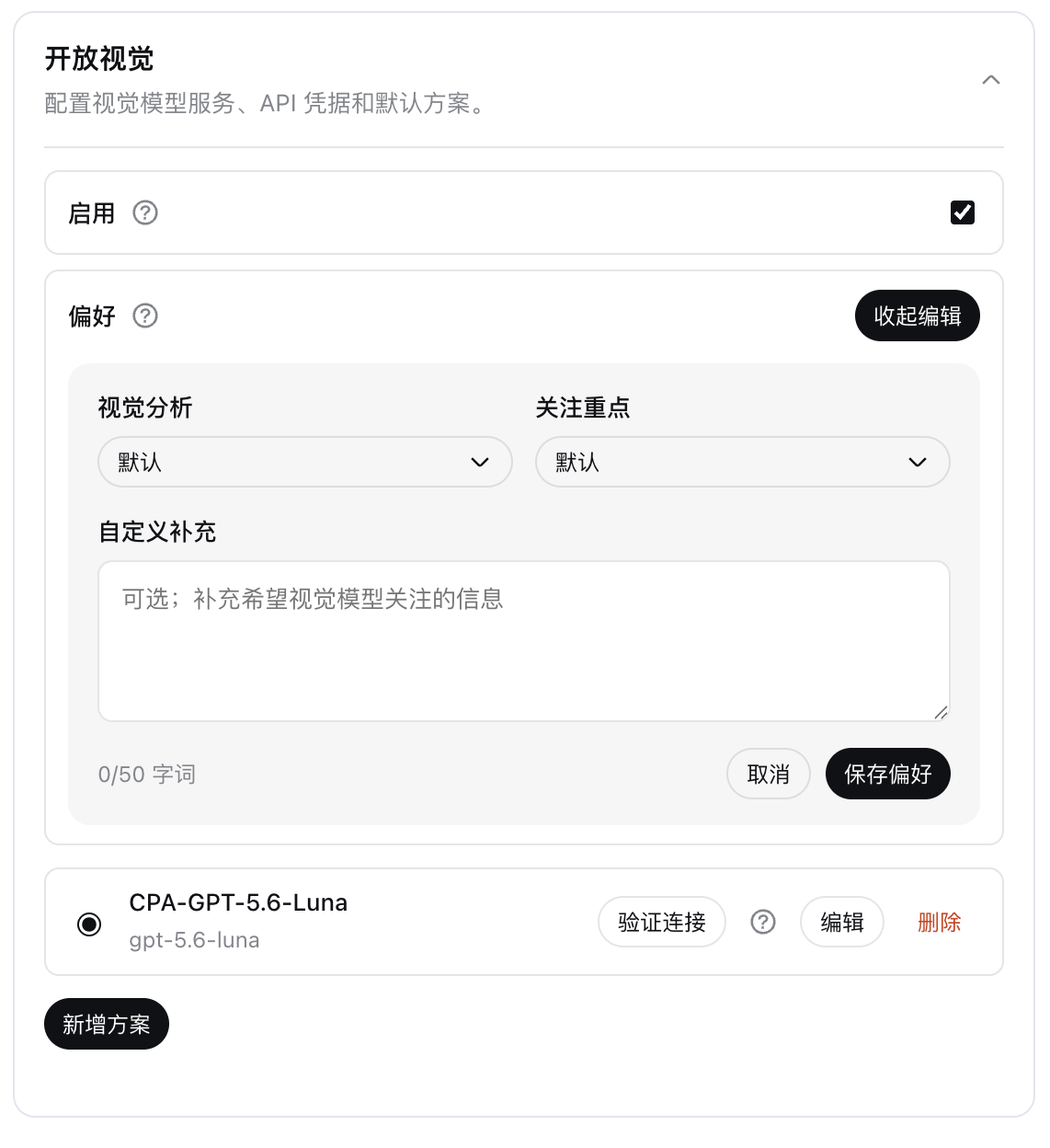
Preferences are applied internally after the visible Tool Call and immediately before the request is sent to the vision model. This is why the extra preference text does not appear in the Tool Call arguments. It does not modify the main model's system prompt, conversation history, tool declaration, or Harness loop. Leaving every option at Default adds nothing and preserves the original task prompt exactly.
Preference changes apply to the next visual analysis, including inside an existing conversation.
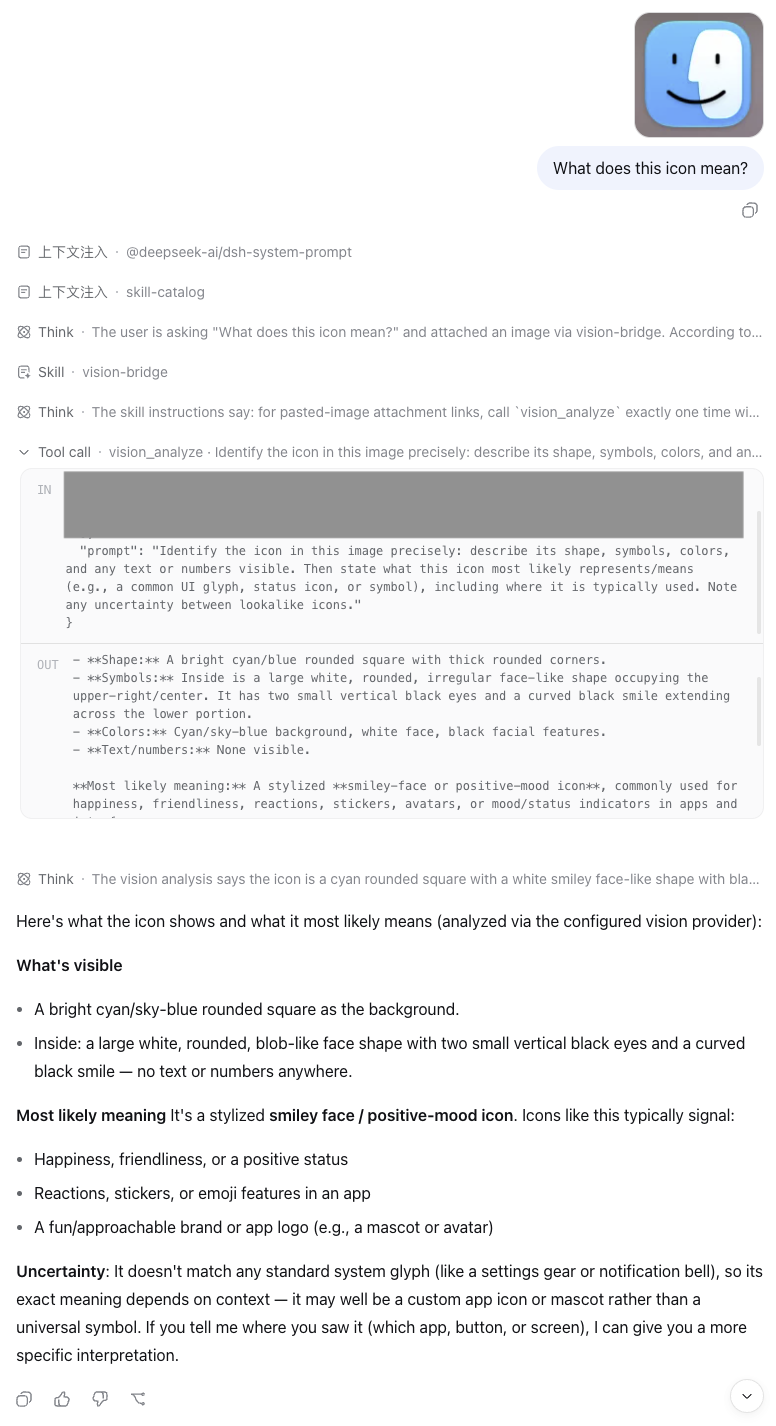
Paste, drop, or select an image in DSH Web, ask the question you actually want answered, and send it normally. Open Eyes keeps the user's text in the same conversation, provides a session-bound attachment to the vision tool, and returns the visual model's analysis for the main model to use.
In the example below, the non-multimodal main model GLM-5.3 (High effort) receives an image question, calls vision_analyze, delegates the image to GPT-5.6-Luna, and uses the returned visual evidence in its answer.
The same tool can analyze image files already available to an Agent:
Call vision_analyze on screenshots/error.png. Transcribe the exact error code
and describe the actions visibly available in the interface.
Local PNG, JPEG, WebP, and GIF files are supported. Relative paths resolve from the current Agent session working directory. Remote image URLs are disabled by default and can be enabled through advanced configuration when needed.
The default vision scheme and visual preferences are resolved for every analysis, so both can change live without rebuilding the conversation. The Enable state is deliberately fixed when a conversation is created so repeatedly toggling it cannot change that conversation's model-visible prompt or tool catalog.
The Settings card covers the fields most people need. Advanced request limits, retries, custom headers, authentication overrides, remote URLs, and filesystem policies remain available in cordis.patch.yml and are preserved when a scheme is edited in Settings.
- id: vision-bridge
  config:
    enabled: true
    visualAnalysis: default
    focusAreas: []
    preference: ''
    providers:
      - id: my-vision
        protocol: openai-chat-completions
        baseUrl: https://api.example.com/v1
        model: your-vision-model
        credential: VISION_PROVIDER_API_KEY
        maxOutputTokens: 2048
        chatMaxTokensField: max_completion_tokens
    defaultProvider: my-vision
Store VISION_PROVIDER_API_KEY in the Credential source used by DSH. Keep only the reference name in configuration.
For a headless profile, replace web in the installation and inspection commands with the intended profile name. The vision_analyze tool and bundled vision-bridge Skill remain available without the Web Settings card.
Authentication, request, protocol, and user-cancellation failures are not retried. In the rare case where a provider accepted a request just before the connection failed, a recovery retry may create duplicate provider usage or billing.
VISION_NOT_CONFIGURED: add at least one scheme and select a valid default.Inspect the active profile with:
dsh --profile web --dump-configdsh plugin --profile web remove dsh-open-eyesRestart DSH Web and reload the page afterward. If you added vision-bridge or vision-bridge-skill rows manually, remove only those rows and preserve unrelated profile configuration.
corepack enable
pnpm install --frozen-lockfile
pnpm run typecheck
pnpm run lint
pnpm run test
pnpm run build
npm pack --dry-run
pnpm run test:e2e
The test suite does not require a paid vision API. The packed-profile test installs, starts, and removes the real tarball in a temporary DSH profile.
Released under the MIT License. Security issues should be reported privately according to the security policy.
CLASSIFICATION EVIDENCE
系统优先读取 GitHub Topics,再与站内分类词典和词根规则比对。当前命中: multimodal、vision。
Tencent
Open-source LLM knowledge platform: turn raw documents into a queryable RAG, an autonomous reasoning agent, and a self-maintaining Wiki.

liustack
The first vision plugin for DeepSeek Harness, and the vision bridge for every text-only coding agent. Paste an image, get structured JSON evidence (OCR, layout, semantics). | 全网最强 DeepSeek Harness 外挂视觉插件,为 DeepSeek、GLM 等纯文本模型外挂视觉能力,粘贴图片即得结构化 JSON 证据(OCR、版面、语义)。

dream-num
An open-source Office workspace where people and AI agents create, collaborate, and review together.