
模型与 MCP
待识别

rea
morluto
Reverse engineer anything with agents, from app behavior down to native binaries.
PROJECT TOPICS
INSTALL REFERENCE
dsh plugin --profile web add github:hybridIce/dsh-plugin-pdf-annotator
该命令指向仓库当前默认分支;尚无绑定当前 commit 的完整验证结果。
PROJECT README
在 PDF 中选中句子、添加批注,再把多条批注一起交给 Agent 处理。
A DeepSeek Harness plugin for selecting PDF text, adding comments, and sending them as a batch.
选中的原文会显示编号高亮,批注集中在下方列表。攒好几条后,可一起插入输入框,补充要求再发送,也可直接提交这批批注。
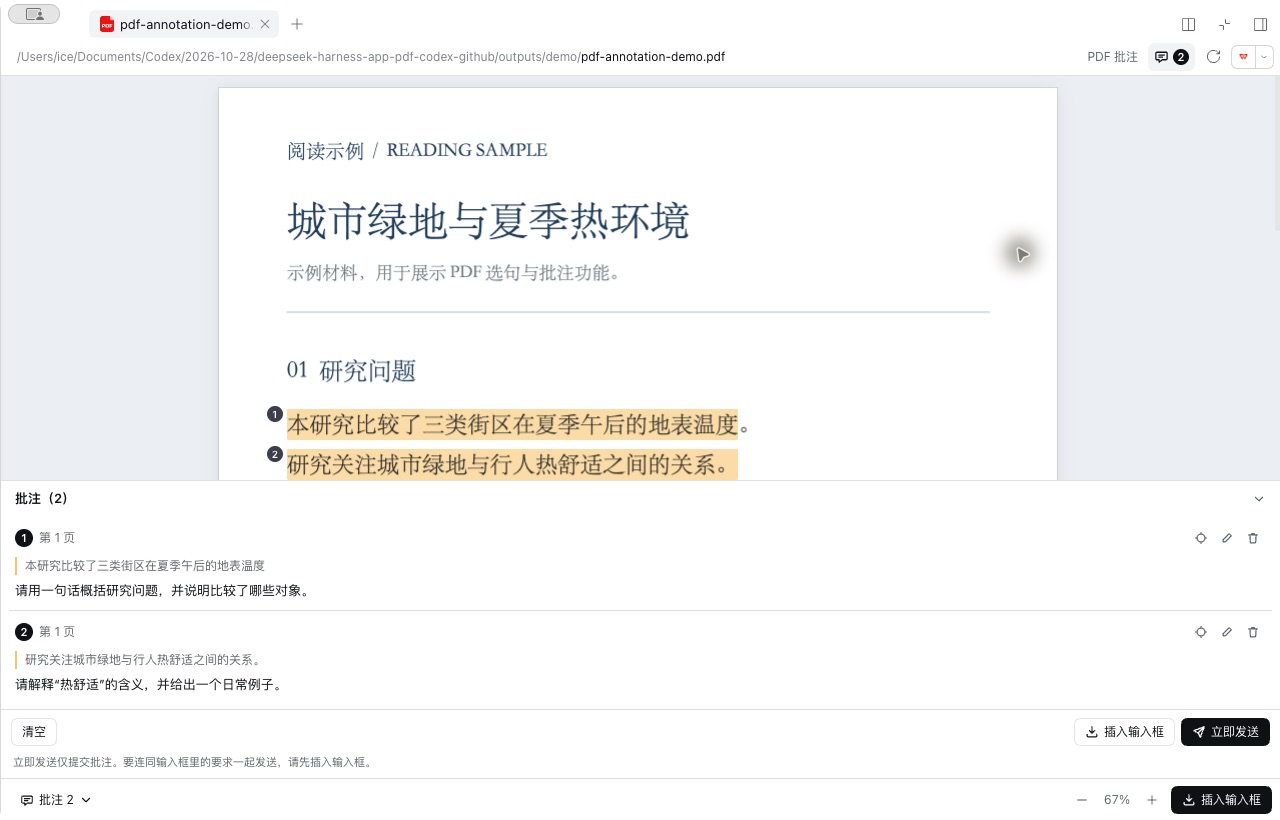
DeepSeek Harness 中的实际操作截图;文档内容为演示材料。
需要 DeepSeek Harness 0.2.1-rc.3 或更新的 0.2.x 版本。Harness 仍处于开发预览阶段,后续接口变化可能影响兼容性。
打开 插件 → 实验性插件 → 更多,启用 自定义插件索引(部分版本名称为 自定义插件市场)。
切换到 发现 → 添加索引源,粘贴以下地址:
https://raw.githubusercontent.com/hybridIce/dsh-plugin-pdf-annotator/main/index.json选择 PDF 批注 · 社区插件 索引,打开 PDF 批注 卡片,点击 安装并确认来源。
安装后启用插件,打开 PDF,在预览头部选择 PDF 批注 查看器。
索引支持中英文名称和介绍。添加一次后即可从「发现」页浏览版本和安装;如果已经安装,卡片会显示 已安装。
English: Enable the custom plugin index bundle, open Discover, and add the URL above. Select PDF Annotator to view its details and install.
打开 Harness 的 插件 → 添加插件 → 安装第三方插件。
输入仓库地址:
https://github.com/hybridIce/dsh-plugin-pdf-annotator安装后启用 PDF 批注。如果应用提示需要重启,请先完成正在运行的任务,再重启。
打开 PDF,在预览头部选择 PDF 批注 查看器。
仓库包含编译后的插件文件,安装时无需手动构建。
在 Releases 下载 dsh-plugin-pdf-annotator-0.1.2.tgz,保存到固定位置,再在“添加插件”中输入安装包的完整路径。
也可在完全退出桌面版后使用 macOS 自带命令行:
"/Applications/DeepSeek Harness.app/Contents/Resources/runtime/cli/bin/dsh" plugin --profile desktop add /path/to/dsh-plugin-pdf-annotator-0.1.2.tgzWeb 版使用对应的 profile,例如 dsh plugin --profile web add /path/to/dsh-plugin-pdf-annotator-0.1.2.tgz。
发送给 Agent 的内容包含文件路径、页码、所选原文和你的批注。正在发送时新增或修改的批注会保留,供下一次提交。
npm ci
npm run typecheck
npm test
npm run build
npm pack
主要目录:
src/client/annotations/   批注存储与持久化
src/client/chat/          消息格式、草稿追加与批量发送
src/client/viewer/        PDF 渲染、选区、高亮与批注界面
scripts/build.mjs        构建与打包
tests/ 逻辑测试本插件使用 MIT 许可证。随插件分发的 PDF.js、字体和解码器的许可信息见 THIRD_PARTY_NOTICES.md。
CLASSIFICATION EVIDENCE
系统优先读取 GitHub Topics,再与站内分类词典和词根规则比对。当前命中: deepseek-harness。
morluto
Reverse engineer anything with agents, from app behavior down to native binaries.

deepseek-ai
DeepSeek Harness: Everything is a Plugin.

nexu-io
The 1st Collaborative AI Design Agent Workspace. Local-first and open source. Create motion, prototypes, websites, apps, dashboards, presentations, images, and videos with your team and AI agents. Share work, exchange feedback, and iterate together in one workspace.