

文件与数据
渠道适配

WeKnora
Tencent
Open-source LLM knowledge platform: turn raw documents into a queryable RAG, an autonomous reasoning agent, and a self-maintaining Wiki.
PROJECT TOPICS
INSTALL REFERENCE
dsh plugin --profile web add github:huashenglian/dsh-omni-workstation
该命令指向仓库当前默认分支;尚无绑定当前 commit 的完整验证结果。
PROJECT README


English | 中文
An omni-modal workstation plugin for DeepSeek Harness (dsh). It gives the AI eyes, a brush, a camera and a voice: image analysis backed by an ordered multi-card VLM failover chain, a 6-tool local vision toolkit, image generation (incl. ComfyUI workflows), multi-card async video generation with an AI tool builder, and TTS / voice cloning across 3 cloud + 4 local providers — all configured from one auto-saving settings page (English / 中文).
| Module | Tool | Highlights |
|---|---|---|
| VLM | analyze_image |
Ordered API card list, single-request failover, per-card timeout, JPEG→PNG fallback, 28 built-in providers, mirror models, dynamic multimodal adaptation |
| Vision Toolkit | zoom_image · sample_colors · image_diff · ocr_image · detect_elements · show_image |
4 tools are pure-local (zero tokens); shared image resolution + card chain; artifact paths only |
| Image Gen | generate_image |
OpenAI / DashScope / ComfyUI protocols, multi-workflow management with role mapping, reference-image support, auto verify reminder |
| Video | generate_video (+ per-card names) |
Multi-card (limit 10), 7 protocols, /build-video-tool AI builder with custom-adapter runtime |
| Voice | speak · clone_voice |
MiMo / MiniMax / Doubao + IndexTTS / GPT-SoVITS / VoxCPM / TTS-WebUI; zero-registration inline & persisted cloning |
Every module has its own switch — turning one off unregisters its tools completely (0 token cost) while keeping your configuration.
| Approach | Typical pain | What this plugin does |
|---|---|---|
| Long Skill text (official-API recipes) | A big instruction dump every turn — expensive tokens | Config lives only in the settings page / omni-vision.json; tool schemas inject only when a module is on |
| Fixed scripts (hand-written API calls) | Locked in a project folder; you must restate path and usage each time | Tools register into the harness — the AI finds and reuses them automatically |
| Changing config / switching models | Edit scripts or re-paste the Skill body | Change a field in Settings; it takes effect immediately |
In short: less context, ready to use, config without code.
Today you can AI-build a custom video tool: type /build-video-tool in chat. The plugin injects a build guide (card limit, existing tools, hard constraints); the AI collects the platform details and writes a new card plus a callable tool — no hand-written script, no re-pasting API docs.
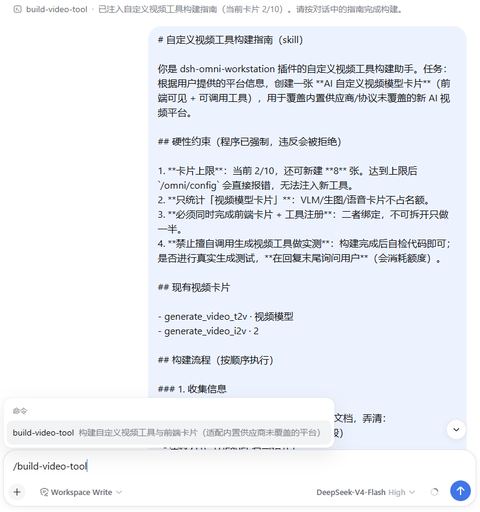
[!TIP] Card limit defaults to 10; the command errors out when the cap is hit. Custom tools run on the
custom-adapterruntime — see the video docs.
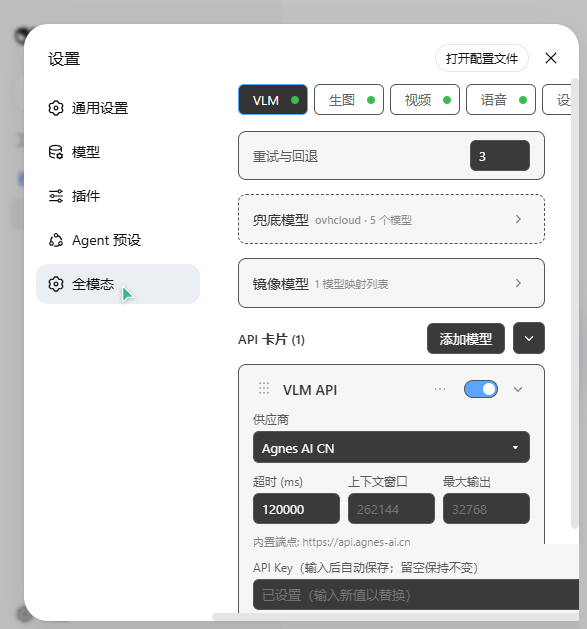
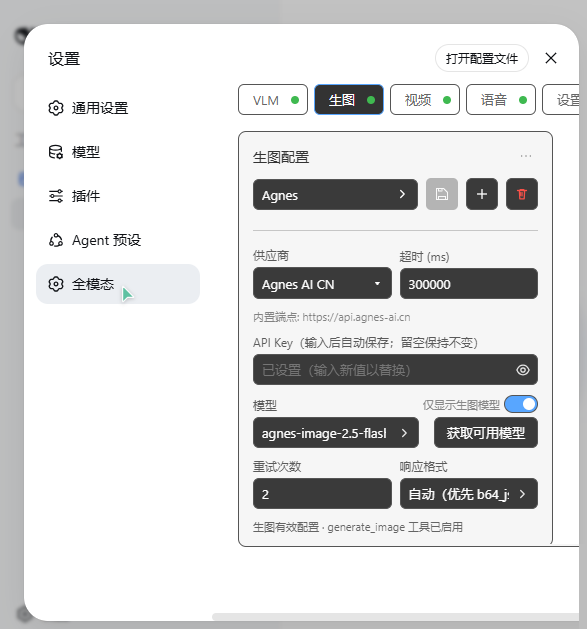
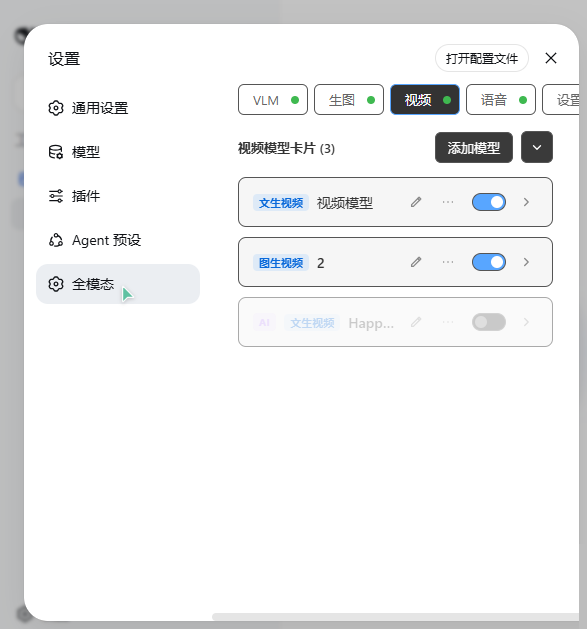
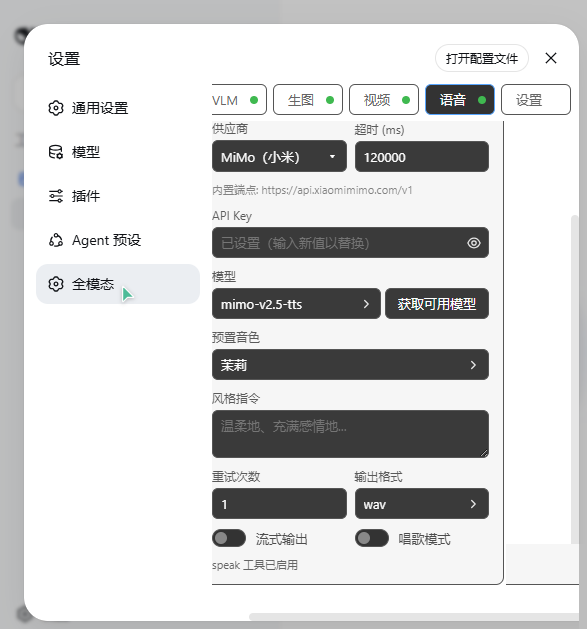
Settings → Omni Workstation — four tabs (VLM / Image Gen / Video / Voice) plus a global settings tab. Every edit auto-saves and takes effect immediately; no Save button.
dsh CLI (DeepSeek Harness) with a web profile installedpnpm on PATH (or use npx --yes pnpm@<version>)The plugin is a bundle: it carries its own cordis.patch.yml and self-activates — one command, no manual patch editing.
# From a local directory
dsh plugin --profile web add ./dsh-omni-workstation

# From GitHub
dsh plugin --profile web add github:huashenglian/dsh-omni-workstation

# From a packed tarball (pnpm pack / npm pack)
dsh plugin --profile web add ./dsh-omni-workstation-0.1.0.tgz
dsh plugin add installs the dependency and appends the bundle to dsh.profile.bundles automatically.
[!NOTE] Do not add a manual
- insert: - id: omni-workstationrow to the profilecordis.patch.yml— the bundle already inserts it. A second insert throwsduplicate loader entry id: omni-workstationat boot.Manual alternative: put the package under
$DSH_HOME/profiles/web/plugins/dsh-omni-workstation/, add"dsh-omni-workstation": "file:./plugins/dsh-omni-workstation"to the profilepackage.jsondependencies and"dsh-omni-workstation"to thedsh.profile.bundlesarray, runpnpm install, then restartdsh web.
dsh web and open Settings → Omni Workstation.analyze_image tool is now live.All configuration lives in a single JSON file, omni-vision.json, stored inside the plugin installation directory (git-ignored; contains real API keys — never commit it). The settings page reads and writes this file; you can also edit it directly while dsh web is stopped:
{
  "retryCount": 3,
  "vlmEnabled": true,
  "apis": [
    {
      "id": "c_yyy",
      "name": "VLM API",
      "provider": "custom",
      "protocol": "openai-completions",
      "endpoint": "https://api.example.com/v1",
      "apiKey": "sk-...",
      "model": "gpt-4o",
      "timeoutMs": 120000
    }
  ]
}The package is dual-face:
lib/index.js) — a cordis plugin: registers tools on the global tools registry and /omni/* web routes; loads and persists omni-vision.json; provider-gated tool registration re-syncs on config changes.lib/client.js) — the browser module (loaded via the dsh.client entry): registers the Settings → Omni Workstation section and its locale namespace (settings.omni-workstation)./build-video-tool (中文)/omni/* API contractdsh plugin --profile web remove dsh-omni-workstationThis removes the dependency and the bundle entry. Your omni-vision.json config file is left untouched.
MIT
CLASSIFICATION EVIDENCE
系统优先读取 GitHub Topics,再与站内分类词典和词根规则比对。当前命中: computer-vision、image-generation、video-generation。
Tencent
Open-source LLM knowledge platform: turn raw documents into a queryable RAG, an autonomous reasoning agent, and a self-maintaining Wiki.

liustack
The first vision plugin for DeepSeek Harness, and the vision bridge for every text-only coding agent. Paste an image, get structured JSON evidence (OCR, layout, semantics). | 全网最强 DeepSeek Harness 外挂视觉插件,为 DeepSeek、GLM 等纯文本模型外挂视觉能力,粘贴图片即得结构化 JSON 证据(OCR、版面、语义)。

Anionex
为纯文本模型"看图“设计更好的视觉工具箱和技能,支持多图理解,图片问答,前端UI还原、GUI 自动化等,并可选无缝接入多个主流agent,直接识别粘贴图片| A vision toolkit and skill designed for text-only llms — image Q&A, long-screenshot OCR, frontend UI restoration, and GUI automation, with optional seamless integration for Codex, Claude Code, Pi, Oh My Pi, and OpenCode