

开发工具
待识别

treg
superdesigndev
OpenRouter for agent tools. Join community here: https://discord.gg/6mQYYfFMAn
PROJECT TOPICS
INSTALL REFERENCE
dsh plugin --profile web add github:huanlin-labs/dsh-skill-cockpit
该命令指向仓库当前默认分支;尚无绑定当前 commit 的完整验证结果。
PROJECT README


v1.7.1 — published on npm. 19/19 self-test suites, all green ·
npm run verify:installpacks the tarball, installs it into an empty directory and boots that copy (13/13 checks;/pingreads back1.7.1). Published asdsh-skill-cockpit; npmlatest= 1.7.1. (The bare namedsh-skill-panelbelongs to a different author.)
Release:
v1.7.1is on npm, tagged in git, and has a GitHub Release. It delivers the D/E UI enhancements (density, sticky header, root grouping, body search, keyboard row actions, copy actions, path-aware search) and fixes the vault page's missingreserveListPathOfhelper. Details are at the top ofCHANGELOG.md.
Honest boundary. This is not a sandbox. It manages only the skill roots DSH itself exposes and writes only inside
~/.dsh/skillsand~/.agents/skills; it cannot stop other processes, manual edits, or skills invoked outside DSH. CLI / doctor /verify:installare covered by automated tests on this Windows machine. The running host was restarted on 2026-11-04 and/pingreports 1.7.1. On 1.7.1 the live page renders 76/76 skills with a clean 76-item health check; this round exercised List / Groups / Presets / Usage / Trash / Vault / Preferences / Checkup, plus one-click repair against a temporary malformed skill (name and short description repaired,.bakwritten, fixture removed afterwards).Back up allproduced 76 skills / 2242 files / 79,703,006 bytes on disk. A button-by-button exhaustive visual pass has not been done, so unlisted controls remain 未验证 (not yet verified) and rest on their unit/route evidence. CI runs the full suites andverify:installon ubuntu, macOS 15 and Windows × Node 20/22/24; run 41076632643 is green on all 27 jobs. A skill cockpit for DSH (DeepSeek Harness): one page in the app-level navigation that shows every skill the machine actually exposes, says why a skill is missing, and lets you toggle a single skill without editing anything but its entry-file name.
npm i dsh-skill-cockpit # or install it as a DSH bundle via the plugin managerRestart DSH after installing; the page sits in the left nav between Plugins and Schedule.
dsh-skill-cockpit-doctornpx dsh-skill-cockpit-doctor # why is the page missing? state dir / skill roots / assembly / gloss
npx dsh-skill-cockpit-doctor --json # machine-readable
npx dsh-skill-cockpit-doctor --home <dir> --fix # redirected home for tests/CI; fixes only safe things
npx dsh-skill-cockpit-doctor --dry-run # say what --fix would do, write nothing
npx dsh-skill-cockpit-doctor --report out.json # write the same JSON to a file (read-only)Exit codes: 0 ready · 1 something to fix · 2 environment problem.
Platform matrix (who is verified and who is not): docs/platforms.md.
Pre-release self-check (what is ticked, with evidence, and what is still open): docs/self-check.md.
Something is broken (check-by-check table + three common symptoms): docs/troubleshooting.md.
What is actually done vs. still missing (each row with evidence): docs/status-ledger.md.
verify:install on macOS/Linux; nobody has run a real
DSH session on them..bak-<timestamp> backup first) and never invents content: it only fixes the entry
name, fills a missing description from the skill's own body text, or quotes a YAML-breaking colon.
If it cannot fix something it now says so instead of staying silent.project-dsh,
project-agents, custom, user-dsh, user-agents, bundled) and writes only inside
~/.dsh/skills and ~/.agents/skills. Other harnesses' directories are never touched.tool-call blocks
named skill; skills invoked before that log shape existed, or from a different entry point,
read as 0.sidebar.panellist seat with
order: 5 — between the shipped Plugins row (0) and the shipped Schedule row (10) — plus
the whole page in the layout's main keyed slot. Both seats are registered through the
framework's slots service, the same extension point the shipped pages use.project-dsh,
project-agents, custom, user-dsh, user-agents, and bundled. Scanning only
~/.dsh/skills under-reports what a session can actually see.dropped:no-frontmatter,
dropped:unclosed, dropped:bad-yaml, dropped:missing-fields, dropped:bad-name), plus a
missing root, a shadowed entry, or an explicit error — instead of showing nothing.tool-call block (name: "skill", argument arguments.name), and the cockpit
reads them and counts. 0.6.9 fixed a detector that only recognised an older
skill-invocation shape — which made every count read zero; re-scanning 113 existing sessions
surfaced real usage (e.g. ui-design ×8, git-workflow ×4).
Counts live in <dshHome>/dsh-skill-cockpit/usage.json (skill names, counts, timestamps only —
never message text).shadowed (a duplicate name loses to a higher-priority root),
short-description (too short to choose between), dir-name-mismatch (bundle folder contradicts
the frontmatter name), empty-body (a heuristic, measured in file bytes and labelled as such).SKILL.md ⇄
SKILL.md.disabled. There is no sidecar state file, so there is exactly one source of truth:
the filename. Project-level skill roots are always read-only.ctx.skills.registerProvider(() => provider) contributes entries, and there is no hook to wrap
or exclude another provider's output. So skills that live in the filesystem are disabled by
renaming (above), while skills supplied by another provider — bundled or third-party — cannot be
disabled by this panel at all. Those rows say so instead of showing a switch that silently does
nothing.peer dependency at all.** The host half declaresinject = []and the client half declares onlyslots`, so the plugin is not subject to DSH's compatibility-exemption
gate and does not touch the credentials surface.Three mechanism differences we can actually stand behind — no adjectives:
| this plugin | dsh-skill-hub | dsh-skill-mcp-panel | dsh-echocat-skill-panel | |
|---|---|---|---|---|
| Seat | full page in the app nav (sidebar.panellist, order 5) |
settings-page "skill hub" | side panel, two tabs | bars + panels + a report column |
| Toggle mechanism | rename SKILL.md ↔ .disabled (the only disk write) |
rename + sidecar reconciliation | no file change: overlay JSON + overlay provider | move the skill dir out of the watched root |
| After you uninstall it | state persists (the filename is the state) | persists (reconciled at boot) | all toggles lost (state lives in plugin storage) | persists |
| Model-facing tool | yes: skill_panel, 20 actions |
none found | none found | none found |
| Dependencies | zero deps / zero peers, no build step | TS build | no build step | no build step |
| Skill roots | all six root kinds scanned + why a skill is invisible; project roots read-only | diagnostics + one-click fix (ahead of us here) | — | — |
Cells come from reading those repos' source on 2026-10-08; they iterate fast — check their repos. We do not claim a unique nav seat:
@linxin666/dsh-client-ui-skill-exploreralso usessidebar.panellist(corrected 2026-10-20).
What it does: before each turn (agent/pre-step) the plugin matches your message against every skill's
description; a hit puts that skill's body straight into this turn's context (a system reminder) —
the model no longer has to remember to call skill_panel, and you write no rules.
Master switch + three sensitivities (right side of the toolbar; the tiers only matter while it is On):
| Tier | Score threshold | Description hits required | Body cap per skill |
|---|---|---|---|
| strict | ≥ 4.0 | 2 | 4 KB |
| standard (default) | ≥ 2.5 | 1 | 8 KB |
| loose | ≥ 1.5 | 1 | 16 KB |
Shared caps: at most 3 skills per turn, 24 KB total.
A skill is injected at most once per session; </system-reminder> is always escaped; any failure only skips that turn.
Per-row "Must" (pin): ignores relevance and goes to the front of every turn's injection (still bound by the
per-skill cap and the total budget); it does nothing while the skill itself is Off. Lists live in
~/.dsh/skill-cockpit/autoload.json (pinned / perSkillOff).
What turning it on costs (measured, not sugar-coated):
pdf ≈ 2–3k tokens; the loose tier can reach
24 KB ≈ 6–8k tokens per turn, and it competes for attention every turn.Recommendation: keep standard + On; turn it on for document/paper work; keep pins to 1–2. Turning it Off keeps every skill available — the model can still call one itself, it just gets no body pushed in.
Why not 100%: the host exposes no public "plugin writes into the system prompt" channel, so the ceiling is
"put the body into context each turn". That is why the wording is high-confidence triggering, never "forced/guaranteed".
Tool skill_autoload: action=on|off / tier / except / pin / unpin / status / probe / eval.
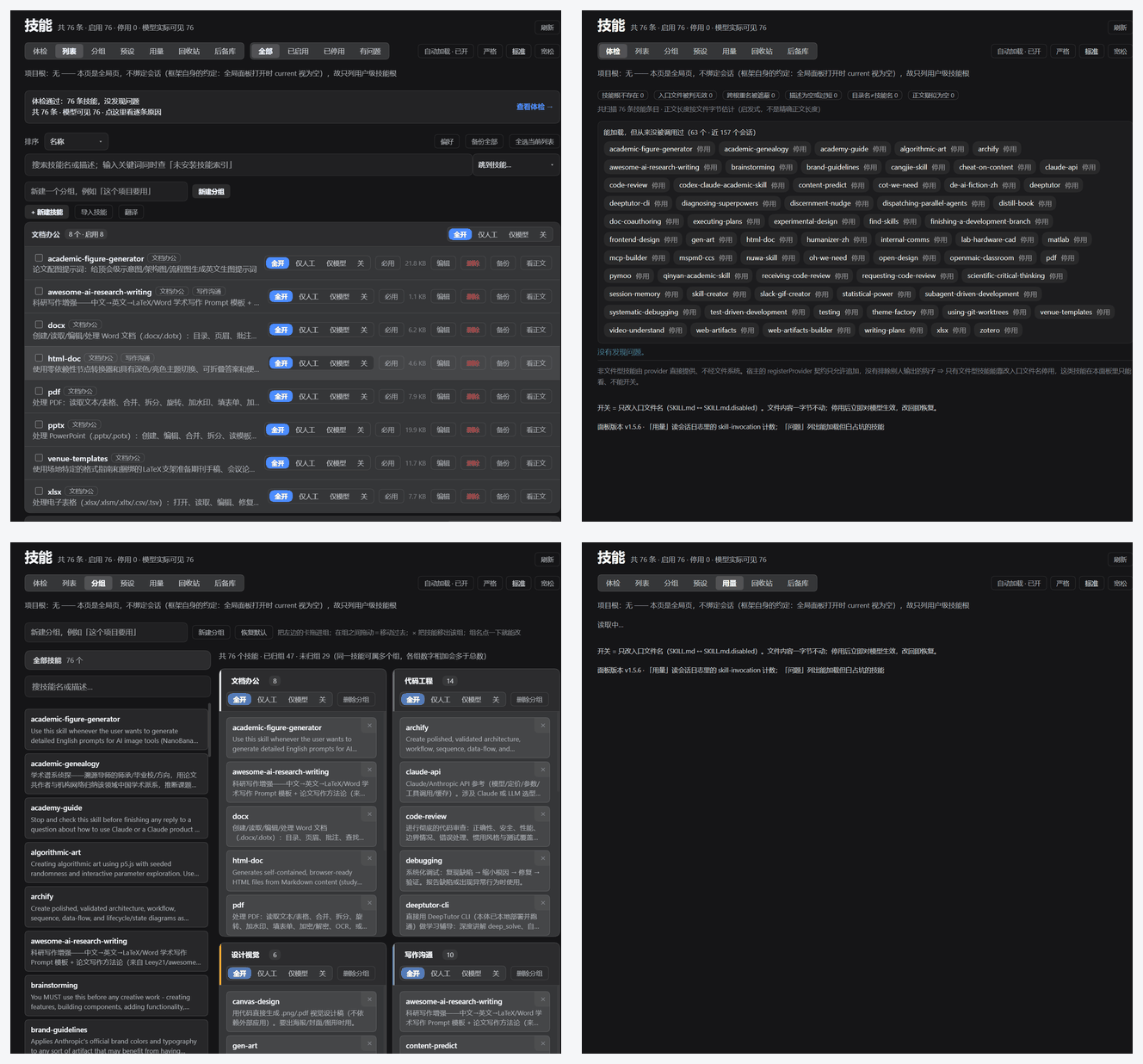
The panel is one page in the nav with four views along the top:
| View | What it is for |
|---|---|
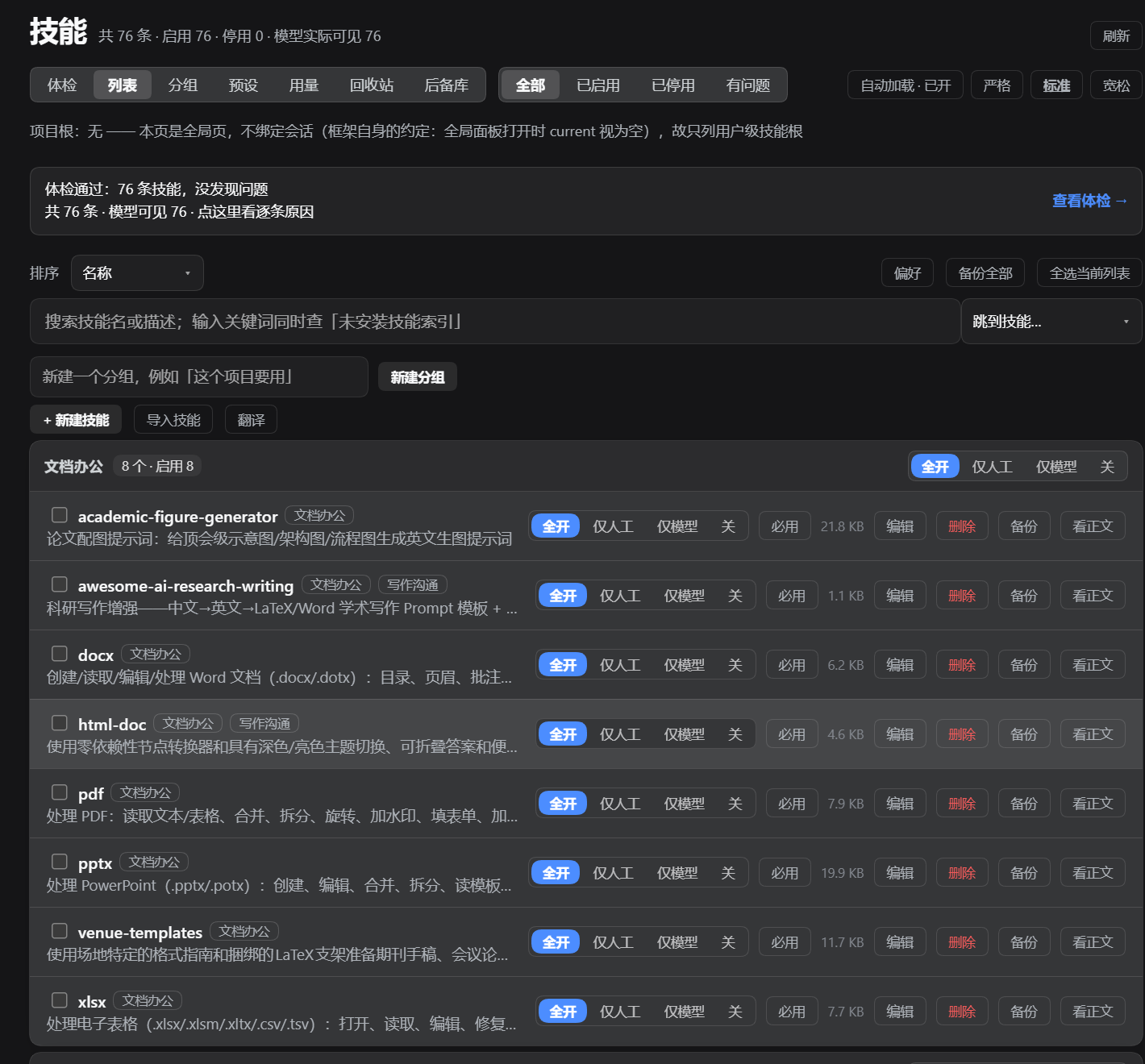
| 列表 | every skill in one place, grouped into cards: name, source-root tag, functional tags, description, size, per-skill switch, 「看正文」 to read its entry file |
| 管理 | 「新建技能」「导入技能」 on the list, 「编辑」「删除」 on every writable row. Delete copies the folder into the recycle bin first and asks twice; edits keep a .bak; imports never overwrite a same-name skill. |
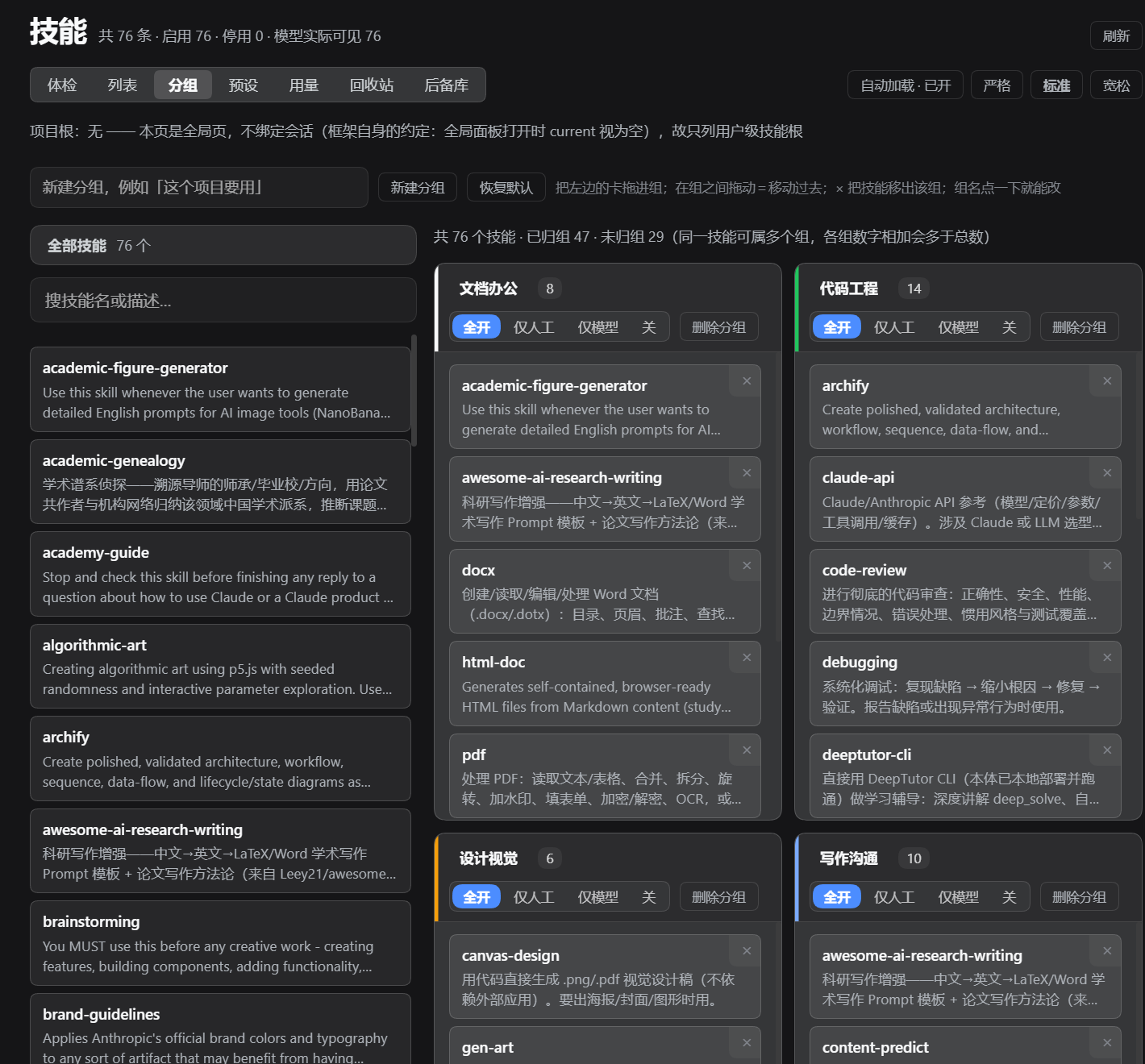
| 分组 | a board you arrange yourself — drag a card from the left pane into a group on the right; six built-in functional groups (文档办公 · 代码工程 · 设计视觉 · 写作沟通 · 研究资料 · 元技能) plus your own, renameable and deletable |
| 用量 | per-skill invocation counts aggregated from session logs, so you can see which installed skills have never been used |
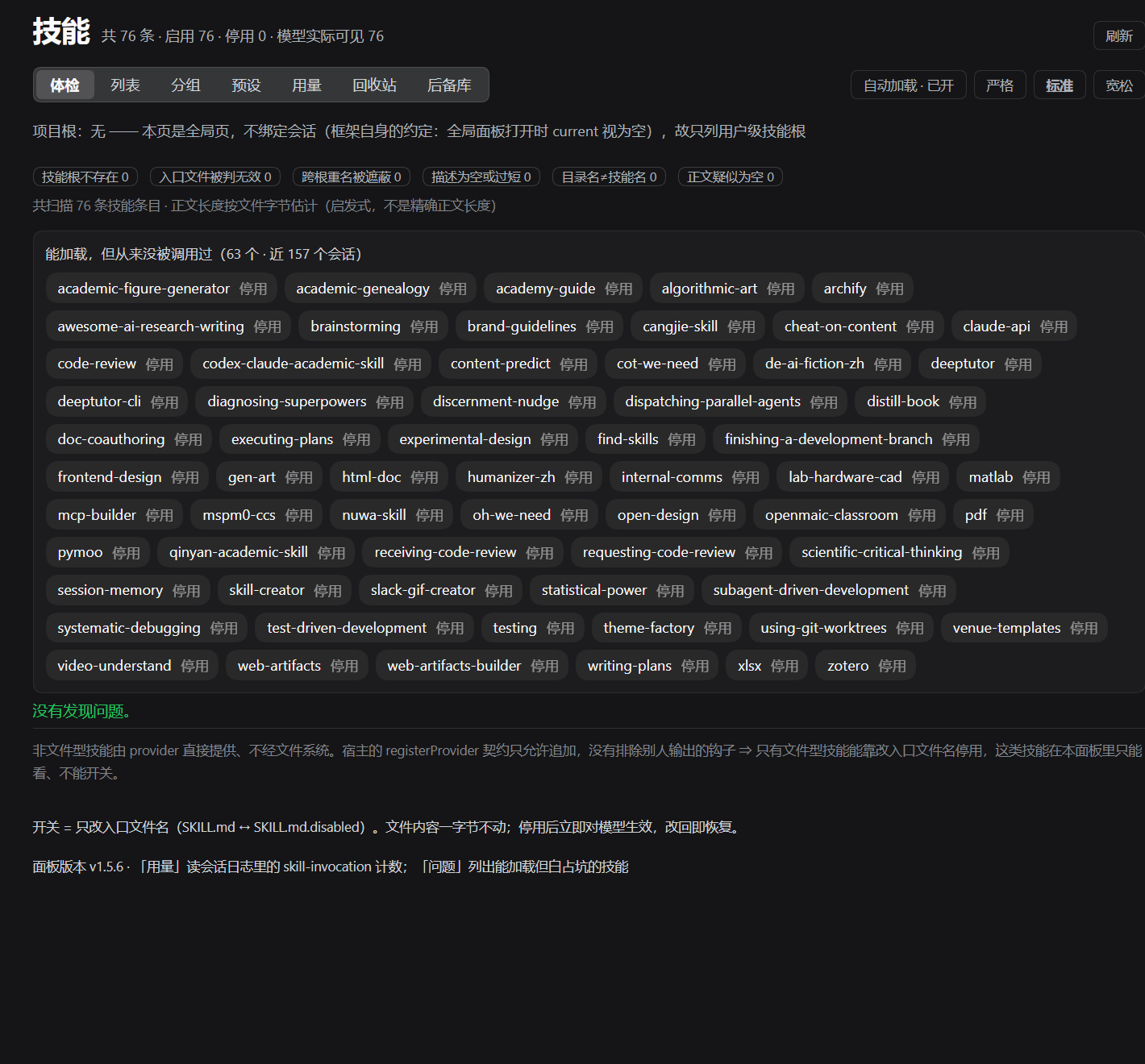
| 问题 | 「loads but earns nothing」 and 「why is this skill missing」 diagnostics, one row per finding |
Two behaviours worth stating explicitly, because both are places where a naive panel lies to you:
localStorage), not on disk. Arranging skills
writes nothing. The only disk write in the whole plugin remains the entry-file rename.| Method | Path | What |
|---|---|---|
| GET | /__dsh-skill-panel/ping |
identity, version, route list, writable roots |
| GET | /__dsh-skill-panel/skills?cwd=… |
the full scan report (cwd fixes the project-level roots) |
| GET | /__dsh-skill-panel/body?path=…&cwd=… |
one entry file's text (whitelist-only, size-capped) |
| GET | /__dsh-skill-panel/undeclared?q=… |
search the "not installed" index (read-only) |
| POST | /__dsh-skill-panel/skill/read |
read one writable skill (edit form fill) |
| POST | /__dsh-skill-panel/skill/create |
create <root>/<name>/SKILL.md |
| POST | /__dsh-skill-panel/skill/update |
edit description / when-to-use / body, with backup |
| POST | /__dsh-skill-panel/skill/delete |
move the skill folder into the recycle bin |
| POST | /__dsh-skill-panel/skill/import |
copy a local folder that contains SKILL.md |
| GET | /__dsh-skill-panel/usage |
{ ok, skills:[{name,count,lastAt}], scanned, skipped, sessions, updatedAt } |
| GET | /__dsh-skill-panel/checks?cwd=… |
{ ok, checks:[{kind,skill,detail}], summary, thresholds, note } |
| POST | /__dsh-skill-panel/toggle |
{ filePath, disable, cwd, plan? } → entry-file rename |
/usage writes exactly one file, <dshHome>/dsh-skill-cockpit/usage.json, and only ever
stores skill names, invocation counts and timestamps. The scan is incremental: a session log whose
(size, mtime) is unchanged is skipped, so the second call on this machine took 21 ms against a
104-session history. Requests carrying a foreign Origin are refused with 403.
The panel is a local web surface, so the routes do not trust their caller. Two refusals are part of the contract, and each one has a negative test in the suite:
/body is whitelist-only. It answers only for entry files that the /skills report
listed; any other path — an arbitrary file, the plugin's own data file, a path that merely
exists — is refused with 403 and no content, so the route cannot be turned into a file
reader. (Before 0.3.1 it read any path it was given; found by review, not by an incident.)/toggle only ever writes inside the two user-level write roots. The target must sit inside
~/.dsh/skills or ~/.agents/skills; project-level roots are read-only even when the report
lists the file, because a path derived from a session's cwd must never become a write.cwd is optional on both routes (0.3.2): this panel is also a standalone page that has no
session at all. Without it the report simply has no project-level roots, so those entries are
refused while every user-level one still works — and a cwd that does not resolve is ignored
rather than trusted, so it cannot be used to slip past the write-root gate.
Requests carrying a foreign Origin are refused with 403.
A skill can reach a session down two different roads, and only one of them ends at a file:
user-dsh, user-agents, custom, project roots, a bundled directory): the
entry is a real SKILL.md or x.md, so the cockpit can park it by renaming the entry file.ctx.skills.registerProvider(() => provider) — additive by
design. A provider contributes its own list(); there is no hook to wrap, filter or exclude
another provider's output. Nothing this panel does can make such a skill disappear.That asymmetry is not a missing feature, it is the host API's shape, so the panel states it
plainly: a provider-supplied row renders 本面板无法禁用(属 … provider) where the switch would
otherwise sit. A switch that silently did nothing would be worse than no switch.
Skills do not have to be installed to be findable. Keep a plain folder of skill directories
somewhere outside the two skill roots — ~/.dsh/skills and ~/.agents/skills — and write one
markdown table next to it. That folder is never scanned by dsh and never loaded into a session, so
it costs no context and no memory: it is cold storage that only the panel's search can see.
The table is the contract. One row per skill, five columns:
| 名字 | 一句话能力 | 来源(仓库·许可) | 体积 | 适用会话/预设 |
|---|---|---|---|---|
code-review |
Reviews a diff for correctness, security and tests | my-org/skills · MIT | 42.1 KB | any |
Point the plugin's undeclaredIndexPath config at that file. From then on, a search that misses
the installed list also queries the table and renders a read-only card (name, one-liner, source and
licence, size, suggested session) with a copy button — the panel never downloads and never installs
by itself.
To actually use one, install it temporarily: open Import skill, give it the vault folder path, and the panel copies it into a writable root. Delete it when the task is done — deletion goes through the recycle bin, so the copy can be restored and the vault is untouched.
Unconfigured, or pointing at a file that does not exist, the second hop simply does not appear; nothing errors. (The shipped default points at the author's own vault — set your own path.)
Rendered from the shipped CSS in the dark theme (1420 px wide):
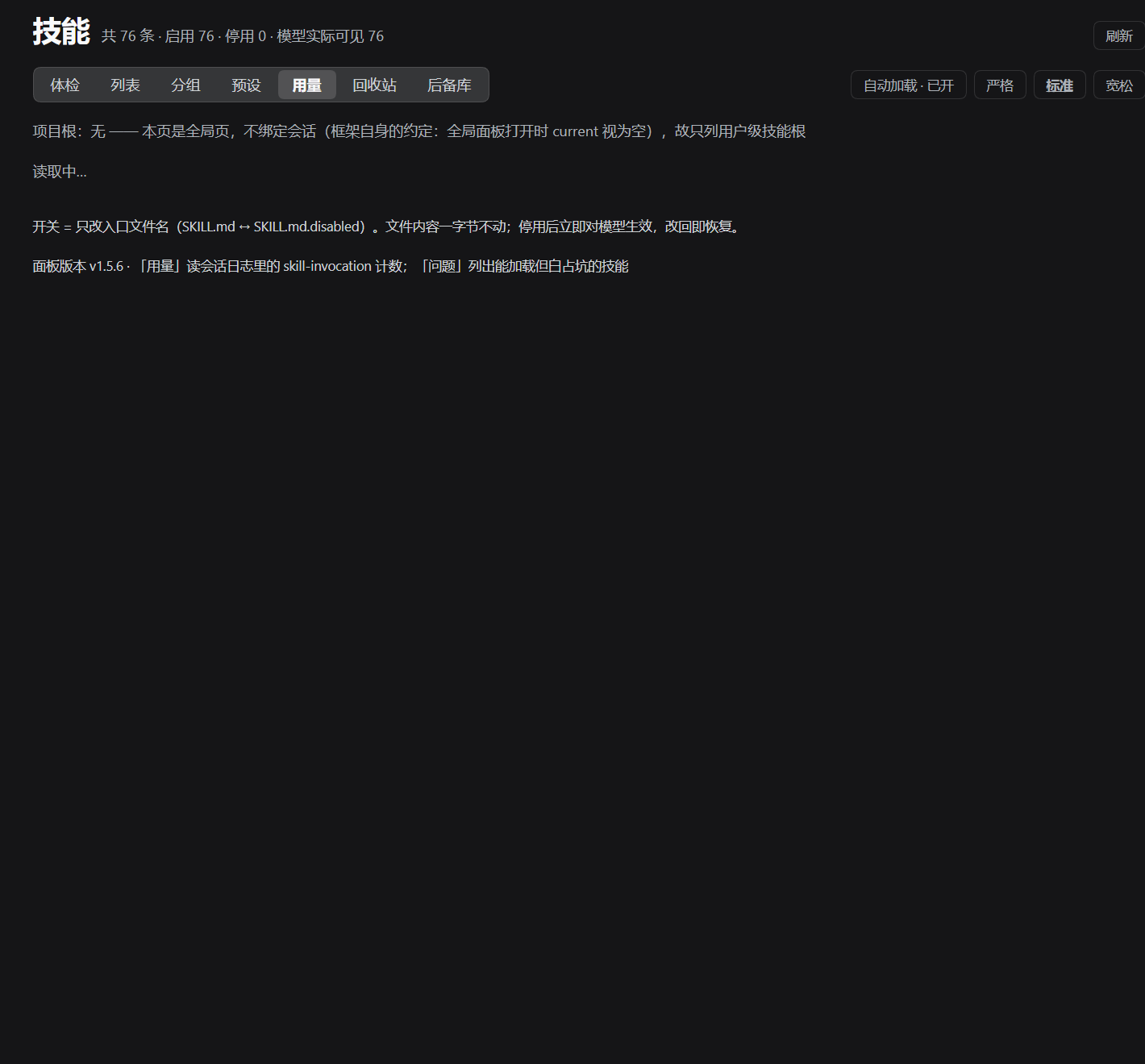
Three steps; each one says what you should see.
1 · Install the package
npm i dsh-skill-cockpit # or pnpm add / yarn addExpect: node_modules/dsh-skill-cockpit/package.json reports the version you installed.
2 · Mount it in your profile (DSH owns this; the plugin never edits your config)
Add "dsh-skill-cockpit": "^1.5.0" (or your installed version) to dependencies in
~/.dsh/profiles/<your profile>/package.json, or one insert: line in cordis.patch.yml.
Local development: "dsh-skill-cockpit": "link:D:/插件/dsh-skill-panel".
Expect: the output of node -e "console.log(require('./package.json').dependencies)" lists it.
3 · Restart DSH, then self-check
npx dsh-skill-cockpit-doctorExpect: the last line says everything is ready, and a Skills entry appears between Plugins and Automation in the left nav.
If not, run --json and look at the first non-ok check: assembly → back to step 2; state dir / skill root → --fix.
node test/run-all.mjs # 19 suites: data layer · toggle loop · host routes · client · usage · checks · …Pure ESM JavaScript, no build step — lib/*.js runs as-is.
| Path | What |
|---|---|
lib/index.js |
host half: local HTTP routes (/__dsh-skill-panel/*) |
lib/client.js |
client half: the whole UI (classic script, React.createElement) |
lib/roots.js · lib/scan.js · lib/frontmatter.js |
six-root enumeration, scan, YAML frontmatter |
lib/toggle.js |
the only entry-file writer: 8 guards, rename only |
lib/usage.js |
session-log reader → invocation counts (multi-frame zstd, incremental) |
lib/checks.js |
pure functions: the four "loads but earns nothing" diagnostics |
lib/undeclared.js |
"referenced but not installed" index |
test/ |
self-tests (no framework) |
从「只看」升级为「全生命周期」,全部在本地完成,不含 MCP 管理、不含联网市场:
| 能力 | 说明 |
|---|---|
| 回收站 | 删除先整目录移入 <DSH home>/skill-panel/trash;面板可预览 / 还原 / 彻底删除 |
| 一键修 | 补 name、纠正 name 与目录不一致、给带冒号的描述加引号、用正文首行补短描述;改前 .bak,修不了就拒绝 |
| 批量 | 多选后批量开 / 关 / 删(二次确认)/ 加入分组 |
| 排序筛选 | 名称 / 来源 / 状态 / 用量(用量懒加载) |
| 偏好 | 用量窗口、默认排序、危险操作二次确认,写入 localStorage |
| 备份 | 单技能 / 全部复制到 <DSH home>/skill-panel/backups/<timestamp>,不覆盖同名 |
| 模板 | 空白 / 带脚本 / 带引用 |
| 遮蔽徽章 | 跨根重名时在行内标出「被遮蔽 · 遮蔽者」 |
| 跳转 | 搜索框旁下拉直接定位技能 |
截图见对应版本的 GitHub Release 说明。自测 19/19 套件全绿;各套件自己的断言数见 test/out/ 的报告。
原生 <select> 的下拉列表由操作系统绘制 —— 深色主题下白底浅灰字,选项读不出来;技能一多,列表还变成一条长条盖住面板。0.6.40 把最后 6 处原生下拉(排序 / 跳到技能 / 偏好里的用量窗口与默认排序 / 批量加入分组 / 新建模板)统一换成一个自绘 Picker:
| 项 | 落地 |
|---|---|
| 对比度 | 菜单自带底色与字色(主题 token,缺失时有兜底),不再靠继承 |
| 高度 | 限高 248px + 滚动,长列表不再盖住面板 |
| 长列表 | 「跳到技能」自带搜索框,并右对齐到触发按钮 |
| 交互 | hover / 选中态,Esc 与点外面收起,点当前项不重复触发 |
截图:产出/0.6.40/dropdown-sort.png · dropdown-jump.png。测试:客户端 93/93(新增 4 条防回退断言)。
The published package is the generic build (A). It assumes nothing about the machine:
the trash lives in <DSH home>/skill-panel/trash, the reserve list in
<DSH home>/skill-panel/后备库.md, and writable skills are the DSH-managed roots only.
A local build (B) is the same code plus an optional machine-local file:
<DSH home>/skill-cockpit/local.jsonCommon keys (all optional): dshHome, trashRoot, backupRoot, reserveListPath,
writableSources, customSkillDirs, agentsHome.
Advanced keys read from the same file (defaults are the tested path): bundledSkillDir,
includeDefaultRoots, undeclaredIndexPath, usageStorePath, usageMaxFiles,
maxBodyBytes, minDescriptionLength, emptyBodyBytes.
trashRoot and backupRoot are refused if they point inside a skill root (moving or backing up a skill into its own source could recurse).
The file is never published and never required — without it the generic defaults apply.
CLASSIFICATION EVIDENCE
系统优先读取 GitHub Topics,再与站内分类词典和词根规则比对。当前命中: developer-tools。
superdesigndev
OpenRouter for agent tools. Join community here: https://discord.gg/6mQYYfFMAn

T-Auto
A toolkit for low-level operations in DSH, designed to reduce token usage and task execution time / DSH 底层操作工具插件,旨在减少 Token 消耗与任务耗时

crafter-station
A public gallery of animated pets for Codex, Claude Code, DeepSeek Harness, Hermes, OpenCode, Gemini CLI, and more.