

模型与 MCP
待识别

rea
morluto
Reverse engineer anything with agents, from app behavior down to native binaries.
PROJECT TOPICS
INSTALL REFERENCE
dsh plugin --profile web add github:huangzhilin-hzl/dsh-power-type
该命令指向仓库当前默认分支;尚无绑定当前 commit 的完整验证结果。
PROJECT README
English | 中文

Power Mode typing effects for the DeepSeek Harness (DSH) Web composer: sparks, shockwaves, combo, heat and embers.
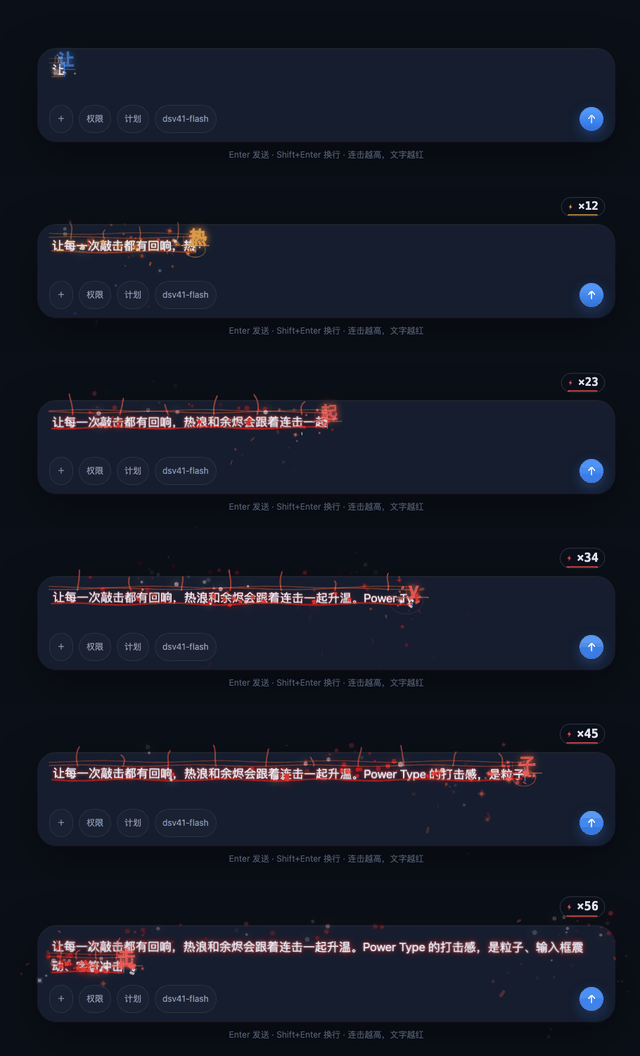
Requires DSH Web >=0.2.1-rc.2 <0.3.0.
dsh plugin --profile web add dsh-power-typeTo install the current commit instead of the published release, use the repository:
dsh plugin --profile web add github:huangzhilin-hzl/dsh-power-typeIf running DSH from source, execute this from the DSH repository root:
pnpm dsh plugin --profile web add github:huangzhilin-hzl/dsh-power-typeRestart DSH Web and refresh the page after installation. No plugin build is required.
For local development, install from a local checkout instead:
dsh plugin --profile web add /absolute/path/to/dsh-power-typeLocal installation uses a directory link, so keep that directory in place.
Start typing in the composer. Effects are enabled by default. Toggle the plugin under Plugins → Installed plugins → Power Type.
Adjust intensity and sound in the browser console:
window.__dshPowerType.setIntensity(1.5)      // Default: 1; range: 0.2–2.5
window.__dshPowerType.setSoundEnabled(false) // Mute key/Enter cues
window.__dshPowerType.setVolume(0.5)         // 0–1, default 0.9
Settings are saved locally in the browser.
dsh plugin --profile web remove dsh-power-typeFor a DSH source checkout, use pnpm dsh instead of dsh.
Install dependencies in a DSH checkout, then run these commands from this plugin directory:
export DSH_CHECKOUT=/absolute/path/to/deepseek-harness
node --test test/engine.test.mjs
node --test test/browser.test.mjs
node --test test/dsh.test.mjs
Browser tests require Chrome/Chromium. DSH integration also requires pnpm and a built Web frontend at apps/web/dist in the DSH checkout. Use CHROME_PATH and DSH_TEST_PNPM to specify executable paths when needed.
Set DSH_PLUGIN_SPEC=github:huangzhilin-hzl/dsh-power-type to run the DSH integration test against the remote package.
Open demo/index.html for a standalone visual demo, or demo/index.html?heat=1 for a continuous heat demo. Add &theme=light for the light theme.
CLASSIFICATION EVIDENCE
系统优先读取 GitHub Topics,再与站内分类词典和词根规则比对。当前命中: deepseek-harness。
morluto
Reverse engineer anything with agents, from app behavior down to native binaries.

deepseek-ai
DeepSeek Harness: Everything is a Plugin.

nexu-io
The 1st Collaborative AI Design Agent Workspace. Local-first and open source. Create motion, prototypes, websites, apps, dashboards, presentations, images, and videos with your team and AI agents. Share work, exchange feedback, and iterate together in one workspace.