
安全与治理
插件

dsh-redteam-model
SeaOf0
基于dsh web实现的多种模式,目的是服务于redteam进行授权的安全研究,覆盖渗透测试、红队评估、代码审计等范围领域,请勿用于非法行为。(允许二开,赋予模块各位自己的业务逻辑,方法论只有自己熟练的才好用,好的方法论=好的生态)
PROJECT TOPICS
INSTALL REFERENCE
dsh plugin --profile web add github:hsushjk/dsh-uriauth
该命令指向仓库当前默认分支;尚无绑定当前 commit 的完整验证结果。
PROJECT README
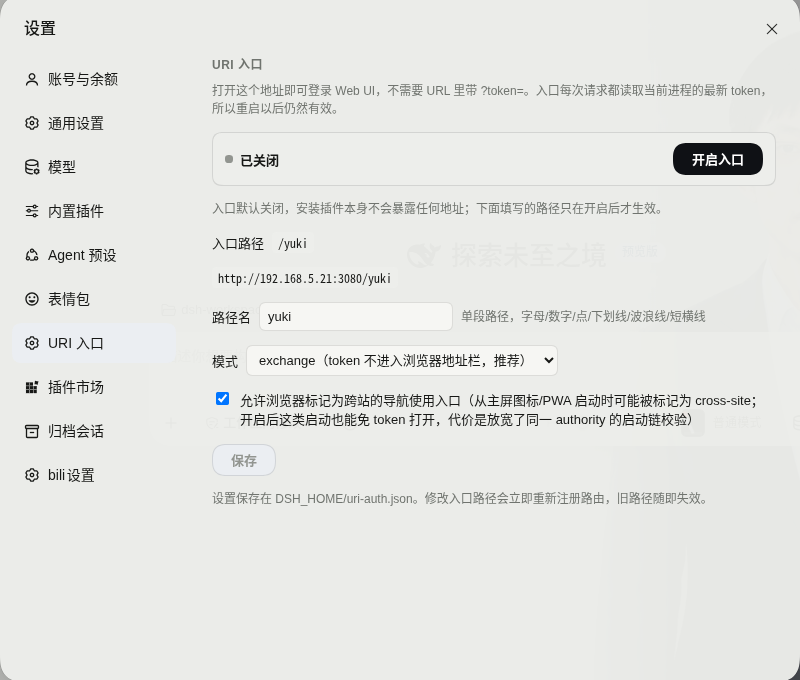
DeepSeek Harness(DSH)插件,给 DSH Web UI 一个固定的免 token 入口,插件装好后处于关闭状态,需在设置里手动开启
dsh web 的鉴权是「一次性引导凭证 + 长期 cookie」:
dsh web: http://<host>:<port>/?token=<随机串>/,服务端回 303 + Set-Cookie: dsh-auth-<id>=…; HttpOnly; SameSite=Strict(30 天)dsh web 也没有关闭鉴权的开关,遇到这些场景只能回日志里翻 token:
该插件把「token → cookie」这一步做进服务端进程内:入口每次请求现读当前进程的 token,所以服务重启后入口依然有效,设置一次长期使用
因为入口等价于「把机器交给拿到链接的人」,它默认关闭:装好插件不会监听任何新路径,必须由人在设置页开启,并先读完一段警告再确认
插件安装在 DSH 的 profile 里(下例为 web profile)
# 1) 克隆到 ~/plugins
git clone https://github.com/hsushjk/dsh-uriauth.git ~/plugins/dsh-uriauth

# 2) 装到 profile
cd ~/.dsh/profiles/web
pnpm add file:~/plugins/dsh-uriauth
3)把 dsh-uriauth 追加到 ~/.dsh/profiles/web/package.json 的 dsh.profile.bundles:
{
  "dsh": {
    "profile": {
      "bundles": [
        "@deepseek-ai/dsh-web-app",
        "dsh-uriauth"
      ]
    }
  }
}
4)重启 DSH
设置 → URI 入口 → 开启入口 → 读警告 → 确认开启设置文件 <DSH_HOME>/uri-auth.json:
| 字段 | 默认值 | 说明 |
|---|---|---|
enabled |
false |
入口总开关,false 时不注册任何入口路由(路径返回 404),改为 true 需在设置页确认警告,或调用 API 时带 "confirm": true |
entry |
trustme |
入口路径名(单段),仅允许字母、数字、.、_、~、-,长度 1–64,api、plugins、assets、connect、favicon.ico、index.html、__uriauth 被保留 |
mode |
exchange |
exchange:token 不进入浏览器地址栏(推荐),redirect:302 到带 token 的 URL(兼容模式,token 会留在访问记录里) |
allowCrossSiteNavigation |
false |
允许被浏览器标记为跨站/PWA 启动的导航使用入口 |
设置页的修改会写回设置文件,删除该文件即回到默认值(包括关闭开关)
webServer 与 connection 服务,使用 requestRejection / authenticatedUrl / authorizeIndex 这些既有 API@deepseek-ai/dsh 0.2.1-rc.5、Node 22+dsh.client 模块格式加载(loader id 必须等于包名 dsh-uriauth),注册一个 settings.sectionCLASSIFICATION EVIDENCE
系统优先读取 GitHub Topics,再与站内分类词典和词根规则比对。当前命中: auth。
SeaOf0
基于dsh web实现的多种模式,目的是服务于redteam进行授权的安全研究,覆盖渗透测试、红队评估、代码审计等范围领域,请勿用于非法行为。(允许二开,赋予模块各位自己的业务逻辑,方法论只有自己熟练的才好用,好的方法论=好的生态)

dhicoc
Complete reverse-skill (88 SKILL.md) as a DeepSeek Harness (dsh) Cordis plugin — reverse engineering, authorized pentesting and security research skill pack.

delta-box
Lightweight, agent-native sandboxing with diff, commit and abort