
模型与 MCP
待识别

rea
morluto
Reverse engineer anything with agents, from app behavior down to native binaries.
PROJECT TOPICS
INSTALL REFERENCE
dsh plugin --profile web add github:hoyyang/dsh-concise
该命令指向仓库当前默认分支;尚无绑定当前 commit 的完整验证结果。
PROJECT README
基于 Claude Code 内置 Concise 输出风格(自 2.1.258 起上游未再变动)并加入本插件扩展,带进 DeepSeek Harness(dsh):composer 工具行一键开关(「增强提示词」按钮紧左侧、模型选择按钮左侧区域)——结果先行,少废话,而调查、验证、多角度审查的工作深浅完全不变;开启后每轮最终回答开头必附「摘要」精华摘要卡(工具调用间的中间步骤文本豁免;工程蓝图卡:极淡网格线 + 四角测量角标 + 等宽字体 1.18em,浅底深字;划选卡内文字松开即复制;卡内文件路径高亮可点,单击用系统默认应用打开;卡底自动汇总本回合真实产出的文件)。






dsh plugin add dsh-concise           # npm 包(推荐:全局唯一标识)
# 或
dsh plugin add hoyyang/dsh-concise # GitHub 仓库零配置,开箱即用:不需要 API Key、不需要账号、没有任何设置项。装完刷新 Web 界面,composer 工具行就会出现开关。要求 dsh web 0.1.0-rc.8+(实测通过)。
同一个问题、同一个模型(GLM-5.3 Flash),只差一个 Concise 开关:
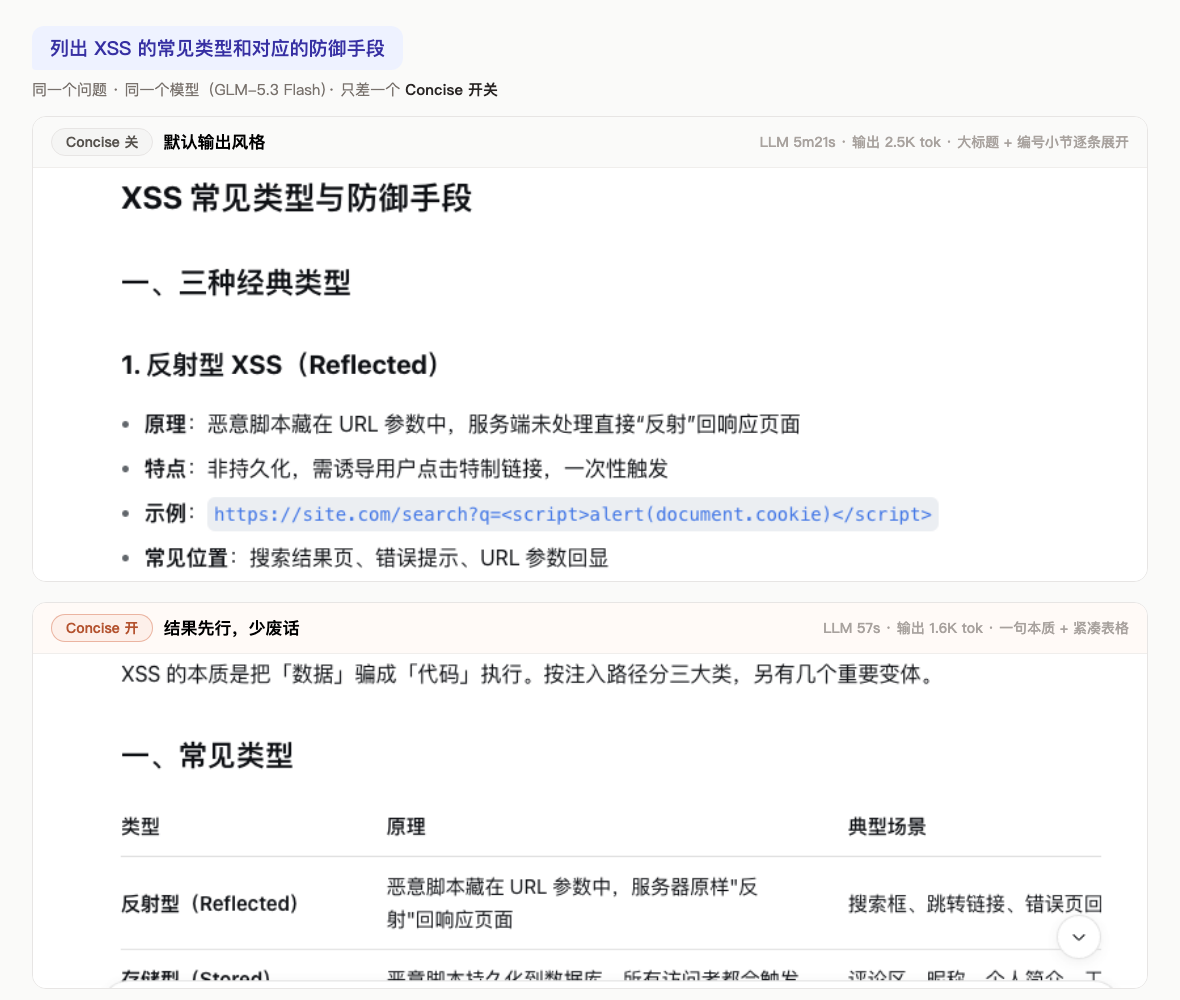
开启后你会得到:
一句话:答案没有变小,废话没有了。
● Concise 开关紧贴在它左边(开关的滑轨一侧挨着它),增强提示词按钮则在模型选择按钮(如 GLM-5.3 Flash)左边;未装增强提示词时,开关自动贴在模型按钮左侧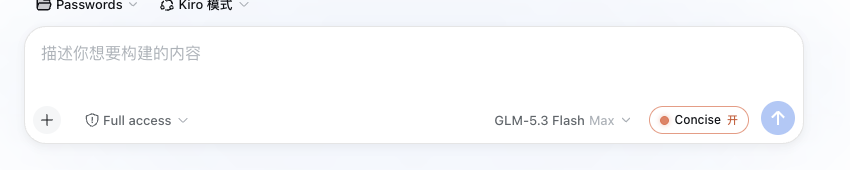
开关按会话独立:在这个会话开了,别的会话不受影响(新会话默认关;想要新会话默认开启可配置 defaultEnabled: true)。
/concise 命令输入 /concise 从 slash 菜单执行(CLI 会话里同样可用):
/concise          # 切换(开 ⇄ 关)
/concise on|off   # 显式设置
/concise status # 查看当前会话状态与风格来源把你的风格写进 ~/.dsh/dsh-concise/style.md(非空即整体覆盖内置文本,删除即恢复)。保存后下一轮生效,/concise status 会显示来源。实测示例——style.md 为「Answer in one short sentence, then stop.」时:
REST API 是一种基于 HTTP 协议、用 GET/POST/PUT/DELETE 等标准方法对 URL 表示的资源进行无状态增删改查的网络接口规范。
恰好一句、无列表、无展开。
curl "http://127.0.0.1:3080/dsh-concise/api/state?sessionId=<id>"   # 查询某会话
curl -X POST -H 'content-type: application/json' \
-d '{"sessionId":"<id>"}' http://127.0.0.1:3080/dsh-concise/api/toggle # 切换某会话开启后,以下文本作为系统提示词 section 注入当前会话的每轮模型请求(order 40;另有 order 900 的尾部提醒 section,以及经宿主 agent/pre-step 通道追加在每步请求末尾的一行瞬态契约提醒,三处文本同源、同一开关门控):
Concise output style (active): lead with the result. Put the answer, the decision, or the finished artifact in the first sentence or two; explanation follows only as needed.
- MANDATORY on every user-facing final reply (the reply that ends the turn and answers the user — intermediate step narration between tool calls is exempt): BEGIN with the digest block in EXACTLY this blockquote format, then continue with the normal answer:
> **摘要:** <2-3 plain, jargon-free sentences restating this turn's conclusion, with the 2-4 key words or numbers bolded via **…**>
The digest may ONLY restate conclusions already present in the reply body — never introduce facts, trade-offs, or analogies the body does not contain; give any unavoidable term a short plain-language gloss in parentheses. However short the answer, the digest block is always present (it is not a recap — it precedes the answer).
Length and structure are NOT exemptions: long explanation replies, step-by-step walkthroughs, and table-heavy documents are where the digest gets skipped most often — such replies must still OPEN with the digest block, before any heading, table, or body text.
URLs, file paths, and code spans stay bare in the digest (or use [label](url) markdown) — bold (**) is for words and numbers only; bolding a URL corrupts the rendered link.
Task-completion reports (openers like 全部完成 / 已实施 / 方案已落盘 / 交付物清单) are NOT a substitute for the digest — such replies MUST still BEGIN with the digest block.
A heading opener like ## 结论 / ## 方案 is also NOT the digest — the digest block precedes any heading, however the reply is structured. A digest blockquote buried mid-reply (e.g. after an opening paragraph or table) is still a violation — the digest must be the very first non-empty line of the reply.
- Monitoring / progress-broadcast replies (openers like 【进度】 / 账目对上了 / 确认无误 / 明白) and 账目 / 清单 / 最终汇总 summaries are user-facing final replies too: a short confirmation is NOT an exemption — the digest block still opens the reply (third most-skipped family, measured in long device-driving sessions).
- Digest content style (caveman × humanizer): the first sentence IS the conclusion — the answer, the decision, or the finished artifact, never background or process recap. Keep only facts and numbers, compressed telegraphically (pleasantries and connective filler cut). NO empty-summary phrases (综上所述 / in summary), NO rule-of-three parallelism, NO 「不是X而是Y」 rhetorical framing, NO vague attribution (专家认为 / experts say), NO inflated significance (标志着 / 赋能 / milestone). Call each thing by ONE name and mention it ONCE — never state anything the body does not prove.
- Never open by restating the question or with pleasantries ("Sure", "Great question", "好的", "当然可以") — the first line is already the answer or the key finding.
- Skip filler closers: no recap of what you just did, no "In summary" restating the response, no boilerplate apologies or hedges, no closing offers ("需要我…吗?") unless a decision is genuinely required.
- For enumerable facts prefer a table or a tight list over paragraphs — structure is not verbosity; compact and structured beats long and prosy.
- Keep every load-bearing detail: constraints, risks, exact commands, file paths, and next actions are content, not filler — compress wording, never omit substance.
- No narration between steps: report what changed, not what you are about to do ("Let me check...", "I'll now...").
- Thoroughness of the work is unchanged: investigate, verify, and double-check exactly as you otherwise would; only the reporting is compressed.
- When you made a choice, state it with a one-line reason; surface alternatives only when they are viable and materially different.
- Replies that end by asking the user a question or requesting a decision (e.g. via the ask_user_question tool) are user-facing final replies too - the question panel does NOT exempt the text: they MUST still OPEN with the digest block. This is the most-skipped case in practice.
- Presentation artifacts between tool calls are NOT narration: a design card, decision card, comparison, or any message the user must read to act or choose (e.g. a 设计卡 issued right before an ask_user_question panel) MUST open with the digest block even though more tool steps follow - the intermediate exemption covers narration only, never user-facing artifacts. A bare panel call with no text does not satisfy this; the artifact text right before the panel carries the digest.
- Skill-driven delivery talk-tracks (openers like 「交付:…」「图已生成…」「报告如下」, artifact-path lists from draw-code / archify / HTML 工坊 etc.) are ALSO user-facing final replies - a skill template orders its content AFTER the digest block and never replaces or postpones it: OPEN with the digest block first, then follow the skill template. This is the second most-skipped case in practice.
● Concise 开关(行序 Concise → 增强提示词 → 模型选择),单击即切换;平时收起只显示滑轨,悬停或键盘聚焦时 Concise 文字向左平滑展开——Switch 紧贴增强提示词固定不动,右缘固定,不推动相邻按钮DIGEST // 说人话;划选卡内文字松开即自动复制所选(头部闪现 COPIED ✓);只重述正文已有结论;规则无条件下发且每轮组装重注入,0.8.0 起口径收敛为「每轮最终回复必附」并在系统提示词尾部增设提醒 section 对冲长流程遵循衰减(本插件对官方 Concise 的分叉扩展);0.11.0 起书写规则融合 caveman × humanizer 精华——首句即结论(绝不背景与过程复述)、电报体密度(砍客套与填充,只留事实与数字)、禁 AI 套话(空洞总结 / 三连排比 / 「不是X而是Y」 / 模糊归因 / 夸大意义词)(纯提示词文本增量,卡片渲染与交互零改动);0.11.6 起卡内路径改为高亮着色 + 单击命中打开(不再改写宿主 React 管理的文本节点)write / present / dsh_image_gen / draw_code / HTML 工坊结果里的文件路径(直接调用与 run_code 内嵌两种形态都覆盖),不是从正文里猜;渲染前做存在性校验(文件不存在或只是正文示例就不列),点击用系统默认应用打开href(属性级,不动子节点)NotFoundError: removeChild,触发共享渲染入口永久 abdicate——表现为所有会话助手回复同时消失、刷新才恢复。0.11.6 起插件对摘要卡只读(仅追加自有交付物区):React 18.3.1 复现对照,旧版崩、新版零错误/concise 命令:slash 菜单与 CLI 会话均可 /concise(切换)、/concise on|off(显式设置)、/concise status(查状态与风格来源)——对齐 Claude Code 的 /output-style/concise 命令)~/.dsh/dsh-concise/style.md 即可整体覆盖内置风格文本(改完保存,下一轮组装即生效)——对齐 Claude Code 的 /output-style:newdefaultEnabled 调整)~/.dsh/dsh-concise/state.json,重启后保持/concise、API、其它标签页的改动 ≤15s 自动跟上,无需刷新prefers-reduced-motion 下动画全关)aria-pressed 开关语义 + 中英双语 tooltip 说明div.dip-root)紧左侧;未装时锚定模型按钮紧左侧(官方 right 槽实际渲染在模型按钮左侧,本插件以该区域为落位基准)适合:
/concise 或本地 API 控制风格不适合:
| 能力 | dsh-concise | Claude Code 内置 Concise | AGENTS.md / CLAUDE.md 写「简洁回复」 | dsh-improve-prompt |
|---|---|---|---|---|
| 适用于 DeepSeek Harness (dsh) | 是 | 否(Claude Code 内置) | 是 | 是 |
| 一键开关 / 下一轮生效 | 是(composer 按钮 + /concise) |
是(/output-style) |
否,改文件后需重载 | 是(改提示词文本) |
| 按会话独立 | 是 | 是 | 否(项目/全局级) | 是 |
| 每轮摘要卡 | 是(可划选复制) | 否 | 否 | 否 |
| 卡内路径可点 / 交付物汇总 | 是(0.11.6) | 否 | 否 | 否 |
| 写进项目文件 | 否 | 否 | 是 | 否 |
| 自定义风格文本 | 是(style.md) |
是 | 是(手写) | 是(提示词模板) |
对比对象:Claude Code 内置 Concise 输出风格(2.1.258 起上游未再变动)、项目级 AGENTS.md/CLAUDE.md 约定、dsh-improve-prompt(改的是提示词文本,不是输出风格)。本插件不做提示词工程或改写,只约束表达方式并产出摘要卡。
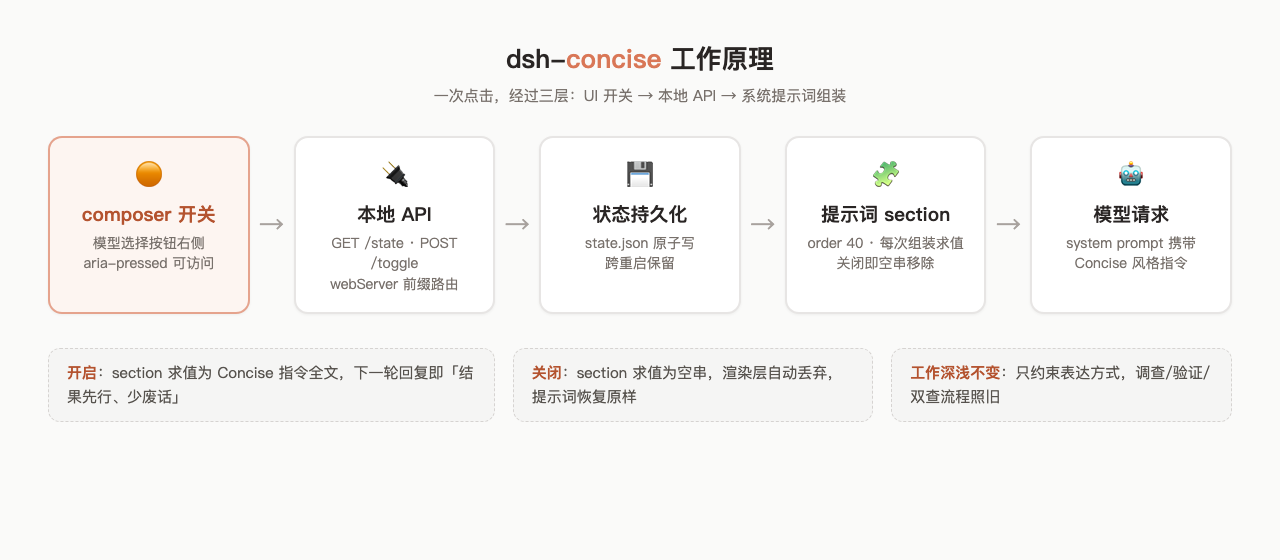
| 层 | 机制 |
|---|---|
| 提示词注入 | systemPrompt.section({ name: 'dsh-concise:style', order: 40 }),text 为函数、每次模型组装按 context.agent.session.id 取当前会话开关求值;关闭时返回空串,渲染层自动丢弃该 section |
| host 命令 | commands.register({ name: 'concise' }):/concise [on\|off\|status],作用于当前会话,slash 菜单自动收录,CLI 会话同样可执行 |
| 自定义风格 | $DSH_HOME/dsh-concise/style.md 非空时覆盖内置文本,mtime 缓存按次求值,改完即生效 |
| 开关 API | webServer.register 前缀路由 /dsh-concise/api:GET /state、POST /toggle、POST /set,带 sessionId 操作该会话,不带则操作新会话默认值(仅本机回环) |
| 会话级状态 | $DSH_HOME/dsh-concise/state.json:default + 每会话覆盖(500 条 LRU 淘汰),tmp + rename 原子写 |
| UI 落位 | client 模块注册 conversation.input.right 槽作锚点,把按钮 portal 到「增强提示词」条目紧左侧(未装时模型 seat 紧左侧),MutationObserver 维持相对位置;React 重渲染/条目重建后自动对位 |
| 状态同步 | toggle 后按会话广播 dsh-concise:change 自定义事件;15s 轻量轮询(仅可见标签页)+ focus/visibility 重取,覆盖命令行/API/其它会话入口的状态变更 |
| 精华摘要渲染 | 风格文本要求每轮最终回答以 > **摘要:** 引用块开头(无条件下发 + 尾部提醒 + 每步契约提醒三通道);client 监听消息 DOM(subtree + rAF 合批),将以「摘要:」或旧标签「说人话:」开头的 blockquote 升级为工程蓝图卡(极淡网格 + 四角角标 + 等宽 1.18em + 划选复制);0.11.6 起对卡片只读——卡内路径用 CSS Custom Highlight 着色、点击按命中位置定位(caretPositionFromPoint),链接只改 href,仅追加插件自有的交付物区(POST /dsh-concise/api/turn-artifacts 取本回合真实工具产出并做存在性过滤);卸载即净 |
conversation.input.right 列表槽渲染在模型按钮左侧(与其文档描述相反)。本插件以槽位条目为自定位锚点:首选把 portal 容器插入「增强提示词」条目的紧左侧(识别链:.dip-root 精确类名 → dip- 类名前缀 → aria-label 文本,防其它插件独立改版导致失锚);未装时插入模型 seat 紧左侧,并保持会话切换/重渲染后的位置正确。以下验收项在 dsh 0.1.0-rc.8 实机全部通过:
/state、/toggle、/set、未知路径 404,输入输出全部断言通过Concise output style (active)(会话日志逐字核验);关闭后同会话下一轮请求 0 命中/concise 命令矩阵:toggle / on / off / status 四路径实测通过,slash 菜单正确收录与执行[Concise][增强提示词][模型选择][发送](未装增强提示词时为 [Concise][模型选择][发送])aria-pressed 同步、按钮文案与状态一致state.json 即时落盘,页面刷新后状态一致lib/client.js 热重载后 fiber 重建、UI 即时更新node --test,零依赖)NotFoundError: removeChild(宿主 ErrorBoundary 接管整卡),新 client 0 错误;A/B 各执行一次开了之后复杂任务的回答会变得敷衍吗? 不会。提示词明确约束"工作深浅不变"(investigate、verify、double-check 照旧),只压缩表达——该查证的照常查证,该给出的命令/路径/风险一字不少。
和直接在 AGENTS.md 里写"请简洁回复"有什么区别? 一是开关粒度:随时一键切换、只作用于当前会话,不用改文件、不用重载;二是作用层级:本插件注入的是系统提示词 section,优先级和稳定性高于项目级指令,且不会污染你的项目配置;三是模型无关:任何模型都套同一输出风格。
开关是全局的还是按会话的?
按会话。 每个会话独立记忆自己的开关状态,互不影响;新会话默认关闭(可用插件配置 defaultEnabled: true 让新会话默认开启)。切换后当前会话的下一轮回复即生效,其它会话不受影响。
支持暗色主题吗?
支持。样式全部使用 dsh 的 --dsw-alias-* 设计令牌与少量半透明品牌色,明暗主题下均可读。
摘要卡底部的「交付物」区是怎么来的?
以本回合真实工具产出为准(write / present / dsh_image_gen / draw_code / HTML 工坊结果里的绝对路径),不是从正文正则里猜;渲染前还会做存在性校验——文件已删除、或只是正文里的示例路径,就不会列出来。
卡里的文件路径为什么有时点不动? 先按绝对路径直开,失败再按会话 cwd 候选解析;历史会话拿不到 cwd 时按路径尾部递归查找,都不存在才降级为复制路径。
升级到 0.11.6 后卡片有什么变化? 卡内路径不再显示类型图标,改为着色 + 虚线下划;点击行为(系统默认应用打开 / 复制降级)不变。卡片对插件只读,不会因为宿主重渲染而整卡消失。
git clone https://github.com/hoyyang/dsh-concise.git
cd dsh-concise
npm run build        # tsc 编译 host + tsdown 打包 client + npm pack
npm run typecheck    # 双 tsconfig 类型检查
目录结构:
src/index.ts          host:双提示词 section + 每步契约提醒 + 会话级状态 + HTTP API + /concise 命令
src/client/index.ts   client:槽位锚点 + 开关按钮 + 摘要卡渲染 / 高亮 / 交付物区
src/client/chips.ts   路径识别、点击打开、交付物 chip 纯函数
src/client/normalize.ts 摘要链接与文本归一化
scripts/build.sh      自包含构建脚本(pnpm/npm 均可)
test/                 host / chips / normalize 单测(零依赖)
assets/ README 截图与图示CLASSIFICATION EVIDENCE
系统优先读取 GitHub Topics,再与站内分类词典和词根规则比对。当前命中: llm、deepseek-harness。
morluto
Reverse engineer anything with agents, from app behavior down to native binaries.

deepseek-ai
DeepSeek Harness: Everything is a Plugin.

nexu-io
The 1st Collaborative AI Design Agent Workspace. Local-first and open source. Create motion, prototypes, websites, apps, dashboards, presentations, images, and videos with your team and AI agents. Share work, exchange feedback, and iterate together in one workspace.