
模型与 MCP
待识别

rea
morluto
Reverse engineer anything with agents, from app behavior down to native binaries.
PROJECT TOPICS
INSTALL REFERENCE
dsh plugin --profile web add github:hongshunanhai/dsh-subor-startup
该命令指向仓库当前默认分支;尚无绑定当前 commit 的完整验证结果。
PROJECT README
English | 简体中文
A boot animation plugin for DeepSeek Harness—bringing the power-on screen of that 1990s Subor learning console into your DSH.
Available on the plugin market / under review — see the Install section below.
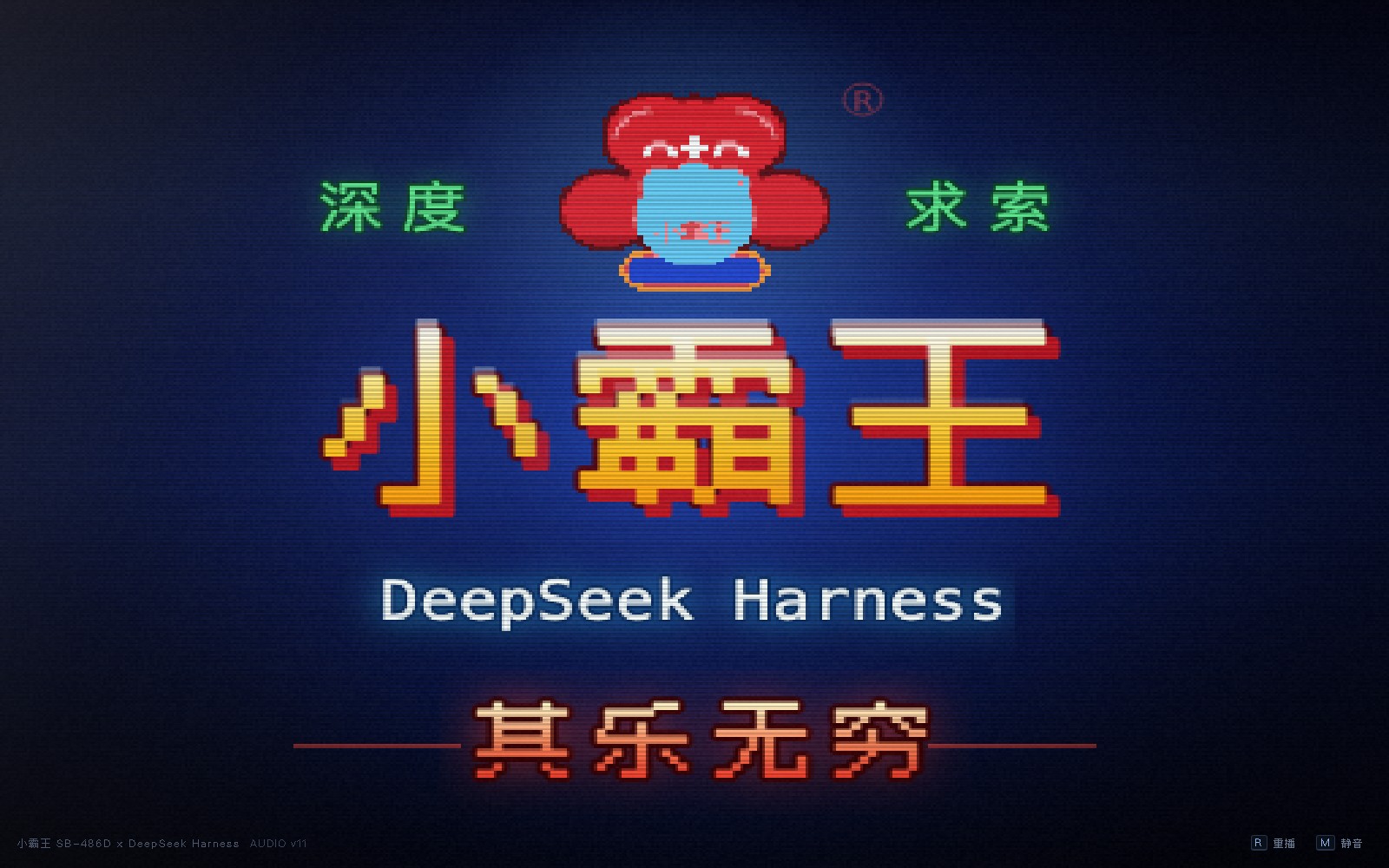
Real screenshot of the boot screen: the CRT power-on, the 「小霸王」 pixel logo, the
DeepSeek Harnesssubtitle and the 「其乐无穷」 slogan.
Authentic CRT look 512×384 logical resolution with the Ark Pixel font, complete with scanlines, vignette, glass glare, the power-on line, rolling static and the collapse on shutdown—every detail of a CRT is there.
Real voice line 「啊哈」 (aha) and 「其乐无穷啊」 (endless fun) are sampled from the original console recording; 「DeepSeek」 is synthesized separately and pitch-matched to the source (F0 ≈ 130 Hz), spliced into one complete line: 「啊哈,DeepSeek 其乐无穷啊」.
A 108-tile classic game wall Contra, Super Mario Bros., Battle City, Adventure Island, Jackal, Green Beret, Salamander, Double Dragon, Ninja Gaiden, Kage, Circus Charlie, Pac-Man, Galaga, Tetris, Bomberman, Excitebike, Arkanoid, Tennis, Macross and TMNT—every tile is a real game screenshot, with no two neighbouring tiles repeating.
Auto-play and skippable Plays the moment DSH opens, no "start" button needed. Once the wall fills the screen, press any key to end it immediately; if you do nothing at all, a 30-second timeout releases the page anyway—it will never lock you behind a black screen.
Full-screen, no bezel When embedded in DSH there is no TV shell—the picture fills the whole viewport. Everything scales proportionally from the 512×384 logical resolution, with image-rendering: pixelated keeping the pixels sharp.
Graceful fallback If the game screenshots fail to load, the plugin falls back to built-in redrawn pixel scenes instead of showing a blank screen.
DSH Settings → Plugin Market → search dsh-subor-startup → click Install → restart DSH.
dsh plugin --profile desktop add github:hongshunanhai/dsh-subor-startupdsh plugin --profile desktop add link:/path/to/dsh-subor-startupSome DSH versions refuse terminal operations on the
desktopprofile (reporting "managed exclusively by the Electron application"). In that case, install from the desktop app's Plugins page instead.
Restart DSH after installing (quit completely, then reopen). The boot animation plays the first time you open it.
| Item | Requirement |
|---|---|
| Platform | DSH web profile / DSH desktop profile |
| Node | >= 20 |
| Dependencies | None (no npm install needed) |
dsh plugin --profile desktop remove dsh-subor-startupEnable only one boot-animation plugin. Running this alongside another, such as dsh-startup-screen, stacks both overlays and gives you two boot sequences in a row.
| Environment | Supported |
|---|---|
| DSH web profile | ✅ |
DeepSeek Harness Desktop (with webServer) |
✅ |
Electron file:// + IPC front-end delivery |
⚠️ The host half skips injection; the client half self-boots instead |
You can view it without installing the plugin:
cd public
python3 -m http.server 8000
# open http://localhost:8000/splash.html
URL parameters:
| Parameter | Effect |
|---|---|
?t=7 |
Freeze on the 7-second mark (for tuning the timeline) |
?embed=1 |
iframe mode: fills the viewport, then posts dsh-subor:done to the parent page |
?next=<url> |
Standalone mode: the URL to navigate to when playback ends |
?loop=1 |
Loop playback |
dsh-subor-startup/
├── package.json
├── cordis.patch.yml
├── lib/
│   ├── index.js          # Host half: static-asset routes + index.html iframe injection
│   └── client.js         # Client half: self-boot fallback for the desktop app
├── public/
│   ├── splash.html
│   ├── preview.jpg
│   ├── assets/
│   │   ├── style.css
│   │   ├── js/boot.js
│   │   ├── fonts/font.css
│   │   └── games/*.jpg   # 20 game screenshots (removable; falls back to built-in scenes)
│   └── audio/
│       └── deepseek-short-deep.wav
├── tools/
│   └── make_voice.py     # Regenerate the voice line (macOS say + numpy)
├── market/               # awesome-dsh-plugin listing entry
├── screenshots.json      # Market detail-page screenshot list
├── README.md             # English (default)
├── README.zh-CN.md       # 简体中文
└── LICENSE1. For learning and personal interest only. This is a personal hobby project, not intended for any commercial purpose.
2. Third-party rights. 「小霸王 / SUBOR」 and 「DeepSeek / DeepSeek Harness」 are trademarks of their respective owners. The game screenshots and voice samples used in this project come from third parties, and all rights to them belong to their owners. This project claims no rights to those materials and has no authorization or endorsement from them.
3. Scope of the license. The PolyForm Noncommercial License 1.0.0 applies only to the code and copy authored for this project; it does not cover the third-party materials listed above.
4. Fan works are at your own risk. Anyone who modifies, adapts, translates or redistributes this project bears any disputes and legal liability arising from it themselves; the author is not responsible for them.
5. Takedown requests. If a rights holder believes this project infringes their rights, please contact the author, and the relevant content will be removed once verified.
The code is licensed under the PolyForm Noncommercial License 1.0.0:
This is a source-available license (the source is public, but it is not OSI open source).
CLASSIFICATION EVIDENCE
系统优先读取 GitHub Topics,再与站内分类词典和词根规则比对。当前命中: deepseek-harness。
morluto
Reverse engineer anything with agents, from app behavior down to native binaries.

deepseek-ai
DeepSeek Harness: Everything is a Plugin.

nexu-io
The 1st Collaborative AI Design Agent Workspace. Local-first and open source. Create motion, prototypes, websites, apps, dashboards, presentations, images, and videos with your team and AI agents. Share work, exchange feedback, and iterate together in one workspace.