其他
完整应用

deepseek-harness
deepseek-ai
DeepSeek Harness: Everything is a Plugin.

honghuachen/deepseekharness-desktop
一键安装的跨平台桌面容器(macOS / Windows),完整运行官方 DeepSeek Harness Web 壳,内置兼容性守护机制,支持第三方插件管理、更新与移除,并自动拉取官方内核最新版本。 | One-click cross-platform desktop container (macOS / Windows) running the official DeepSeek Harness Web shell, with built-in compatibility safeguards, third-party plugin management (update & remove), and automatic updates to the official runtime.
PROJECT TOPICS
PROJECT README
English | 中文
An extremely thin, cross-platform (macOS + Windows) desktop container: the window always runs the official deepseek-ai/deepseek-harness web shell — the container itself ships no business UI of its own.
Core capability: it automatically checks for and updates to the latest official release on every launch.
┌─────────────────────────────────────────────────────┐
│  DSH Web.app (thin Electron shell)                   │
│                                                       │
│  1. Query npm registry: @deepseek-ai/dsh latest      │
│  2. New version found → pnpm-install into versions/  │
│  3. Atomically flip the `current` symlink → rollback │
│  4. Launch the official `dsh web` service            │
│     (127.0.0.1:<port>)                               │
│  5. Window loads the official page ← 100% official   │
└─────────────────────────────────────────────────────┘| Decision | Rationale |
|---|---|
| The shell has zero business logic — only "update + launch + open window" | The upstream project iterates fast; a thin shell never conflicts with it |
| Each runtime version installs into its own directory, switched via a symlink | An upgrade that fails rolls back instantly; old versions stay around for rollback |
pnpm's build-script allowlist (allowBuilds) is pre-configured |
Only known native modules (node-pty/koffi, etc.) are allowed to run install scripts |
| A portable Node v22 ships with the app | No dependency on the system Node version; ABI stays consistent with native modules |
| The data directory is independent of the shell | Session data lives in ~/.dsh; upgrading or reinstalling the shell never touches it |
npm install          # install Electron and other devDependencies
npm run fetch-tools  # download vendor/pnpm + vendor/node (portable Node)
npm start
The first launch downloads the official runtime (roughly 1–2 minutes, depending on your network); afterwards it only downloads again when a new version is available.
npm run dist # produces macOS (dmg/zip) + Windows (NSIS installer/zip)One build covers both platforms (electron-builder cross-builds the Windows target directly on macOS):
| Platform | Artifacts |
|---|---|
| macOS arm64 | DSH Web-<ver>-arm64.dmg / -mac.zip |
| Windows x64 | DSH-Web-Setup-<ver>-x64.exe / -win.zip |
Windows notes:
node.exe and pnpm ship inside the package; version switching uses NTFS junctions (no admin privileges needed), falling back to a pointer file in restricted environments.zstd command (if missing, the badge feature silently degrades — install it with scoop install zstd if you want it).On every launch, unless a kernel version has been manually pinned (see below):
GET https://registry.npmjs.org/@deepseek-ai/dsh/latest to fetch the latest version;-rc.N is supported);<data dir>/runtime/versions/v<version>/, then atomically flip the runtime/current symlink over to it on success; on failure, the previous version stays active;Offline: the check is skipped and the already-installed version is used directly; an error is only raised if there's no installed version at all and the machine is offline.
The About DSH Web menu item shows both the container's own version and the "kernel" version (the currently active version of the official @deepseek-ai/dsh runtime).
Menu DSH Web → Check for Updates… (⌘U) opens a dedicated window covering both halves of the app:
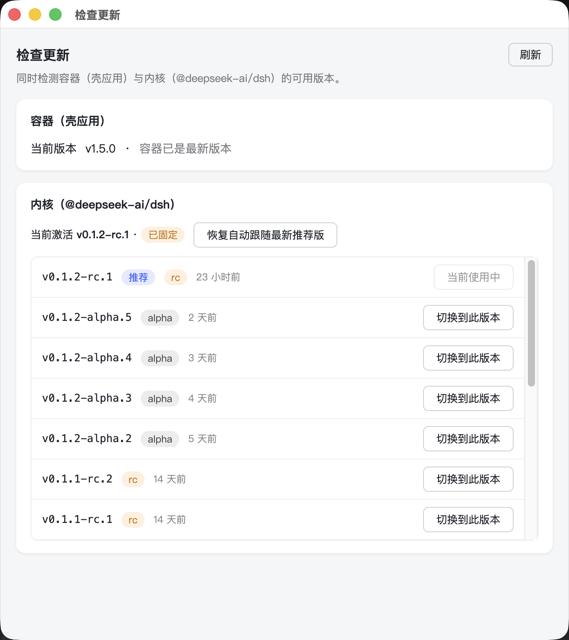
electron-updater — "Download & Install" fetches the update, then "Restart & Install" applies it in place. Because the installer isn't code-signed, Authenticode verification is disabled at runtime (win.verifyUpdateCodeSignature: false in electron-builder.yml). Every release must include the latest.yml/.blockmap files electron-builder generates alongside the installer, or the updater has nothing to compare against.@deepseek-ai/dsh): lists every version ever published to npm, newest first, tagged alpha / rc / (once the official package ships one) a true stable, with the version behind npm's latest dist-tag marked "Recommended". You can switch to any version in the list; switching briefly restarts the background service and streams the install log live.prune() won't clean it up even if it falls outside the "2 most recent" window. Click "Resume following the latest recommended version" to unpin and go back to auto-updating to npm latest on every launch."Recommended" here means npm's
latestdist-tag, which the official package has maintained since day one — it is not the semver notion of "no pre-release suffix". As of writing, every published version of@deepseek-ai/dshstill carries a-rc.N/-alpha.Nsuffix, so there's no true GA release yet; the UI intentionally avoids the word "stable" for that reason.
<data dir>/                        # ~/Library/Application Support/DSH Web when packaged; .data/ under the repo in dev
├── runtime/
│   ├── versions/v0.1.1-rc.2/     # each version gets its own full node_modules
│   └── current -> versions/v0.1.1-rc.2
├── pnpm-store/                    # content-addressed store, deduplicated across versions
├── logs/app-YYYY-MM-DD.log        # runtime logs
└── settings.json # user configurationsettings.json (openable from the menu):
{
  "port": 43130,             // web service port; auto-probes forward if taken
  "channel": "latest",       // update channel (currently only npm's `latest`)
  "autoCheckUpdates": true,  // disable to skip the update check on every launch
  "dshHome": "",             // empty = the official standard ~/.dsh; point elsewhere to isolate data
  "taskBadge": true,         // show a completed-task count badge on the Dock/taskbar icon
  "pinnedKernelVersion": ""  // empty = auto-update to npm `latest`; set via the Check for Updates window to pin a specific kernel version
}By default the app uses the official standard data directory ~/.dsh, so session history is fully interoperable with the official CLI.
Third-party containers (e.g. the older DSH Desktop) may push community plugins into a profile through a plugin marketplace. These are often incompatible with newer official releases and can crash the web service on startup (showing up as a blank white window). To address that, this app provides:
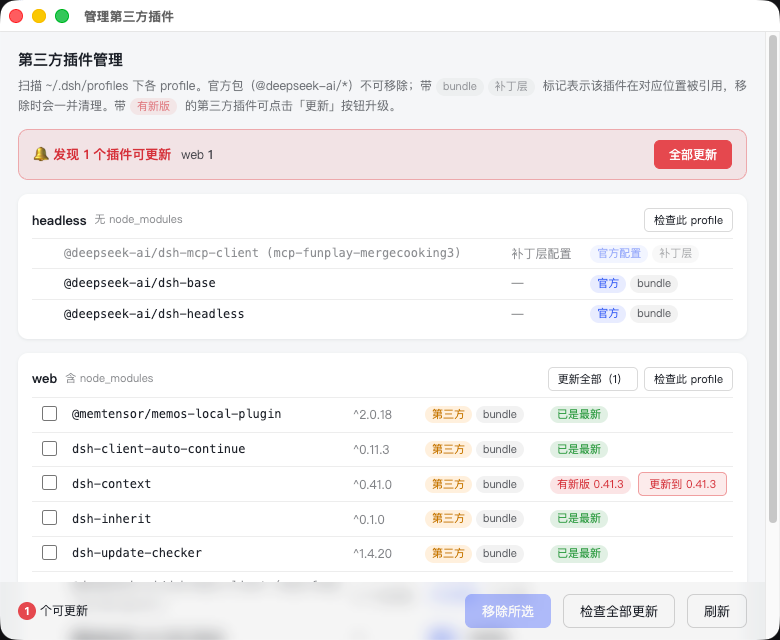
.sanitized-backup-* directory.Note: the
desktopprofile belongs to the older DSH Desktop. Removing plugins from it will break that older shell's marketplace features (that's the intended effect of decontamination) — quit the older shell first if you still use it. To install a plugin, use the official method:dsh plugin --profile <name> add <package>.
Menu DSH Web → Community Plugin Marketplace… (⌘⇧M, or switch to that tab inside the "Manage Third-Party Plugins" window):
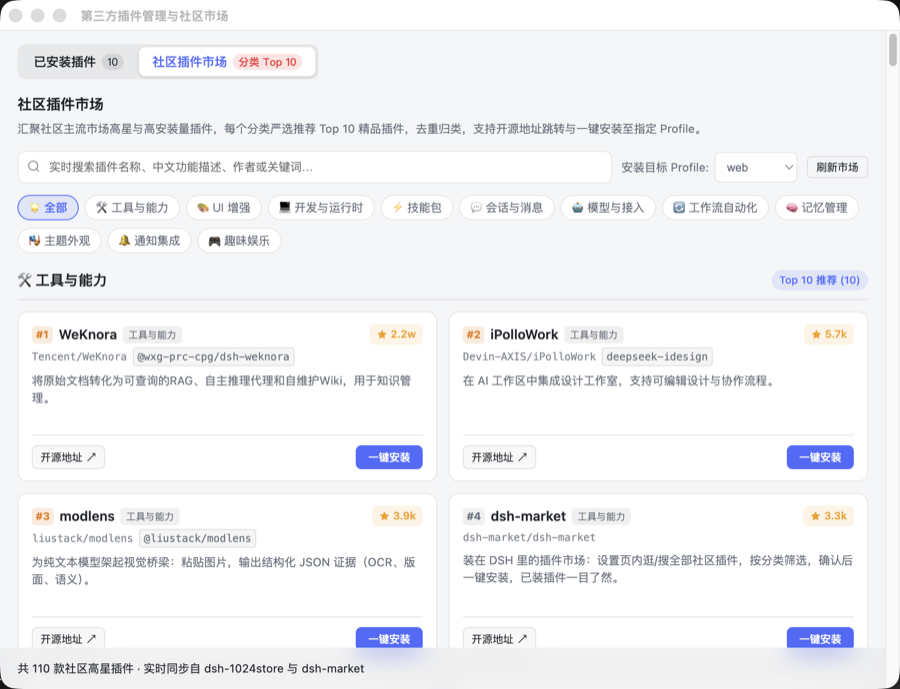
package.json and dsh.profile.bundles directly — no manual file editing needed.Menu DSH Web → Token 用量统计… (⌘⇧T) opens a dedicated window that tallies token usage and estimated cost across every session under ~/.dsh/sessions:
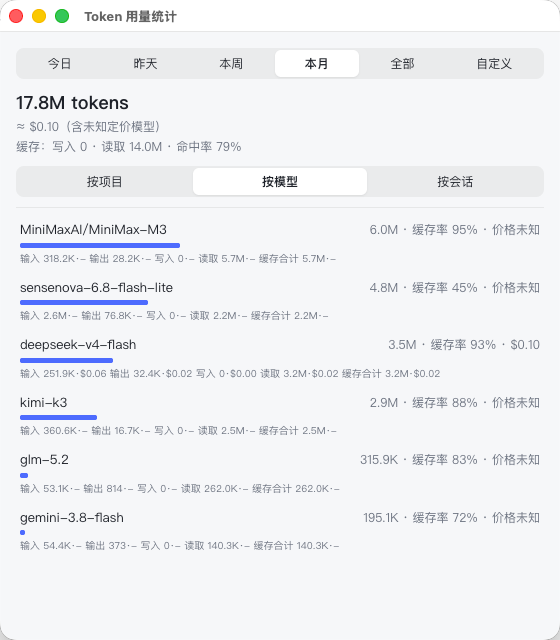
.git, worktrees included) / by model / by session (capped at the 50 most recently active)Cost estimates come from a local, editable pricing table. The first time the window opens, the bundled pricing.default.json is copied to pricing.json in the app's data directory; from then on only that user copy is read/written (an app update never overwrites it). DeepSeek Harness can route to any provider/model — real-world usage has included OpenRouter, SenseNova, Zhipu, and Google models, for example — and this table only ships pricing for DeepSeek's own official models; every other model shows as "unknown pricing" until you add its rate using the same JSON shape. DeepSeek's official API also prices differently during UTC peak/off-peak windows; this only uses the (lower) off-peak rate as a single approximation, so the cost shown is an estimate (≈), not an exact bill.
Performance and cross-platform support: decompressing .zstd session logs prefers the system-installed zstd CLI when available (roughly an order of magnitude faster in practice), and falls back to the pure-JS fzstd library otherwise — a case that mainly shows up on Windows machines without extra command-line tools installed. Neither path needs any native compilation, so it works correctly on Windows too. The whole scan/decompress/parse pipeline runs on a dedicated worker thread and never blocks the main process or the UI.
~/.dsh session data, and concurrent writes are risky. After migrating to this app, quit or remove the old shell.43130, chosen to avoid colliding with the old DSH Desktop's 43120.CSC_LINK environment variable) before running npm run dist again.src/main/
├── main.js # startup orchestration, windows, menu, lifecycle, crash self-healing
├── config.js # paths and constants (registry URL, build allowlist)
├── updater.js # update engine: check/install/atomic-swap/cleanup (pure Node, testable)
├── kernel-versions.js # fetches every published npm version of @deepseek-ai/dsh (pure Node, testable)
├── shell-update.js # checks GitHub Releases for a newer container version (pure Node, testable)
├── shell-auto-updater.js # container auto-update: wraps electron-updater (Windows only)
├── kernel-switch.js # kernel version switch state machine: install → activate → persist pin (pure Node, testable)
├── update-window.js # Check for Updates window (container + kernel) + its IPC handlers
├── runner.js # official service process management: launch/double health check/graceful exit
├── plugin-guard.js # third-party plugin guard: surgically restores an official profile
├── plugin-manager.js # third-party plugin manager window
├── badge.js # task-completion Dock/taskbar badge watcher
├── semver.js # pre-release-aware version comparison
├── status-window.js # startup progress window (plain text, not the product UI)
├── logger.js # file logging
└── token-usage/ # token usage stats: scan/decompress/parse/dedupe/aggregate/pricing/window
├── scanner.js # recursively find session.jsonl(.zstd)
├── decompress.js # prefers system zstd, falls back to pure-JS fzstd
├── parser.js # parses session events into usage records
├── dedup.js # dedupes by requestId (streaming snapshots repeat the same request)
├── aggregator.js # aggregates by project/model/session + estimates cost
├── pricing.js # pricing table loading (bundled default + user-editable copy)
├── cache.js # incremental cache keyed by file mtime/size
├── scan-worker.js # runs the actual scan on a worker thread, off the main process
├── service.js # orchestrates the steps above
├── window.js # the stats window + its IPC handlers
└── stats-window.html # the stats window's UI
scripts/
├── fetch-tools.mjs # build-time download of pnpm/portable Node into vendor/
├── e2e-update-test.mjs # headless end-to-end test (hits the real registry, full chain)
├── test-plugin-update.mjs # self-test for third-party plugin update logic
├── test-token-usage.mjs # self-test for the token usage module (incl. a real-file decompression regression)
├── kernel-versions-test.mjs # self-test for parsing/classifying/sorting the npm version list
├── shell-update-test.mjs # self-test for the GitHub Releases update check
├── kernel-switch-test.mjs # self-test for the kernel switch state machine (incl. pin/rollback-on-failure)
├── badge-test.mjs # self-test for the task-completion badge
├── plugin-guard-test.mjs # self-test for the plugin guard
├── repair-session.mjs # repairs sequence numbers in a corrupted session.jsonl(.zstd)
└── verify-session-file.cjs # verifies a session file's zstd framing / sequence continuitynpm test # fast regression suite: badge / plugin guard / plugin update / token usage / kernel versions / shell update / kernel switch (no network needed)
npm run test:e2e # end-to-end update flow test (hits the real npm registry, slower)Issues and PRs are welcome. Please read CONTRIBUTING.md first (it covers the dev workflow and the commit message convention).
CLASSIFICATION EVIDENCE
系统优先读取 GitHub Topics,再与站内分类词典和词根规则比对。当前命中: desktop-app。
deepseek-ai
DeepSeek Harness: Everything is a Plugin.

anywhere-labs
为 DeepSeek Harness (DSH) 插件生态打造的现代化桌面端解决方案。万物皆「插件」,桌面本身也是「插件」。

awesome-dsh-plugin
A curated list of plugins for DeepSeek Harness (dsh) · DeepSeek Harness 插件精选列表