


模型与 MCP
待识别

rea
morluto
Reverse engineer anything with agents, from app behavior down to native binaries.
PROJECT TOPICS
INSTALL REFERENCE
dsh plugin --profile web add github:hifengzy/dsh-plugin-deepseek-peak-hours
该命令指向仓库当前默认分支;尚无绑定当前 commit 的完整验证结果。
PROJECT README




English · 简体中文
A lightweight DeepSeek Harness (DSH) plugin that shows whether DeepSeek API usage is billing at the peak or off-peak rate right now, next to the composer's context meter. Clicking the badge opens the FLASH / PRO price table for that window.
Peak 09:00 - 12:00 ← click for the price table| Where | Appears when | Exact position |
|---|---|---|
conversation.composer.dock |
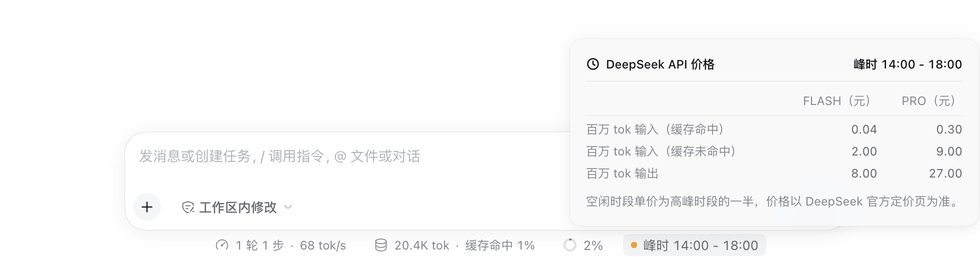
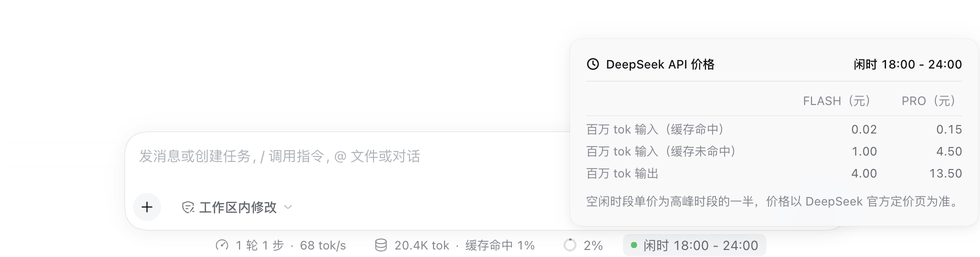
A session with a conversation (composer docked at the bottom) | In the statistics row under the composer card, immediately right of the built-in Context used x% reading |
conversation.hero.options |
The New Session home (a blank session) | Right-hand side of the options row above the composer card, beside the workspace and preset controls |
Peak 09:00 - 12:00 during a peak window, Off-peak 18:00 - 24:00 otherwise. Overnight and whole-day windows read their real range: 00:00 - 09:00, 18:00 - 24:00, 00:00 - 24:00.Input, 1M tokens (cache hit) / Input, 1M tokens (cache miss) / Output, 1M tokens, columns FLASH (CNY) and PRO (CNY), plus the note that off-peak rates are half the peak rates.--dsw-alias-state-warn-primary and --dsw-alias-state-success-primary tokens.The interface is shown in Chinese; the same layouts appear in every locale.
New Session — the badge rides the options row right of the workspace and preset chips, matching their 28px chip height. Peak on the left, off-peak on the right.
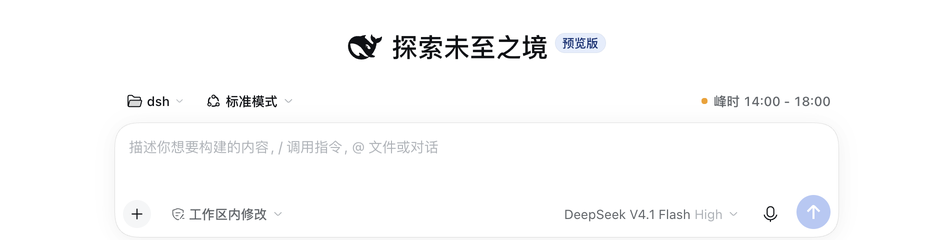
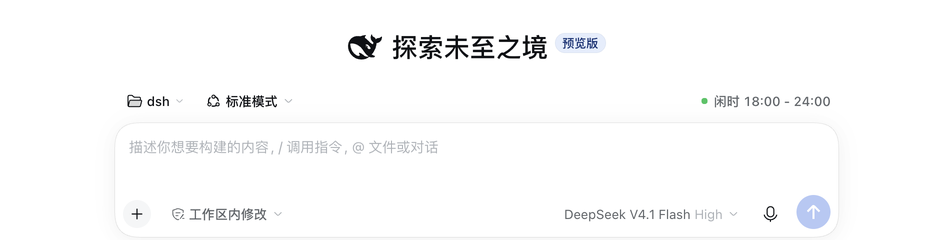
An existing session — the badge is the last reading in the statistics row under the composer, immediately right of the context meter, and keeps that row's 22px height.


Click for prices — the popover lists the FLASH and PRO price of the running window, with the note that off-peak rates are half the peak rates.
The schedule is quoted from DeepSeek's official pricing page:
Off-peak rates are half of the peak rates. Beijing time, Monday to Friday (excluding Chinese statutory holidays) 09:00 - 12:00 and 14:00 - 18:00 are peak hours; all other times, including weekends and Chinese statutory holidays all day, are off-peak.
Prices in CNY per million tokens, matching the official page on 2026-11-16:
| FLASH peak | FLASH off-peak | PRO peak | PRO off-peak | |
|---|---|---|---|---|
| Input (cache hit) | 0.04 | 0.02 | 0.30 | 0.15 |
| Input (cache miss) | 2.00 | 1.00 | 9.00 | 4.50 |
| Output | 8.00 | 4.00 | 27.00 | 13.50 |
Background: time-of-day pricing started on 2026-08-17, weekends became off-peak all day on 2026-08-23, and the FLASH series switched to the prices above at 12:00 Beijing time on 2026-09-10. When DeepSeek changes prices, update the plugin (see below).
In DSH open Plugins → Add plugin and enter the npm package name:
dsh-plugin-deepseek-peak-hoursOr point it at this repository's directory for local development. The plugin is active for the whole profile and survives a restart. Refresh the page after installing.
react / react-dom, and never imports @deepseek-ai/dsh-client-ui-primitives or other DSH Client packages that change without notice.--dsw-* / --dsh-* theme tokens, so light and dark themes both match; the popover copies the built-in statistics dialog (12px padding, --dsw-radius-lg, elevation-prominent, z-index 1100, Escape and outside-click dismissal).Asia/Shanghai regardless of the machine's zone (the test suite also passes under TZ=America/New_York).HOLIDAY_RANGES in client.js and publish a release when the notice appears.PRICES in client.js when DeepSeek changes its price list; the plugin does not scrape the web.npm test # schedule, holidays, boundaries, slots and dictionary wiring
npm run test:tz # the same suite under a non-Beijing machine zoneFiles:
client.js            # everything: schedule + badge + price popover (no build step)
index.js             # Host half; registers nothing
cordis.patch.yml     # inserts the deepseek-peak-hours row
locale/{zh,en}.json  # Plugin Manager title and description
icon.svg             # 36×36 plugin icon (clock plus the peak wedge)
assets/icon-180.png  # 180×180 storefront tile
test/                # node --test suites
The schedule lives between /* #region schedule */ markers, and the tests evaluate that block straight out of client.js, so there is exactly one implementation.
CLASSIFICATION EVIDENCE
系统优先读取 GitHub Topics,再与站内分类词典和词根规则比对。当前命中: deepseek、deepseek-api。
morluto
Reverse engineer anything with agents, from app behavior down to native binaries.

deepseek-ai
DeepSeek Harness: Everything is a Plugin.

nexu-io
The 1st Collaborative AI Design Agent Workspace. Local-first and open source. Create motion, prototypes, websites, apps, dashboards, presentations, images, and videos with your team and AI agents. Share work, exchange feedback, and iterate together in one workspace.