
模型与 MCP
待识别

rea
morluto
Reverse engineer anything with agents, from app behavior down to native binaries.
PROJECT TOPICS
INSTALL REFERENCE
dsh plugin --profile web add github:hgognav233-netizen/agent-workflow-viewer
该命令指向仓库当前默认分支;尚无绑定当前 commit 的完整验证结果。
PROJECT README
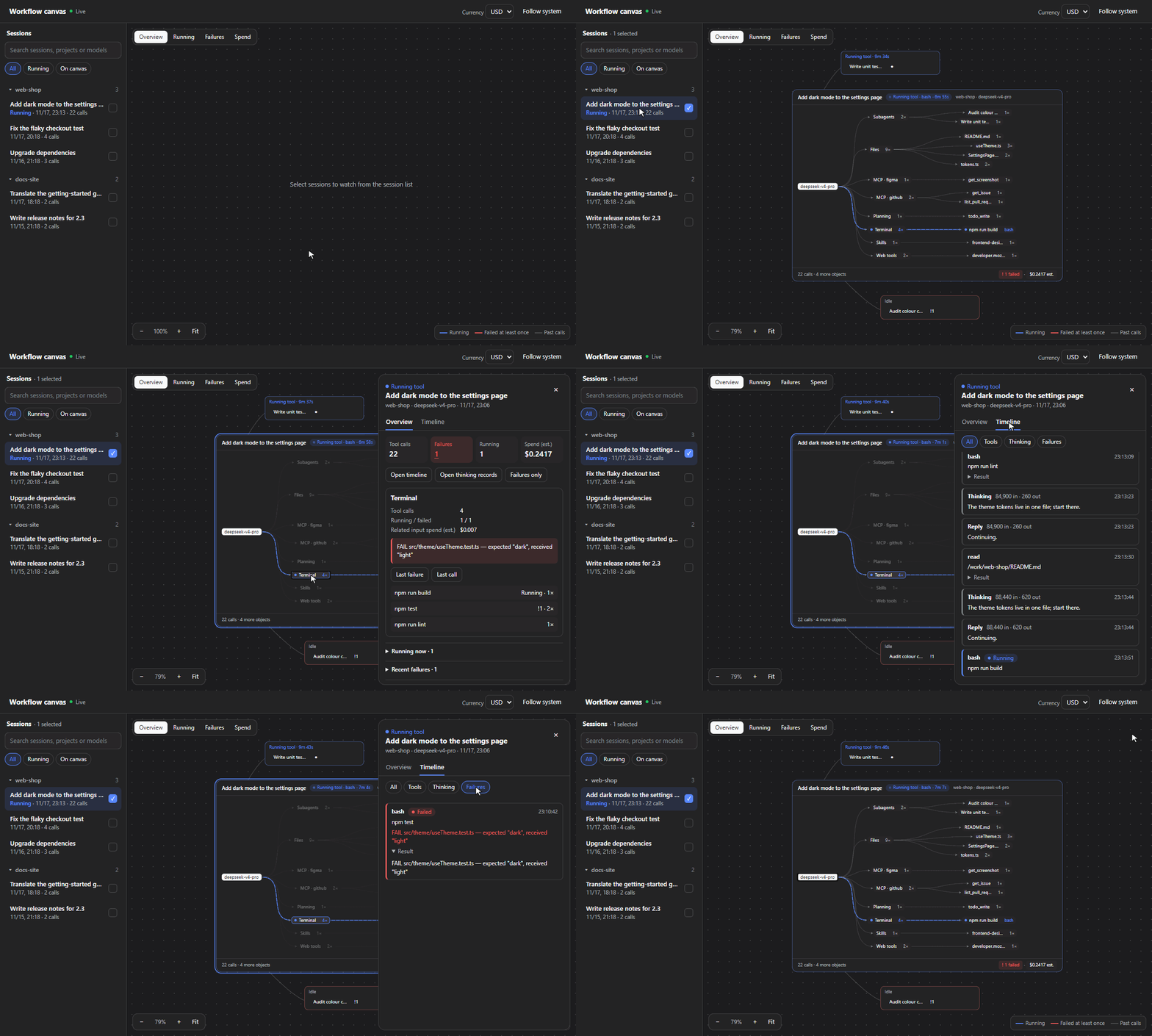
See what your Harness agent is doing while it works. A Workflow icon in the left navigation, below Plugins, opens a canvas of all sessions; ◇ Workflow beside the conversation input opens the same canvas focused on the current conversation. Both follow the Harness language and colour scheme.
The left-hand icon opens a full page that is not bound to the open conversation:
Open /agent-workflow/canvas directly while signed in to DSH Web. In DSH Desktop, Open in browser creates a two-hour link for the system browser that shows the same information as the canvas inside Harness. Switch estimated spend between USD and CNY in the header; the CNY view shows the reference rate and its date.
Install version 0.4.0 from GitHub in the DSH Web profile:
dsh plugin --profile web add github:hgognav233-netizen/agent-workflow-viewer#v0.4.0In DSH Desktop, open Plugins and paste the Git source:
git+https://github.com/hgognav233-netizen/agent-workflow-viewer.git#v0.4.0Enable the bundle, restart the Harness host, and choose Workflow in the sidebar.
To try the development version, clone this repository and install the checkout as a local bundle. Pass the absolute checkout path to the Plugins page or the plugin manager's install_bundle action. Restart the Harness host after changing index.js and reload the interface after changing client.js.
subagent or wait_agent are shown as actions ("Start child task", "Wait for child task"); the child sessions themselves are drawn as branches. MCP tools are grouped as MCP · server name.Counts reflect the latest 3,000 events owned by a session. The timeline shows up to 400 matching entries per page. Inside Harness the canvas uses the Harness language and changes with it; a browser link carries the language it was opened in; otherwise the browser language decides.
The former single-session page, /agent-workflow/view?root=…, now opens the canvas focused on that session.
The plugin reads Harness session logs and serves the canvas and timeline through the Harness web server. It does not modify logs or send them to another service. Responses can contain message excerpts, the model's reasoning text, tool results, local paths, or command summaries. Review screenshots and diagnostics before sharing them. Spend is estimated by the plugin from the public price list; Harness itself records no money.
Activity routes request authenticated Harness access. The browser link from DSH Desktop works only on a loopback address, expires after two hours, and carries its key in the address fragment, which browsers do not send to servers or in referrers. Anyone with the link on this computer can read the same records as the canvas, so do not share it. On older hosts without route admission, a peerless request is allowed only through a loopback listener with a local authority and no cross-site browser context. Harness Web Server documentation
Run the tests with Node.js 22 or 24. The tests use the built-in runner and synthetic session logs.
npm testThe host projection is in index.js, the canvas page is in canvas.js, and client.js places it in the Harness interface. To report a problem, open an issue with your Harness version, operating system, and the steps needed to reproduce it. Use a synthetic or redacted session when attaching examples.
CLASSIFICATION EVIDENCE
系统优先读取 GitHub Topics,再与站内分类词典和词根规则比对。当前命中: llm、deepseek、deepseek-harness。
morluto
Reverse engineer anything with agents, from app behavior down to native binaries.

deepseek-ai
DeepSeek Harness: Everything is a Plugin.

nexu-io
The 1st Collaborative AI Design Agent Workspace. Local-first and open source. Create motion, prototypes, websites, apps, dashboards, presentations, images, and videos with your team and AI agents. Share work, exchange feedback, and iterate together in one workspace.