

开发工具
待识别

treg
superdesigndev
OpenRouter for agent tools. Join community here: https://discord.gg/6mQYYfFMAn
PROJECT TOPICS
INSTALL REFERENCE
dsh plugin --profile web add github:herenfor/dsh-wsl
该命令指向仓库当前默认分支;尚无绑定当前 commit 的完整验证结果。
PROJECT README

Coming in 0.1.15: Manually check for and install updates from a WSL plugin’s detail page, with explicit prerelease selection. Preview an npm plugin’s description before installation. Tags resolve to an exact version before the native installer runs and verifies the result; failures show diagnostics and logs. Existing sessions, settings and enabled states are preserved.
Run DeepSeek Harness tasks in WSL from the Windows Desktop window


English · 中文
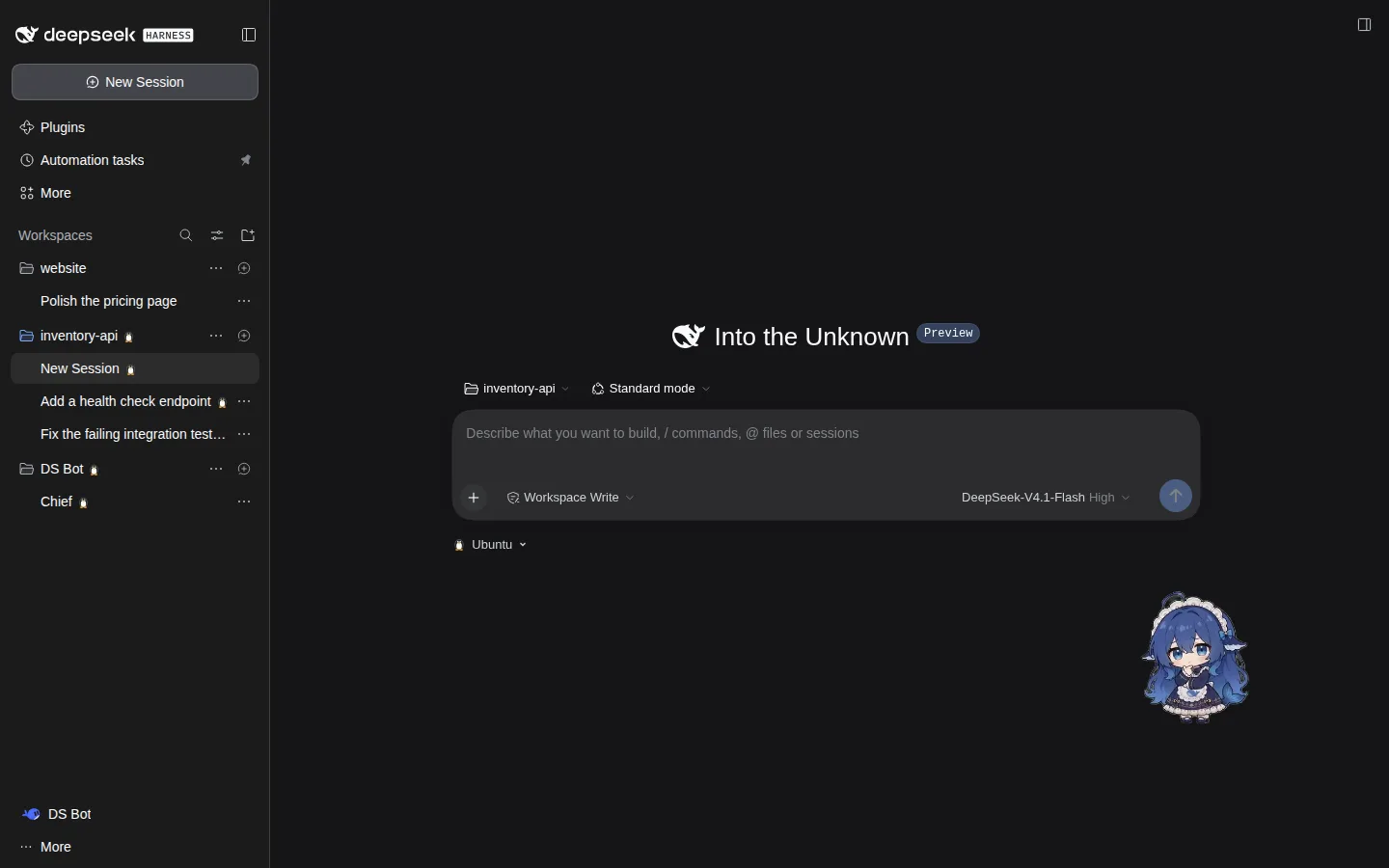
Screenshots from a test environment, for illustration only. The third-party plugins shown are listed under "Screenshot credits" at the end.
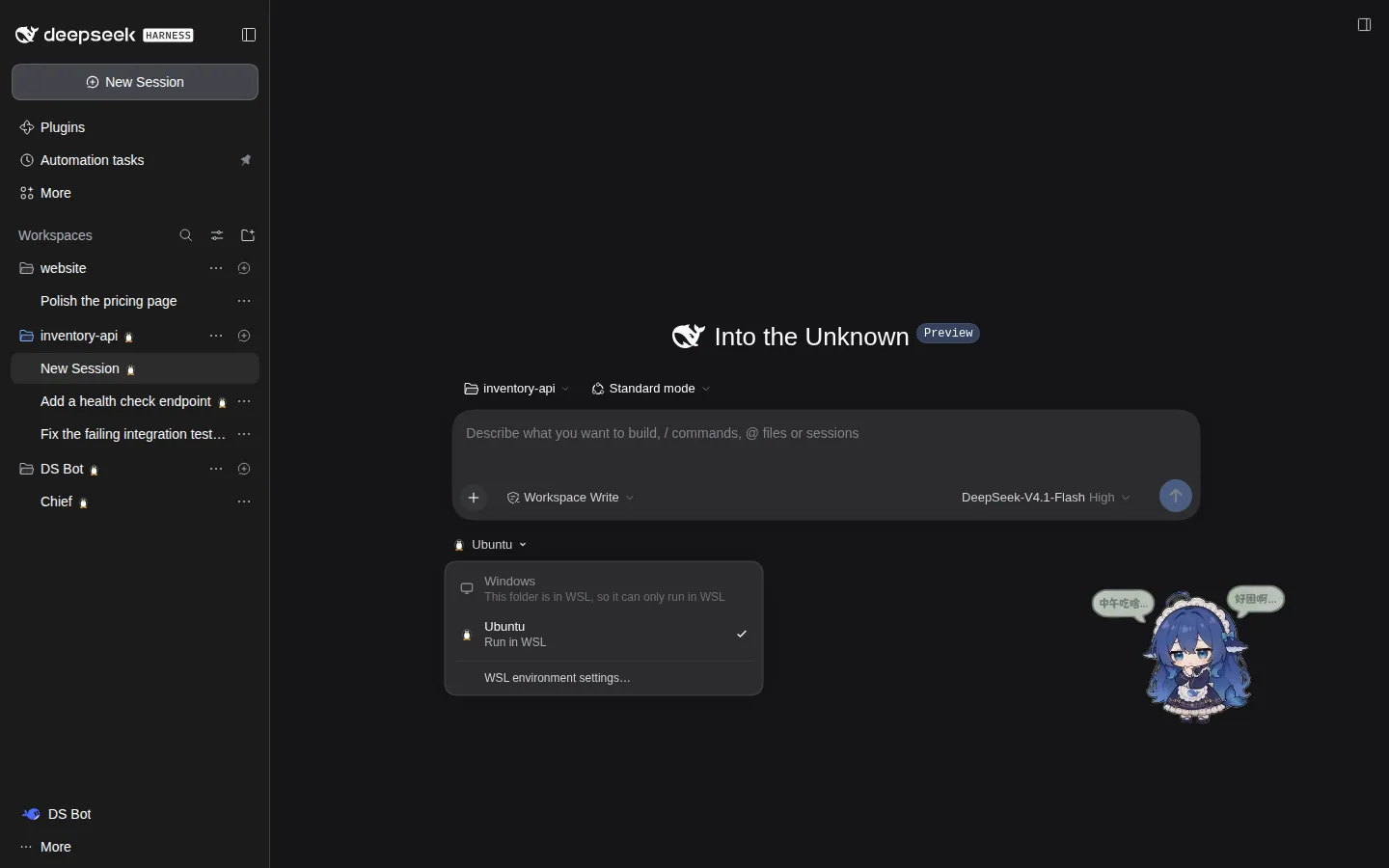 Pick the run location under the input box |
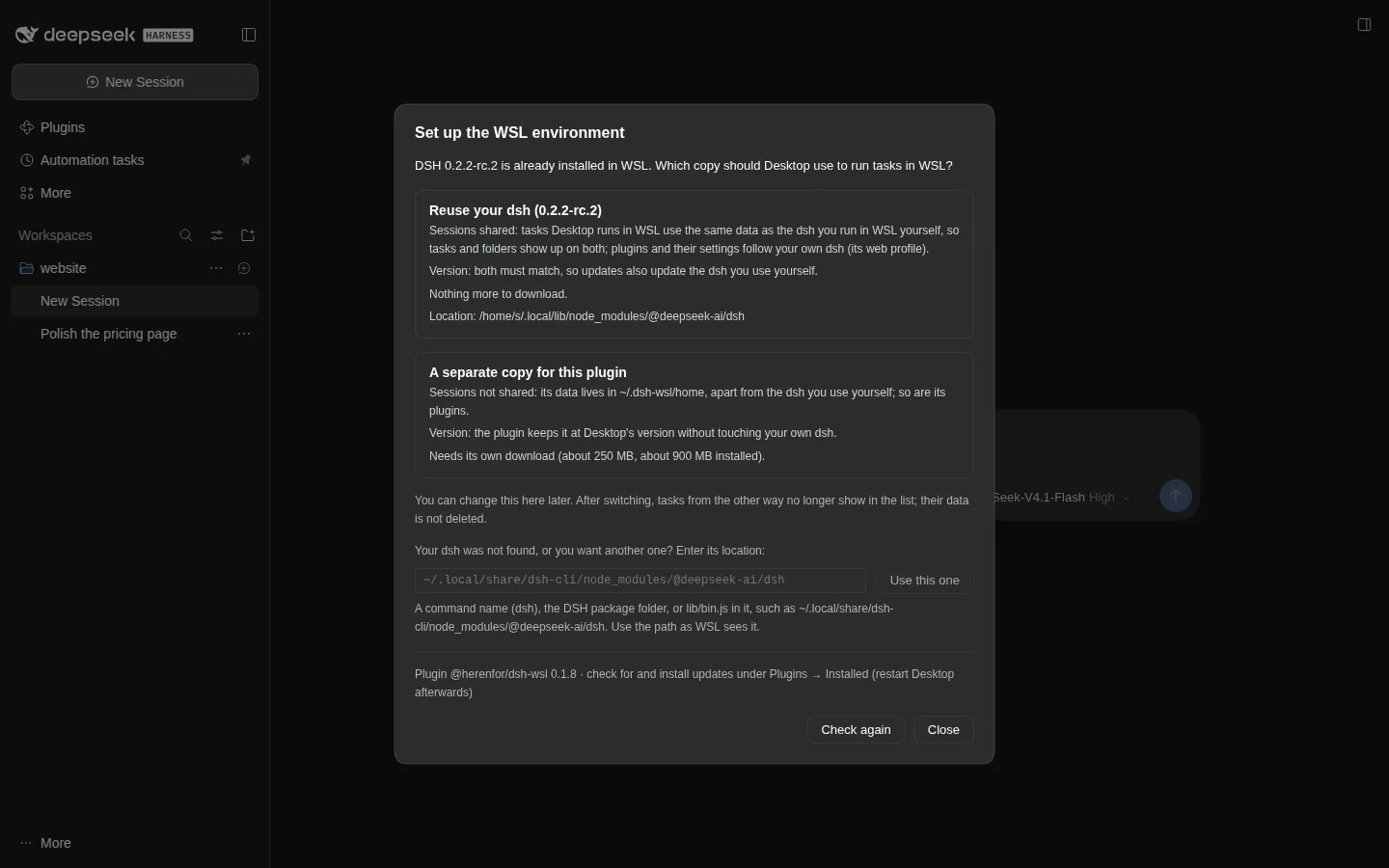 First-run setup: reuse your own dsh or use a copy of its own |
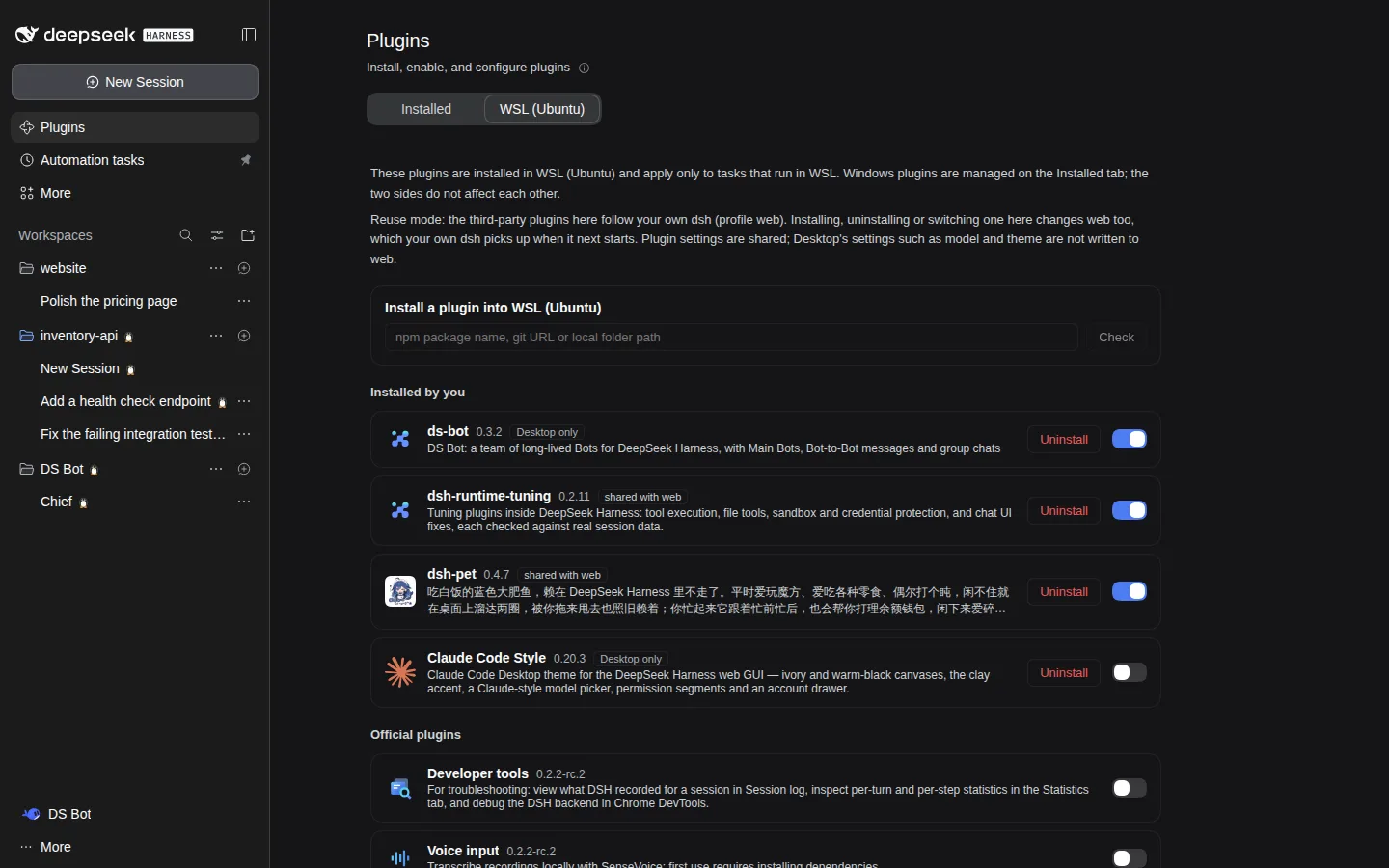 The WSL tab on the Plugins page |
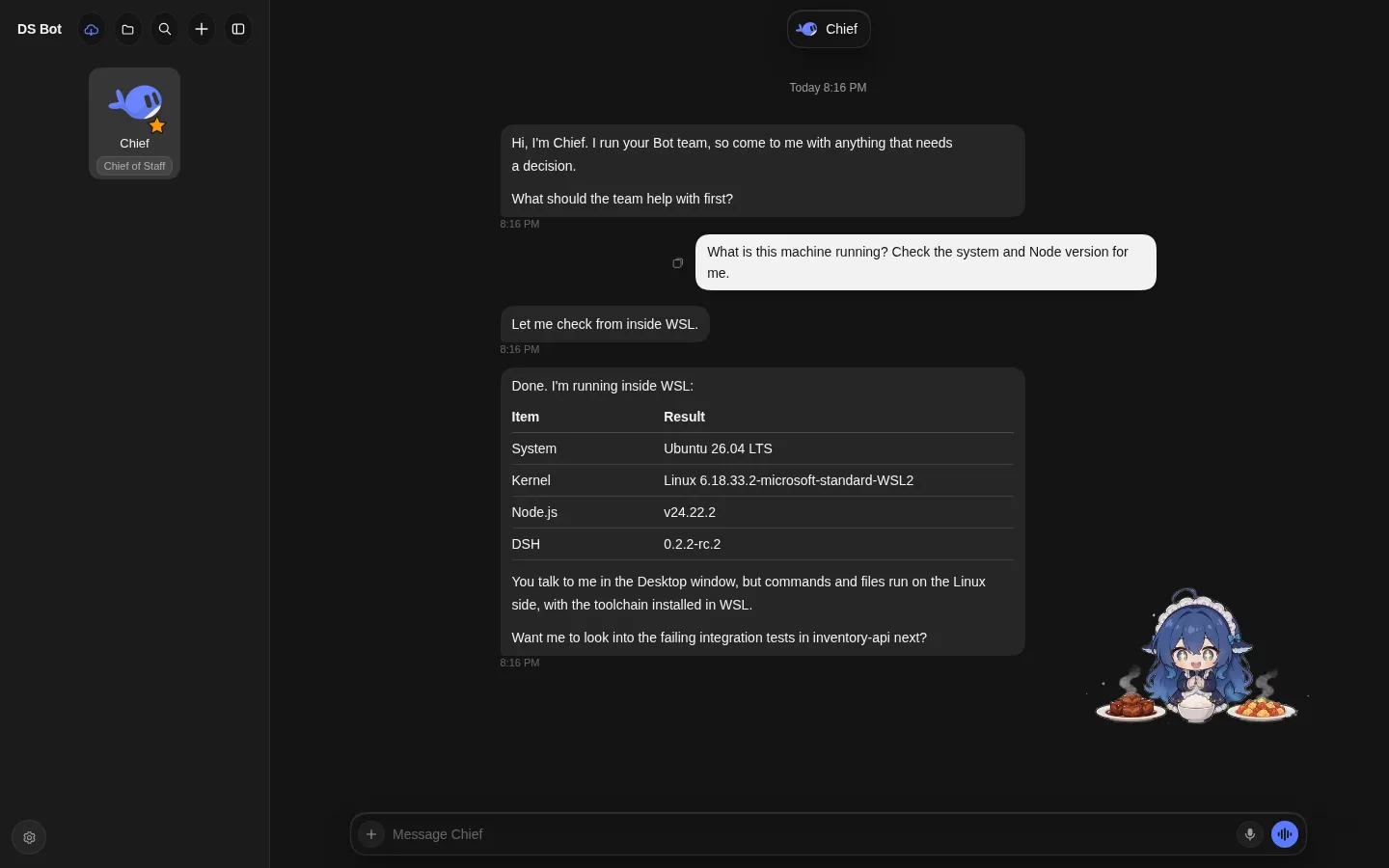 DS Bot installed in WSL, with its own interface working in the Desktop window |
Install @herenfor/dsh-wsl in Windows Desktop only. It deploys the WSL companion, dsh-wsl-agent, automatically; do not install a second bridge inside WSL.
@herenfor/dsh-wsl and install.Reuse mode detects DSH on PATH and in common standalone install folders, so an entry usually needs no input. Manual entries are under “Advanced”. Saved pnpm version paths are repaired when the corresponding stable package entry is valid; check again after upgrading to pick up the new version.
Needs DSH Desktop 0.2.x on Windows 10 or 11, and WSL 2. Feature details, other ways to install, updates, uninstalling, troubleshooting and known limitations are in the plugin's README.
The WSL plugin page now uses “This profile only” and “Follows web”, with hover explanations of the profiles inside WSL. Sync failures distinguish the completed change in the current profile from a failed update to the source profile. Chinese and English wording are updated together.
Tested with DSH 0.2.2-rc.1, 0.2.2-rc.2 and 0.2.2-rc.3. The scope differs between records:
| Verification | Plugin version | DSH version | Scope |
|---|---|---|---|
| Current local candidate | 0.1.14 | 0.2.2-rc.3 | 64 unit tests; real manager and two isolated Hosts for wrong-location rejection, removal recovery, retained sessions and reinstall; Chinese/English label and sync-failure screenshots |
| Latest use-side recovery record | 0.1.12 | Desktop / WSL both 0.2.2-rc.3 | Bridge and tuning loaded after configuration repair and restart; web was stopped, so creating a session there was not checked online |
| Historical native Desktop entry acceptance | 0.1.12-dev.1 | Desktop / WSL both 0.2.2-rc.3 | Automatic discovery, persistent old pnpm entry migration, Host / daemon startup and first-restart connection and task mirroring |
| Earlier compatibility work | Earlier releases | 0.2.2-rc.1, 0.2.2-rc.2 | Historical bridge, plugin-mirroring and installation checks |
The current local setup uses two isolated Linux Hosts in the Desktop and WSL roles. Browser fixtures drive plugin rows and sync failures, with screenshots checked in Chinese and English. The historical native Desktop record covers entry migration, connection and task mirroring after the first restart, with UI checked through code and state.
Windows                                         WSL
Desktop (DSH Host + page)                       DSH Host (profile desktop-wsl)
  └ plugin @herenfor/dsh-wsl                       └ plugin dsh-wsl-agent
      ├ per-task routing: WSL tasks go to WSL         ├ reports WSL's page modules, routes and plugins
      ├ merges both sides' sidebar, modules,          └ credential broker: asks Desktop when needed
      │ settings
└ one wsl.exe connection ◄──────────────► resident daemon, exits 5 s after Desktop closeswsl.exe's standard input and output, with a resident process on the WSL side, the same approach as Claude Code Desktop's WSL mode.wsl: prefix on the page; forwarded requests are rewritten by field and by value.| Path | Contents |
|---|---|
experiments/mirror/mirror/ |
The Desktop-side plugin, the package published to npm: routing, merging, the setup window, the WSL plugins tab, page code in client.js |
experiments/mirror/agent/ |
The WSL-side plugin dsh-wsl-agent, carried into WSL by the Desktop-side plugin |
experiments/transport/ |
The wsl.exe connection: multiplexing (mux.mjs), the Desktop end (client.mjs), the WSL daemon (daemon.mjs) |
experiments/mirror/tests/ |
Unit tests |
scripts/release.sh |
Releases a version (see below) |
scripts/assemble.sh |
Copies transport and agent into the plugin package |
.github/workflows/publish.yml |
Publishes to npm when a version tag is pushed |
scripts/sync-windows.sh |
Development: assembles, then copies the package into a Windows test folder |
dev/ |
Test environment for development: a dsh web on Linux standing in for Desktop, a fake wsl.exe, screenshot tools; see dev/README.md (in Chinese) |
docs/ |
Design and experiment notes (in Chinese) |
CLAUDE.md |
For an agent taking over: status, entry points, rules (in Chinese) |
node --test experiments/mirror/tests/*.test.mjsscripts/release.sh 0.1.1 --dry-run # tests, assembles, checks the package contents; changes nothing
scripts/release.sh 0.1.1 # then sets the version, commits, tags v0.1.1 and pushesThe pushed tag starts .github/workflows/publish.yml, which runs the tests, checks that the tag matches the version and that the package carries the current bridge files, and publishes to npm with npm trusted publishing (no npm token stored in GitHub). A version with a pre-release part (0.2.0-beta.1) goes to the npm tag next. Installed copies are updated by their users from the Plugins page; nothing updates in the background.
The workflow publishes only once the package's trusted publisher is set on npmjs.com (settings of @herenfor/dsh-wsl: GitHub Actions, repository herenfor/dsh-wsl, workflow publish.yml). Until then, or to publish from your own machine, use scripts/release.sh <version> --local after npm login: it publishes, waits until the version is live (approve it on npmjs.com if npm staged it for 2FA approval), then commits, tags and pushes. A failed run changes nothing and can simply be run again.
scripts/assemble.sh copies the latest experiments/transport and experiments/mirror/agent files into the package; the release script runs it. scripts/sync-windows.sh is for development: it also copies the package into a Windows test folder you name, which a Desktop links to. For end-to-end tests the test environment in dev/ is usually enough.
Screenshots from a test environment, for illustration only. Third-party plugins shown: the desktop pet dsh-pet (PC2005-cloud; code MIT, character art not for commercial use), DS Bot (Fei2411, Apache-2.0), Claude Code Style (Nwflower, MIT) and dsh-runtime-tuning (MIT). Names and artwork belong to their authors. In the DS Bot screenshot, the replies come from a local stand-in model used for testing; the system details in the table are the real output of the command run in WSL.
MIT, see LICENSE. The ID field table in experiments/mirror/mirror/ids.mjs is adapted from dsh-ssh-workspaces (MIT); its copyright notice ships with the plugin package (experiments/mirror/mirror/LICENSE).
CLASSIFICATION EVIDENCE
系统优先读取 GitHub Topics,再与站内分类词典和词根规则比对。当前命中: developer-tools。
superdesigndev
OpenRouter for agent tools. Join community here: https://discord.gg/6mQYYfFMAn

T-Auto
A toolkit for low-level operations in DSH, designed to reduce token usage and task execution time / DSH 底层操作工具插件,旨在减少 Token 消耗与任务耗时

crafter-station
A public gallery of animated pets for Codex, Claude Code, DeepSeek Harness, Hermes, OpenCode, Gemini CLI, and more.