



模型与 MCP
待识别

rea
morluto
Reverse engineer anything with agents, from app behavior down to native binaries.
PROJECT TOPICS
INSTALL REFERENCE
dsh plugin --profile web add github:hennychen/dsh-git-sidebar
该命令指向仓库当前默认分支;尚无绑定当前 commit 的完整验证结果。
PROJECT README
🌐 项目主页:https://hennychen.github.io/dsh-git-sidebar/ · 插件市场索引:https://hennychen.github.io/dsh-git-sidebar/market/index.json


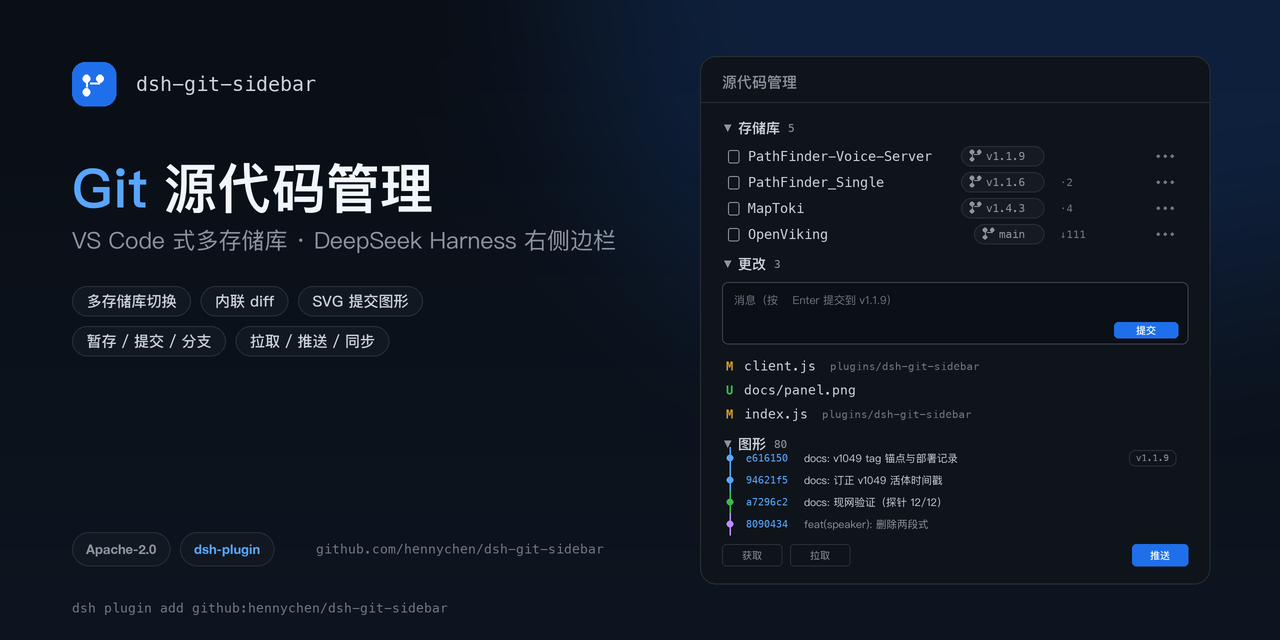
VS Code Source Control 风格的 Git 面板,装在 DeepSeek Harness 桌面端 Web GUI 的右侧边栏里:多仓库发现、暂存与提交、分支与提交图形都在同一面板完成。
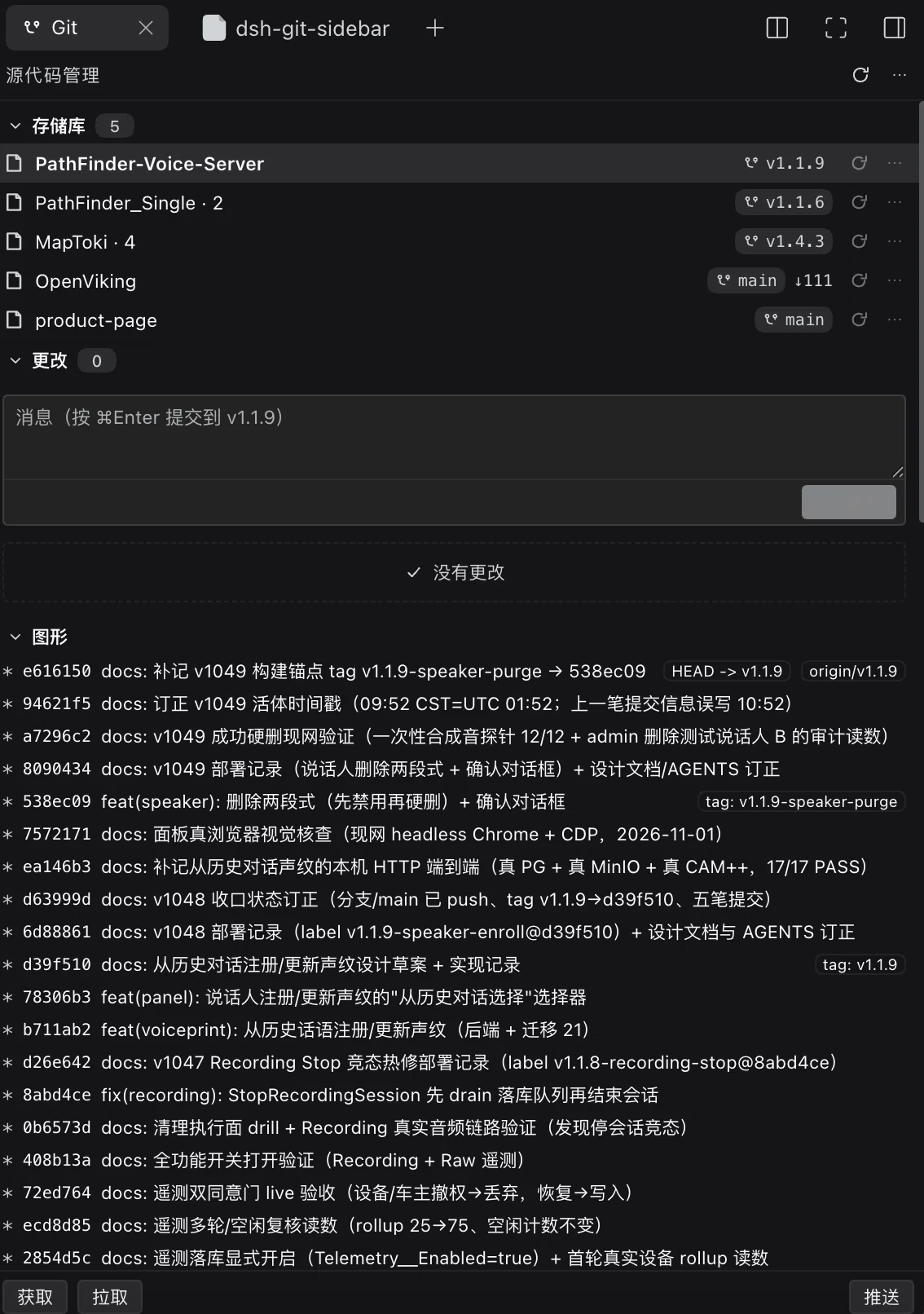
面板分三段,对齐 VS Code 的 Source Control 布局:
↑ahead ↓behind、⇅ 同步、⋯ 完整 Git 菜单;点分支胶囊可切换/新建分支可见/总数,隐藏状态按会话记忆获取 / 拉取 / 推送 / 同步、分支签出与新建/删除、储藏、标记、工作树、克隆、GIT 输出查看器(最近 60 条命令与输出)。v0.8.4 起移除了底部常驻的「获取/拉取/推送」按钮,动作集中在仓库行、⋯ 菜单与图形工具栏。
| VS Code | 本插件 |
|---|---|
| SOURCE CONTROL 标题栏 + 刷新 / 更多 | 同左 |
| 仓库 + 分支 + ahead/behind | 同左(点仓库名切换仓库) |
| 提交信息框 + Commit(⌘Enter) | 同左;另有 提交全部 / 提交并推送 / Amend / 撤销上次提交 与提交信息历史 |
| Changes 分组(暂存全部 / 放弃全部) | 同左,含逐文件暂存/放弃、筛选、树/列表视图 |
| Staged Changes 分组(全部取消暂存) | 同左,含逐文件取消暂存 |
| 点击文件看 diff | 行内展开统一 diff |
| 分支切换 / 新建分支 | 分支列表 + 图形分支多选 |
| Commit 历史 | 图形 + 点击提交查看详情 |
| Pull / Push / Sync | 仓库行 ⇅、仓库 ⋯ 菜单、图形工具栏 |
| Git 输出 | 「显示 GIT 输出」查看器 |
状态字母与配色沿用 VS Code 语义:M 修改、A/U 新增、D 删除、R 重命名、! 冲突;文件名按扩展名着色。
本仓库是 DSH profile bundle(dsh.bundle.patch + dsh.client),右侧边栏的「源代码管理」标签由客户端半注册。
# 方式一:从 GitHub 安装到 profile(pnpm 拉取本仓库)
dsh plugin --profile desktop add github:hennychen/dsh-git-sidebar

# 方式二:本地开发挂载(改代码即时生效)
dsh plugin --profile desktop add link:/path/to/dsh-git-sidebar
安装后在 设置 → 插件 里确认该 bundle 已启用(也可由插件管理器的 install_bundle 完成注册),再重启一次 dsh。右侧边栏 + 里会出现「源代码管理」。
右侧边栏 → + → 源代码管理。
子目录仓库;工作区 标记;localStorage。本仓库自带一份符合官方规范的插件市场索引,可直接作为「发现」的索引源:
https://hennychen.github.io/dsh-git-sidebar/market/index.json添加:设置 → 插件 → 实验性插件 → 更多 → 打开「自定义插件市场」,然后在 发现 → 添加索引源 粘贴上面的 URL。安装确认框会显示 Git 来源(hennychen/dsh-git-sidebar)与固定提交。
索引规则对照(DSH 会拒绝违反任意规则的整个索引):
| 规则 | 本仓库的实现 |
|---|---|
format: 1,UTF-8 JSON,静态 https,2xx 无重定向 |
docs/market/index.json,经 GitHub Pages 提供 |
每个版本声明 dsh.bundle |
每个列出 tag 的 package.json 都有 dsh.bundle.patch |
每个版本 engines.dsh 非空并从该版本 manifest 原样复制 |
>=0.2.0-rc.2 <0.3.0 |
publishTimestamp 为该提交的 committer 时间(秒) |
生成器用 git log -1 --format=%ct <commit> |
| git source:规范 https URL + 40 位小写 commit | https://github.com/hennychen/dsh-git-sidebar + tag commit |
title / description 为 LocalizedText(必须含 en) |
中英双语,取自 locale/*.json |
icon 相对索引 URL 解析且为 https |
icons/dsh-git-sidebar.svg |
| 引用的 category/label/sortKey 必须已声明 | 只声明并使用 development 分类 |
重新生成索引(新增版本后):
git tag v0.8.6
node scripts/market-index.mjs
git add docs/market && git commit -m "chore: update market index"
v0.8.1 起包名改为
@hennychen/dsh-git-sidebar。生成器以最新 tag 的包名为准,自动丢弃改名前的旧名版本(v0.6.4–v0.8.0),避免索引内出现同名冲突。v0.6.1–v0.6.3因缺少engines.dsh也会被跳过。
| 用途 | 文件 | 尺寸 |
|---|---|---|
| README 横幅 / GitHub 社交预览 | docs/cover.png | 1280×640(16:9) |
| 3:2 卡片(文章头图、演示) | docs/cover-3x2.png | 1200×800 |
| 方形(社交头像、聊天预览) | docs/cover-square.png | 1080×1080 |
三张图由 scripts/make-cover.py(Pillow)统一生成:python3 scripts/make-cover.py docs。GitHub 社交预览需在仓库 Settings → Social preview 手动上传 docs/cover.png。
index.js:宿主半。注册 /git-sidebar 路由;仓库由会话目录推导(活动会话 → 工作目录服务;否则 → 会话日志 header 的 cwd),root 参数只接受会话目录或已注册工作区内的路径;execFile 固定 argv、校验 pathspec、限制输出大小。client.js:客户端半。用 sidebarRightTabs.register 注册 git 类型 + guide 卡片,在 sidebar.right.pane.tab / .title 注册面板;渲染包在 ErrorBoundary 里,失败时显示可见错误卡而不是空白。客户端会向自身宿主路由发 op=client-event 心跳(mount / paint / apply / info / render-error)。排查“面板空白”时:
curl -s 'http://127.0.0.1:<port>/git-sidebar/api?op=client-events&sid=<sessionId>'
curl -s 'http://127.0.0.1:<port>/git-sidebar/api?op=client-asset&sid=<sessionId>' # 客户端模块是否在 boot graph目录以 link: 方式挂在 desktop profile 里:
client.js / index.js 后,用 plugin_manager 将 @hennychen/dsh-git-sidebar 的 bundle 关再开即可热重载(不必重启 App);@hennychen/dsh-git-sidebar;git tag vX.Y.Z → node scripts/market-index.mjs → commit docs/market → push main 与 tag。brand-primary 近白)@hennychen/dsh-git-sidebar(原无 scope 名被占用)CLASSIFICATION EVIDENCE
系统优先读取 GitHub Topics,再与站内分类词典和词根规则比对。当前命中: deepseek、deepseek-harness。
morluto
Reverse engineer anything with agents, from app behavior down to native binaries.

deepseek-ai
DeepSeek Harness: Everything is a Plugin.

nexu-io
The 1st Collaborative AI Design Agent Workspace. Local-first and open source. Create motion, prototypes, websites, apps, dashboards, presentations, images, and videos with your team and AI agents. Share work, exchange feedback, and iterate together in one workspace.