
部署运维
基础设施

sandbase-harness
sandbaseai
Local-first, self-hosted AI agent runtime and MCP bridge with sandboxed sessions, memory, credentials, audit/replay, and a local Console.
PROJECT TOPICS
INSTALL REFERENCE
dsh plugin --profile web add github:heekei/dsh-usage
该命令指向仓库当前默认分支;尚无绑定当前 commit 的完整验证结果。
PROJECT README
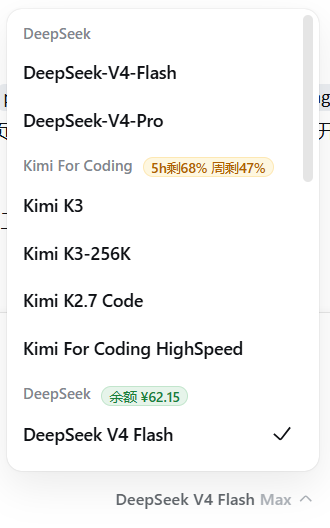
DSH 供应商用量查询插件. 后端查询各供应商的套餐/余额用量, 前端在输入框上方渲染用量徽标条.

dsh-usage 是 DeepSeek Harness (DSH) 的供应商用量查询插件。它实时查询各 LLM 供应商的 套餐/余额用量, 并在会话输入框下方显示一条低调的用量读数条, 让你一眼看清当前还能用多少。
安装仅需一条命令 (见下方详细安装):
dsh plugin --profile web add github:heekei/dsh-usage重启 DSH Web 后, 打开任意会话即可看到输入框下方的用量读数条.
GET /api/dsh-usage.json (与 DSH 同源, 无需独立端口); 用量自动刷新, 间隔可在设置页配置 (默认 5 分钟)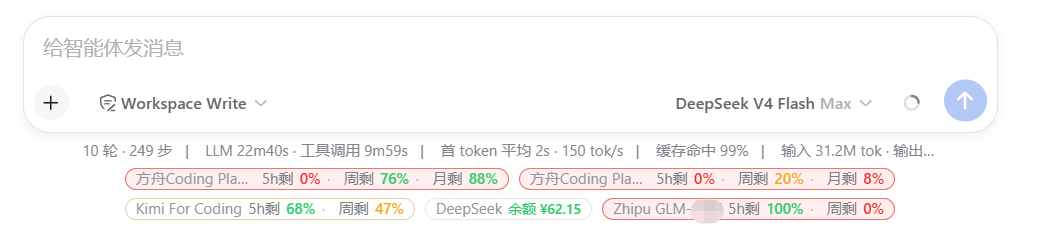
适用于 DeepSeek Harness (DSH). 插件是标准 bundle 型插件: 声明
dsh.bundle.patch, 由dsh plugin安装进 profile 后自动启用, 无需手动配置cordis.patch.yml.
dsh plugin --profile web add github:heekei/dsh-usage或使用 git 地址:
dsh plugin --profile web add git+https://github.com/heekei/dsh-usage.git安装完成后重启 DSH Web 生效.
说明:
dsh plugin会把剩余参数转发给 profile 目录下的 pnpm 安装依赖, 并在安装后 根据包的dsh.bundle.patch自动把dsh-usage加入 profile 层列表 (行为与dsh-git-sync一致).
适用于不想用 dsh plugin 命令的场景:
plugins/dsh-usage # 本仓库profiles/node_modules/dsh-usage → junction 指向 plugins/dsh-usage:New-Item -ItemType Junction -Path profiles/node_modules/dsh-usage -Target plugins/dsh-usageprofiles/web/cordis.patch.yml 注册插件:- insert:
- id: dsh-usage
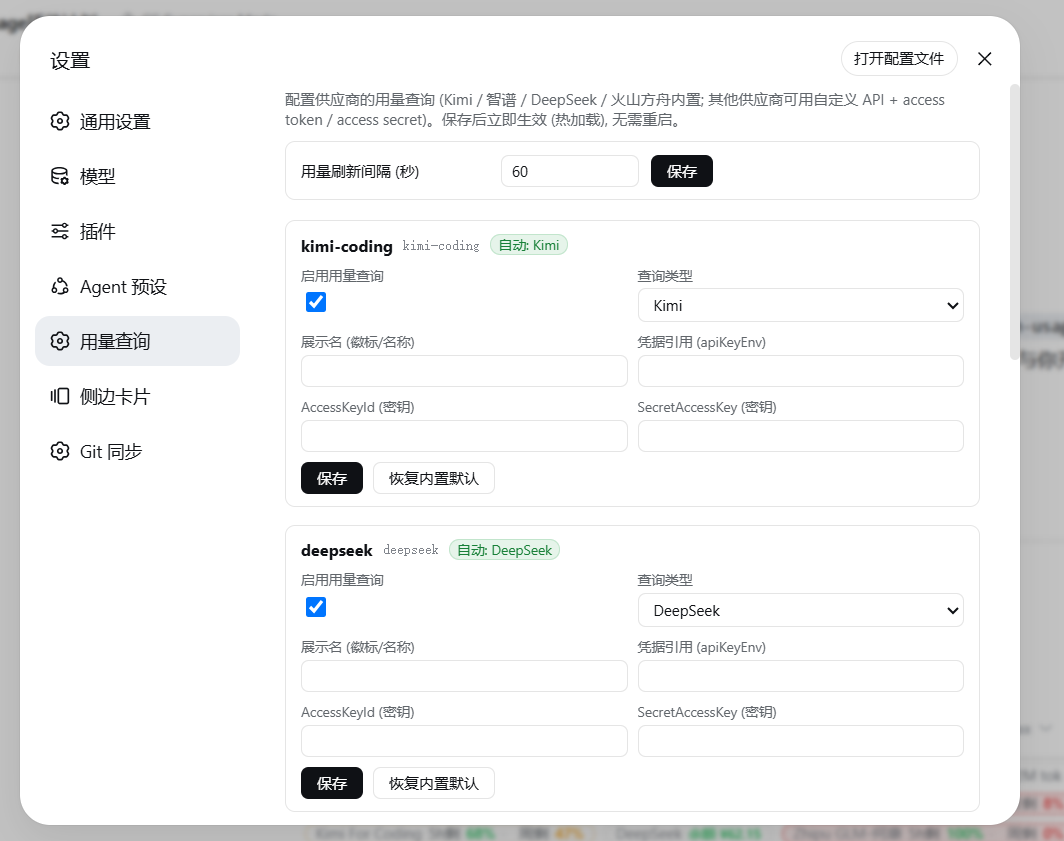
name: 'dsh-usage'⚙️ 设置 → 用量查询 分节: 每个 llm-pi-ai 供应商一张卡片, 可配置 启用/类型/展示名/凭据引用/自定义API/AK·SK, 保存即生效.
settings.yaml 的 dsh-usage: 命名空间)配置跟随供应商路由 (与 llm-pi-ai.providers 同名), schema 校验 + 热加载, 改完即生效 (无需重启):
dsh-usage:
  providers:
    # 内置类型: 只改展示名/凭据引用
    kimi-coding:
      enabled: true
      type: kimi            # kimi | zhipu | deepseek | volcengine | custom | none
      base: Kimi For Coding # 徽标展示名 (缺省用 llm-pi-ai 的 displayName)
      apiKeyEnv: KIMI_API_KEY  # 凭据引用覆盖 (缺省用路由自己的 apiKeyEnv)

    # 火山方舟: 控制面 AK/SK (密钥, 只在配置处填写)
    ark-coding-mine:
      type: volcengine
      accessKeyId: AKLT...
      secretAccessKey: ...

    # 自定义 API: 中转站/自建服务/特殊格式
    my-gateway:
      enabled: true
      type: custom
      base: 我的网关
      apiKeyEnv: MY_GW_KEY        # 访问 token (凭据文件 .credentials.yaml)
      url: https://gw.example.com/api/usage   # 支持 {{apiKey}} {{baseUrl}} {{accessKeyId}} {{secretAccessKey}}
      method: GET                 # GET | POST
      headers:
        authorization: Bearer {{apiKey}}
        x-custom: v1
      body: '{"ak":"{{accessKeyId}}","sk":"{{secretAccessKey}}"}'  # POST 时用, JSON 模板
      extractor: >-
        (r) => ({ usage: "余额 " + r.data.balance, usageColor: r.data.balance > 10 ? "ok" : "bad" })
      # extractor: 接收响应 JSON, 返回 { usage: string, usageColor?: "ok"|"warn"|"bad" }

    # 关闭某供应商的用量查询
    glm-zk:
      enabled: false
# 或 type: none~/.dsh/.credentials.yaml (如 MY_GW_KEY: sk-xxx), 配置里只写引用.accessKeyId / secretAccessKey 为 secret 字段 (跨 wire 传输时被脱敏).dsh-usage 分节时, 使用内置默认规格 (Kimi×2 / DeepSeek / GLM / 方舟×2).刷新间隔 (秒, 默认 300 = 5 分钟) 可在 设置 → 用量查询 → 用量刷新间隔 里配置, 保存即热加载生效, 无需重启。
也支持写入配置文件 settings.yaml 的 dsh-usage.interval (秒), 或用环境变量 DSH_USAGE_INTERVAL_MS (毫秒) 兜底。优先级: 设置页/配置文件 > 环境变量 > 默认 300s。
| 变量 | 默认 | 说明 |
|---|---|---|
DSH_HOME |
~/.dsh |
DSH 配置目录 (settings.yaml / .credentials.yaml) |
DSH_USAGE_INTERVAL_MS |
(已由设置页替代) | 兜底: 用量刷新间隔 (毫秒) |
源码位于 lib/:
lib/index.js — 后端: 配置 schema, 内置查询 (Kimi / GLM / DeepSeek / 火山签名 V4), 自定义查询, /api/dsh-usage.json 数据接口lib/client.js — 前端: 输入框下方用量读数条 + 设置页"用量查询"分节依赖: @deepseek-ai/schemastery (MIT), @deepseek-ai/cosmokit (MIT, 传递) — 均为 MIT 许可, 可自由再分发.
CLASSIFICATION EVIDENCE
系统优先读取 GitHub Topics,再与站内分类词典和词根规则比对。当前命中: quota。
sandbaseai
Local-first, self-hosted AI agent runtime and MCP bridge with sandboxed sessions, memory, credentials, audit/replay, and a local Console.

Han-1413141
Cost tracking for DeepSeek Harness: session and model costs, token usage, budgets, provider balances, and coding-plan quotas. Bilingual English/Chinese UI.

wssfk12138
DeepSeek Harness Token 余额监控插件:鲸鱼娘待机/扣费/复苏动画、峰谷计费、连续扣费飘字与会话费用统计。