
模型与 MCP
待识别

rea
morluto
Reverse engineer anything with agents, from app behavior down to native binaries.
PROJECT TOPICS
PROJECT README




English | 中文
A DSH plugin that hands your databases to the agent. Register a connection once, then just ask — the agent queries it through MCP tools and answers in the conversation.
The fastest path is the one you already walked: import the connections DBeaver already knows, saved passwords included, and skip typing anything.
data-sources.json) and decrypts credentials-config.json with DBeaver's own
key, so host, port, database, user and the saved password arrive together.
Tick the boxes, click import, done. Existing endpoints are marked, so the same
connection is never added twice.dsh-mcp-client row, no
JSON to edit, no environment variable to export.pip install to
run by hand: the panel finds an interpreter, builds .venv and installs the driver
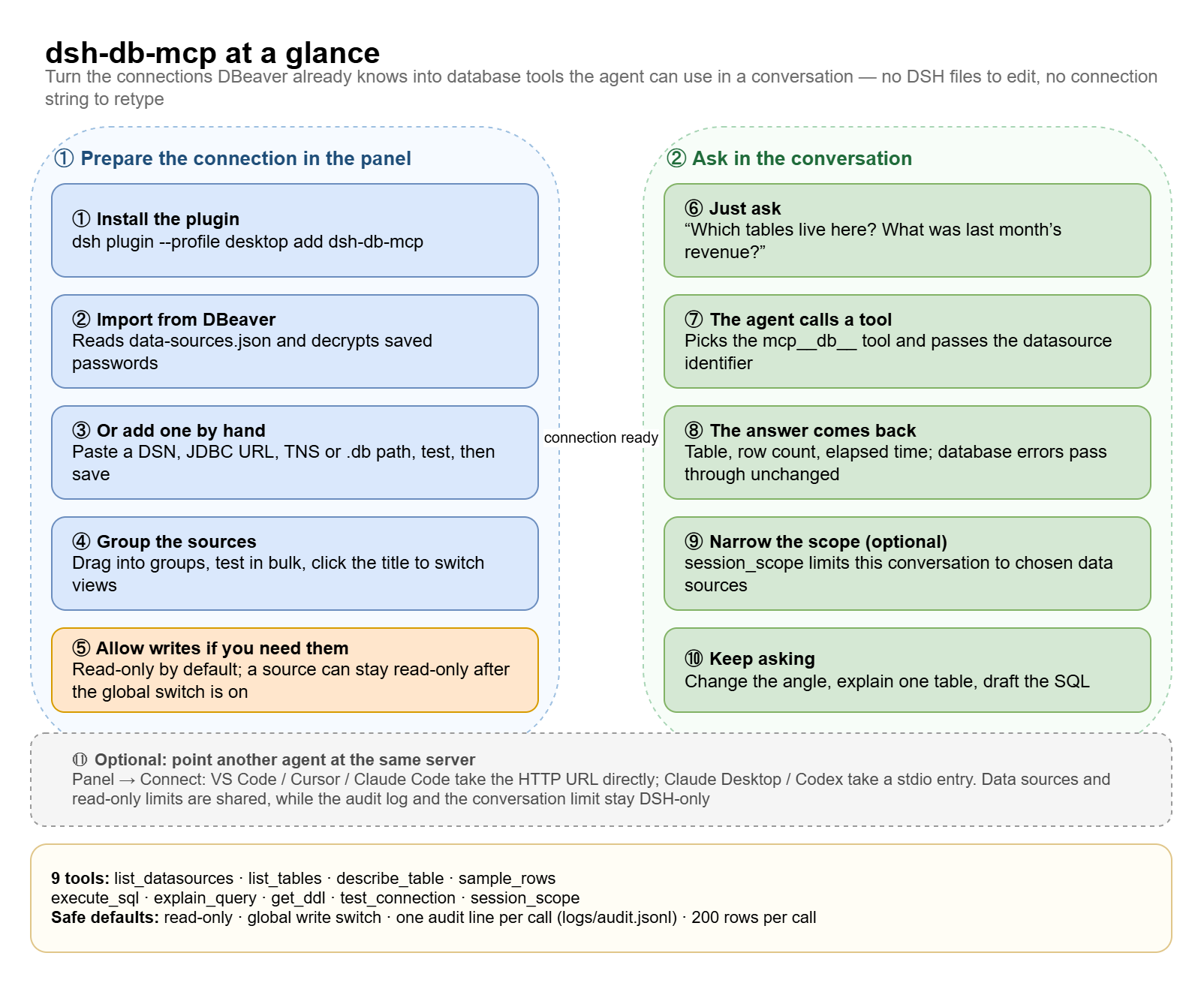
packages from Runtime → Install / repair dependencies.Left: what you do in the panel. Right: what happens in the conversation once a source exists.
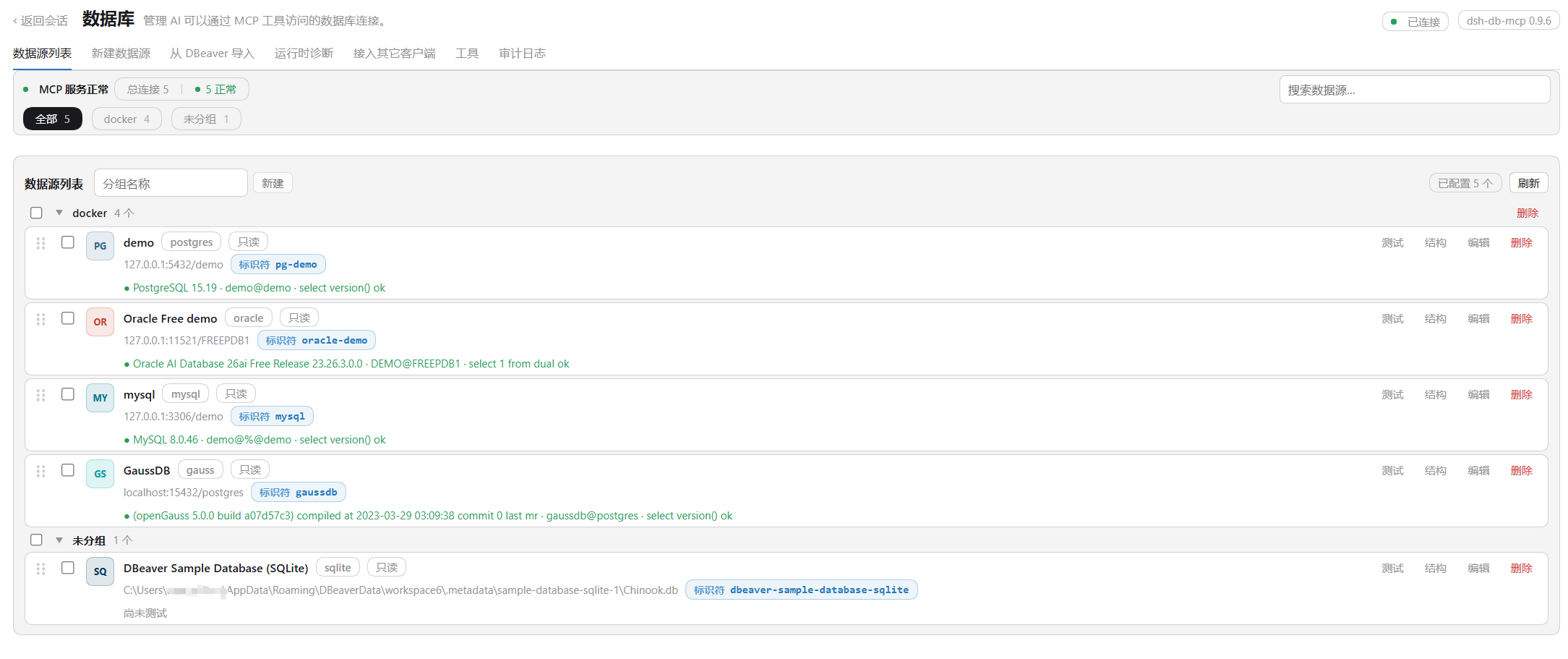
The source list. A health strip across the top, sources grouped the way you grouped them, engine badges, the identifier each tool call needs, and a failed probe stays inline with its full error and a copy button. The Import from DBeaver tab sits right next to it.
The registry lives in ~/.dsh/db-mcp/ (datasources.json + secrets.json, mode
0600), not inside a profile. So:
The panel publishes the identical MCP server over streamable HTTP. The Connect
tab shows the address (http://127.0.0.1:8765/dsh-db-mcp) and writes the entry for
you with one click:
| Client | Written as |
|---|---|
| VS Code / VS Code Insiders | HTTP entry in mcp.json |
| Cursor | HTTP entry in ~/.cursor/mcp.json |
| Claude Code | HTTP entry in ~/.claude.json |
| Claude Desktop | stdio entry in claude_desktop_config.json |
| Codex CLI | [mcp_servers.dsh-db-mcp] in ~/.codex/config.toml |
Point JetBrains AI or anything else that speaks MCP at the same URL and it works too. Data sources, the read-only flag and the DDL switch are shared; the audit log, the tool list and the conversation-level limit stay inside DSH. The safety page has the line-by-line table; clients.md walks through the endpoint.
| Needs | |
|---|---|
| DSH | >= 0.2.0-rc.2 (declared in engines.dsh) |
| Node.js | the runtime DSH itself ships (24.x). The plugin only uses node:sqlite — available from 22.5 — for the in-process SQLite probe; if it is missing, the Python driver covers SQLite and the panel says so |
| Python | 3.10 or newer for the bundled server (mcp, psycopg, oracledb and pydantic all require 3.10+; tested on 3.13). The panel creates the venv; you only need an interpreter on PATH or set pythonPath in the plugin config |
| Database drivers | installed by the panel into that venv: mcp, psycopg[binary], py-opengauss, PyMySQL, oracledb, cryptography. SQLite needs nothing extra |
| OS | Windows, macOS or Linux. Venv paths (.venv/Scripts/python.exe vs .venv/bin/python) and the DBeaver workspace location are detected per platform |
dsh plugin --profile desktop add dsh-db-mcp   # desktop app
dsh plugin --profile web add dsh-db-mcp       # web UI
--profile picks the profile to install into (desktop and web ship with DSH;
any other name is created on first use). Remove with
dsh plugin --profile desktop remove dsh-db-mcp.
Upgrading has its own traps — pnpm's metadata cache, its release cooldown, and Windows holding the old files open. See Updating from the app; if the app asks you to disable other configurations first, restart DSH and update again (that releases the running app's hold on the bundle).
Then:
A connection whose password was never saved shows no password; open the source
once and type it — it goes to secrets.json and never comes back to the page.
Prefer to start from scratch? New data source takes one connection string
(postgresql://user:pw@host:5432/db, a JDBC URL, an Oracle TNS descriptor or a
.db path) and fills the form from it. A Test button next to Save logs in
for real before you commit the source.
| Tool | Purpose |
|---|---|
mcp__db__list_datasources |
registered sources: id, kind, target, read-only |
mcp__db__list_tables |
tables and views of a source |
mcp__db__describe_table |
columns, types, nullability, primary key |
mcp__db__sample_rows |
a few rows of a table |
mcp__db__execute_sql |
execute one statement — a query, or a write when that is allowed |
mcp__db__explain_query |
query plan |
mcp__db__get_ddl |
CREATE TABLE statement |
mcp__db__test_connection |
real login, select 1, server/user/schema |
mcp__db__session_scope |
limit this conversation to some sources, or lift the limit |
datasource is optional on all of them: omitted, the plugin falls back to the source
flagged isDefault (or the first one in the registry).
Queries run in the conversation; the panel is for managing connections, not a
SQL console. The Tools tab can hide the ones you never use — fewer distractions,
smaller tool list in the model's context.
create, alter, drop, truncate, rename, grant and
revoke are refused unless the source was granted DDL in that same dialog; the
schemas above still bound where such a statement may land.secrets.json holds an AES-256-GCM
envelope per source, the key lives beside it in secret.key (mode 0600); no HTTP
route ever returns a password, and the Python child receives a short environment
allowlist rather than the whole DSH environment.logs/audit.jsonl — tool, source, duration, row
count, SQL. Result rows are never logged.list_tables and describe_table.| Document | Contents |
|---|---|
| CHANGELOG.md | Every release and what it changed — one dated section per version, plus what is on main but not yet published |
| docs/guide.md | Panel walkthrough: install, connection strings, importing, groups, structure browser |
| docs/safety.md | The three gates, the DDL switch, what still applies to an outside client |
| docs/clients.md | The HTTP endpoint, wiring other clients, the tools list |
| docs/runtime.md | Runtime directory, Python dependencies, Docker test databases, troubleshooting |
| docs/reference.md | HTTP routes, tool contracts, registry and settings files, plugin config |
| docs/development.md | Repository layout, hot reload, test suites, release flow |
| docs/design-notes.md | The design notes (Chinese): current-state spec for the architecture, the data model, the three gates and the plugin config — and why each decision was made |
| docs/architecture.drawio | Three-page map: file layout, call graph, runtime picture |
Apache License 2.0 — see LICENSE.
CLASSIFICATION EVIDENCE
系统优先读取 GitHub Topics,再与站内分类词典和词根规则比对。当前命中: mcp。
morluto
Reverse engineer anything with agents, from app behavior down to native binaries.

deepseek-ai
DeepSeek Harness: Everything is a Plugin.

nexu-io
The 1st Collaborative AI Design Agent Workspace. Local-first and open source. Create motion, prototypes, websites, apps, dashboards, presentations, images, and videos with your team and AI agents. Share work, exchange feedback, and iterate together in one workspace.