
其他
完整应用

deepseek-harness
deepseek-ai
DeepSeek Harness: Everything is a Plugin.

haiyoucuv/dsh-chat-tweaks
DSH web UI-tweak plugin: show the provider display name next to the model name in the composer model seat, remove the chat column max-width, and more — every feature has its own switch on a dedicated Settings page. / DSH web 界面美化插件:在模型选择器显示厂商名、取消对话列最大宽度等,每个功能都在独立的「设置 → 聊天增强」页中开关。
PROJECT TOPICS
PROJECT README
DeepSeek Harness 的界面美化插件:在模型选择器显示 厂商名、取消对话内容最大宽度等,每个功能都在独立的设置 → 聊天增强 页面中独立开关,全部即时生效、无需重启。
A UI-tweak plugin for the DeepSeek Harness: show the provider display name in the composer model seat, remove the chat column max-width, and more — every feature has its own switch on a dedicated Settings → Chat Tweaks page, applied live without a restart.

| 开关 | 效果 |
|---|---|
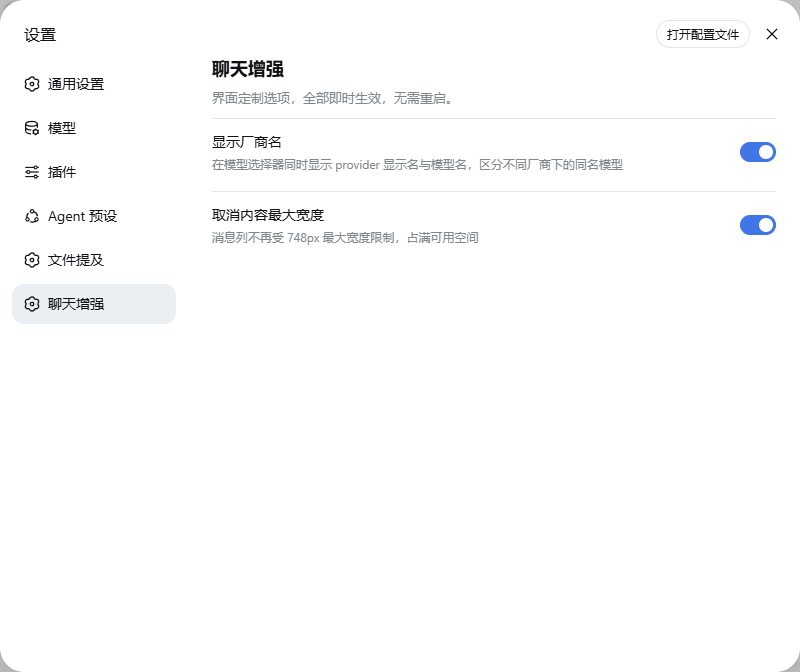
| 显示厂商名 | 模型选择器(输入框旁的模型座位)同时显示 provider 显示名与模型名,区分不同厂商下的同名模型(如 DeepSeek · DeepSeek-V4-Flash) |
| 取消内容最大宽度 | 消息列不再受 748px(--dsh-chat-content-width)限制,占满可用空间 |
所有功能以注册表(src/client/features.ts)组织,新增一个 UI 功能 = 加一条注册项 + 两句文案,设置页自动多出一个开关(见扩展指南)。
设置 → 聊天增强(独立设置页):
模型座位显示厂商名:

# 从 GitHub 安装(推荐,发布后)
dsh plugin --profile web add https://github.com/haiyoucuv/dsh-chat-tweaks/archive/refs/tags/v0.1.0.tar.gz

# 或从本地目录(开发调试)
dsh plugin --profile web add link:/path/to/dsh-chat-tweaks
也可以直接在 profile 目录用 pnpm 安装:
cd ~/.dsh/profiles/web && pnpm add /path/to/dsh-chat-tweaks
⚠️ 旧版
dsh-model-provider-label已停止维护:其「显示厂商名」功能已并入本插件。如果你安装过旧版,请先卸载——二者都占用conversation.input.model单槽位、优先级同为-100,共存会抛错:dsh plugin --profile web remove dsh-model-provider-label旧版插件说明与历史版本见指南:https://github.com/haiyoucuv/dsh-model-provider-label
安装后重启 dsh web(Ctrl+C 后重新运行 dsh web),使浏览器端加载新插件 bundle。
⚠️ 这是本版本 DSH 的已知限制:浏览器可读写的设置命名空间被硬编码在
dsh-host-apiproxy的WEB_SETTINGS_NAMESPACES白名单里。不执行本步骤时,设置页的开关会显示为禁用、写入失败(错误码settings-not-exposed)。
执行插件自带的幂等补丁脚本(profile 重装或 dsh 升级后可重跑):
npm run expose # 等价于 node scripts/patch-apiproxy.mjs然后再次重启 dsh web。之后开关即可正常读写,值持久化在 ~/.dsh/settings.yaml。
打开 设置 → 聊天增强,按需切换:
所有改动即时生效,无需重启。
pnpm install          # 安装 esbuild / typescript 等开发依赖
npm run build         # 产出 lib/index.js(节点端)与 lib/client.js(浏览器端)
npm run typecheck     # TypeScript 类型检查
lib/ 由 scripts/build.mjs 生成并提交,修改 src/ 后重新构建即可(页面刷新即生效,无需重启服务)。
src/index.ts):注册 dsh-chat-tweaks 设置命名空间(默认全开),值持久化到 ~/.dsh/settings.yaml。src/client/):ctx.settingsScope.bind 订阅设置;带 apply 的功能开关实时执行对应副作用;settings.section 槽位注册独立设置页「聊天增强」(导航标签 + 页面,与「模型 / 插件 / Agent 预设 / 文件提及」并列),开关数量由 FEATURES 注册表驱动;-100 遮蔽 conversation.input.model 座位,厂商名开关联动 trigger 显示(数据复用宿主 modelDirectories 服务,行为与原生实现一致)。全宽 CSS 用稳定的 [data-chat-flow] 属性选择消息列(不依赖哈希类名),!important 覆盖内置规则,开关即时注入/移除 <style> 标签。
src/client/features.ts 的 FEATURES 数组加一条:{ key, labelKey, descKey, default, apply? }apply(enabled):开关变化时执行的副作用(注入/移除 CSS 或 DOM 变化);apply,组件内通过 settings scope 响应式读取。src/client/index.tsx 的 zh / en 字典加对应文案(label / desc 两个 key)。src/index.ts 的 schema 加同名字段(默认值与注册表一致)。npm run build,刷新页面——设置页自动多出一个开关。| 现象 | 原因与解决 |
|---|---|
| 设置页开关是禁用状态 | 命名空间未暴露:运行 npm run expose 并重启 dsh web |
| 修改代码后界面没变化 | lib/ 未重建:运行 npm run build 后刷新页面 |
| 模型座位消失/报错 | 与旧版 dsh-model-provider-label 共存:卸载旧插件 |
| 设置值存到哪里 | ~/.dsh/settings.yaml 的 dsh-chat-tweaks 一节 |
dsh --profile web),版本 0.1.0-rc.6 系列;package.json peerDependencies。MIT © dsh-chat-tweaks contributors
CLASSIFICATION EVIDENCE
系统优先读取 GitHub Topics,再与站内分类词典和词根规则比对。当前命中: 无有效分类标签。
deepseek-ai
DeepSeek Harness: Everything is a Plugin.

walkinglabs
Harness engineering beginner tutorial, from 0 to 1

anywhere-labs
为 DeepSeek Harness (DSH) 插件生态打造的现代化桌面端解决方案。万物皆「插件」,桌面本身也是「插件」。