

模型与 MCP
待识别

rea
morluto
Reverse engineer anything with agents, from app behavior down to native binaries.
PROJECT TOPICS
PROJECT README

MCP servers for DeepSeek Harness, managed from the browser. Add, edit, enable, restart, remove — applied live, no config edits, no restart.



DSH 0.2.0.x · Node 22.19+ / 24.9+ · MIT
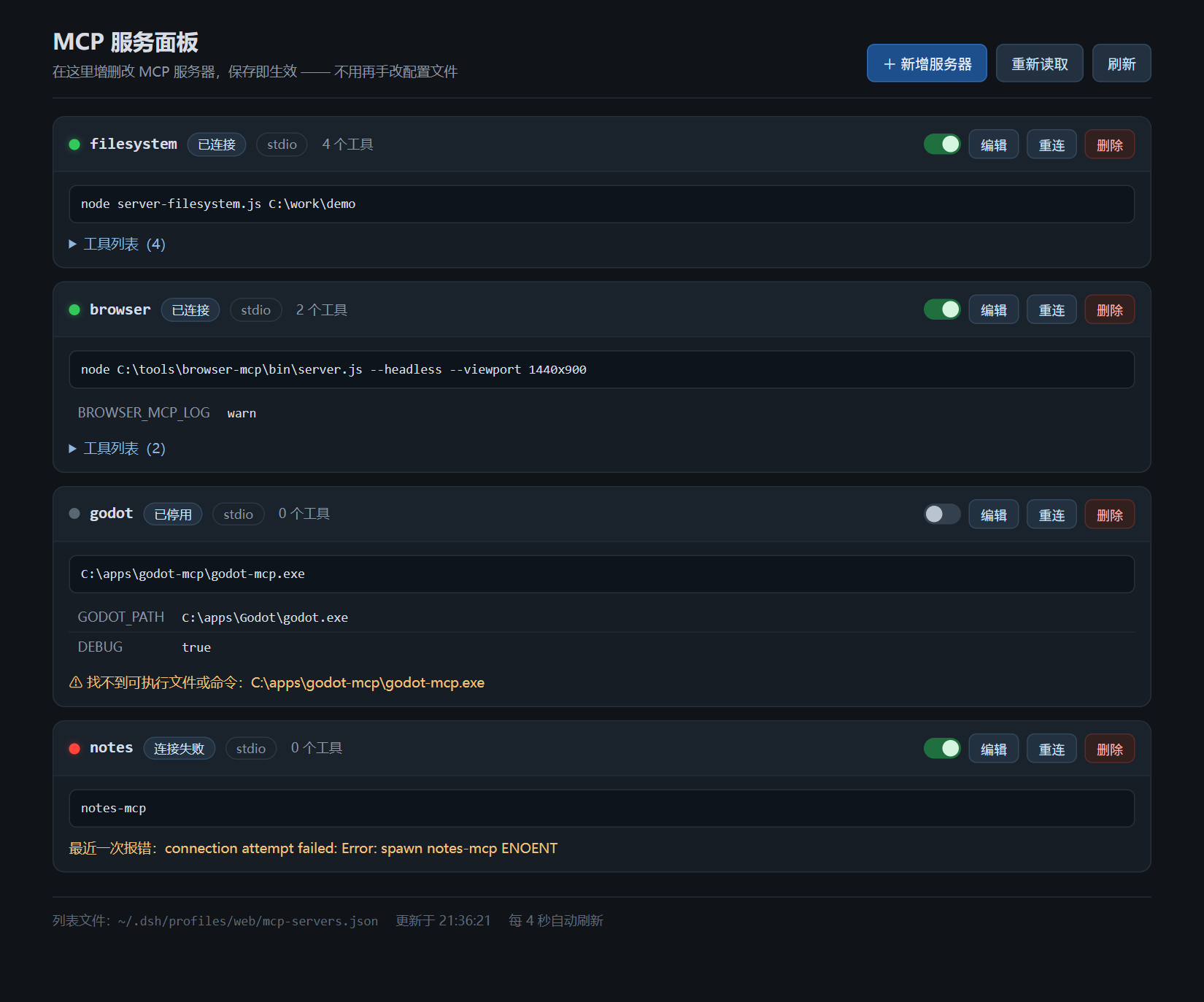
DSH's MCP support (@deepseek-ai/dsh-mcp-client) is one insert row per server in cordis.patch.yml. That works — until it doesn't:
command at a path that does not exist and the client retries with backoff: the console fills with spawn ... ENOENT while the GUI shows nothing at all.transport, args, env, cwd, headers, reconnect…This plugin turns that list into cards you can click. Underneath it is still the official dsh-mcp-client, so tool names (mcp__<server>__<tool>), behaviour and performance are unchanged.
| Feature | What it does |
|---|---|
| Live CRUD | Add, edit, rename, enable, disable, restart, delete. The Loader creates, updates or disposes exactly the affected mcp-client entries while the Host keeps running. |
| Real diagnostics | Every save checks the command — bare names against PATH + PATHEXT, paths against the file itself — so a typo shows up instead of retrying silently. Failures show the underlying cause from the Host log, attributed per server. |
| Nothing to hand-edit | The list lives in <profile>/mcp-servers.json, mounted by a cordis:include row this bundle declares itself. Installing it is the only configuration step. |
| Survives config reloads | The list is a nested Loader tree, so editing your profile's cordis.patch.yml (DSH hot reload) never drops servers added from the panel. |
| Zero runtime dependencies | The host half uses node:fs / node:http only. The page is three static files read per request, so UI edits need no Host restart. |
| Bilingual entry | The Settings entry follows your language (en / zh). |
# DSH's plugin manager shells out to pnpm
npm i -g pnpm

# install the bundle into your web profile
dsh plugin --profile web add dsh-mcp-live-panel
Or, in the GUI: Plugins → Add plugin → dsh-mcp-live-panel → Install → Enable now.
Then open Settings → MCP panel, or go straight to http://127.0.0.1:3080/mcp.
The first launch creates an empty
mcp-servers.json. Nothing is spawned until you add a server.
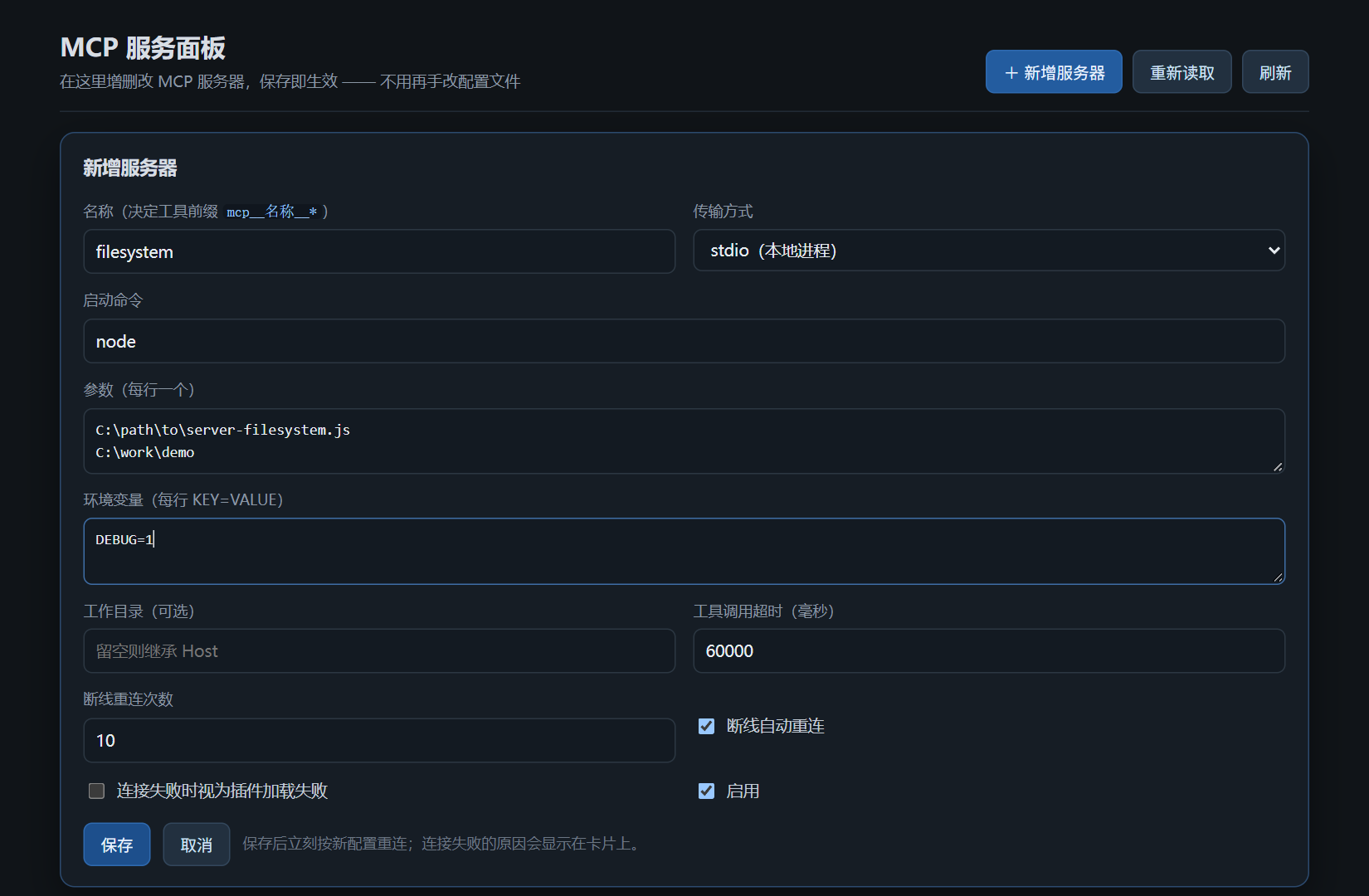
| Action | Where | Effect |
|---|---|---|
| Add | + New server | Saves, then connects; tools register as mcp__<name>__<tool> |
| Edit / rename | Edit on a card | Restarts that server with the new configuration |
| Enable / disable | The switch | Disabling disconnects the process, unregisters its tools and stops the retries |
| Reconnect | Reconnect | Dispose + connect again, keeping the configuration |
| Remove | Delete | Disconnects and drops the row |
| Re-read | Reload | Re-applies the file after you edit it by hand |
Two transports are supported, with the form adapting to the choice:
KEY=VALUE), working directory;Key: Value).Plus tool-call timeout, reconnect attempts, and an enabled flag. "Fail plugin activation on connection failure" exists for advanced use — leave it off.
<profile>/cordis.patch.yml            ← you never touch this
├── mcp-servers   (cordis:include)    ← mounts the managed list
└── mcp-panel                         ← this package: page + JSON API

<profile>/mcp-servers.json            ← owned by the panel
└── { id, name: '@deepseek-ai/dsh-mcp-client', config, disabled? }mcp-servers.json, then refreshes the include subtree.The browser half is one Settings section embedding the host page; its label is registered in both languages.
The bundle patch ships sensible defaults. Override by entry id when you need to:
- id: mcp-panel
  config:
    path: '/mcp'              # page + API mount
    includeId: 'mcp-servers'  # the include row that mounts the list
    store: 'mcp-servers.json' # relative to the profile, or absolute
If /mcp is already taken by another plugin, change path (and PANEL_PATH in lib/client.js, or navigate to the new path directly) — otherwise that row fails to load with a duplicate-route error.
engines.dsh and peerDependencies. DSH refuses an incompatible install instead of crashing after it.pnpm on PATH for dsh plugin and the Plugins page.dsh plugin --profile web add dsh-mcp-live-panel@latest; your server list is untouched.dsh plugin --profile web remove dsh-mcp-live-panel. mcp-servers.json stays in the profile and comes back if you reinstall.dsh-mcp-client entries from your cordis.patch.yml first, then install and rebuild them in the panel. Two owners of the same serverName — or of /mcp — conflict.<profile>/mcp-servers.json. Only add servers you trust.npm test # 55 host assertions + 21 browser-half assertions
npm pack --dry-run # inspect the published contentstest/panel-test.mjs drives the real plugin through a fake Cordis context — page, state, CRUD, validation, log attribution. test/client-test.mjs drives the browser half through a fake module loader, slots and locale service.
lib/index.js        host half: store, JSON API, assets, log attribution
lib/client.js       browser half: the Settings section
assets/             page HTML/CSS/JS, read from disk per request
locale/             plugin card title/description (en, zh-CN)
cordis.patch.yml    bundle layer: mcp-servers + mcp-panel rows
test/ both suites, no running Host required.github/workflows/ci.yml runs both suites on Node 22 and 24 for every push and pull request.
.github/workflows/publish.yml publishes from a v* tag with --provenance, after checking that the tag matches package.json and that the version is not on npm yet. A manual run is a dry run unless you unset dry_run.
One-time setup: create an npm token (granular with Read and write, or a classic Automation token) and save it as the repository secret NPM_TOKEN.
npm version patch          # bump + tag vX.Y.Z
git push --follow-tags     # CI publishes
--provenance needs a public repository (GitHub OIDC). On a private one, drop the flag.
MIT © GreenDoyle
Not affiliated with DeepSeek. Built for DeepSeek Harness.
CLASSIFICATION EVIDENCE
系统优先读取 GitHub Topics,再与站内分类词典和词根规则比对。当前命中: mcp、deepseek、mcp-tools、deepseek-harness、deepseek-harness-plugin。
morluto
Reverse engineer anything with agents, from app behavior down to native binaries.

deepseek-ai
DeepSeek Harness: Everything is a Plugin.

nexu-io
The 1st Collaborative AI Design Agent Workspace. Local-first and open source. Create motion, prototypes, websites, apps, dashboards, presentations, images, and videos with your team and AI agents. Share work, exchange feedback, and iterate together in one workspace.