dsh-lab-ssh
English | 简体中文
Safety-gated SSH development tools for DeepSeek Harness and standard MCP clients.
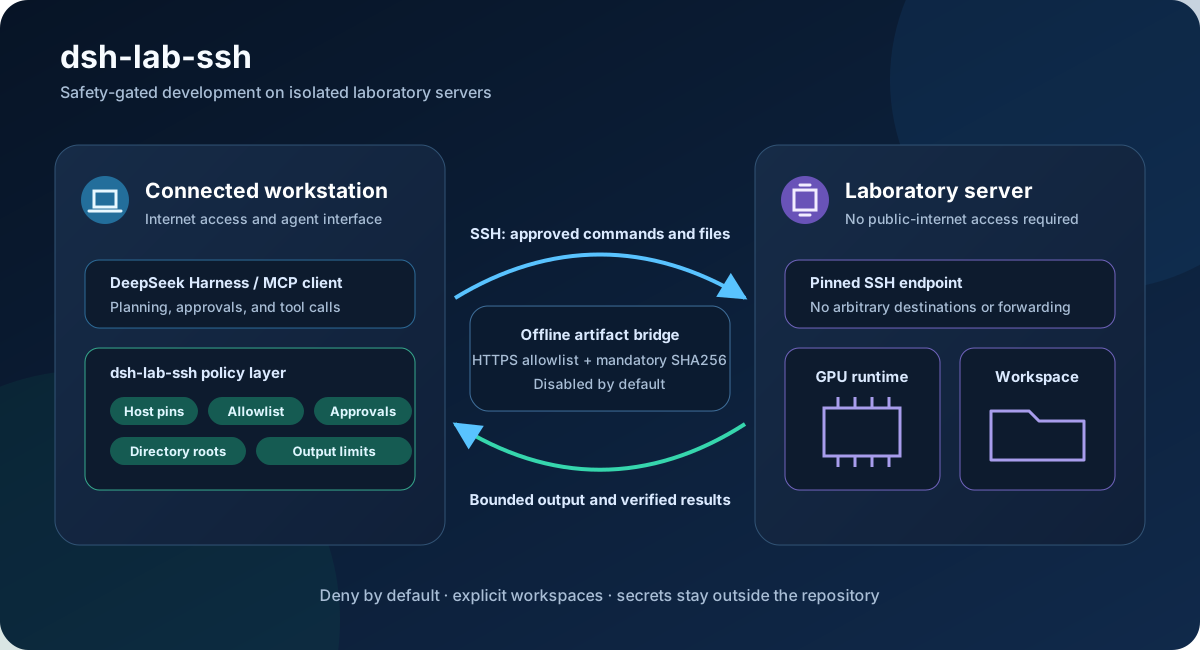
The plugin lets an agent running on a connected workstation use a laboratory server's GPU, runtime, and explicitly configured source workspace while the server remains isolated from the public internet.
Version 0.3.0 is an experimental preview. Pin a tested DeepSeek Harness version before laboratory deployment.
This is an independent community plugin and is not an official DeepSeek AI package.
Why it exists
Giving an agent a normal SSH terminal exposes arbitrary destinations, commands, and filesystem paths. This project inserts a deny-by-default policy layer:
- fixed model-visible host aliases;
- pinned OpenSSH SHA256 host-key fingerprints;
- environment, local-key-file, or SSH Agent credential references;
- per-host command allowlists, auto-approval rules, and deny rules;
- bounded command output and timeouts;
- alias-based remote directory roots with canonical containment checks;
- bounded UTF-8 reads and atomic, hash-protected writes;
- optional alias-based command working directories;
- a disabled-by-default HTTPS artifact bridge for offline servers;
- one JSON policy shared by DeepSeek Harness and Codex MCP.
The plugin does not expose arbitrary hosts, interactive shells, inline secrets, unrestricted file transfer, delete/move/chmod operations, background commands, port forwarding, reverse tunnels, or agent forwarding.
Status
The DeepSeek Harness plugin, stdio MCP server, command policy, restricted SFTP access, working-directory aliases, and first artifact-bridge layer are implemented. The test suite contains 25 tests across 9 files and never contacts real laboratory infrastructure or the public internet.
Visual short-lived credential sessions, persistent audit, role-based policy, directory sync, dependency closure, caching, and resumable transfer remain future work.
Quick start
Requirements:
- Node.js
^22.19 or >=24;
- DeepSeek Harness
0.1.0-rc.7 or a compatible 0.1.x preview;
- pnpm on
PATH for dsh plugin.
Build and install:
Set-Location <PLUGIN_DIR>
npm install
npm run build
npx -y @deepseek-ai/dsh@0.1.0-rc.7 plugin --profile web add <PLUGIN_DIR>
Copy the example configuration outside the repository, replace every placeholder, and point the DSH user patch at it:
- id: lab-ssh
  config:
    configFile: C:/Users/<USER>/.dsh/lab-ssh.private.json
Set credential environment variables in the same process that starts DSH:
$env:LAB_SSH_GPU01_PASSWORD = '<enter locally>'
npx -y @deepseek-ai/dsh@0.1.0-rc.7 web
See the Chinese operator guide and Chinese quick start for configuration, approval policy, offline artifact staging, and troubleshooting.
Tools
ssh_list_hosts: list redacted configured host aliases.ssh_list_file_roots: list directory aliases and access policy.ssh_list_directory: list bounded entries under an authorized root.ssh_read_file: read bounded UTF-8 text and return its SHA256.ssh_write_file: create or atomically replace bounded UTF-8 text.ssh_exec: run an allowlisted command on a fixed host and optional directory alias.ssh_stage_artifact: approval-gated download, verification, and atomic upload of one artifact.
Offline servers
The artifact bridge is not a transparent proxy. The workstation accepts an HTTPS URL without credentials or query tokens, validates every redirect against an administrator domain allowlist, enforces a size limit and mandatory trusted SHA256, then atomically creates the file inside an explicitly artifact-enabled remote root. Existing files are not replaced.
Generic SOCKS/HTTP proxying, SSH forwarding, and reverse tunnels remain out of scope so server network isolation is preserved.
Codex MCP
The repository contains the safe empty config/lab-ssh.empty.json and project-level .codex/config.toml. Build the package and reload Codex in a trusted project to discover the MCP server. For real deployment, point a private Codex configuration at a JSON file outside the repository.
The server can also be started directly:
node <PLUGIN_DIR>/lib/mcp-server.js --config <PRIVATE_CONFIG_PATH>
Develop and verify
npm install
npm run typecheck
npm test
npm run build
npm run pack:check
On Windows, run a clean-room acceptance test that reclones the public repository into the system temporary directory and reuses neither the current dependencies, build output, DSH profile, nor private SSH configuration:
powershell -ExecutionPolicy Bypass -File scripts/clean-room-test.ps1
It runs npm ci, type checking, tests, build, package inspection, isolated-profile plugin installation, and a DSH Web HTTP smoke test with hosts: []. Port 3180 is used by default, and the temporary environment is removed afterward.
Review SECURITY.md before publishing. Real SSH configuration, credentials, logs, local profiles, build output, and archives must not be committed or included in a release.
License
MIT


