
模型与 MCP
待识别

rea
morluto
Reverse engineer anything with agents, from app behavior down to native binaries.
PROJECT TOPICS
INSTALL REFERENCE
dsh plugin --profile web add github:gavinc-cn/touchstone-dsh
该命令指向仓库当前默认分支;尚无绑定当前 commit 的完整验证结果。
PROJECT README
An AI-agent-driven automated testing platform. Point it at a repository; it explores the code, writes and runs test cases, files what breaks, fixes it, and re-verifies the fix.




English | 中文
Touchstone turns "we really should test more" into a running loop. You register a project — its source
directory, a working directory, and the house rules the agent must follow — and
Touchstone drives an AI agent through DeepSeek Harness
(dsh) to generate test cases, execute them, report failures as bug reports, fix the code, and
re-verify the fix. Every artifact lands on disk in a reviewable form: a case library of Markdown case
files, a bug_report/ directory, and per-round logs.
It is not a one-shot "run my test suite" CLI. Touchstone is built around long-lived, multi-round agent sessions: a task runs round after round in the same session with its context intact, so the agent remembers what it already tried. A unified queue keeps exactly one writer per project (no two agents editing the same checkout at once), and the whole thing is observable — live round logs, a rendered session window, and an SSE-backed board.
Touchstone runs locally. Standalone mode is a Python web site; plugin mode defaults to the bundled Node
backend (since 2026-10-15, with backend: python as the one-line fallback). Either way it is a SQLite
database plus a file-system workspace, and no data leaves your machine except for the model calls your
dsh host makes.
case.md + status.md per
case, plus an INDEX.md per directory). Agents read and extend them across tasks; you can fix a bad
case by editing a file.git worktree so exploratory work never touches your main checkout.backend: python).
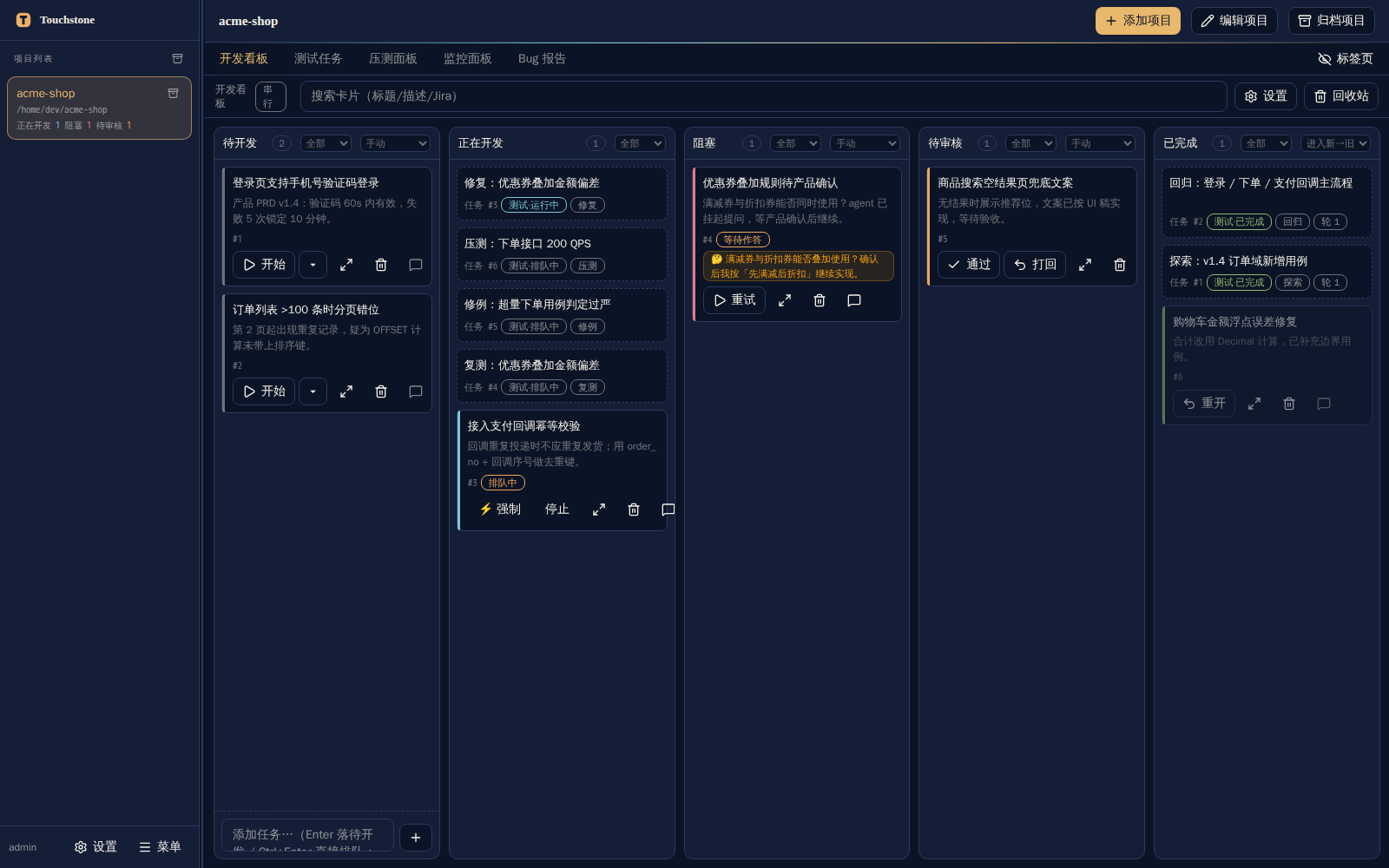
Frontend: React + Vite. Storage: SQLite + plain files. Runs on Linux and Windows.The development board — cards per column, task entries inline, per-project queue badges:
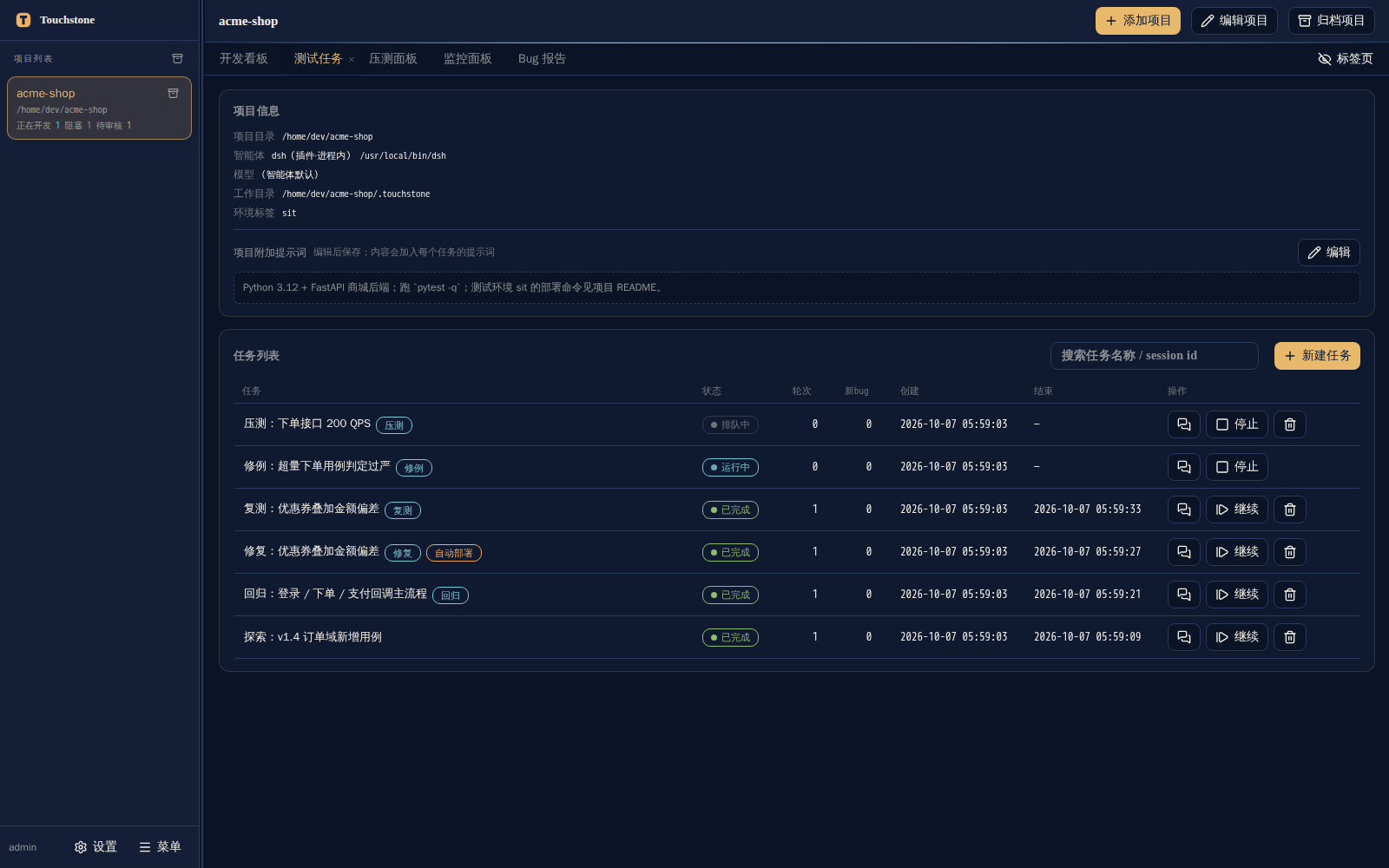
Test tasks — six task types, round counts, statuses, and per-task actions:
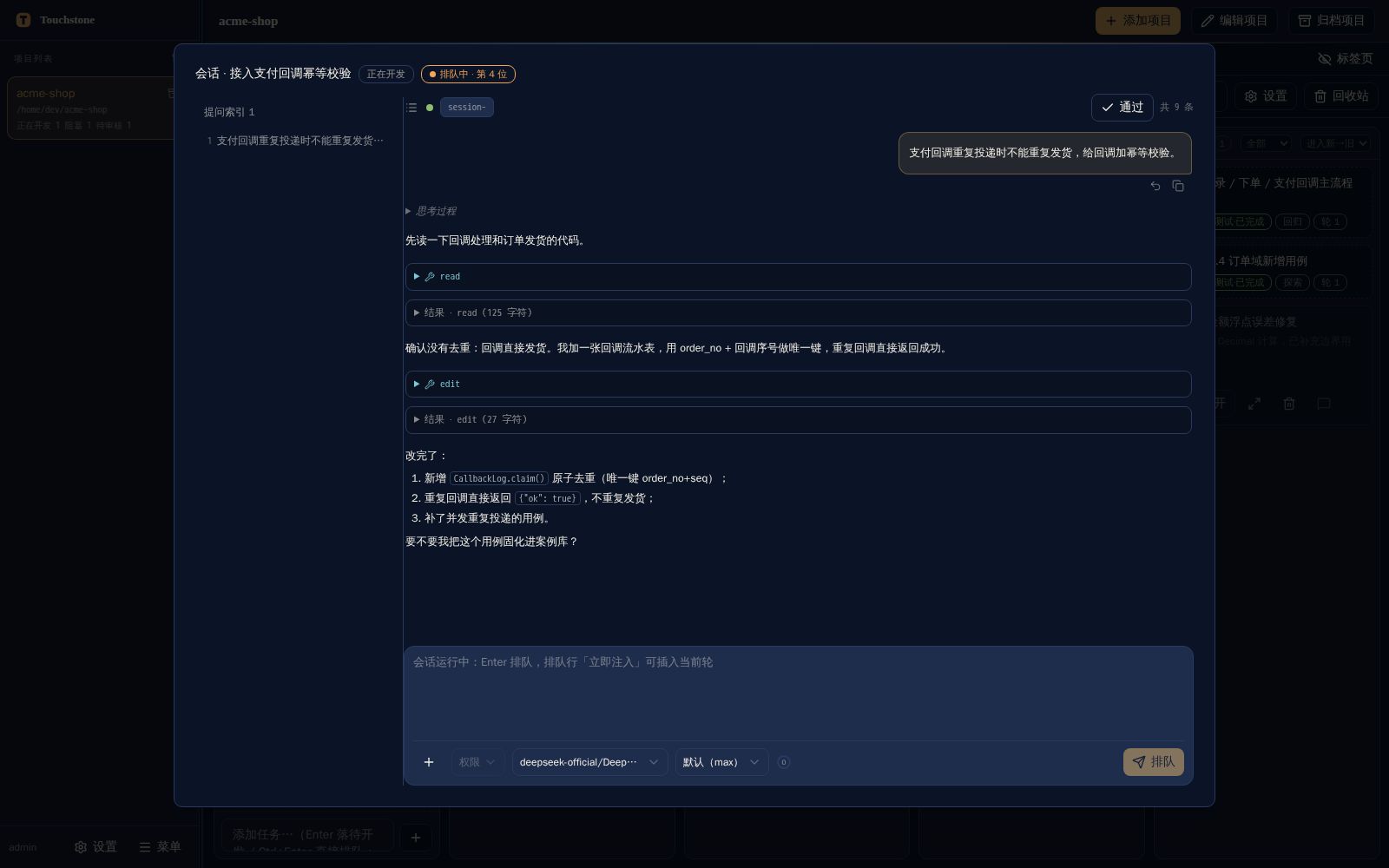
The session window — the full agent transcript rendered from the dsh session store, with reply,
approval, and model controls:
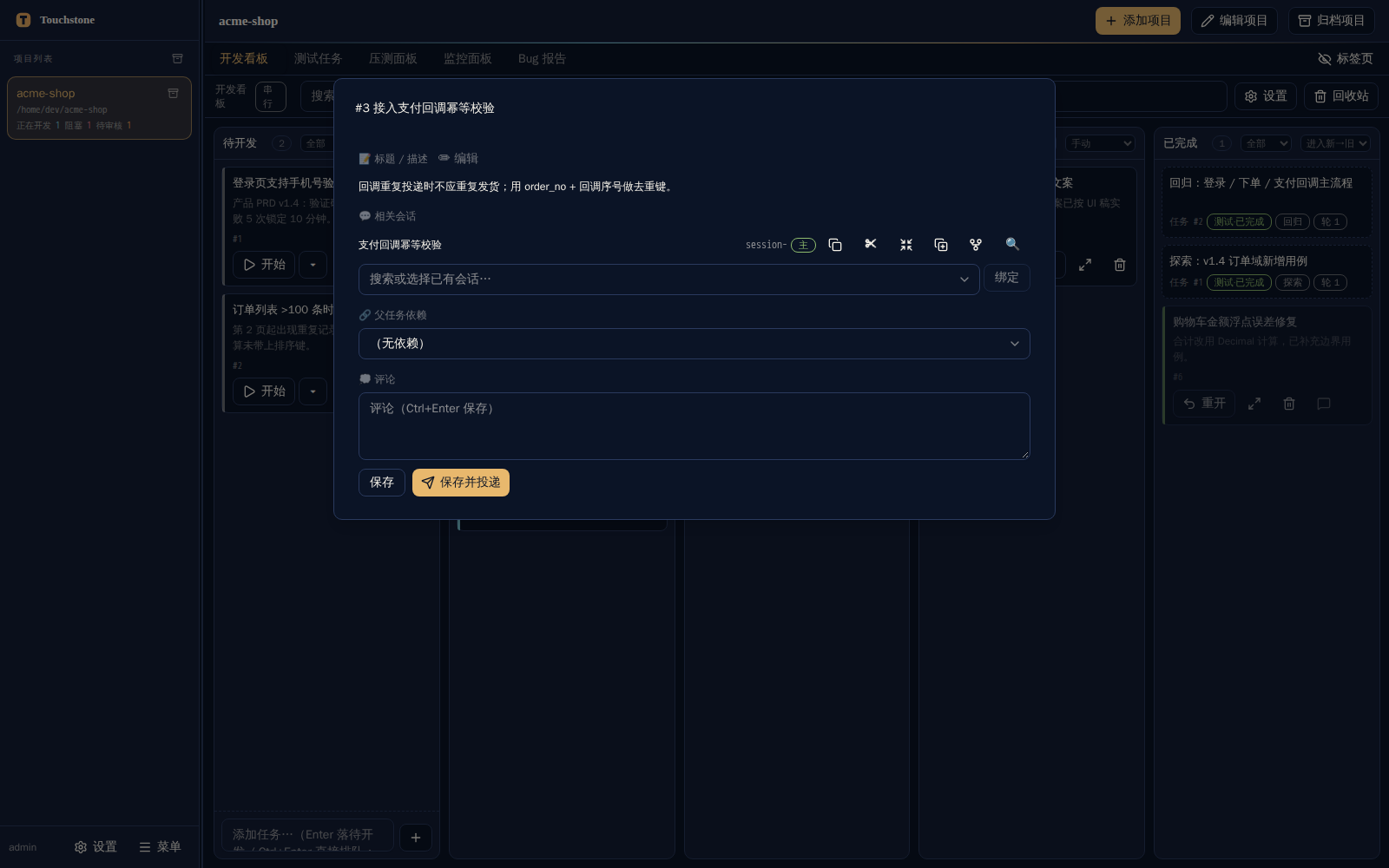
Card detail — description, scheduling, dependent cards, bound sessions, and comments:
flowchart LR
  U[Browser] -->|REST + SSE| S["Touchstone server<br/>Python stdlib · SQLite · files"]
  S -->|"/touchstone-agent<br/>resident sessions"| D["dsh host<br/>DeepSeek Harness"]
  D -->|"read / edit / bash"| R["Your repository"]
  D --> C[("Case library<br/>free_style/")]
  D --> B[("Bug reports<br/>bug_report/")]
  S --- C
S --- Bdsh plugin to create or resume a
session and sends the round prompt. Rounds stream back to the UI and to
<work_dir>/.web/task_<id>_round_<n>.log as they happen.free_style/, bug reports under
bug_report/, monitoring state under .live/. You review them like code.| Type | What the agent does | Typical end stage |
|---|---|---|
| Exploration | Reads the code and writes new test cases into the case library | Report |
| Regression | Re-runs existing cases (optionally limited to a commit date range) | Report |
| Stress | Produces a load scenario + driver script, then the platform runs the load | Report |
| Fix | Analyzes a bug report, patches the code, deploys, and re-tests | Fix / Deploy / Retest |
| Retest | Re-verifies one bug report (retest only, deploy + retest, or deploy only) | Retest |
| Case revision | Rejects a bug report as a bad case and rewrites the case instead | Revision |
| Concept | Meaning |
|---|---|
| Project | A repository plus its work directory, agent binding, and guidance |
| Task | One queued unit of work: a task type, a stage range, a stop condition, and a round history |
| Round | One prompt/response cycle in the task's agent session |
| Case library | <work_dir>/free_style/ — Markdown cases, status files, and per-directory indexes |
| Bug report | <work_dir>/bug_report/<timestamp>_FS_<title>/ — the failure dossier for a case |
| Card | A board item that can start, queue, and drive its own agent session |
| Queue | The per-project serial slot shared by tasks, cards, and chat messages |
| Requirement | Version | Needed for |
|---|---|---|
| Node.js | 22.19+ or 24+ | The dsh host and the plugin-mode backend (default; the front-end build alone needs Node 18+) |
| Python | 3.12+ | Standalone mode (./touchstone.sh start) and plugin mode with backend: python (verified on 3.12) |
DeepSeek Harness (dsh) |
current release | Agent execution — required for plugin mode |
git clone https://github.com/gavinc-cn/touchstone-dsh.git
cd touchstone-dsh
python3 -m pip install -r backend_py/requirements.txt # needed for standalone mode / plugin mode with backend: python./touchstone.sh start # builds the front end on first run, then serves 127.0.0.1:4601
./touchstone.sh status # PID and the actual port
./touchstone.sh stopThen open http://127.0.0.1:4601.
The first start seeds an admin account. If TS_ADMIN_PASSWORD is not set, a random one-time password
is generated and printed once in the startup banner:
grep '一次性初始口令' .run/server.log # or: ./touchstone.sh statusYou will be asked to change it on first login. Set TS_ADMIN_PASSWORD=<your-password> before the first
start to skip the one-time password (and the forced change).
Plugin mode (
dsh) is password-free by default (2026-10-08): the shell passesTS_ADMIN_PASSWORDLESS=1, so the seededadminhas an empty password and no forced change — the panel is auto-logged-in asadminanyway. Set a password in Settings → Change password whenever you want one (it then becomes the password used for direct/standalone logins). The plugin also writes the backend's stdout/stderr line by line to<db dir>/plugin-backend.log(next to~/.touchstone/touchstone.db) — that is where the plugin-mode startup banner and the[board]/[waitq]/[runner]diagnostics can be read.
Standalone mode gives you the full site — projects, case library, bug reports, board, queue, monitoring — but agent execution needs plugin mode (below), because the agent runs inside the
dshhost process.
dsh plugin (recommended: enables agent execution)The plugin embeds Touchstone in the dsh Web UI as a sidebar entry and panel, and lets Touchstone drive
resident agent sessions in the host process.
Option A — from npm (self-contained package: whole platform + prebuilt front end):
npx @deepseek-ai/dsh web          # 1) start the dsh host once (creates ~/.dsh/profiles/web)
dsh plugin --profile web add @gavinc-cn/touchstone-dsh   # 2) install the plugin package
# 3) select the bundle in the profile manifest (the Plugins panel toggle does the same thing):
node ~/.dsh/profiles/web/node_modules/@gavinc-cn/touchstone-dsh/dsh-plugin/scripts/select-bundle.mjs \
  ~/.dsh/profiles/web/package.json
# 4) restart the dsh web UI, open http://127.0.0.1:3080, use the Touchstone entry (Alt+T toggles the panel)
Plugin mode needs no Python by default. Since 2026-10-15 the plugin shell starts the bundled Node
backend (it probes the host Node for node:sqlite first; if the host is too old it shows a hint page with
the two ways out). Python is used only for the Python backend — standalone mode, or backend: python in the
plugin config, which is the one-line fallback during the observation window (deleting the key no longer
reverts anything: the default is node now). For that Python backend, the platform's own dependencies are
installed with pip, not npm:
pip install -r ~/.dsh/profiles/web/node_modules/@gavinc-cn/touchstone-dsh/backend_py/requirements.txt
# Windows: python -m pip install ...   (the official installer ships python.exe, not python3)
With the Python backend, the plugin resolves the interpreter itself when you do not configure one: it probes
python first, then python3 (the same order as touchstone.cmd), and uses the first one that actually
runs. If that is not the interpreter where you installed the dependencies, the missing-dependency page prints
the exact command for the interpreter it picked; to pin another one, set pythonPath in the profile patch:
- id: touchstone-dsh
  config: { backend: python, pythonPath: /path/to/python }
No repoDir is needed: the package carries both backends (backend/ for Node, backend_py/ for Python)
and webui/dist-plugin, so the plugin falls back to its own directory.
Option B — from a checkout (development):
cd touchstone-dsh
./dsh-plugin/install.sh           # idempotent install of this checkout into the profile
The installer prints the optional profile patch for pointing the plugin at your working copy (or picking a specific interpreter); skip it to use the package's own directory:
- id: touchstone-dsh
  config: { repoDir: /path/to/touchstone-dsh, pythonPath: /path/to/python3 }
Both run modes share one database (~/.touchstone/touchstone.db by default) and are mutually exclusive
while running; the second instance refuses to start and tells you who holds the lock.
A cross-platform launcher offers the same commands:
python touchstone.py start | stop | restart | status | build | test~/.touchstone/projects/<path id>, so nothing extra lands in the tested repo), and the
guidance the agent should follow. The case library and bug report directories are derived and
created for you.| Variable | Default | Purpose |
|---|---|---|
TS_PORT / TS_HOST |
4601 / 127.0.0.1 |
Listen address. Use TS_HOST=0.0.0.0 to expose the site on your LAN |
TS_PYTHON |
python3 |
Interpreter used by the launcher (must have the runtime dependencies) |
TOUCHSTONE_DB |
~/.touchstone/touchstone.db |
SQLite database. Must live on a local disk — file locking does not work on CIFS/network shares |
TS_ADMIN_PASSWORD |
(random, printed once) | Initial admin password; setting it skips the forced change |
TS_ADMIN_PASSWORDLESS |
1 in plugin mode |
Seed admin with an empty password and no forced change (the plugin shell sets this); ignored when TS_ADMIN_PASSWORD is set |
TS_WEB_DIR |
webui/dist |
Static front-end directory the server serves |
TOUCHSTONE_RUN_DIR |
.run/ in the repository |
PID / log / port files |
TS_EXT_DIR |
extensions |
Root of the built-in asset manifests |
TS_ARCHIVE_SYNC |
1 |
Keep board "Done" and dsh session archive in sync (set 0 to disable) |
TS_DSH_PROFILE / TS_DSH_PYTHON |
web / auto-detected |
dsh profile and interpreter used by the plugin installer |
Runtime paths inside a project's work directory:
| Path | Contents |
|---|---|
free_style/ |
Case library (cases, status files, indexes) |
bug_report/ |
Bug reports, one directory per report |
.web/ |
Round logs, chat logs, stress metrics and reports |
.live/live.json |
Agent live state used by the monitoring page |
board_media/ |
Attachments pasted onto board cards |
| Area | Supported |
|---|---|
| Agent sessions | Create, resume, reply, inject into the running turn, cancel, compact, fork, rewind-by-fork, model and permission-preset switching (presets follow your DSH permission catalog) |
| Session observability | Full transcript rendering, archive state, attachment preview, live status stream (no polling) |
| Tasks | Six types, seven stages, stop conditions, date-range scoping, per-round logs, restart, continue |
| Board | Cards across five columns, drag & drop, queue position, parent dependencies, scheduled start, trash, isolated worktrees |
| Case library | Derived indexes, change-based retest triage, optional semantic (RAG) search |
| Stress testing | Scenario validation, concurrent load, second-by-second metrics, charts, Markdown/JSON reports per run |
| Notifications | Feishu (Lark) outbound push, inbound commands, and answering questions from chat cards |
| Multi-user | Login, admin/user roles, per-project ownership checks on every project-scoped endpoint |
Known limitations, stated plainly:
dsh has no event for it, so the session window shows
what the host reported and nothing more.dsh itself has not been verified on Windows yet.test-full and
test-ui report a skip rather than running.touchstone-dsh/
├── backend/ Node backend (the plugin-mode default): server.js + lib/ + routes/ + schema/
├── backend_py/ Python backend: server.py, runner.py, waitq.py, board.py, chat.py, db.py, …
│ (+ requirements.txt). Legacy-but-kept; used by standalone mode / backend: python
├── builtin_prompts/ Prompt assets injected into first-round prompts
├── dsh-plugin/ The dsh plugin package (thin Node shell + driver + client bundle)
│ + autocommit/ (auto-commit guard, bundle row 2, shipped in the package)
├── extensions/ Built-in asset manifest root (empty: its only asset moved into dsh-plugin/autocommit/)
├── webui/ React + Vite front end
├── tests/ pytest / vitest suites and the isolated-instance harness
└── touchstone.sh|py|cmd Launchers (Linux / cross-platform / Windows)./touchstone.sh build # install front-end deps and build webui/dist
./touchstone.sh test # backend pytest + front-end vitest
./touchstone.sh test-full # + isolated end-to-end scripts (scripts are not distributed here)
./touchstone.sh test-ui # Playwright end-to-end (needs a running site; scripts not distributed)
cd webui && npm run dev # front-end dev server on :5173, /api proxied to :4601Optional commit gate:
git config core.hooksPath githooks # pre-commit runs the fast test layer (SKIP_TS_TESTS=1 to skip once)See tests/README.md for the test matrix and prerequisites.
127.0.0.1 by default and requires a login. Exposing it (TS_HOST=0.0.0.0) puts it
on your network — do that deliberately.admin account is the only
administrator and cannot be renamed or deleted.MIT © Touchstone contributors
CLASSIFICATION EVIDENCE
系统优先读取 GitHub Topics,再与站内分类词典和词根规则比对。当前命中: deepseek-harness、deepseek-harness-desktop、deepseek-harness-plugin、deepseek-harness-plugins。
morluto
Reverse engineer anything with agents, from app behavior down to native binaries.

deepseek-ai
DeepSeek Harness: Everything is a Plugin.

nexu-io
The 1st Collaborative AI Design Agent Workspace. Local-first and open source. Create motion, prototypes, websites, apps, dashboards, presentations, images, and videos with your team and AI agents. Share work, exchange feedback, and iterate together in one workspace.